What Is Network Access Control? a Guide for Indy SMBs
A lot of Johnson County business owners are dealing with the same quiet problem right now. The office Wi-Fi works well enough, staff can print, cloud apps load, and nobody thinks much about which devices are coming and going on the network. Then a contractor plugs in a laptop, an employee connects a personal tablet, or an old front-desk PC keeps talking to the network long after anyone should trust it. That's the point where “good enough” turns into a business continuity risk.
In older Greenwood buildings and along the I-65 corridor, the issue gets worse. Spotty Wi-Fi in brick walls, aging switches in a back closet, and a mix of old and new devices create the perfect blind spot. When a business loses access to files, phones, scheduling systems, or line-of-business software, downtime burns cash fast. It can cost up to $9,000 per minute. That's why network security can't stop at a firewall and antivirus anymore.
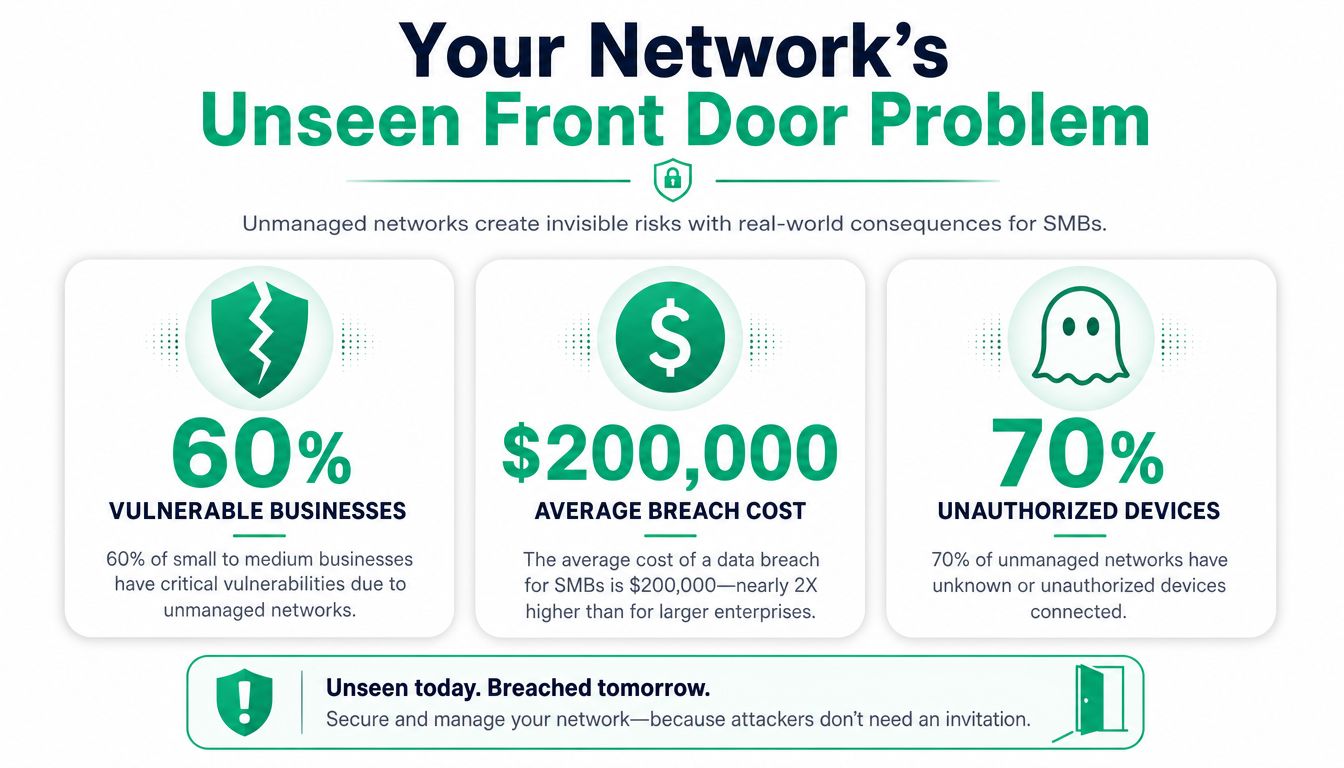
Your Network's Unseen Front Door Problem
A business network without access control is like a storefront with a solid deadbolt on the front door, but the side entrance is propped open with a rock.
That's not theory. It's a pattern seen in Greenwood business parks, medical offices near downtown Indy, and light industrial shops across Johnson County. The building may have decent internet and a decent firewall, but the internal network still accepts too many devices too easily. A printer gets added without review. A vendor joins guest Wi-Fi and lands too close to business systems. A former employee's machine still has a path to shared resources.
Practical rule: If you don't know every device that can touch your network, you don't control your network.
TL;DR
- Network Access Control (NAC) decides which users and devices can connect to your network and what they can reach.
- It works like a digital front desk. It checks identity, device health, and policy before allowing access.
- NAC is a strong fit for Indiana SMBs that need business continuity, HIPAA alignment, CMMC readiness, and tighter NIST CSF security discipline.
- It helps reduce downtime by blocking or quarantining risky devices before they spread trouble.
- Good NAC isn't just pre-checks. It keeps watching after connection and can cut off a device that goes bad later.
- The best deployments tie NAC into switching, Wi-Fi, identity, endpoint security, firewalls, and SOC-as-a-Service monitoring.
- Start small, pilot first, and build policies around real roles instead of one-off exceptions.
Why this problem keeps showing up
Most small and midsize businesses buy security in pieces. They add a firewall one year, endpoint protection the next, maybe better backups after a scare. That's useful, but it still leaves a gap between “this device touched my network” and “this device should be trusted.”
For a broader perspective, there are some useful insights on cyber security from Wisenet Security Ltd. They reinforce a point every local IT consultant learns quickly. Security failures usually happen in the handoff between tools, not just because one product was missing.
Why NAC has moved from nice-to-have to necessary
The market tells the story. The Network Access Control market was valued at USD 3.49 billion in 2023 and is projected to reach USD 25.28 billion by 2032, with a CAGR of 24.66% according to SNS Insider's NAC market report. Businesses aren't buying NAC for its advanced image. They're buying it because unmanaged device access causes real interruptions, cleanup costs, and compliance headaches.
If you want a plain-English look at the overall threat environment Indiana companies face, this guide to security threats to a network for Indiana businesses gives useful context.
NAC is the control layer that says, “You can come in,” “You can only go here,” or “You're not connecting until your device is clean.” For a small business owner, that's the difference between a contained issue and a full-blown outage.
What Network Access Control Actually Is
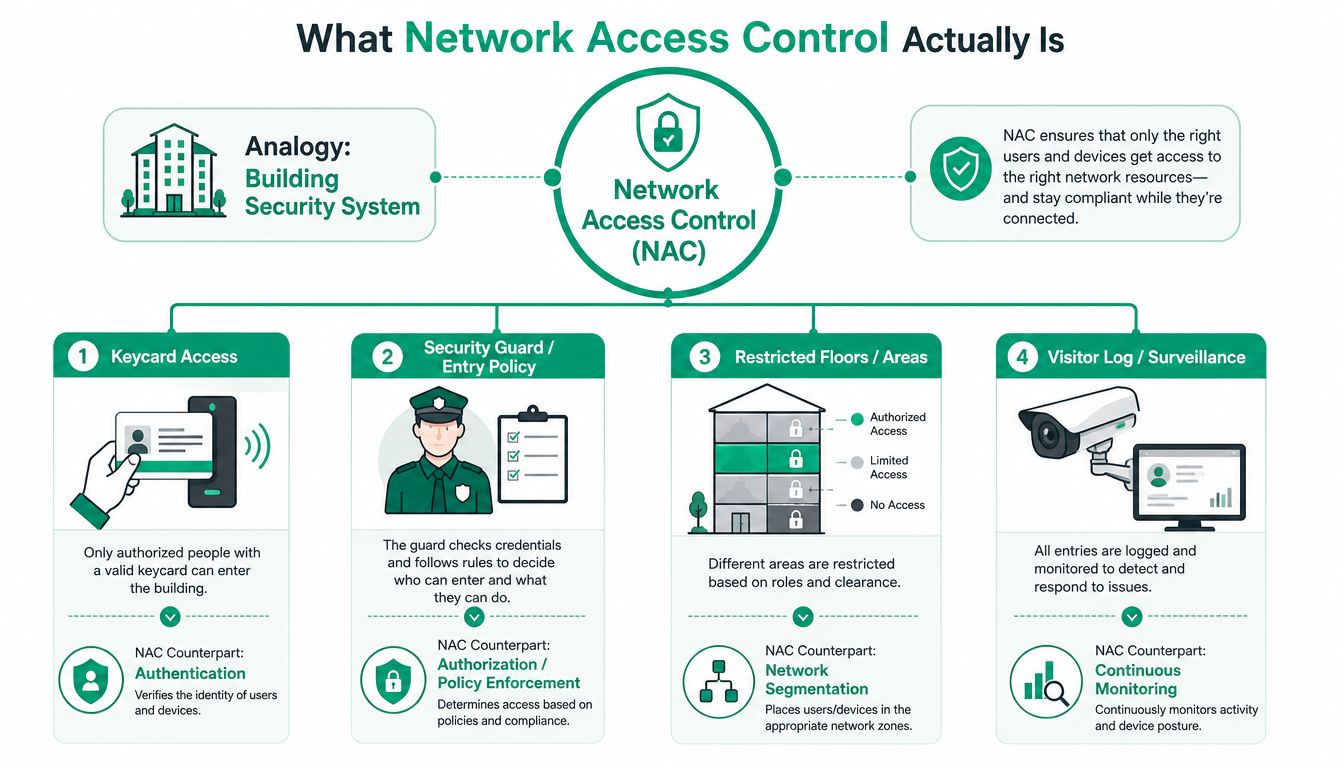
What is Network Access Control? It's the system that checks a user and a device before they join your network, then decides what access they get and keeps track of what they do while connected.
The simplest way to think about it is a building badge system. A badge proves who you are. The building rules decide which doors you can open. Security cameras and logs record movement after you get inside. NAC does the digital version of that for your business network.
The AAA engine behind NAC
NAC runs on the AAA model. That means Authentication, Authorization, and Accounting. According to NordLayer's NAC best practices guide, NAC uses this model to verify identity, assign access levels, and monitor activity so only trusted users and secure devices get in.
Here's what that means in plain English:
- Authentication checks who the person is and what the device is.
- Authorization decides what that person and device can reach.
- Accounting logs activity so IT can track access and respond when something looks off.
That structure matters because a password alone isn't enough anymore. A user can have the right login and still be using a machine with missing patches, weak endpoint protection, or the wrong configuration.
A device shouldn't get broad network access just because somebody knows the Wi-Fi password.
It's also a Zero Trust control
A lot of downtown Indy firms hear “Zero Trust” and assume it's a buzzword cooked up by vendors. In practice, it's simple. Don't trust a device just because it's already inside the building or connected to office Wi-Fi.
That's where NAC earns its keep. It supports a Zero Trust architecture by checking identity, posture, and policy before access is allowed. In many environments, it also works with standards like IEEE 802.1X for wired and wireless authentication, which is one of the technical foundations behind modern admission control.
This is also where identity tools enter the picture. If you want to compare systems that manage who gets access to what, this roundup of identity and access management tools is a solid companion read.
A lot of business owners also benefit from seeing how Zero Trust gets applied in practical environments outside the U.S. Throughwire put together a pragmatic Zero Trust guide for China that's worth reading because it stays focused on implementation instead of marketing fluff.
A short visual helps if you want to see the concept another way:
The Main Flavors of NAC Solutions
Not every NAC deployment looks the same. That's good news for Indiana SMBs, because the right answer depends on your building, your staff, your compliance pressure, and how much control you already have over endpoints.
One core function stays consistent. Before allowing a connection, NAC performs device identification and profiling, capturing things like the device type, manufacturer, and operating system so only known and authorized devices can even attempt access, as explained in Ericom's NAC overview.
Agent-based and agentless
The first big choice is whether the NAC platform uses an agent on the endpoint.
Agent-based NAC installs software on managed devices. That usually gives deeper visibility into device posture, such as whether endpoint security is active, whether the OS is current, and whether specific policies are met. The trade-off is more deployment work and more coordination with users.
Agentless NAC checks devices without installing local software. It's easier to roll out and useful for guest access, contractor devices, and environments where you can't manage every endpoint directly. The downside is thinner visibility and less control over health checks.
Here's the quick comparison.
| Feature | Agent-Based NAC | Agentless NAC |
|---|---|---|
| Visibility | Deeper device posture insight | Lighter visibility |
| Deployment effort | Higher, because software must be installed | Lower, faster to start |
| Best fit | Company-owned endpoints | Guests, contractors, mixed environments |
| Policy depth | Stronger enforcement options | More limited checks |
| User friction | More setup upfront | Less initial disruption |
Cloud-hosted and on-premises
The second choice is where NAC lives.
A cloud-hosted NAC platform often fits modern SMBs better, especially if users move between the office, home, and client sites. It's easier to scale and typically fits a predictable monthly operating model. That matters when you're trying to trade surprise cleanup bills for cleaner budgeting.
An on-premises NAC server can make sense for businesses with tighter internal control requirements, legacy systems, or network designs that still revolve around a physical campus. Some manufacturers, medical environments, and specialized firms still prefer that approach.
If physical access systems and cloud-managed controls are already on your radar, this guide to cloud-based access control for Indy businesses helps frame the decision in a practical way.
What works and what doesn't
What works:
- Role-based policies tied to job function, not one-off exceptions
- Separate treatment for managed and unmanaged devices
- Guest segmentation that keeps visitors away from internal resources
- A pilot deployment before broad enforcement
What doesn't:
- Using NAC like a fancy password prompt
- Assuming every device needs identical access
- Skipping inventory work
- Treating remote and hybrid devices as somebody else's problem
If your policy says every authenticated user gets broad internal access, you bought NAC and kept the old risk.
Real-World NAC Benefits for Indiana Businesses
The value of NAC isn't that it adds another dashboard. The value is that it keeps a bad device from turning into a bad week.
A compromised laptop shouldn't be able to wander across file shares, line-of-business systems, VoIP gear, and production printers just because it connected successfully once. NAC limits that blast radius. Illumio's NAC overview notes that NAC implementations shrink attack surfaces by enforcing Zero Trust principles, using granular policies and continuous monitoring to revoke access when anomalies appear. That's the kind of control that helps maintain operational continuity.
Business continuity and ROI
For a Greenwood manufacturer, continuity means the shop floor can still pull files and print labels. For a dental office in Johnson County, it means scheduling, imaging, and billing keep moving. For a professional services firm in downtown Indy, it means people can work without losing access to shared documents and cloud tools.
NAC helps in three practical ways:
- It prevents wider outages by isolating suspicious devices before they spread problems.
- It cuts wasted tech time by automating onboarding and access decisions that staff or IT used to handle manually.
- It supports predictable IT spending because fewer surprises hit the budget when access is controlled up front.
That's where ROI lives. Not in a glossy feature list. In fewer emergency calls, less user downtime, and less cleanup after one device goes sideways.
Compliance that makes sense in the real world
If you're in healthcare, NAC supports a stronger story around HIPAA because it helps limit who and what can access systems carrying protected health information. If you're in defense manufacturing or part of that supplier ecosystem feeding Crane and related work, NAC helps support CMMC readiness by tightening endpoint access and reducing unnecessary trust. For general business security, it fits neatly inside a NIST CSF program because it strengthens identification, protection, and detection practices.
Those standards don't ask whether your office is in Hamilton County growth mode, a Greenwood medical suite, or a warehouse off the interstate. They care whether access is controlled, monitored, and documented.
It also reduces chaos during growth
A lot of SMBs hit a wall when they add staff, open a second location, or support more mobile devices. Without NAC, every change creates another exception. Someone has to remember which VLAN, which SSID, which switch port, and which policy belongs to whom.
With NAC in place, the system handles those decisions more consistently. That's one of the cleanest ways to turn wasted tech time into billable hours for your team or productive hours for your staff.
How NAC Integrates With Your Existing Tech
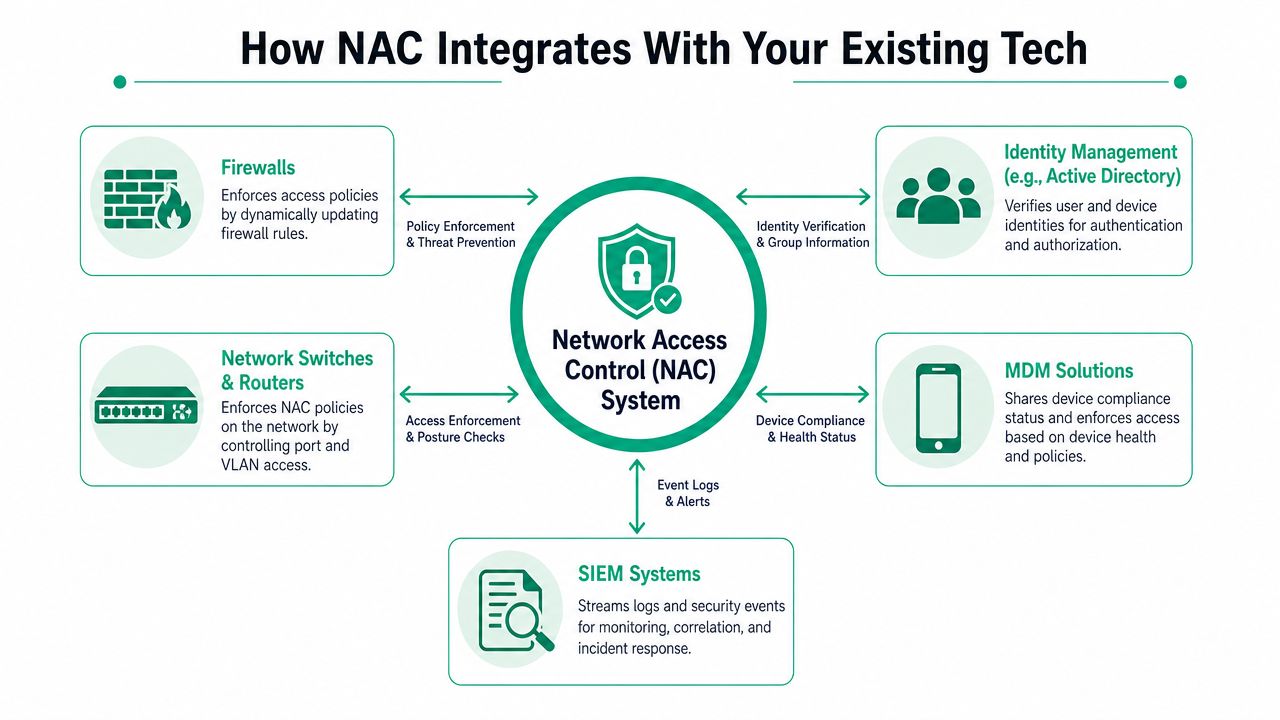
NAC isn't useful as a stand-alone island. It gets better when it ties into the gear and services you already run.
In our 17 years of local service, one thing has stayed consistent. Security tools work better when they share context. A NAC platform should know who the user is, what the endpoint looks like, where it connected, and what your firewall and monitoring stack are seeing at the same time.
Where NAC plugs in
A practical SMB deployment often connects NAC to tools like these:
- UniFi networking for switch-port and Wi-Fi policy enforcement
- Bitdefender GravityZone for endpoint health signals
- Microsoft Entra ID for user identity validation
- Firewalls for segmentation and policy handoff
- Mobile device management platforms for company phones and tablets
- SOC-as-a-Service monitoring for alerting and response
That combination gives IT a cleaner chain of trust. The identity system verifies the user. The endpoint stack reports health. NAC makes the access decision. The firewall limits movement. The SOC watches behavior after connection.
What that looks like in practice
Say an employee walks into a Greenwood office with a company laptop. They connect to secure Wi-Fi on a UniFi stack. NAC checks Entra ID for who they are, asks Bitdefender GravityZone whether the device is healthy, then places them on the right network segment. If something changes later, such as endpoint protection going offline or suspicious activity showing up in logs, NAC can restrict access instead of letting the device roam freely.
That's very different from old-school trust based on location alone.
Good NAC treats the office network like a checkpoint, not a free-for-all.
This also pairs well with directory and identity cleanup. If your business still has sprawl inside user groups and legacy permissions, this guide to Active Directory management for Indy SMBs is worth a look.
The deeper technical layer
This is also where higher-level design matters. A mature setup may combine NAC with Zero Trust architecture, latency-optimized mesh nodes for problem buildings, and SOC-as-a-Service monitoring for round-the-clock visibility. In environments where storage has already been stressed by outages or hardware issues, recovery planning matters too. When we dissembled a similar client's failing RAID array, the key lesson wasn't only about bit-level data recovery. It was that prevention beats restoration every time. NAC is one of the controls that helps keep small problems from becoming restore-the-backup problems.
Your NAC Implementation Checklist
Most failed NAC projects don't fail because the product was bad. They fail because the rollout was sloppy.
The smart move is to treat NAC like a controlled network change, not a panic purchase after a scare. There's also one best practice that gets missed all the time. SecureW2's NAC best practices guide points out that post-admission NAC matters because it keeps monitoring devices after they connect, and 52% of malware infections happen on initially compliant devices. That's why quarantine and ongoing checks matter just as much as the first approval.
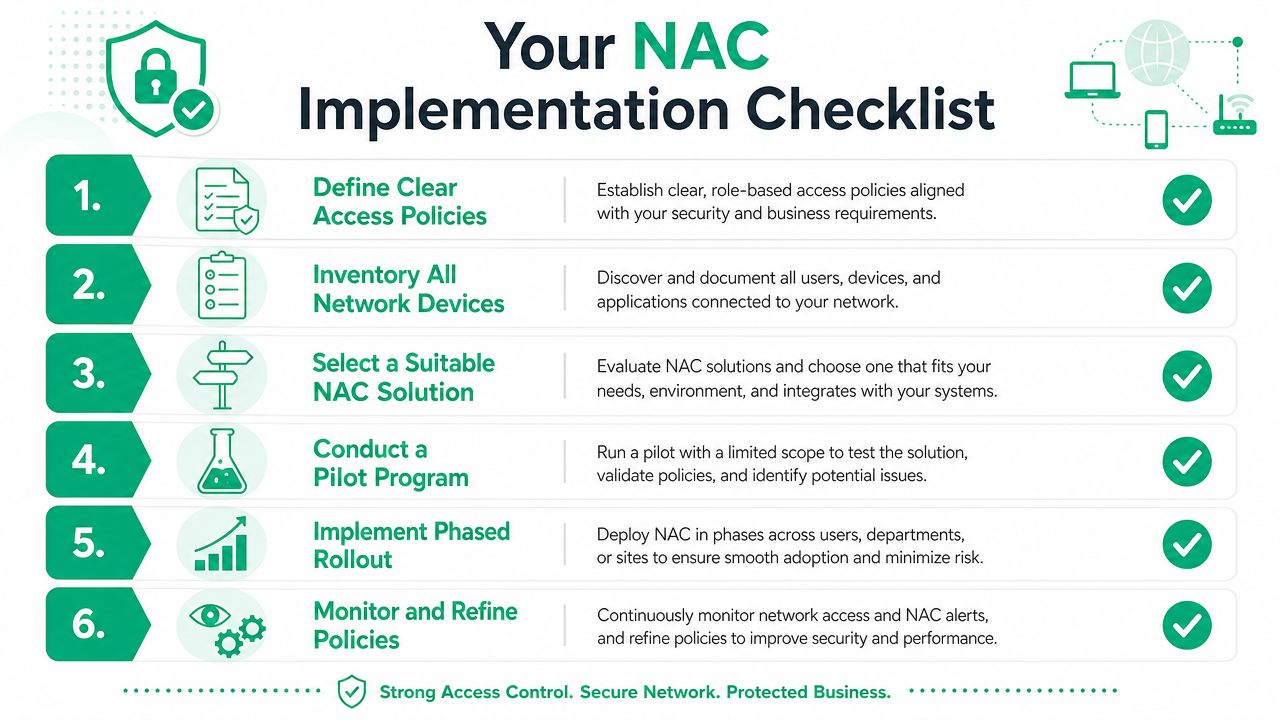
A practical rollout sequence
-
Inventory what's really on the network
Start with discovery. Company laptops, personal phones, printers, cameras, badge readers, tablets, VoIP handsets, warehouse scanners, everything. If you miss categories now, they become exceptions later. -
Group access by role
Finance, front desk, clinicians, guests, vendors, shop floor devices, and IT admin accounts should not all live on the same trust level. Build access around roles, not around individual names. -
Choose the right NAC model
Decide whether your environment needs agent-based checks, agentless access, cloud-hosted management, or a hybrid. Older buildings around Greenwood often need a design that respects both wired and wireless quirks. -
Start in monitor-only mode
Don't flip the switch to full enforcement on day one. Watch what would have been blocked first. That's how you catch weird legacy devices before they break a workflow. -
Run a pilot with one segment
Pick a manageable slice of the business, such as office staff on one floor or one department in a single location. Clean up the surprises there before you spread the policy wider. -
Turn on post-admission controls
This is the pro move. A device that was compliant on Monday can become risky later. Quarantine, restricted VLAN assignment, and automated alerts are what keep one bad endpoint from becoming everyone's outage.
A few mistakes to avoid
- Don't write policies around edge cases first
- Don't ignore unmanaged devices
- Don't let guest Wi-Fi touch internal resources
- Don't forget printers, IoT gear, and specialty equipment
If you're still tightening the basics of your environment, this guide on how to set up a business network for Indy SMBs is a good foundation.
Start narrow. Get clean visibility. Then enforce. That order saves a lot of headaches.
Common NAC Questions and Your Next Step
Does NAC slow down the network
It doesn't lead to the slowdowns that are often anticipated. A properly designed NAC deployment adds policy checks, not random drag. If users feel a slowdown, the issue is usually bad network design, old hardware, poor Wi-Fi coverage, or clumsy policy mapping. In a lot of older Southside buildings, the better fix includes cleaner switching, stronger wireless design, and smarter segmentation together.
Is NAC overkill for a small business
No. Small businesses often need it more because they have less margin for downtime and fewer internal IT hands. If a single infected laptop can interrupt scheduling, accounting, phones, or shared files, then access control has direct business value.
Isn't a firewall enough
A firewall matters, but it answers a different question. A firewall controls traffic between networks and systems. NAC decides whether a user or device should be trusted on the network in the first place, and what access they should get once connected.
What industries benefit most
Healthcare, legal, manufacturing, logistics, and professional services all benefit. HIPAA, CMMC, and NIST CSF conversations get easier when you can show controlled access, segmentation, and monitoring. But even if you don't live under a formal compliance regime, the business continuity case still holds.
What's the first step
Get a clean picture of your environment. Which devices connect, how they authenticate, what they access, and where your blind spots sit today. Once that's mapped, NAC becomes a design decision instead of a guess.
If your business is in Greenwood, Indianapolis, or anywhere along the I-65 corridor, Finchum Fixes IT can help you sort out whether Network Access Control belongs in your environment and how to roll it out without disrupting operations. A Free Network Assessment or Security Risk Audit is the right next step if you want fewer surprises, tighter compliance, and a network that supports uptime instead of threatening it.