Secure File Sharing: A Guide for Indiana Businesses
TL;DR
- Secure file sharing fixes a common Indiana SMB problem: sensitive files moving through email, personal cloud accounts, and public links.
- The real risk isn't just theft. It's downtime, compliance trouble, rework, and stalled operations when teams can't trust how files move.
- Good systems combine encryption, MFA, permissions, audit trails, expiring links, malware scanning, and governance.
- SFTP remains a key technical foundation because it runs inside SSH on port 22 through an encrypted channel.
- Most failures come from bad access settings, not broken encryption.
- The right setup depends on your business: cloud, on-premise, or hybrid.
- Indiana firms handling HIPAA, CMMC, SOC 2, or NIST CSF obligations need proof, not just good intentions.
- Rollout matters. Training, monitoring, and a written policy keep staff from slipping back to email attachments and shadow IT.
A lot of Johnson County business owners think file sharing is solved because their staff can already send files.
That's usually the problem.
A Greenwood office sends invoices through email. A shop off the I-65 corridor drops CAD files into a personal cloud folder because the supplier “needs it fast.” A medical practice forwards intake paperwork to a billing partner. Everybody gets the file where it needs to go, until somebody shares the wrong version, opens a public link, or can't prove who downloaded what.
That's where secure file sharing stops being an IT nice-to-have and starts looking like basic business continuity.
The Real Cost of a Simple File Transfer
A common Southside bottleneck looks harmless at first. A manufacturing team in a Greenwood business park needs to send large design files to a vendor. Email chokes on the attachment size. Someone uses a personal Dropbox or Google Drive account. Another employee replies to the old thread with a revised spec sheet. By Friday, three versions of the same file are floating around, nobody knows which one is final, and the owner assumes the issue is “just a communication problem.”
It isn't.
It's a control problem. Once files move through personal apps, ad hoc links, and inboxes, your company loses clean authority over access, versioning, and logging. If that file contains customer data, protected health information, pricing, HR records, or controlled technical data, the risk moves from messy to expensive in a hurry.
Where local businesses get burned
The damage usually starts in small ways:
- The wrong person gets access: A public or loosely shared link gets forwarded outside the intended recipient list.
- The wrong file gets used: Teams work from stale attachments instead of a single governed file.
- The business can't prove anything: There's no audit trail showing who opened, downloaded, or changed the file.
- Operations stall: Staff stop and scramble because they don't know what's trustworthy anymore.
That last one matters more than many owners realize. Downtime can cost businesses up to $9,000 per minute. Even if your loss doesn't look like a dramatic outage, wasted staff hours, delayed orders, and compliance cleanup hit the same budget. Secure file sharing pays for itself when it reduces that chaos and turns wasted tech time back into billable work and predictable monthly IT costs.
Practical rule: If your team still sends sensitive attachments by email, you don't have a file-sharing process. You have a risk habit.
Modern business expectations have changed. Secure file sharing became mainstream as companies moved away from email attachments and ad hoc transfers toward encrypted, permission-based systems with controls like password protection, expiring links, access permissions, version history, activity monitoring, and virus scanning, as outlined in this SFTP and secure transfer guide.
What secure file sharing actually protects
It's not only about stopping hackers. It's about reducing the everyday mistakes that chew up time and create liability.
For a Johnson County owner, that means:
| Business issue | What insecure sharing causes | What secure sharing fixes |
|---|---|---|
| Vendor collaboration | Files scattered across inboxes and personal apps | Controlled access in one governed system |
| Client document delivery | Untracked downloads and accidental forwarding | Passwords, expirations, and permissions |
| Staff productivity | Time wasted chasing versions | Centralized access and history |
| Compliance reviews | No proof of access control | Logs, audit trails, and policy enforcement |
If this sounds familiar, start with a practical framework like this Indiana guide to secure data transfer. Most companies don't need more apps. They need one file-sharing process that people will follow.
Choosing Your Secure Architecture
A Greenwood manufacturer usually sees the architecture question for the first time after something breaks. A project manager needs to send drawings to a subcontractor, the accounting team needs a secure way to exchange documents with an outside CPA, and someone asks whether the shared drive, Dropbox account, and VPN are good enough. That is the moment to choose a system on purpose instead of inheriting a patchwork.
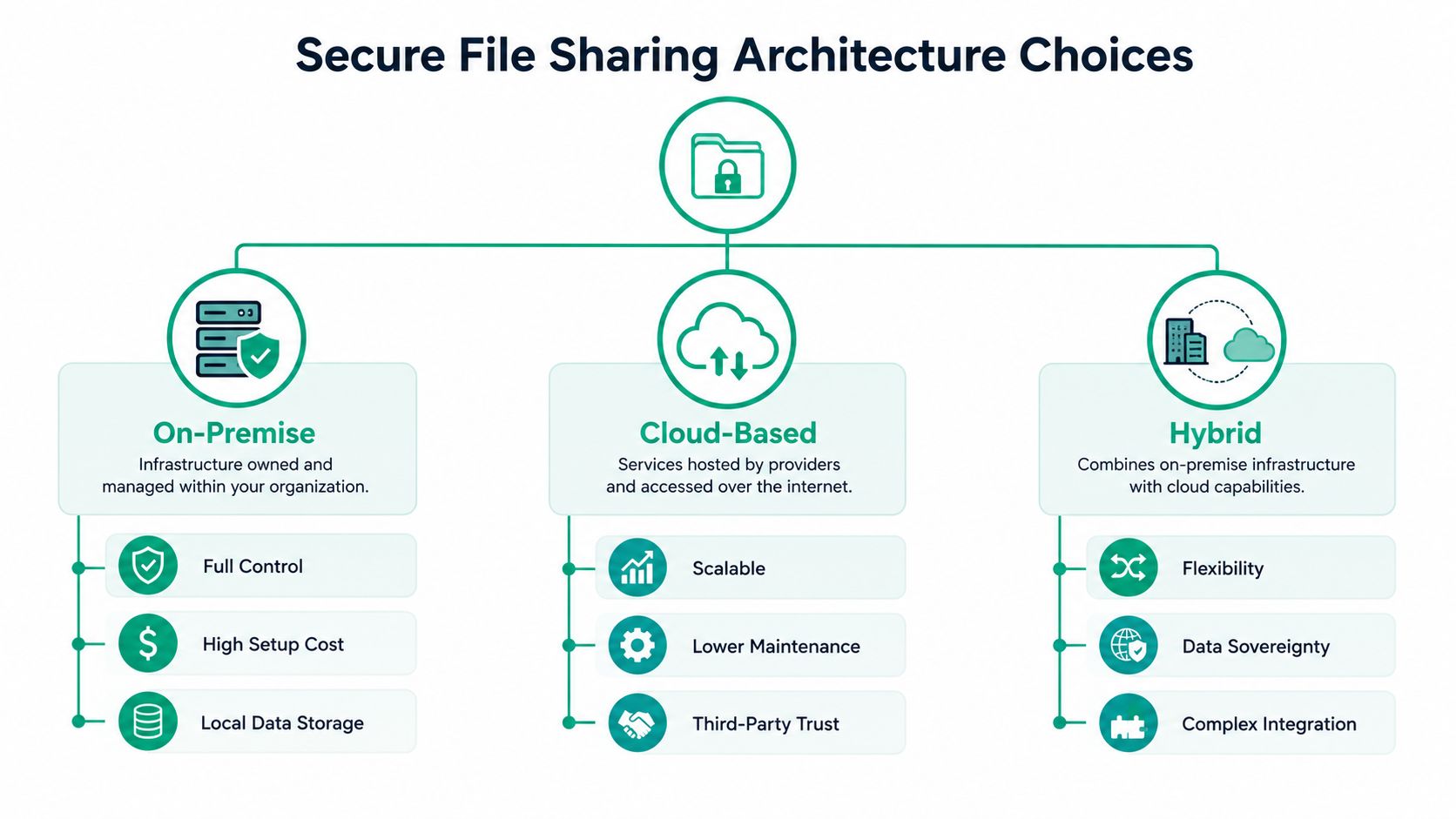
For Indiana SMBs, this decision is less about features and more about priorities. Start with three questions. Where does regulated data live today. Who needs access outside your walls. How much downtime can the business absorb if one system fails. Those answers usually point to one of three models: on-premise, cloud-based, or hybrid.
The three models in plain English
On-premise fits companies that need tight internal control and already have the staff to maintain servers, storage, backups, patching, and monitoring. I usually recommend it only when there is a clear operational reason to keep file systems local, such as a plant floor dependency, a legacy application that cannot move, or a customer contract that pushes you in that direction. The trade-off is simple. You get more direct control, and you inherit more failure points.
Cloud-based works well for firms that share files with clients, vendors, field staff, or remote employees every day. It lowers the maintenance burden and usually gives smaller teams a better shot at consistent security settings, especially if they do not have an internal IT department watching file servers full time. For many Johnson County businesses, this is the fastest path to a usable system that people will adopt.
Hybrid is common in Indiana because many businesses are in the middle. They have one or two older systems onsite, but they also need secure outside collaboration. Healthcare practices, defense suppliers, and professional service firms often land here. PHI may stay tied to one controlled environment for HIPAA reasons, while approved client or vendor exchanges move through a managed cloud portal. A machine shop working toward CMMC can take a similar approach by keeping controlled files in a tighter enclave while shifting routine collaboration into a separate governed workflow.
Build the transport layer first
Secure file sharing still needs a secure way to move files from point A to point B. SFTP remains relevant for that reason. It gives businesses an encrypted transfer method that many line-of-business apps, partners, and automation tools can still support.
That does not mean SFTP is the whole architecture. It is one layer. A good design also accounts for identity, retention, audit logs, external sharing rules, and recovery. I have seen companies buy a technically sound transfer tool, then create risk because nobody decided where files should live after upload, who owned the folders, or how access should expire.
Encryption during transfer solves one problem. It does not solve governance, compliance, or continuity.
Zero Trust is the better default
A secure architecture should assume that users, devices, and sessions need to be verified each time access is requested. That approach matters for Indiana SMBs because work now happens from offices, homes, job sites, clinics, and vendor locations.
In practical terms, Zero Trust means the file-sharing platform should answer a few plain questions every time:
- Who is requesting access
- Are they using an approved device or connection
- Which files or folders do they need
- How long should access last
- What gets logged for audit and incident review
This matters for compliance. HIPAA expects controlled access to protected information. CMMC expects you to limit access to authorized users and keep records that prove those controls are working. Architecture choices either make those requirements easier to meet or harder to clean up later.
Use a simple decision path
Here is the roadmap I use with local owners who want a decision they can defend.
Choose cloud-based first if your biggest risks are scattered sharing, remote work, and lack of internal IT capacity. This usually gives the fastest ROI because it cuts support time, reduces version confusion, and makes recovery easier if a laptop is lost or an employee leaves.
Choose on-premise first if a specific application, contract, or operational dependency requires local control, and you already have the discipline to maintain backups, patching, access reviews, and uptime.
Choose hybrid first if compliance scope, legacy systems, or business continuity goals force you to split workloads. This option can be the right answer, but only if someone owns the integration and policy side. Hybrid done casually turns into two systems with twice the cleanup.
A useful outside reference is FaxZen's secure sharing guide, especially for comparing secure sharing methods in practical terms.
If remote access is part of the design, pair your file-sharing decision with a clear remote connectivity standard. This guide to the best VPN for small business is a good place to line up secure file access with the rest of your network plan.
Implementing Ironclad Access Controls
Most file-sharing failures don't happen because somebody cracked the encryption. They happen because a folder was shared too broadly, a former employee still had access, or a manager told the system to “just let everyone in for now.”
That's why access control isn't a side setting. It's the whole ballgame.
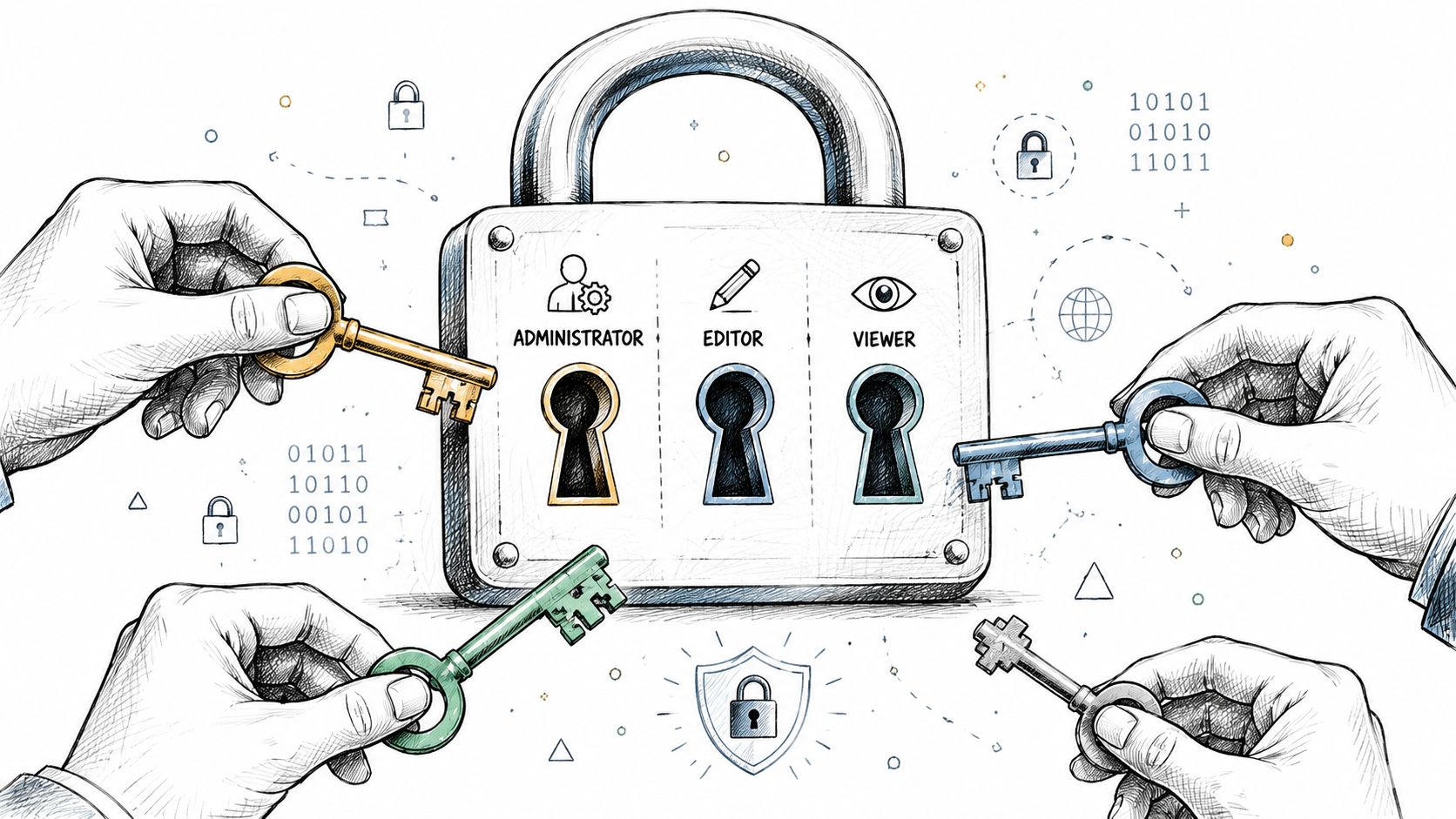
Industry guidance is clear on the stack that works: encrypt files at rest and in transit, enforce structured authentication and granular permissions, then add logging and DLP. It also notes that the highest-risk failure point is usually misconfiguration of access or sharing policies, not the cryptography itself, as explained in Egnyte's secure file sharing guidance.
Start with roles, not people
Don't assign file permissions one user at a time unless you enjoy future cleanup projects.
Set up role-based access control, often called RBAC. Accounting gets accounting folders. HR gets HR folders. Project managers get the client and vendor workspaces tied to their jobs. Temporary contractors get tightly scoped access with an expiration date.
That structure does two things:
- It reduces accidental exposure.
- It makes offboarding far cleaner.
In our 17 years of local service, one pattern keeps repeating. Companies think they have a security tool problem when they really have a permissions sprawl problem. Too many exceptions. Too many old shares. Too many “we'll fix it later” access decisions.
MFA is not optional
If you're protecting anything tied to HIPAA, CMMC, financial records, or customer data, multi-factor authentication has to be turned on. No debate.
Microsoft lists two-factor authentication, virus scanning, ransomware detection, and expiring-sharing links among the core controls associated with secure file sharing. That lines up with what works in the field. Password-only access breaks down fast once users reuse credentials or fall for phishing.
For a deeper look at the identity side of this, Securing cloud identities is a useful read for owners and internal IT leads alike.
What good permissions look like
Use this model:
- Default deny: New users get nothing until a role grants access.
- Least privilege: Give only what a person needs to do the job.
- Time-bound guest access: Vendors and outside counsel shouldn't have open-ended folder rights.
- Review cycles: Managers should review access on a schedule, especially after role changes.
A lot of owners need their team to see this visually before it clicks. This short video does a solid job explaining the moving parts.
The fastest way to create a leak
Here's the bad pattern I want business owners to watch for. Somebody creates a top-level share for convenience. Subfolders inherit the same broad permissions. A staff member uploads a compensation sheet, a client list, or a health document into the wrong place. Nobody notices until the wrong recipient opens it.
That's not a breach caused by advanced malware. That's a permissions design failure.
If you're evaluating platforms or rebuilding your identity model, this review of the best identity and access management tools helps sort the stronger options from the checkbox products.
Designing Secure and Efficient Workflows
A secure tool that slows everyone down won't stay secure for long. Staff will route around it. They'll drag files back into Outlook, text screenshots, or use personal apps because “it's faster.”
So the target isn't maximum lock-down. It's controlled convenience.
Email attachments lose for daily operations
Take a Hamilton County financial advisor sending client documents. The old method looks familiar. Attach PDF. Add a vague subject line. Hope the client received it. Maybe send the password in a second email. Then resend when the client can't find the first message.
The better workflow is cleaner:
- User logs into the approved platform.
- They select the file or folder.
- They apply the right permissions.
- They send a secure link with a password and expiration.
- The system records access and activity.
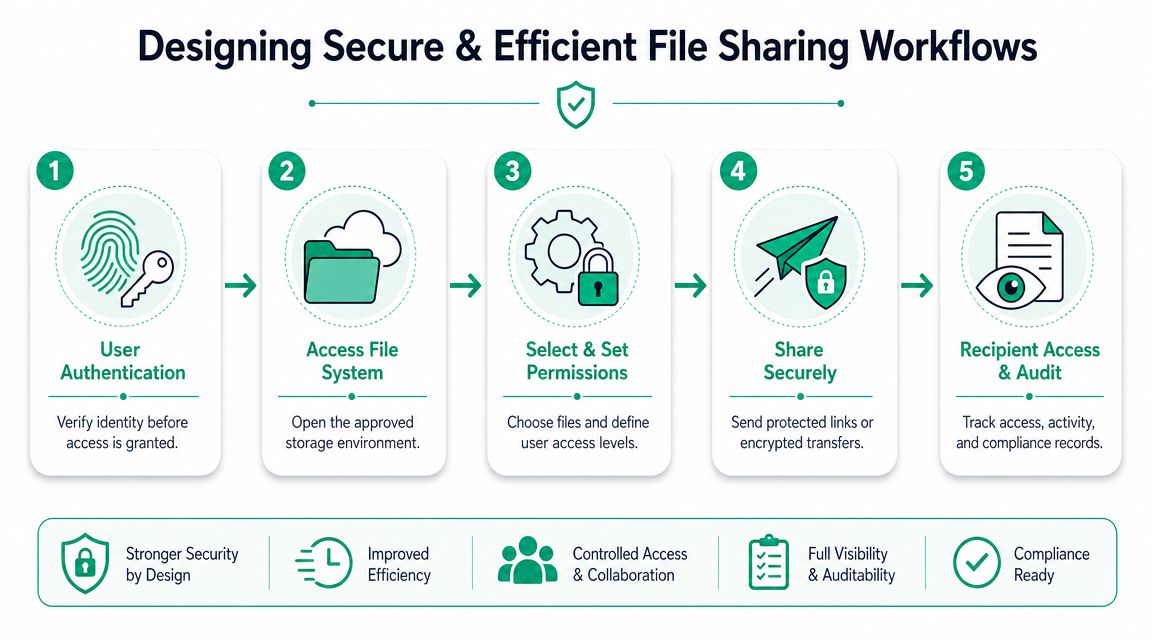
That process feels easier to the sender and looks more professional to the recipient. It also cuts down on support calls about missing attachments, version confusion, and accidental forwarding.
The best option depends on your workflow
On this point, owners often get bad advice. They're told to “just use a secure platform,” as if every use case is the same.
It isn't.
The better question is whether you need controlled external collaboration, audit trails, and policy enforcement for vendors, clients, or regulated data flows. That's the more useful lens when comparing cloud-based sharing with self-hosted portals, as described in FileCloud's breakdown of file-sharing security choices.
Build workflows people will keep using
A strong workflow usually includes:
- Client-friendly delivery: Secure links are easier for outside recipients than portal gymnastics.
- Automatic expiration: Old access shouldn't stay alive forever.
- Download controls: Not every recipient needs permanent local copies.
- Audit visibility: Managers should be able to confirm whether a file was accessed.
- Security tooling around the flow: Products such as Bitdefender GravityZone can complement endpoint protection on devices touching sensitive files.
Good workflow design removes excuses. If the safe way is also the easy way, staff stop hunting for shortcuts.
There's also an operational payoff. Teams spend less time babysitting file exchanges and more time doing actual work. That's the ROI many owners miss. Secure file sharing isn't just a security line item. It turns clunky manual file handling into a repeatable business process.
If your staff still hops between inboxes, local folders, and shared drives, this guide on how to automate business processes for Indy SMBs is a useful next step.
Meeting Compliance and Recovery Mandates
If you work in healthcare, defense manufacturing, legal services, or finance around Indianapolis, secure file sharing has to do more than keep data private. It has to help you prove that your controls exist and that people are using them correctly.
That's where many low-end tools fall short.
Compliance needs proof
Microsoft describes secure file sharing as a way to keep files protected from online threats and accessible only to people granted permission by the owner. It also ties these systems to compliance-heavy collaboration through controls like access management, audit trails, and governance, and notes their relevance to HIPAA, GDPR, and SOC 2 in regulated environments, as covered in Microsoft's secure file sharing guidance for businesses.
For Indiana businesses, that maps directly to common local realities:
- Healthcare practices need controlled access to PHI and logs that support HIPAA expectations.
- Defense-adjacent manufacturers often need file handling discipline that supports broader CMMC and NIST CSF programs.
- Professional services firms need auditability when sharing tax, payroll, legal, or client records.
A clean compliance posture usually depends on a few core capabilities working together, not one magic product.
| Compliance need | File-sharing capability that supports it |
|---|---|
| Proving access was restricted | Role-based permissions and MFA |
| Showing who touched a file | Audit trails and activity logs |
| Controlling external sharing | Password-protected, expiring links |
| Enforcing governance | Centralized policies and approvals |
Recovery is part of the same conversation
A file-sharing platform can be secure and still leave you exposed if recovery is weak.
That matters when ransomware hits a synced folder, when an employee deletes the wrong project archive, or when aging hardware fails. In one local recovery job, we disassembled a similar client's failing RAID array because nobody realized their “shared files” were effectively tied to one brittle storage path. File access looked normal until it suddenly wasn't.
That's why I push owners to pair secure file sharing with:
- Immutable off-site backups
- Version history
- Documented recovery procedures
- Tested restore paths
If your only recovery plan is “the cloud should have it,” you don't have a recovery plan.
Secure sharing protects the front door. Recovery protects the business when something still gets through.
What auditors and insurers care about
They usually want evidence that your process is controlled, repeatable, and documented. That means your file-sharing environment should line up with your broader incident response and disaster recovery planning.
For a practical framework, use an Indiana IT disaster recovery plan template as the companion document to your file-sharing controls. The two belong together. One governs how data moves. The other governs how the business keeps moving when systems fail.
Your Go Live Plan Training Monitoring and Rollout
A secure file-sharing rollout usually fails in one of two ways. The technical setup is rushed, or the staff never changes behavior.
Both are fixable if you treat rollout like an operations project, not a software install.
Phase one setup
Start with a limited scope. Pick one department, one file type, or one external workflow. Don't migrate every file share in the company on day one.
Use this order:
- Define the use case: Vendor exchange, client document delivery, internal restricted files, or all three.
- Configure the baseline: MFA, permissions, logging, link expiration, and malware scanning.
- Create pilot groups: Include one manager, a few daily users, and one external recipient if relevant.
- Test from the user side: Upload, share, revoke access, restore versions, and review logs.
Fortra's practitioner guidance flags public-link sharing, weak passwords, and unsecured connections as major pitfalls. The same source ties insecure file-sharing behavior to the wider breach environment by citing an average data-breach cost of $3.8 million in its secure file sharing rollout guidance. That's why setup discipline matters.
Phase two training
Training shouldn't sound like a compliance lecture. Staff need simple rules they can remember during a busy day.
Teach them:
- Don't email sensitive attachments when the approved system can send a secure link.
- Don't create open-ended public shares unless a manager and policy allow it.
- Don't reuse weak passwords or bypass MFA because a vendor is in a hurry.
- Do verify recipients before granting access to files with customer, payroll, or health data.
A short live session beats a PDF nobody reads. Follow that with quick-reference instructions inside the apps people already use.
Phase three monitoring
Here, mature teams separate from hopeful ones. Once the system goes live, somebody needs to watch for policy drift.
That doesn't always require a full internal security team. SOC-as-a-Service monitoring can help by watching alerts, suspicious access patterns, and after-hours anomalies that local SMBs often miss. If a user suddenly starts bulk-downloading files or sharing in a way that breaks policy, someone should know fast.
A rollout checklist that works
- Pilot first: Prove the process before wider deployment.
- Turn off old habits: Remove or restrict legacy sharing paths where possible.
- Train managers separately: They approve access and exceptions, so they need deeper understanding.
- Review after launch: Check logs, user friction points, and exception requests.
- Fold it into policy: If it isn't written down, people will treat it as optional.
The companies that get this right usually don't have the fanciest stack. They have a clear standard, decent training, and ongoing oversight.
An Indiana Business Policy and Checklist Kit
A workable policy does not need to be long. For most Indiana SMBs, a one to two page standard is enough if it tells managers what to approve, tells staff what to stop doing, and ties file handling to backup, compliance, and recovery.
That matters in Johnson County because secure file sharing usually touches more than one requirement at once. A medical practice may need HIPAA safeguards and breach response discipline. A manufacturer working toward CMMC may need tighter control over who can access drawings, quotes, or technical documents. In both cases, the policy should help the business stay operating during an outage, not just satisfy an audit question.
Sample policy language
Use this as a starting point, then have your IT and legal advisors tailor it to your contracts, regulatory obligations, and insurance terms.
Purpose
Protect company, client, patient, and partner data during storage and transfer. Support continuity, compliance, and controlled collaboration so work can continue during staff changes, vendor changes, and security incidents.
Scope
Applies to employees, contractors, vendors, and temporary users who access company files through approved systems, whether they work onsite, remotely, or from a client location.
Approved methods
Sensitive files may be shared only through the company's approved secure file sharing platform or another authorized secure transfer method. Standard email attachments, text messages, and personal cloud accounts are not approved for restricted, regulated, or contract-controlled data.
Access rules
Access is assigned by role and business need. Management approves exceptions. IT removes access promptly when job duties change, a project ends, or employment ends. MFA is required for all approved users.
External sharing
External recipients receive the minimum access needed for the task. Expiration dates, password protection, download limits, and view-only settings must be used when the platform supports them and the data classification requires them.
Logging and review
File access, sharing activity, permission changes, and failed access attempts must be logged. Management or IT reviews exceptions, stale access, and unusual activity on a defined schedule.
Incident handling
Employees must report accidental sharing, suspicious access, lost devices, or misdirected links immediately. The response process must align with the company's broader recovery, notification, legal, and cyber insurance obligations.
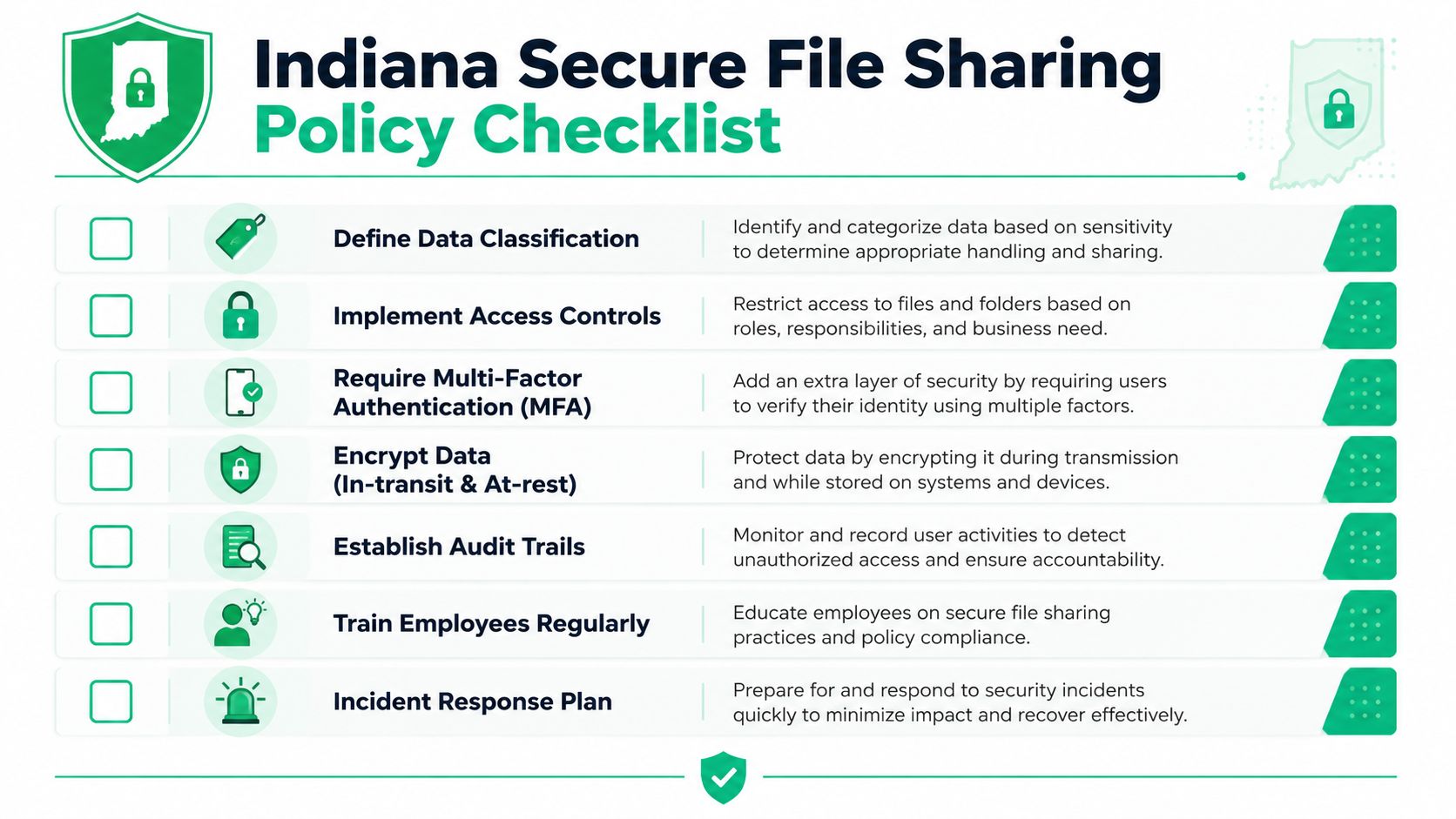
Your implementation checklist
Use this as an owner-level scorecard, in priority order.
- Classify data first: Identify which files are public, internal, confidential, regulated, or contract-controlled.
- Match controls to risk: Apply stricter sharing rules to HR, financial, health, legal, and customer data before lower-risk files.
- Pick the architecture: Choose cloud, on-premise, or hybrid based on workflow, vendor access, retention needs, and recovery goals.
- Require identity controls: Turn on MFA, role-based permissions, and documented approval for exceptions.
- Lock down external sharing: Use expirations, passwords, limited guest access, and manager approval where needed.
- Enable visibility: Keep audit logs, permission history, and alerts for unusual access or bulk downloads.
- Protect recovery: Back the platform with immutable off-site backups and test restores against the files your team depends on.
- Map compliance needs: Verify that HIPAA, CMMC, customer contract terms, and retention rules are addressed in the platform settings and written policy.
- Train by job role: Teach front desk staff, managers, finance, and operations teams the file handling rules that apply to their daily work.
- Review quarterly: Check for orphaned accounts, over-permissioned folders, policy exceptions, and restore readiness.
A key insight for business owners
Secure file sharing sits in the middle of security, compliance, operations, and recovery. If one part is weak, the rest feel it.
I usually tell owners to treat this as a business standard, not a software purchase. The platform matters, but the bigger return comes from fewer workarounds, cleaner approvals, better audit trails, and faster recovery when someone deletes the wrong folder or a workstation gets hit. That is why a Greenwood medical office, a Johnson County machine shop, and an Indianapolis accounting firm can use different tools and still follow the same roadmap. Start with data classification. Set access by role. Limit outside sharing. Keep logs. Test recovery.
If your team still relies on attachment-heavy email, informal shared drives, or personal cloud apps, the cost shows up in more than security risk. It shows up in slow handoffs, version confusion, audit stress, and longer downtime when something breaks.
If your team wants a second set of eyes on file sharing, access control, backups, or compliance readiness, Finchum Fixes IT offers a Free Network Assessment and Security Risk Audit for businesses in the Greenwood and Indianapolis area. It's a practical way to find the gaps before they turn into downtime.