Your IT DR Plan Template for Indiana Businesses
TL;DR
- A real it dr plan template gives your team clear steps for outages, ransomware, hardware failure, and cloud account problems.
- Too many businesses still rely on tribal knowledge and an old USB drive. That fails fast when staff are stressed or systems are encrypted.
- According to recent disaster recovery statistics, only 33% of organizations have an organized response approach to IT disasters.
- Start with business impact analysis, then set RTO and RPO before you pick tools.
- Modern recovery has to include immutable off-site backups, identity recovery, and cloud control plane access.
- Test the plan like you expect to use it. Compare actual recovery time to your target and update the document after any major change.
- For Greenwood and Indianapolis businesses, the goal is simple: less downtime, fewer lost billable hours, and a predictable IT budget.
Monday starts normally in a Greenwood business park. Coffee is hot, payroll needs to run, and someone in accounting is already buried in email. Then a staff member clicks the wrong attachment. A file server disappears behind a ransom note. Shared folders won't open. Microsoft 365 logins start acting strange. The owner asks the question every business owner asks in that moment.
“How long are we down?”
That question gets expensive fast. Downtime burns billable hours, stalls orders, and turns a planned workday into a damage-control exercise. For a lot of Johnson County business owners, the ugly part isn't just the attack. It's finding out the “plan” was really an external drive under a desk, a former employee who knew the server layout, and a hope that backups were probably working.
Your First Line of Defense Against Downtime
An it dr plan template is your operating manual for a bad day. It gives your team a defined recovery order, named owners, vendor contacts, and clear decision points before stress and guesswork take over.
For small and midsize businesses around Greenwood, Franklin, and Indianapolis, downtime usually comes from ordinary weaknesses that have been tolerated for years. Aging hardware. Backups nobody has restored from lately. Shared admin passwords. One internet circuit. A former IT provider who left with tribal knowledge still in his head. In a ransomware incident, those weak spots get exposed fast, especially if attackers hit backups and identity systems before anyone realizes what is happening.
That is why a real recovery plan has to cover more than servers. It has to address how you recover clean data, how you regain control of Microsoft 365 or domain admin accounts, and how you keep the business running while technical work is in progress. For Central Indiana SMBs, that usually means choosing a plan that is disciplined enough to work under pressure, but simple enough that a small team can follow it.
What ad hoc recovery looks like in the real world
Businesses without a written plan usually lose time in the same places:
- No one has authority to call the incident. Staff wait too long because they are unsure who can shut off access, contact the IT provider, or notify leadership.
- Backups exist, but recovery is unproven. A job may show green in a dashboard, yet the restore fails, takes too long, or brings back encrypted files.
- Identity gets ignored. Teams focus on the server first, while compromised admin accounts, Azure AD, or Microsoft 365 access remain exposed.
- Dependencies surface late. File shares may restore, but DNS, MFA, licensing, VPN access, printers, or line-of-business databases keep users dead in the water.
- Recovery order follows noise, not impact. The loudest complaint gets attention first instead of the system that protects payroll, production, or patient care.
I have seen this play out in small offices more than once. The backup appliance was present. The passwords were scattered across sticky notes, an old spreadsheet, and one manager's memory. Everyone assumed the restore would be the easy part. It rarely is.
Practical rule: If recovery depends on memory, goodwill, or one person answering a phone at 6:30 a.m., the business is carrying more risk than it realizes.
Why a template still works, even in the ransomware era
A template does not solve recovery by itself. It gives you a place to define the parts that matter before an outage turns into a billing problem.
For SMBs, that matters because the trade-off is always the same. You need enough structure to restore systems in the right order, but you do not need enterprise paperwork that nobody maintains. A good template helps you document the systems that keep the business open, the people allowed to make decisions, and the recovery methods that hold up if production data and credentials are both under attack.
That also changes how backup planning should be approached. Local backup is useful for hardware failure and accidental deletion. It is not enough by itself for modern ransomware. A stronger design usually includes offline or immutable copies, separate admin controls, and tested restore steps. If you're reviewing backup options, this guide to enterprise data backup solutions that guarantee business uptime is a useful companion because backup tooling only works when it fits an actual recovery process.
Templates also help with coordination outside IT. Leadership needs to know who can approve emergency spending. Department heads need a fallback process if systems stay down all day. Staff need one communication path, not five conflicting texts. The same principle shows up outside technology too. A property team using a guide for LA property safety still starts with roles, escalation, and a documented response sequence. The setting is different. The discipline is the same.
For a Johnson County business, the point is simple. A disaster recovery plan should help you restore operations with clean data, trusted accounts, and a clear order of work. If it cannot do that, it is just paperwork.
The Core Components of Your DR Plan Template
A usable DR plan starts with one hard question. What has to come back first so the business can keep operating?
That answer is different for every shop in Johnson County, and it should drive the whole document. A law office may put document management, Microsoft 365 access, and line-of-business software at the top. A manufacturer off I-65 may care more about ERP, label printing, workstation access on the floor, and the network gear those systems depend on. For a clinic, systems tied to patient care and HIPAA obligations can change the order quickly. The plan needs to reflect actual business pain, not a generic list pulled from the internet.
A solid template usually starts with a business impact analysis, then ties each system to a recovery objective. That means identifying critical assets, key dependencies, communication requirements, and realistic RTO and RPO targets early, as outlined in this IT disaster recovery plan template guidance.
Start with ownership
Plans fail in the first hour when nobody knows who is allowed to call the incident, approve outside help, or tell staff what is happening.
Assign names, not job titles alone. In small businesses, one person may wear two hats, and that is fine if the handoffs are clear. What matters is decision authority and a backup for each role.
| Role | Primary Responsibility | Example Personnel |
|---|---|---|
| DR Coordinator | Declares incident, approves plan activation, sets priorities | Owner, operations director, practice manager |
| Technical Lead | Restores systems, coordinates vendors, validates recovery steps | Internal IT manager, MSP engineer |
| Communications Lead | Handles staff updates, client notices, vendor messaging | Office manager, HR lead, admin manager |
| Security Lead | Reviews containment steps, access resets, evidence handling | Security consultant, IT lead |
| Department Representative | Confirms business process impact and validation needs | Accounting manager, production supervisor, clinic lead |
Add after-hours numbers. Add alternates. Add the vendor contacts you call when things break. A plan that assumes one specific employee will always answer the phone is a weak plan.
Build the business impact analysis
The business impact analysis is where the template stops being theory and starts becoming useful.
For each system, answer a few plain questions:
- What business process does it support
- Who depends on it
- What stops working if it goes down
- What has to be restored before this system can function
- Is there a manual workaround, and for how long
This exercise changes priorities fast. The expensive platform is not always the first one back. In plenty of SMB environments, a file share, identity service, line-of-business database, or even a domain controller is the foundation the rest of the stack depends on.
If you want a worksheet that helps sort that out, this business impact analysis template is a practical way to turn rough opinions into a real recovery order.
Set RTO and RPO before you spend money
Recovery goals should be set before backup products, cloud replicas, or failover options are discussed. Otherwise, businesses buy tools first and discover later that the design does not match the downtime they can tolerate.
RTO is the target time to restore a system. RPO is the amount of data loss the business can live with. A CPA firm in tax season may need a very tight RPO for client files and accounting data. The lobby TV can wait. A small manufacturer may need shop-floor printing back in hours, while archived HR records can sit longer without hurting production.
These are budget decisions as much as technical ones.
- Short RTOs cost more. Faster recovery usually means better infrastructure, cleaner documentation, standby capacity, or some level of automation.
- Tighter RPOs change backup design. Frequent backups, better storage, and restore validation all matter more.
- Some systems belong in a lower tier. Treating every server like a top priority burns money and usually creates confusion during an outage.
For compliance, if you're in healthcare, legal, or financial services, document why certain systems need tighter recovery objectives and who approved them.
Good DR plans do not promise instant recovery across the board. They define what gets restored first, why it matters, and what the business is willing to spend to make that possible.
Include the sections templates often miss
A DR template should cover more than a system inventory and a few backup notes. The useful versions include the document scope, activation criteria, system dependencies, step-by-step recovery instructions, validation checks, and a maintenance log. They also spell out who signs off when priorities conflict.
For SMBs dealing with ransomware risk, two areas deserve more attention than older templates usually give them. First, identity dependencies. If Microsoft 365, Entra ID, Active Directory, VPN, or MFA is down or compromised, recovery work slows to a crawl. Second, backup trust. The template should note which backups are immutable or isolated, who controls them, and how restore access is protected. Those details belong in the core plan because they affect whether recovery is possible at all.
For physical emergency planning, especially if you're thinking about facilities, evacuation, and restoration logistics alongside IT recovery, this guide for LA property safety is a solid parallel resource. It covers the kind of on-the-ground planning that often has to sit beside your technical recovery work.
At minimum, your IT DR template should include:
- Executive summary: Scope, assumptions, covered systems, and activation criteria.
- System inventory: Servers, cloud services, endpoints, networking, identity systems, backup platforms.
- Dependencies: Which systems need to come up first, including identity and internet access.
- Recovery runbooks: Ordered steps with named owners, access requirements, and vendor contacts.
- Validation steps: How the business will confirm the restored system works.
- Maintenance record: Who reviewed the document, what changed, and when it was last tested.
That is the difference between a plan written for auditors and a plan your team can use on a bad Tuesday morning.
Building Your Modern Recovery Strategy
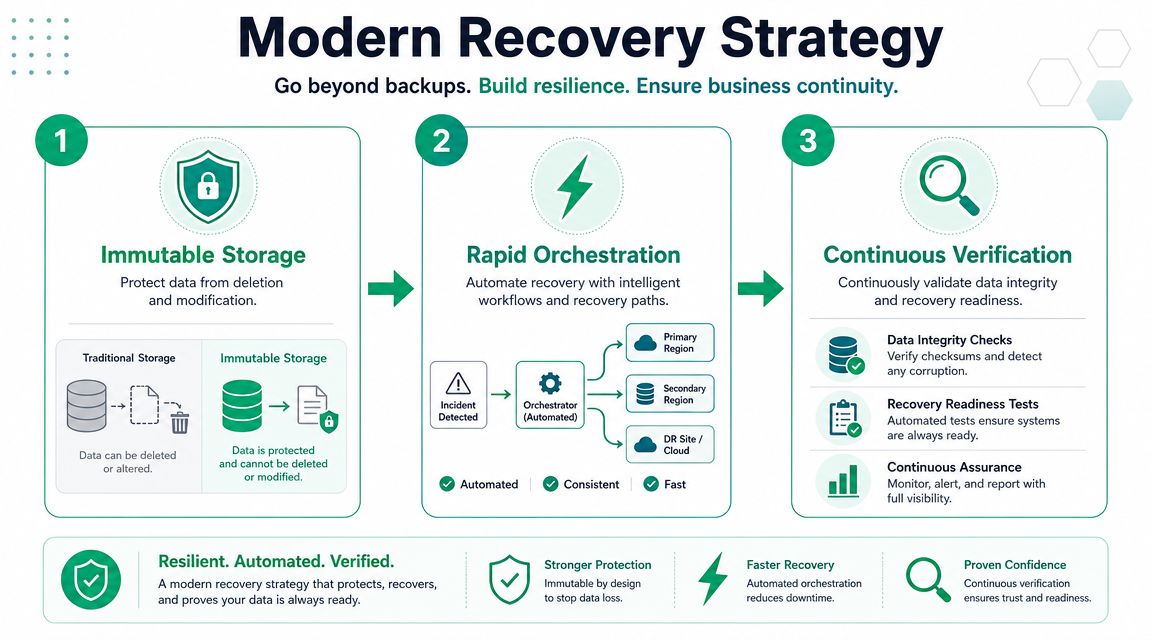
Most disaster templates still act like the main problem is a dead server. That's old thinking. Today's attacks go after backups, admin accounts, remote access tools, and cloud management consoles. If your plan restores a file server but leaves compromised identity in place, you're rebuilding into the same blast zone.
Recent guidance points out that many DR templates still miss ransomware-era priorities like immutable backups, identity recovery, and SaaS or cloud control plane recovery, as summarized in this modern DR template guide. That is the gap that hurts SMBs most, because smaller teams often assume cloud platforms or backup jobs cover more than they do.
Immutable backups are the floor
A backup that attackers can encrypt or delete isn't much of a backup. That's why immutable off-site backups matter. They give you recovery points that can't be altered during the retention window, which changes the conversation during a ransomware incident.
For SMBs around Greenwood and downtown Indy, the practical setup is often a layered one:
- Local recovery copy: Fast restores for common issues like accidental deletion or a failed Windows Server update.
- Off-site immutable copy: Protection against ransomware, site loss, and admin credential abuse.
- Documented restore path: Exact steps for bare-metal restore, virtual recovery, and file-level recovery.
Architecture matters more than products in this context. Veeam, Datto-style appliances, cloud object storage with immutability, and image-based backup tools can all play a role. The key question isn't “Do we have backups?” It's “Can we restore a clean state when the attacker touched identity, endpoints, and backup admin accounts?”
Identity comes before convenience
A lot of recovery plans assume Active Directory, Entra ID, SSO, MFA, and admin vaults will just be there when needed. That's a dangerous assumption.
In ransomware events, identity is often the hinge point. If admin accounts are compromised, the attacker can come back after you restore. If MFA is tied to a disrupted platform, your team can lock itself out of the tools needed to recover. Your template should include:
- Emergency admin access procedures
- Known-good credential vault access
- MFA recovery options
- Privileged account reset order
- Validation of conditional access or Zero Trust rules
A modern DR plan has to treat identity as a recoverable system, not a background service.
If your team can't log in, your backups may as well be on the moon.
Cloud recovery isn't automatic
Microsoft 365, Google Workspace, Azure, AWS, line-of-business SaaS platforms. They all make life easier until an account lockout, sync issue, malicious deletion, or tenant-level problem hits. The shared responsibility model still leaves your business responsible for access control, backup coverage, and recovery workflows.
That means your it dr plan template should spell out:
- Who owns cloud administration
- How to verify backup coverage for SaaS data
- How to restore deleted or encrypted cloud files
- What to do if the primary admin account is unavailable
- How to rebuild devices with secure access to cloud apps
For local businesses with multiple sites, a solid network design also matters. UniFi networking, for example, can support practical failover designs and cleaner visibility across distributed offices when you pair it with documented ISP failover logic and VLAN segmentation. That won't replace a DR plan, but it can reduce outage impact during the ugly middle hours.
Runbooks beat theory
Templates become useful or useless in this context.
A runbook is not “restore from backup.” A runbook is a sequence. It says who starts the restore, where the image lives, which credentials are needed, what dependencies come first, what logs to check, and who signs off that the service is usable. That's what keeps a recovery event from turning into six people talking over each other in a conference room.
A practical runbook should include:
- Trigger condition: What event activates this runbook.
- Owner: Who runs point.
- Prerequisites: Credentials, hardware, cloud access, licensing, network readiness.
- Recovery steps: Ordered actions, not broad goals.
- Verification: How the business confirms the service works.
- Exit criteria: When the system is considered restored.
When maintenance and downtime are part of your planning language, reliability terms from operations teams can help sharpen expectations. This overview of equipment reliability metrics explained is useful because it frames recovery and repair in operational terms business owners already understand.
For backup platform comparison, this Indiana guide to the best backup software for Windows Server can help you match tooling to the recovery targets you've set. Finchum Fixes IT also offers a downloadable incident response planning resource, which can sit beside a DR plan when you need both containment and recovery documents in the same playbook.
Your Communication and Escalation Playbook
Technical recovery falls apart fast when communication is sloppy. Staff start making up answers. Clients hear rumors before they hear facts. Vendors get pulled in too late. A usable plan tells people what to say, who says it, and when it gets escalated.
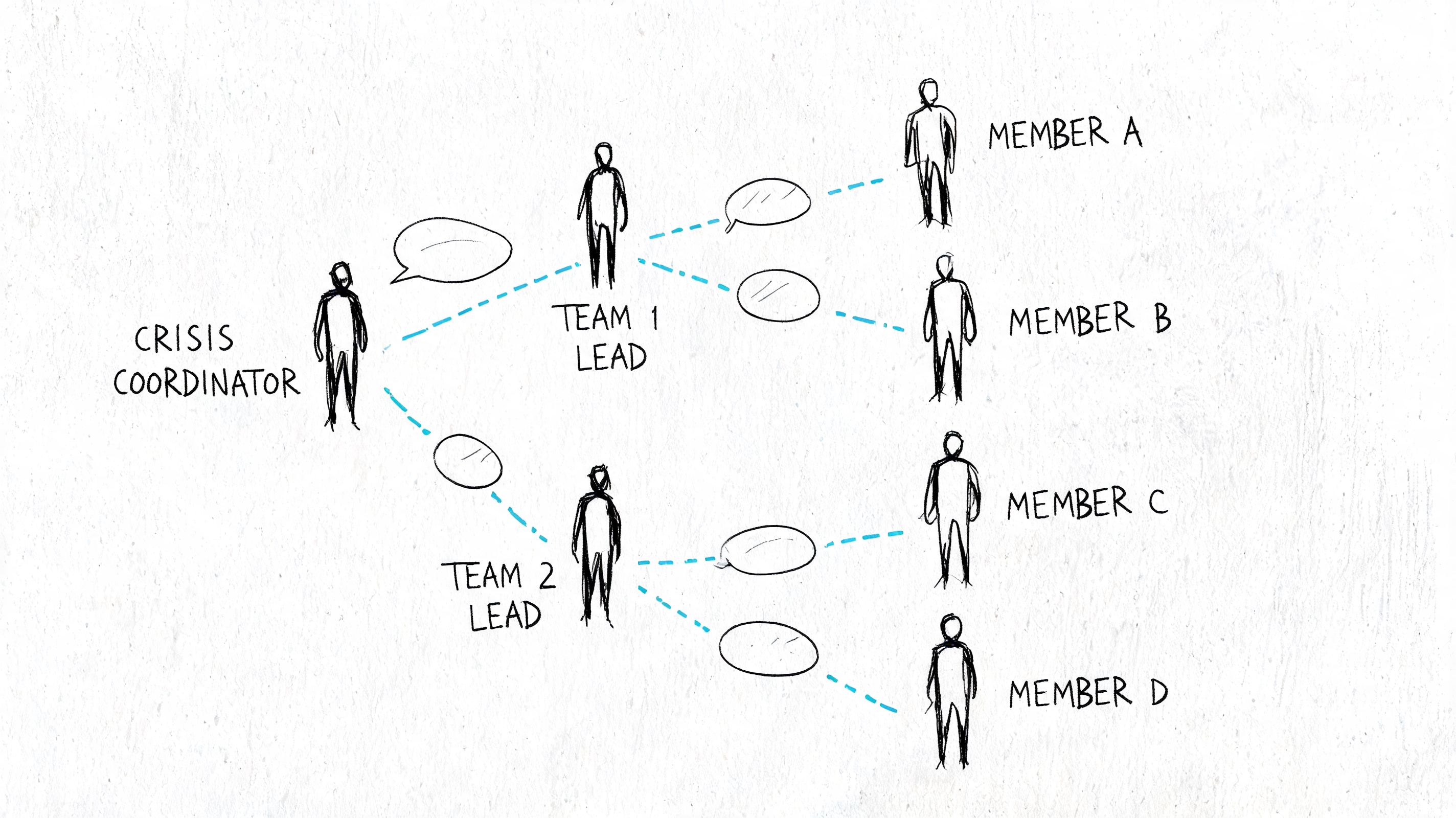
The first rule is simple. Don't let every employee become a spokesperson. Pick the message owner before the incident.
Internal communication
Your team needs short, direct updates. Not essays.
Use a communication structure like this:
- First message: Confirm there is an incident, tell staff what not to do, and give the next update time.
- Operations update: Explain which systems are unavailable and what temporary workarounds are approved.
- Role-based instruction: Accounting, front desk, management, and remote staff may all need different next steps.
- Recovery status: Tell staff when to test access and where to report issues.
A first internal message can be as plain as this:
We are responding to an IT disruption affecting shared systems. Do not reboot devices, connect personal storage, or attempt restores on your own. Use approved fallback procedures until the next update from the response lead.
That kind of message prevents well-meaning damage.
External communication
Clients, patients, vendors, and partners don't need technical jargon. They need confidence that someone is managing the issue.
Keep outbound messages focused on three things:
- Acknowledgment: Something happened and you're addressing it.
- Impact statement: Which services or response times may be affected.
- Next update: When they'll hear from you again.
If you're in a regulated space, involve legal or compliance review where needed. HIPAA issues need one path. A defense contractor dealing with CMMC obligations may need another. Generic wording can create compliance problems if it glosses over reporting obligations.
For businesses that want a matching document for cyber incident handling, this cybersecurity incident response plan template pairs well with an IT recovery plan because the incident and the restoration effort often overlap.
Escalation matrix
Not every outage should wake the owner. Some should. Make the threshold explicit.
| Situation | First Contact | Escalate To | Notes |
|---|---|---|---|
| Single user issue | Help desk or internal IT | Department lead if unresolved | Treat as support until wider impact is confirmed |
| Shared app unavailable | Technical lead | DR coordinator | Check dependencies before mass notice |
| Suspected ransomware | Technical lead and security lead | Owner or executive sponsor immediately | Freeze unauthorized changes and start evidence handling |
| Internet outage at one site | Network lead or ISP contact | Operations lead if business impact grows | Consider failover if available |
| Identity or admin lockout | Security lead | DR coordinator and executive sponsor | High priority because recovery may stall |
A short visual walkthrough can help staff understand the handoff logic before a real incident hits.
What works under pressure
The communication plans that hold up in real incidents tend to share a few traits:
- Offline copies exist: Printed contacts and recovery binders still matter when email is down.
- Approval paths are narrow: One person approves external client messaging.
- Updates are timed: Even if there's no big change, the team sends the next update on schedule.
- Rumor control is deliberate: Staff know where official status lives.
Testing and Maintaining Your Living DR Plan
A disaster plan that hasn't been tested is a rough draft. It may look polished. It may satisfy a checkbox. It still won't tell you whether the restore works, whether the DNS dependency was documented, or whether the accounting manager can validate the recovered data.
Industry guidance treats DR plans as living documents, recommends using recovery or test events to compare actual recovery time against target objectives, and warns against failing to review the plan after staffing, technology, or operational changes, as explained in this DR plan checklist.
In our 17 years of local service, we've seen the same pattern across Greenwood offices, Hamilton County growth companies, and downtown Indy firms. The businesses that recover cleanly aren't always the ones with the fanciest stack. They're the ones that test what they've documented.
What to test first
SMBs usually don't have the time or budget to simulate every disaster path right away. That's fine. Start with the systems that would stop revenue, client service, or compliance.
A sensible first wave looks like this:
- Backups of tier-one data: Can you restore the critical files and databases to a usable state?
- Identity recovery: Can approved staff regain secure access to Microsoft 365, line-of-business apps, VPN, and admin tools?
- Core infrastructure: Firewall, virtualization host, primary file shares, internet failover, and line-of-business app access.
- Communications fallback: Can the team reach each other if primary email is down?
A risk-based testing rhythm
Not every system deserves the same cadence. What matters is impact, change rate, and dependency complexity.
A practical schedule for a budget-conscious SMB:
- Monthly lightweight checks: Confirm backup jobs, retention, alerting, and admin access paths. Review major infrastructure changes.
- Quarterly tabletop exercises: Walk through one scenario with decision-makers and technical owners. Good choices include ransomware, internet outage, failed storage, or cloud admin lockout.
- Periodic partial restores: Recover a critical file set, application component, or virtual machine in a controlled test.
- Annual full documentation review: One benchmark commonly cited in practitioner guidance is annual documentation review, with more frequent testing and immediate updates after major changes, as noted in the earlier industry guidance.
- Immediate retest after change: New firewall, server migration, Microsoft 365 policy overhaul, office move, vendor shift, or line-of-business software upgrade should trigger plan updates.
The worst time to discover your backup admin account is tied to a departed employee is during an incident.
For regulated organizations, be stricter. A healthcare provider dealing with HIPAA risk shouldn't let recovery documentation sit untouched after a platform change. A defense contractor aligning with CMMC expectations should be able to show that recovery procedures are maintained and not just written.
Measure reality, not intent
This part separates useful testing from theater.
If your target says a system should be back within its recovery window, measure the actual result. Did the restore finish when expected? Did users authenticate? Did the app connect to the database? Could the business process successfully run?
Track items like:
- Actual recovery time
- Data completeness after restore
- Missing dependencies
- Manual workarounds required
- Approval bottlenecks
- Access or privilege issues
Then update the document. Not later. Right away.
A broader planning companion is this business continuity planning checklist for Indiana, which helps tie IT recovery testing to the rest of the business. That's important because a successful server restore doesn't help much if your staff still can't process orders or reach customers.
Common maintenance mistakes
Most stale plans fail for boring reasons, not exotic ones:
- Employee names are outdated
- Vendor contacts changed
- Server names no longer match reality
- Cloud permissions shifted
- The office moved, but the plan still references the old network layout
- Backups were upgraded, but the restore instructions weren't
Those are fixable problems if someone owns the review cycle. They become expensive problems when the business assumes the document is “done.”
From Template to True Business Resilience
The difference between a generic file and a working recovery program is customization. A shelf document lists sections. A resilient business maps those sections to the systems, people, vendors, and risks that drive daily operations.
That matters across Central Indiana. A clinic in Greenwood, a machine shop along the I-65 corridor, and a professional services firm near downtown Indy don't recover the same way because their dependencies, compliance pressures, and acceptable downtime aren't the same. The template is only the starting frame.
What turns it into business value is the discipline behind it:
- Recovery targets tied to real business priorities
- Ransomware-era protections like immutable off-site backups
- Identity and cloud access included in the plan
- Communication paths that work when primary tools fail
- Testing that proves the runbooks are usable
That is where ROI shows up. You cut wasted tech time, keep staff productive, protect billable hours, and move emergency spending toward a more predictable monthly budget. You also stop treating every outage like a custom project.
The businesses that handle disruption best usually don't have perfect infrastructure. They have clarity. They know what gets restored first, who owns each action, and what “back to business” means.
Frequently Asked Questions about IT DR Plans
Is an IT DR plan the same thing as a business continuity plan
No. An IT disaster recovery plan is the technical recovery piece. It covers how to restore systems, data, access, and core IT services after an outage, cyberattack, or infrastructure failure. A business continuity plan is wider. It addresses how the company keeps serving customers and operating while recovery is underway.
That distinction matters in practice. If a ransomware event takes out file access on a Monday morning, the DR plan tells the team how to recover Microsoft 365 access, restore clean data, rebuild affected endpoints, and verify identity security. The continuity plan answers a different set of questions, like how payroll gets processed, how staff communicate, and which client work can continue by hand for a day or two.
Do we need a DR plan if we're mostly in Microsoft 365 or other cloud platforms
Yes.
Cloud platforms remove some server work, but they do not remove recovery responsibility. You still need a plan for admin account compromise, MFA failure, bad sync activity, accidental deletion, misconfiguration, and SaaS data recovery gaps. For cloud-heavy SMBs, the plan should focus hard on identity recovery, endpoint rebuilds, backup validation for cloud data, and emergency admin procedures.
This is one of the biggest misses I see with smaller businesses around Central Indiana. They assume "it's in the cloud" means "it's covered." During a real incident, identity is often the first thing that breaks and the last thing anyone documented.
How expensive is it to implement a real plan
A first usable plan is usually affordable for an SMB. The bigger cost shows up when the business wants shorter downtime, cleaner failover, tighter security controls, and tested recovery for every important system.
A small office can start with documented roles, contact lists, backup checks, vendor access details, and a handful of practical runbooks. A regulated organization, or a company with production systems, line-of-business apps, and strict uptime expectations, will spend more because the recovery design is more involved.
The template itself is cheap. Recovery capability is what costs money. Immutable backups, separate admin accounts, better monitoring, segmented networks, cloud failover, and regular testing all improve your odds during a ransomware event. They also add monthly operating cost and planning time. That trade-off is usually worth it if an afternoon of downtime costs more than a year of prevention.
How long does it take to build a first version
For most SMBs, a first working version can come together fairly quickly once the right information is on the table: systems, owners, vendors, dependencies, backup methods, and recovery priorities.
The slow part is usually decision-making. Someone has to decide what comes back first, what can wait, and what "good enough to operate" means. That conversation is harder than writing the document.
Start small and useful. Cover identity, shared files, core apps, internet access, line-of-business systems, and communications first. A shorter plan your team can follow under pressure beats a large file nobody trusts at 2:00 a.m.
What's the biggest mistake small businesses make
They treat backups as the whole plan.
A successful backup job does not mean the business can recover. If users cannot sign in, the domain admin account is compromised, Intune policies are broken, or the restored data is already encrypted, the company is still down. Recovery means getting people back into systems safely, in the right order, with confidence that the environment is clean.
That is why modern DR planning has to include more than restore points. It needs protected backups that attackers cannot easily alter, identity recovery steps, and testing based on actual business risk, not just a once-a-year checkbox exercise.
If you're a business owner in Greenwood or the greater Indianapolis area and you want help turning a template into something your team can execute, talk with Finchum Fixes IT. A Free Network Assessment or Security Risk Audit can identify weak points in backups, identity, Wi-Fi, firewall design, cloud access, and recovery documentation before downtime forces the issue.