What Is Network Segmentation and Why It Matters

Network segmentation divides a business network into isolated zones so traffic can be monitored and controlled at each boundary. Its real job is limiting lateral movement, so one compromised device cannot freely reach every server, application, printer, or backup system in the business.
A business owner along the I-65 corridor usually encounters the problem before anyone calls it segmentation. A front-desk laptop runs slowly, the guest Wi-Fi shares equipment with office workstations, an aging server sits beside a printer and a payment terminal, and nobody can explain which devices are allowed to communicate. In a Greenwood business park, that flat arrangement can turn one stolen password or infected attachment into a company-wide outage.
The practical question isn't, “What is network segmentation?” It's, “How much of my business can one compromised device reach?” A good design answers that question with security containment, compliance scoping, performance isolation, and easier troubleshooting.
Network Segmentation Explained for Central Indiana Businesses
Network segmentation is the practice of dividing an internal network into isolated segments, then monitoring and controlling traffic entering and leaving each segment. NIST describes the purpose as preventing attack escalation, which means an intruder who compromises one system has fewer paths to reach critical resources. NIST's overview of SP 800-215 places segmentation in modern enterprise and cloud environments, not just old perimeter designs.
Consider a Greenwood accounting office with one shared network. A bookkeeper opens a malicious attachment, the laptop contacts a file server, and the attacker begins probing payroll records, administrative credentials, printers, and remote-access tools. The office may still have antivirus software, but a flat network gives the compromised laptop too many possible destinations.
A segmented design puts business systems into zones with deliberate rules. Staff computers might use a corporate zone, visitors use guest Wi-Fi, printers use a controlled device zone, and sensitive servers sit behind a firewall policy that permits only required traffic. The infected laptop may still be compromised, but its blast radius is smaller.
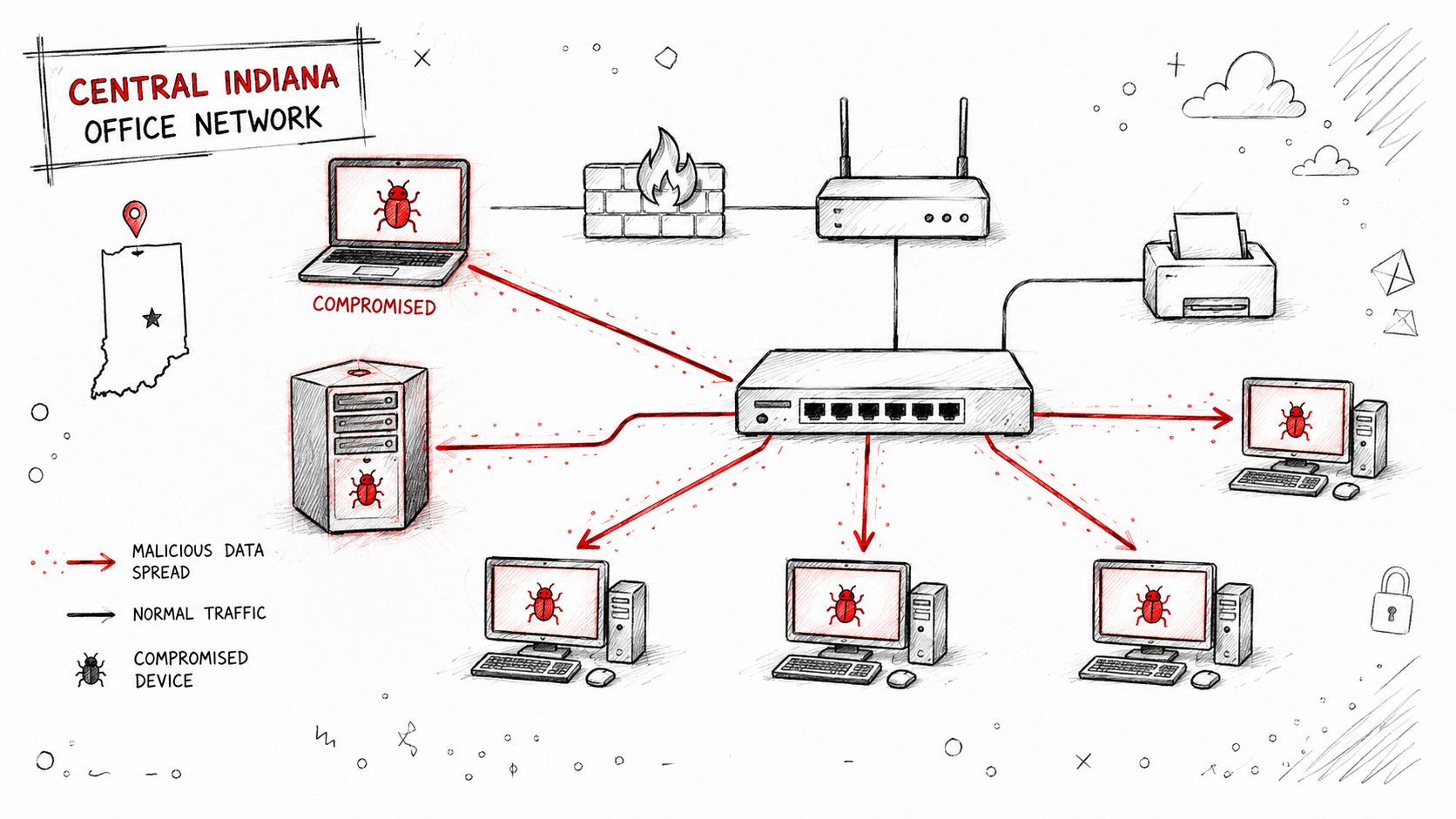
Four jobs a segmented network must perform
- Containment: Stop a workstation, IoT camera, or vendor account from reaching systems it doesn't need.
- Compliance scoping: Separate sensitive workloads so HIPAA, CMMC, PCI DSS, or NIST CSF evidence maps to clearer boundaries.
- Performance isolation: Keep voice, production equipment, and business applications from competing with guest streaming or poorly designed IoT traffic.
- Troubleshooting: Give technicians a smaller search area when a printer, access point, or server stops responding.
NIST's risk-based guidance recommends placing critical resources in their own trust zones while allowing lower-value systems to share zones where appropriate. That balance matters for Johnson County business owners. Segmentation should reduce risk without creating a maze that a small team can't operate.
For a broader foundation, see this guide to network security for Indiana businesses. The important distinction is simple: a VLAN boundary isn't automatically a security boundary. Policy enforcement must determine what can cross it.
How Segmentation Works: From VLANs to Microsegmentation
A Greenwood office with one flat network gives every compromised device a wide path through the business. Splitting staff computers, phones, cameras, guest Wi-Fi, and servers into controlled zones narrows that path. The goal is blast-radius control, not a collection of VLANs that nobody can explain.
Physical separation uses dedicated switches, routers, cabling, or network interfaces. A manufacturing floor and an office network might use different hardware when operational systems need strong isolation. That approach can reduce exposure, but its equipment and maintenance costs make it difficult for many small offices to justify.
VLANs are the practical SMB workhorse. A managed switch places staff, voice phones, cameras, and guests on separate logical networks while the business shares physical infrastructure. IEEE 802.1Q provides VLAN tagging, and trunk ports carry multiple tagged VLANs between switches, access points, and firewalls.
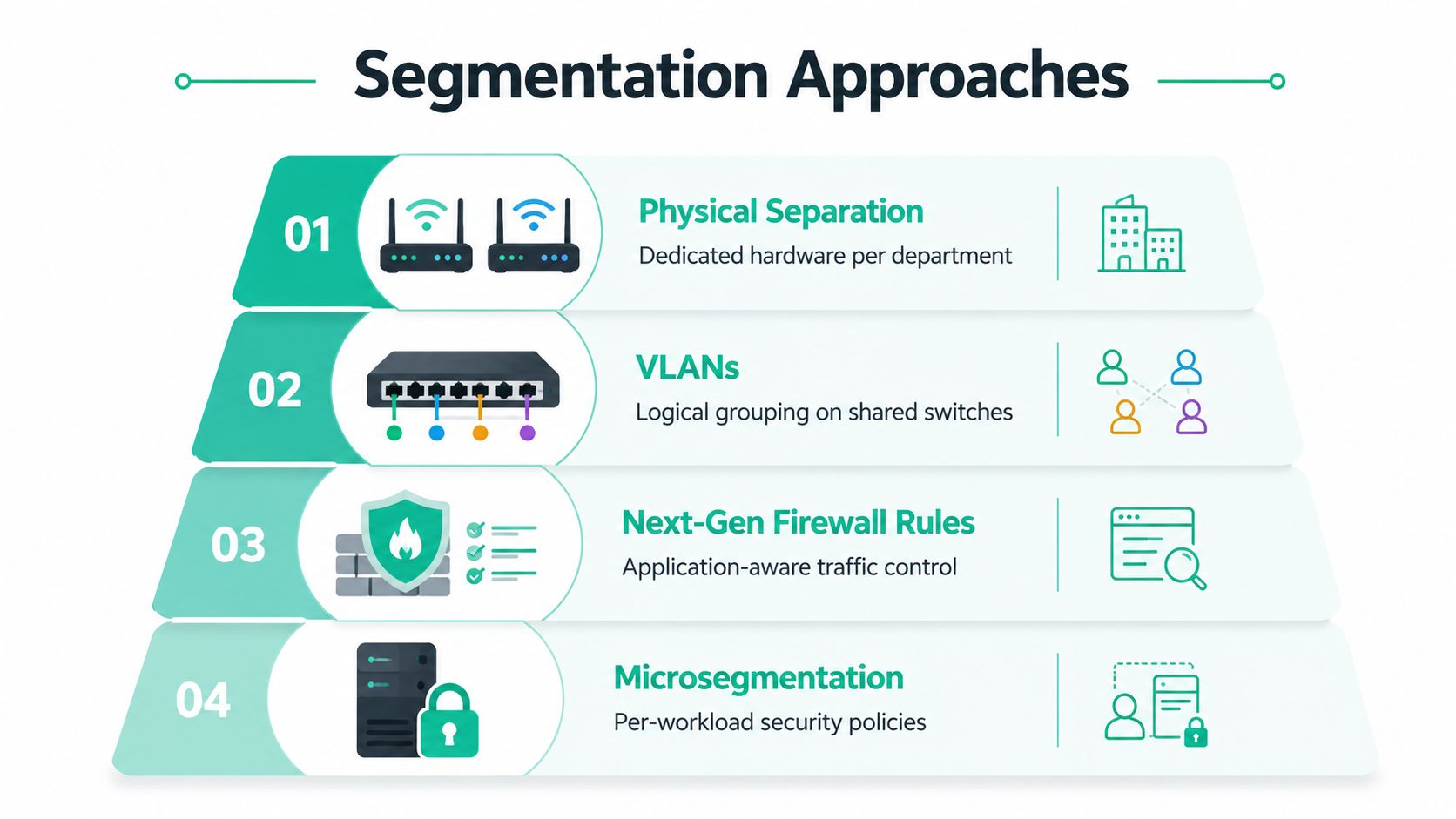
Where policy enters the design
A VLAN separates broadcast domains. It does not decide whether a workstation may access a server. Inter-VLAN routing sends traffic through a router or firewall, where access control lists and next-generation firewall rules allow or deny specific flows.
For a Greenwood business, that might mean staff can reach a file server and printer, cameras can reach their recorder, and guest Wi-Fi can reach only the internet. If a camera is compromised, the firewall blocks it from probing payroll systems. The design adds configuration work, but one contained incident can avoid hours of business interruption and emergency support.
Rules should start with deny-by-default, then permit required traffic. A print server can accept jobs from corporate workstations. Guest Wi-Fi should have no route to internal systems. Voice phones may reach the SIP provider, but they should not browse file shares. Documenting these flows prevents a low-cost VLAN design from becoming an unmaintainable rule set.
Microsegmentation applies policy to individual workloads, applications, services, or hosts, rather than trusting an entire subnet. NIST SP 800-215 describes isolated segments, monitored traffic, and rules that group resources with similar security requirements. Cloud controls may use security groups, workload tags, host agents, or policy engines.
Zero Trust changes the decision from “Which subnet are you on?” to “Who or what are you, and what may you reach?” NIST's Zero Trust Architecture guidance covers network-based and host-based microsegmentation enforced through switches, routers, next-generation firewalls, or host agents.
The trade-off is operational. Too many VLANs create sprawl, stale firewall rules create exposure, and uncentralized logging can hide east-west traffic. Teams planning larger address spaces should review IPv6 subnetting with Server Scheduler. For Indiana examples of VLAN purpose and placement, see why businesses use VLANs.
Why Segmentation Matters for Security Compliance and Uptime
Segmentation creates value in four separate ways. Combining them into one vague “security improvement” misses the business case.
Security containment
Cisco's 2025 security survey found that 79% of organizations called segmentation a top priority, while only 33% had fully implemented both macro-segmentation and micro-segmentation. The same survey reported that 84% experienced a successful breach during the previous 12 months. Cisco's segmentation report defines macro-segmentation as broad zone separation and microsegmentation as fine-grained controls between workloads, applications, or services.
Those figures don't mean segmentation prevents every breach. They show why containment matters after prevention fails. A firewall at the internet edge may block many threats, but internal boundaries determine whether an intruder can move from a laptop to a database or from an office network into production equipment.
Compliance scoping
Healthcare businesses need defensible separation around systems containing protected health information under HIPAA. Defense contractors may need boundaries that support CMMC assessment evidence. General businesses can map access decisions and monitoring to the NIST CSF, including the access-control intent associated with PR.AC-5.
Segmentation doesn't satisfy an entire framework by itself. It does make the environment easier to document, test, and explain. Businesses evaluating payment environments can explore PCI DSS requirements, then map cardholder-data flows to actual firewall rules, VLANs, identities, and logs.
Operations and uptime
Separate broadcast domains reduce unnecessary local traffic, while dedicated policies keep guest devices, cameras, and voice systems from interfering with business workloads. The boundary also gives a technician a cleaner diagnostic path. If a phone can't register, the engineer can inspect the voice zone and its firewall path instead of guessing across the whole office.
The financial argument
Downtime calculations make the discussion concrete. A commonly cited benchmark places outage cost at about $9,000 per minute, or $540,000 per hour, based on an Oxford Economics study summarized by TechTarget and cited by Atlassian's downtime guidance. BigPanda reports an average unplanned outage cost of $14,056 per minute, rising to $23,750 per minute for large enterprises. BigPanda's outage-cost analysis frames resilience as a business-continuity issue.
| Segmentation Driver | Frameworks Supported | Key Evidence / Metric |
|---|---|---|
| Security containment | NIST CSF, Zero Trust | Limits lateral movement and attack escalation |
| Sensitive-data separation | HIPAA, CMMC, PCI DSS | Narrows systems requiring focused controls and evidence |
| Performance isolation | Operational resilience | Separates voice, IoT, guest, and production traffic |
| Business continuity | Managed IT planning | Reduces the systems affected by one incident |
For Indiana SMB owners, compliance and security guidance for Indiana SMBs is most useful when paired with a live network diagram and tested rules, not a binder of policies nobody follows.
Real SMB Use Cases From Greenwood Hamilton County and Downtown Indy
A Greenwood dental office doesn't need a theoretical security diagram. It needs the panoramic X-ray server to remain available while the front desk handles patients.
In a flat design, an infected administrative workstation can attempt to reach clinical imaging systems because both devices share the same broad network. In a segmented design, the workstation belongs to an administrative zone, the imaging server sits in a protected clinical subnet, and the firewall permits only the application traffic the practice requires. A blocked connection becomes a logged event for investigation instead of an invisible path across the office.
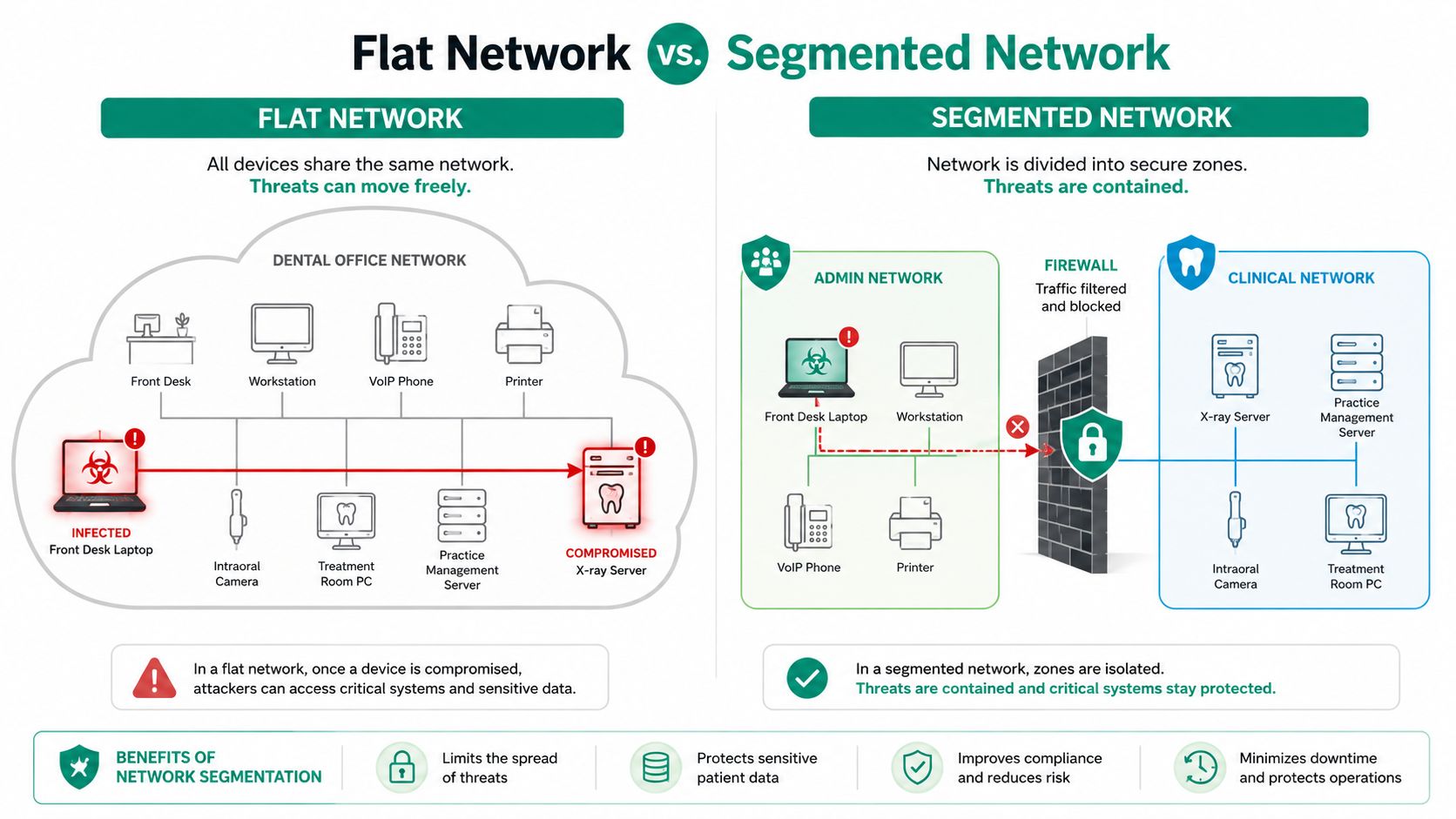
Practical rule: Put clinical systems in a zone that administrative devices cannot browse freely. Then test the allowed workflow, including imaging, printing, backups, and vendor support.
A Hamilton County CNC shop has a different risk profile. Older production PCs may not support current security agents, and an accounting laptop may receive email from the public internet. Separating the office network from operational technology limits the chance that a phishing compromise disrupts controllers, engineering workstations, or production monitoring.
The design doesn't need to make the floor unreachable. It needs to define the few legitimate paths, such as a production-management application reaching a server, while blocking ordinary workstation traffic into the operational zone. That separation supports business continuity without pretending legacy equipment can be replaced overnight.
A downtown Indy law firm may handle PHI for corporate clients while also offering guest Wi-Fi and remote access. Attorney workstations, guest devices, case-management systems, and administrative services should have distinct trust boundaries. If one laptop is compromised, investigators can focus first on its permitted paths instead of treating the entire firm as one undifferentiated environment.
These examples share a pattern: zone by business risk, then enforce communication by need. Segmentation doesn't replace Bitdefender GravityZone, patching, identity protection, or immutable off-site backups. It gives those controls a smaller environment to defend and a clearer incident path to monitor.
The following visual shows why the same policy distinction matters in a clinical setting.
Practical Implementation Steps Using UniFi Firewalls and Zero Trust
A small IT team can roll out segmentation without redesigning every switch in one weekend. The safe approach starts with observation, not rule writing.
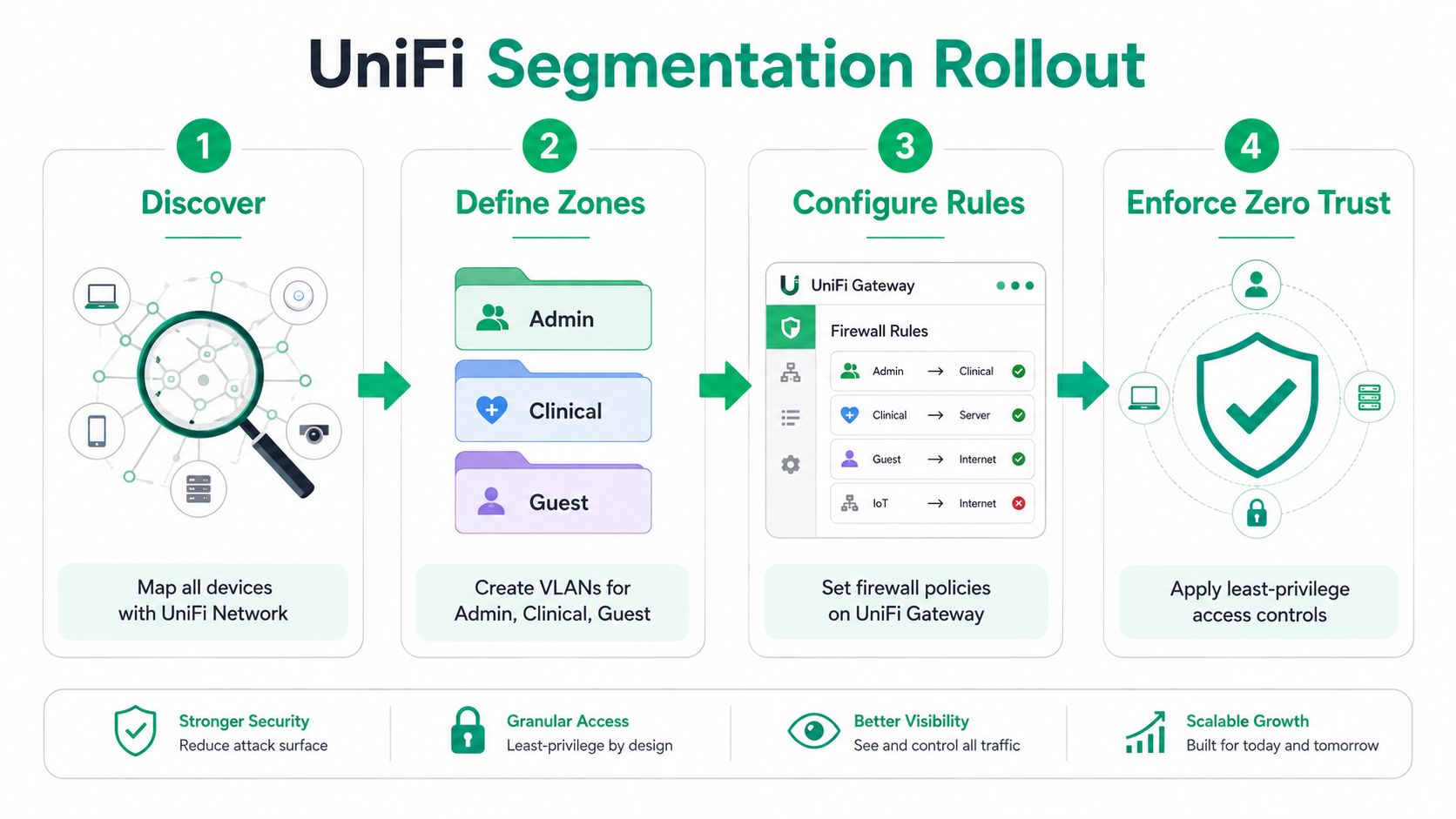
Start with discovery
Use UniFi Network to inventory access points, switches, clients, SSIDs, port assignments, and current networks. Pair that view with an approved internal port scan and interviews with staff who know which printers, scanners, phones, servers, and vendor systems work together.
Record device owner, business purpose, operating system, location, and required destinations. Don't create a policy for an asset nobody can identify. A simple baseline diagram is more valuable than a perfect-looking topology map that omits the shipping printer.
Define zones with a reference design
A practical SMB design might include:
- Corporate: Employee workstations and managed laptops.
- Guest: Internet-only wireless access.
- Voice: Phones and call-control traffic.
- IoT: Cameras, displays, badge readers, and similar devices.
- Servers: File, application, backup, and identity services.
Create dedicated DHCP scopes and firewall zones for each network. On UniFi switches, assign access ports by device role and configure trunk ports only where multiple VLANs must travel, such as an access point uplink. A UniFi Gateway or SonicWall can provide inter-zone policy enforcement at the WAN edge and inside the environment.
Write the smallest useful rule set
Begin by denying east-west traffic between zones. Add explicit exceptions after confirming the workflow. For example, corporate workstations may reach a print service, phones may reach the SIP trunk, and backup agents may reach immutable off-site backups. Guest devices should have no route to internal services.
Keep rule names tied to business purpose, not vague labels such as “allow all temporary.” Log denied traffic at important boundaries, then review the entries during testing. This reveals forgotten dependencies before users discover them at the front counter.
Add Zero Trust controls
Enable UniFi Identity where it fits the environment, require MFA for VPN access, and apply device-posture checks before granting access to sensitive services. A Zero Trust design evaluates identity, device condition, and requested resource instead of trusting a user because their laptop sits on a familiar subnet. Teams wanting a concise introduction can review practical zero trust for startups.
Validate with internal penetration testing, firewall log review, and a SIEM or UniFi-aware collector. A realistic rollout can fit into a two-week project when discovery, policy review, testing, and user communication stay tightly scoped. The tools are straightforward. The hard part is learning the traffic before blocking it.
For SMB-specific architecture decisions, see Zero Trust network architecture for SMBs. The managed approach should also include SOC-as-a-Service monitoring when the business needs continuous review rather than a monthly glance at logs.
Common Pitfalls and Trade-Offs SMBs Run Into
More segmentation isn't automatically better. A 12-person office can create so many VLANs, SSIDs, objects, and exceptions that nobody understands why a printer stopped working. Security improves only when the team can maintain and verify the design.
Five failure patterns
- Flat networks: The business has a firewall at the internet edge but no internal zones. Fix this by separating the highest-risk and highest-value systems first.
- Forgotten allow-rules: A vendor rule added years ago may still permit broad access. Review rules quarterly, identify the owner, and remove exceptions that no longer support a documented workflow.
- Over-segmentation: Every user, printer, and application receives a separate policy. Start with meaningful business zones, then introduce microsegmentation only where risk or application behavior justifies it.
- Monitoring gaps: A blocked connection may protect a server while leaving nobody aware that an attack occurred. Send firewall, endpoint, identity, and switch events to centralized logging.
- Audit mismatch: The diagram says one thing while the live UniFi Gateway or SonicWall configuration says another. Treat the documented baseline as a controlled record and update it after every approved change.
Operational truth: A rule nobody reviews becomes a future exception, and an exception nobody understands becomes an access path.
Segmentation also introduces trade-offs. Traffic crossing a firewall can add inspection work and troubleshooting steps, while an overcomplicated policy can slow legitimate applications or create support tickets. That doesn't argue for a flat network. It argues for testing, ownership, and a design that matches the staff available to operate it.
For critical information, pair network controls with endpoint security and recovery. Bit-level data recovery may help after physical media failure, but it won't restore trust in a compromised environment by itself. Network boundaries, tested recovery procedures, and documented access decisions must work together.
ROI Downtime Cost and How Finchum Fixes IT Can Help
Segmentation earns its place in a budget when it changes the size and duration of an incident. If email, point-of-sale services, phones, and file access all depend on one flat path, a single compromise or faulty device can interrupt several revenue-producing workflows at once.
The downtime benchmark cited by Atlassian puts the impact at about $9,000 per minute for medium and large organizations, while its small-business example uses $427 per minute. The correct number for a Greenwood company depends on payroll exposure, staff utilization, transaction volume, customer commitments, and recovery time. The useful calculation is still direct:
Downtime cost = minutes unavailable × cost per minute.
A managed segmentation project also converts wasted tech time into planned work. Instead of asking an office manager to chase a printer outage or having a senior employee rebuild a failed workstation, the business pays for defined monitoring, rule reviews, documentation, and support inside a predictable monthly budget. That matters to businesses near the I-65 corridor competing for billable hours and dependable customer service.
| Cost Category | DIY In-House | Finchum Fixes IT Managed |
|---|---|---|
| Discovery and design | Staff time, uneven documentation | Scheduled assessment and documented design |
| Firewall and VLAN changes | Internal labor and change risk | Managed implementation with testing |
| Monitoring | Often limited to occasional checks | Ongoing review with escalation procedures |
| Rule maintenance | Dependent on one knowledgeable employee | Recurring policy review and documentation |
| Incident response | Reactive, potentially disruptive | Defined support path and recovery coordination |
A managed provider won't eliminate every outage, and segmentation won't replace immutable off-site backups, endpoint protection, patch management, or employee training. It can limit which systems fail together, give responders useful logs, and reduce the time spent guessing. Read this guide to IT infrastructure management and downtime reduction before comparing a project quote with the internal cost of doing nothing.
Finchum Fixes IT provides network and Wi-Fi design, UniFi firewall configuration, access controls, monitoring, cybersecurity support, data recovery coordination, and managed IT for Indiana businesses. Request a Free Network Assessment for your Greenwood or Indianapolis business to map the current blast radius, document the required traffic, and build a segmentation plan that your team can operate.
Visit Finchum Fixes IT to schedule a Free Network Assessment or Security Risk Audit for your Greenwood or Indianapolis business. The team can review your UniFi networking, firewall rules, wireless design, Zero Trust access, monitoring, and recovery controls, then give you a practical path toward less downtime and a predictable support budget.