What Is Incident Response Planning? A Guide for Indy SMBs
A lot of Johnson County owners are one bad Monday away from a very expensive lesson. The file server in a Greenwood office park starts encrypting shared folders. QuickBooks won't open. Production documents vanish. Staff keep refreshing screens and asking the front office what's going on. Someone says, “Call IT.” Someone else says, “Call insurance.” Nobody knows who shuts off what, who talks to employees, who contacts customers, or whether the backups are safe.
That's the gap between having security tools and having a plan.
If your business runs on email, cloud apps, line-of-business software, Wi-Fi, file shares, or vendor portals, you need a documented response process before something breaks. What is incident response planning? It's the written, practiced procedure your company follows when a cyber event turns into a business emergency.
Your Business Is on Fire What Is the Plan
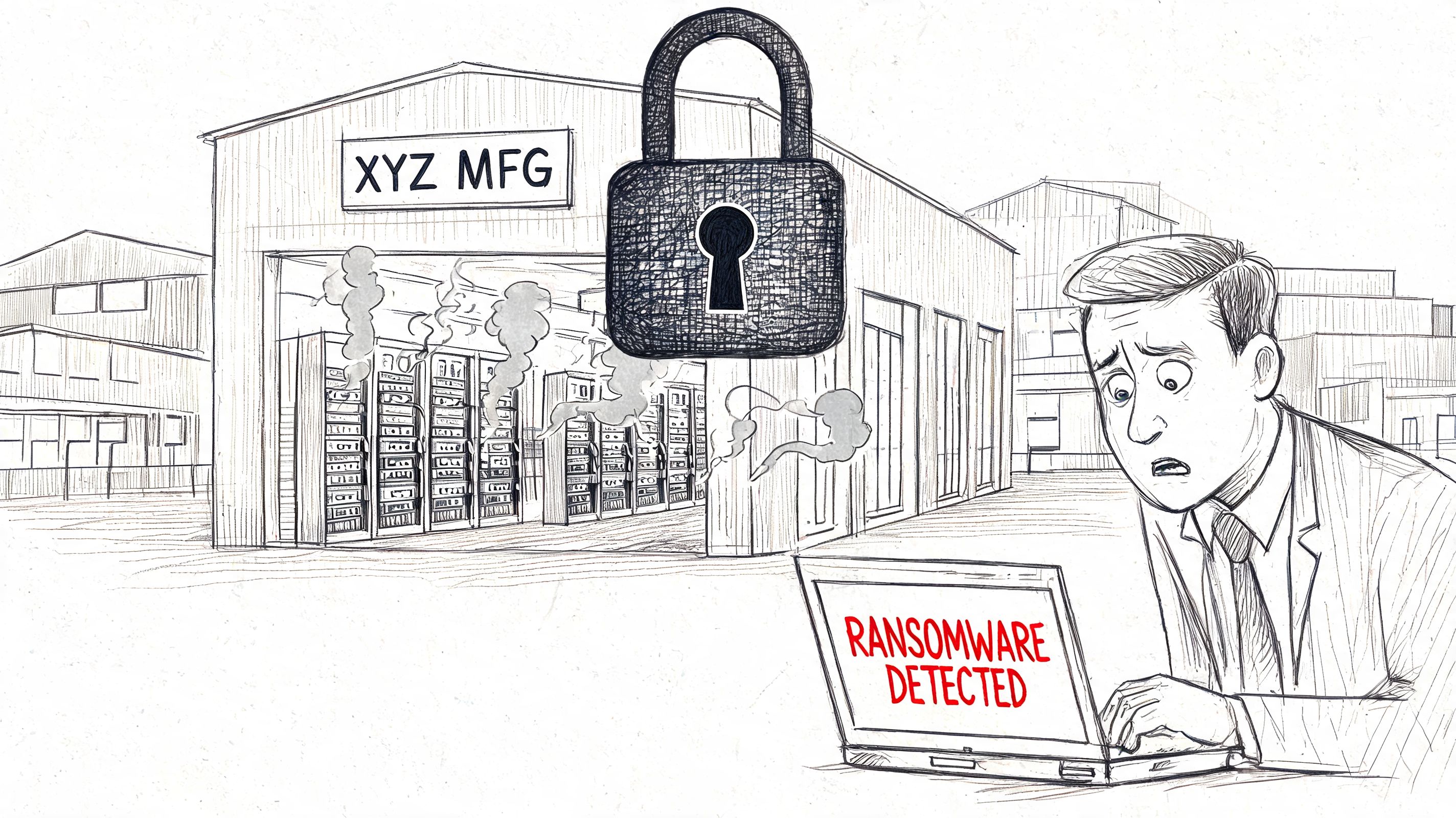
A digital incident doesn't look dramatic from the parking lot. No smoke. No sirens. But inside the building, the effect is the same. People stop working, leaders make rushed decisions, and every minute of confusion burns money.
For Indiana SMBs, this matters more than most business owners realize. SMBs face 43% of all cyberattacks, and a 2025 Ponemon study found 68% of SMBs fail at incident response due to resource constraints, according to Palo Alto Networks' incident response plan overview. That lines up with what happens across the Southside. Small firms don't usually fail because they don't care. They fail because they're busy, understaffed, and trying to run operations with aging hardware, thin internal IT, and no written playbook.
A firewall is a tool. An incident response plan is a decision system.
Call it the fire drill for your digital environment. The plan doesn't prevent every fire. It tells your team who pulls the alarm, who calls outside help, who isolates systems, who approves downtime, and how the business keeps moving while the mess gets contained.
TL DR Don't Get Caught Without a Plan
Key Point
- An incident response plan is a written playbook for handling cyber incidents fast and in the right order.
- SMBs are frequent targets, yet many still rely on ad hoc decisions during a breach.
- Good plans assign roles early, including leadership, IT, legal, HR, and outside support.
- The goal is business continuity, not just technical cleanup.
- A simple tested plan beats a complex unused one every time.
- Offline contacts, backup validation, and containment authority matter more than fancy wording.
- HR has a real role in crisis handling, especially around internal communication and employee coordination. These Paradigm International HR insights are useful for that non-technical side of preparedness.
What the plan actually covers
A practical IRP usually includes a few plain-language answers:
- Who makes the first call when an employee reports ransomware, suspicious login alerts, or business email compromise.
- Which systems matter most so you restore payroll, scheduling, ERP, EMR, or customer service tools in the right order.
- What can be taken offline immediately without waiting for three managers to agree.
- How evidence gets preserved so you don't wipe useful logs or destroy forensic details.
- Who communicates externally with customers, vendors, regulators, counsel, and cyber insurance.
That's why a real plan is different from “our guy can fix computers.” Reactive support helps after the alarm. Incident response planning decides what happens in the first minutes, first hour, and first day.
What works for Indy SMBs
Most enterprise guidance is too heavy for a thirty-person manufacturer off the I-65 corridor or a medical office in Greenwood. Those businesses don't need a binder full of committee language. They need a lean document, printed contacts, approved actions, and a short list of critical systems.
Practical rule: If your plan can't be used during a bad day with limited internet, stressed staff, and incomplete information, it isn't a plan. It's paperwork.
Why Every Indiana Business Needs a Response Plan Yesterday
Indiana companies tend to think about cyber risk in two buckets. Professional firms in Hamilton County worry about client data, compliance, and email fraud. Manufacturers and logistics shops closer to the I-65 corridor worry about downtime, warehouse disruptions, and ransomware freezing production systems. Both are right. Both need a response plan.
The business case isn't subtle. Organizations without a formal incident response plan average a breach lifecycle of 258 days, which is 69 days longer than organizations with a plan, according to JumpCloud's incident response statistics. For SMBs, the picture gets worse. 75% of SMBs lack a plan entirely, and breach expenses for companies without structured response can be $2.66 million higher than for better prepared peers, based on that same source.
That's not an IT inconvenience. That's a continuity problem, a payroll problem, a customer trust problem, and for regulated shops, a legal problem.
Insurance is not a substitute
A surprising number of businesses buy cyber insurance and assume that covers preparedness. It doesn't. Insurance may help fund parts of the recovery, but it won't decide who isolates the affected laptop, who verifies backup integrity, or who preserves audit logs from Microsoft 365, your firewall, and your endpoint platform.
For healthcare groups, HIPAA pressure makes this obvious. For defense contractors, CMMC expectations make it obvious. For everybody else following NIST CSF as a practical security baseline, it should be obvious too. If nobody owns detection, containment, communication, and recovery, then your company is improvising under pressure.
Some owners find it helpful to look at cyber obligations outside the U.S. as a reminder that incident handling quickly becomes a legal issue, not just a technical one. This summary of legal obligations for cyber incidents in Israel shows how fast reporting, accountability, and response structure enter the conversation.
Downtime hits harder than most owners expect
In the field, the pain usually shows up before the forensic report does. Dispatch can't print. Sales can't access proposals. The line-of-business app won't connect to the SQL server. Remote staff can't authenticate. If your office is running through old switching, flat network design, or spotty Wi-Fi in an older brick building, containment gets messier fast.
A response plan helps you make sharp decisions under stress:
- Keep the blast radius small by isolating endpoints, VLANs, or cloud accounts before the issue spreads.
- Protect revenue flow by prioritizing the systems that support quoting, invoicing, scheduling, shipping, and customer communication.
- Shorten executive confusion because leadership already knows who approves downtime and public messaging.
- Support related controls like immutable off-site backups, endpoint detection, and SOC-as-a-Service monitoring.
Good prevention still matters. So does user training. So does anti-ransomware hardening. If you want to reduce the chances of ever using your IRP, this guide on how to prevent ransomware attacks for Indiana businesses is a practical companion.
A short explainer helps if you want a quick visual before going deeper:
The local trade-off
Small businesses usually face the same choice. Spend a little time now documenting how the company responds, or spend a lot more time later trying to invent that process while systems are failing. The first option feels inconvenient. The second option disrupts operations, burns leadership time, and usually costs more than owners expected.
The Six Phases of Effective Incident Response
The cleanest way to understand what is incident response planning is to walk through the lifecycle. The six-phase model is practical because it mirrors what happens during a real incident. Not theory. Sequence.
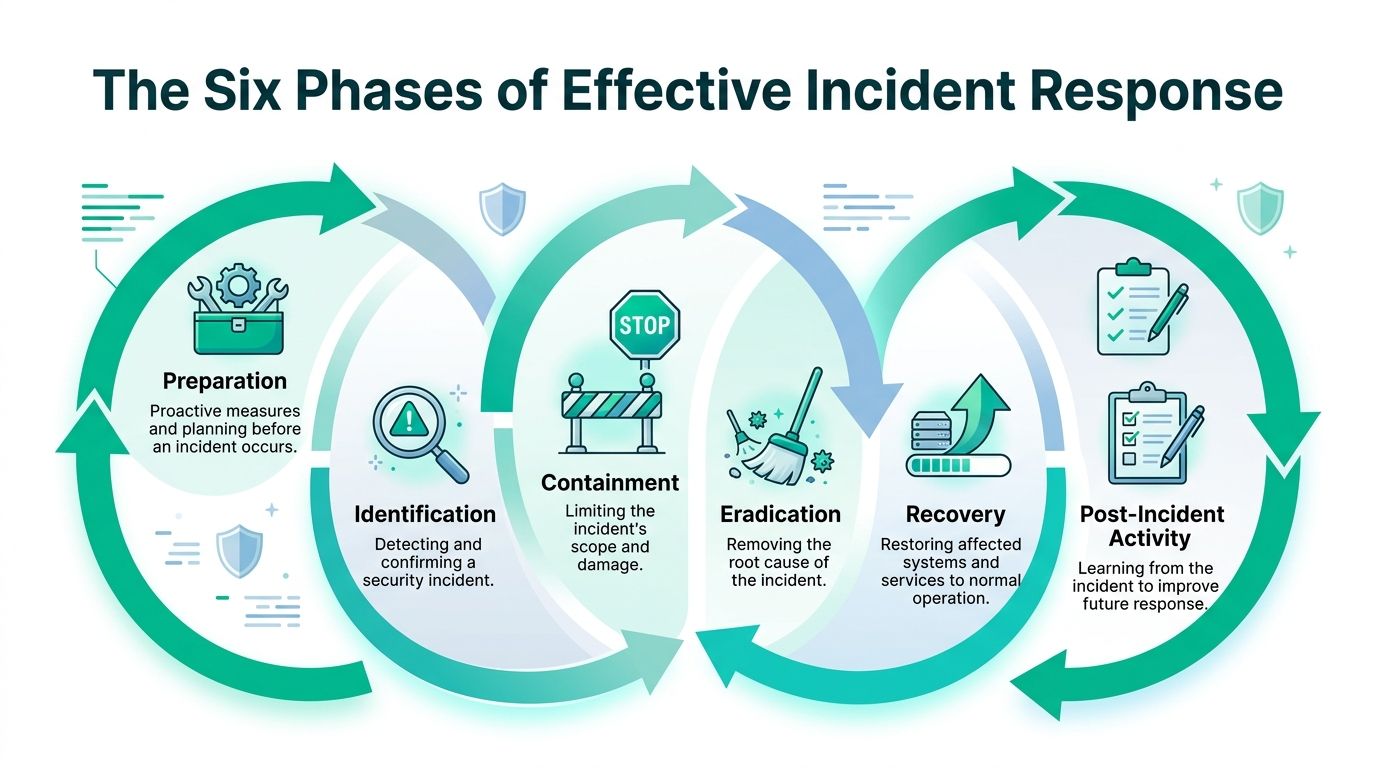
Preparation
Preparation happens before anything goes wrong. During this stage, the business defines its incident team, documents critical systems, sets escalation thresholds, confirms backup strategy, and decides what authority IT has in an emergency.
This phase also covers the technical groundwork. That might include Zero Trust architecture, endpoint controls like Bitdefender GravityZone or Microsoft Defender, MFA across cloud apps, secure backup retention, UniFi networking with segmented VLANs, and log collection into a SIEM. A downtown Indy law office doesn't need the same stack as a warehouse operation in Greenwood, but both need clear documentation.
One point matters more than owners expect. NIST-based guidance shows unclear roles can extend incident resolution by up to 60%, and a proper CSIRT needs analysts, technical responders, and a coordinator using tools such as a SIEM to correlate endpoint and network logs, according to CrowdStrike's incident response steps.
If two managers think the other person is in charge, nobody is in charge.
Identification
Something unusual happens. Maybe Microsoft 365 shows impossible travel alerts. Maybe a user reports odd MFA prompts. Maybe EDR flags suspicious PowerShell behavior on a workstation. Identification is the phase where the company determines whether this is noise, a policy issue, or a real security incident.
Monitoring quality matters. Security tools generate events all day. Your team needs a threshold for when an event becomes an incident. That requires log review, context, and enough visibility across endpoints, servers, switches, firewalls, and cloud systems to make a fast call.
If you're trying to understand how a SIEM fits into that picture, these CloudCops SIEM implementation insights give useful background on log correlation and alerting.
Containment
Containment is the moment people either protect the environment or make the damage worse. If a machine is compromised, it may need to come off the network now. Not after a meeting. If a user account is abused, sessions may need to be revoked, credentials reset, and mailbox rules reviewed immediately.
This stage is where infrastructure choices show their value. A flat network makes isolation painful. Segmentation makes it manageable. At a Greenwood logistics company, a sensible containment sequence might mean quarantining a workstation through endpoint controls, cutting access through network policy, and watching adjacent systems for related indicators.
For many SMBs, this is also where outside help enters. Some use an internal admin. Some use an MSSP. Some use a local IT partner. The response model matters less than clarity and speed.
Eradication
Containment stops the bleeding. Eradication removes the cause.
That may mean deleting persistence mechanisms, removing malware, closing exposed remote access paths, patching vulnerable systems, rotating credentials, rebuilding endpoints, or restoring from known-good images. In tougher cases, it includes forensic review of memory, event logs, mailbox activity, and lateral movement paths.
Experience pays off. A rushed cleanup often leaves one backdoor account, one scheduled task, one malicious inbox rule, or one overlooked script behind. Then the incident comes back.
Recovery
Recovery gets the business back to normal operations without reintroducing the threat. Systems come online in the right order. Backups are validated before production use. Staff regain access in a controlled sequence. Monitoring gets tighter while confidence is rebuilt.
This phase should tie directly to your broader resilience planning. If you're sorting out where incident response ends and broader operations recovery begins, this comparison of business continuity versus disaster recovery helps define the boundary.
A good recovery process usually includes:
- Validation before restoration so corrupted or compromised backups don't go back into production.
- Priority-based restoration so the systems that earn revenue return before low-value systems.
- Temporary controls such as tighter firewall rules, stricter conditional access, or enhanced EDR policies while the environment stabilizes.
Post-incident activity
The last phase is the one companies skip when they're tired. That's a mistake.
Post-incident work means documenting what happened, what failed, what slowed the team down, and what gets fixed before the next event. Maybe the contact sheet was outdated. Maybe VPN access was too broad. Maybe the old file server in the back closet should've been retired two years ago. Through this process, the organization turns a painful event into a stronger operating model.
The goal isn't to write a prettier report. The goal is to make the next incident smaller, shorter, and less expensive.
A Practical IRP Checklist for Your Business
Most owners don't need a hundred-page template to spot gaps. They need a fast readiness check. If you answer “No” or “Unsure” to several of these, your business probably has an incident response problem, not just a cybersecurity problem.
A useful plan should fit the way your company works. A machine shop in the Greenwood business parks has different priorities than a dental office, CPA firm, or multisite contractor. The checklist below keeps it grounded in operations, communication, and recovery.
Incident Response Readiness Checklist
| Area | Checklist Item | Status (Yes/No/Unsure) |
|---|---|---|
| Leadership | Is one person clearly authorized to declare a security incident and activate the response plan? | |
| Roles | Are IT, leadership, HR, legal, and communications responsibilities documented in plain English? | |
| Contacts | Do you have an offline contact list for IT support, internet provider, cyber insurance, attorney, and key vendors? | |
| Critical systems | Have you listed the systems that must come back first for billing, operations, scheduling, email, and customer service? | |
| Backups | Do you use immutable off-site backups or another protected backup method that can't be easily altered by an attacker? | |
| Backup testing | Have you tested restoration of critical data and systems, not just confirmed that backup jobs completed? | |
| Endpoints | Are laptops, desktops, and servers protected with managed endpoint security such as EDR or advanced AV? | |
| Identity | Is MFA enforced for email, cloud apps, remote access, and admin accounts? | |
| Network | Can you isolate a device or segment quickly using firewall rules, VLANs, or managed switching? | |
| Logging | Are security logs retained somewhere useful enough to investigate email abuse, endpoint activity, and account access? | |
| Communication | Do employees know how to report suspicious emails, device behavior, or login prompts? | |
| Compliance | Does the plan account for HIPAA, CMMC, contractual notification duties, or other industry requirements that apply to you? | |
| Devices | Do you know which aging systems, unsupported operating systems, or shadow IT tools would complicate a response? | |
| Vendors | Do you know which outside vendors must be contacted if your ERP, VoIP, payroll, or cloud file platform is affected? | |
| Recovery order | Is there a written order for restoring core systems so the team doesn't waste time debating priorities mid-incident? | |
| Testing | Has anyone walked through the plan in a tabletop exercise with leadership and operations staff? |
What to fix first
If the checklist exposed weak spots, start with the items that cut confusion first:
- Offline contacts and authority because you can't respond quickly if the only phone numbers live in the encrypted system.
- Backup validation because recovery plans collapse when no one has tested restore jobs.
- Critical system ranking because all systems are not equally important.
- Role assignment because “everyone helps” usually means nobody owns the hard decisions.
A template can help you move from vague ideas to an actual document. This incident response plan template for Indiana businesses is a practical starting point if you need to get something written and reviewed.
Keep the checklist close to operations
The best IRPs aren't built by IT in isolation. Pull in the people who know how the company runs. That includes the office manager who knows vendor contacts, the operations lead who understands process bottlenecks, and the finance lead who knows what can't stop for long.
A short, usable checklist beats a polished document nobody reads.
Common IRP Pitfalls We See in the Field
After 17 years working with businesses in Greenwood, Franklin, Whiteland, and across the south side of Indianapolis, the same failures keep showing up. They are rarely advanced attacks or obscure technical issues. They are planning mistakes that stay hidden until a real incident forces every weakness into the open.
The shelf plan
A lot of companies have a document called an incident response plan. That is not the same thing as having a usable plan.
We see plans with former employees still listed as contacts, retired vendors still named for emergency support, and recovery steps built around systems the business no longer uses. Then a phishing incident or server compromise hits, and leadership finds out the plan describes a company that no longer exists.
A usable IRP needs ownership and maintenance. When you replace your MSP, move to Microsoft 365, change cyber insurance carriers, add a cloud ERP, or shift leadership duties, the plan should be updated at the same time.
The insurance fallacy
Cyber insurance supports recovery. It does not run your response.
The policy does not isolate infected endpoints, preserve logs, decide whether operations can keep running, or tell your front office what to say to customers at 8:00 a.m. after a ransomware event. Those decisions still land on your team, and if no one has assigned ownership ahead of time, the clock starts burning immediately.
Analysts at Grand View Research found that businesses are spending more on outside incident response services, which lines up with what we see locally. Small and midsize companies along the I-65 corridor often need outside help because they do not have in-house security depth, especially after hours. That support matters, but it works best when the business already knows who can approve shutdowns, who contacts legal counsel, and who handles vendor escalation.
The untested plan
An untested plan looks fine right up until the moment someone has to use it.
The document says restore from backup. No one has confirmed the backup can restore the accounting server cleanly. The document says notify stakeholders. No one defined whether that includes your payroll provider, bank, managed VoIP vendor, or largest customer. The document says contact the incident team after hours. The only phone list is stored in the same Microsoft tenant that is locked down.
Regular testing also lowers the financial impact of a breach, as noted earlier from the same industry source. More important for a Johnson County business owner, testing exposes the small failures that turn into long outages. A one-hour tabletop exercise is cheap. Finding out during live ransomware that nobody knows the admin credentials for your backup appliance is expensive.
The role confusion problem
This is one of the fastest ways an incident gets worse.
The owner assumes the office manager will handle communications. The office manager assumes IT is doing it. IT focuses on containment and assumes leadership is making customer decisions. HR is left out. Legal is called late. No one is clearly responsible for documenting decisions, preserving evidence, or approving operational downtime.
Good plans assign decision owners, not just task lists. That matters even more for companies dealing with HIPAA, CMMC, PCI, or client contract requirements, because poor documentation during the first few hours can create a second problem after the technical issue is contained.
The too-big framework
A fifty-user company in Greenwood does not need a forty-page document written like a Fortune 500 policy manual. It needs a plan people can use under stress.
The best small-business plans are short and specific:
- A clear incident declaration path with named decision-makers
- Immediate technical actions for endpoint isolation, account lockdown, and log preservation
- A communications list for employees, customers, vendors, counsel, and insurance
- A recovery sequence based on how the business makes money
If your documentation reads better in an audit binder than in a live incident, this IT security audit checklist for Indiana businesses will help you find the gaps between the written plan and the live environment.
The missing local reality
This is the pitfall generic advice misses most often.
A plan for a manufacturer near the I-65 corridor with aging switches, one overworked internal IT generalist, and a line-of-business app supported by an out-of-state vendor should not read like a plan for a hospital system with a full security team. If your backups run slower than expected, if your internet redundancy is weak, or if your vendor support is limited after hours, those are not details to hide. They are operating constraints, and the plan needs to account for them.
The strongest IRPs we see in the field are honest about budget, staffing, hardware age, vendor response times, and business priorities. That honesty is what turns panic into ordered action when something goes wrong.
Build Your Digital Fire Drill Today
An incident response plan is not a luxury item for large companies with security departments. It's a basic operating document for any Indiana business that depends on technology to sell, serve, ship, schedule, bill, or stay compliant.
The point isn't to predict every attack. You won't. The point is to remove hesitation when something goes wrong. When the first suspicious alert lands, your company should already know who takes command, what gets isolated, how communication works, and which systems come back first.
Start smaller than you think
Most businesses in Greenwood and greater Indianapolis don't need a massive project to get moving. They need a first draft built around their real environment:
- Current systems and dependencies
- Known weak spots like aging servers, unsupported workstations, or broad admin access
- Critical recovery order
- Outside contacts and after-hours escalation
- Backup and restoration reality
That's why a business impact review matters. If you haven't mapped which systems create revenue and which outages hurt the most, this business impact analysis template is a good place to begin.
The technical side matters too
Good planning isn't separate from technical design. It depends on it. Segmented networks, endpoint telemetry, MFA, immutable off-site backups, cloud log retention, SOC-as-a-Service monitoring, and clean recovery images all make the plan more executable.
When we've worked through ugly outages and security events locally, the businesses that recover better usually have two things in common. Their leadership made decisions early, and their environment was built for containment. That means practical controls, not wishful thinking.
What business owners should do this week
Keep it simple:
- Write down your top five critical systems in business order, not technical order.
- Print an offline contact sheet for leadership, IT, insurance, legal, and key vendors.
- Confirm backup restorability on something that matters.
- Assign incident authority so one person can activate the plan without debate.
- Schedule a tabletop exercise with the people who would be involved on a bad day.
If that feels like more than your team can organize internally, that's normal. Most SMBs don't have spare bandwidth for this work. They still need it.
A good IRP turns panic into sequence. That alone protects uptime, preserves staff focus, and keeps a cyber incident from becoming a business-ending event.
If you're in Greenwood, Indianapolis, or anywhere along the I-65 corridor, Finchum Fixes IT can help you start with a Free Network Assessment & Security Risk Audit. It's a practical first step to identify weak points, map critical systems, and build an incident response plan your team can use under pressure.