Compromised Passwords Meaning: Your Next Steps
You're probably here because somebody on your team got a warning. Maybe it came from a browser, a password manager, Microsoft 365, or an iPhone. It said a password was “compromised,” and now you're wondering whether that means a hacker is already inside your business.
For a Johnson County owner, that alert matters because it isn't just an IT issue. It's a business continuity issue. If a reused password opens the door to email, payroll, cloud files, or remote access, downtime starts fast, staff stops working, and your day turns into damage control instead of billable work.
In our 17 years of local service around Greenwood, downtown Indy, and the I-65 corridor, we've seen this exact confusion stall good decisions. The fix starts with understanding the compromised passwords meaning in plain English, then acting before a warning becomes an outage.
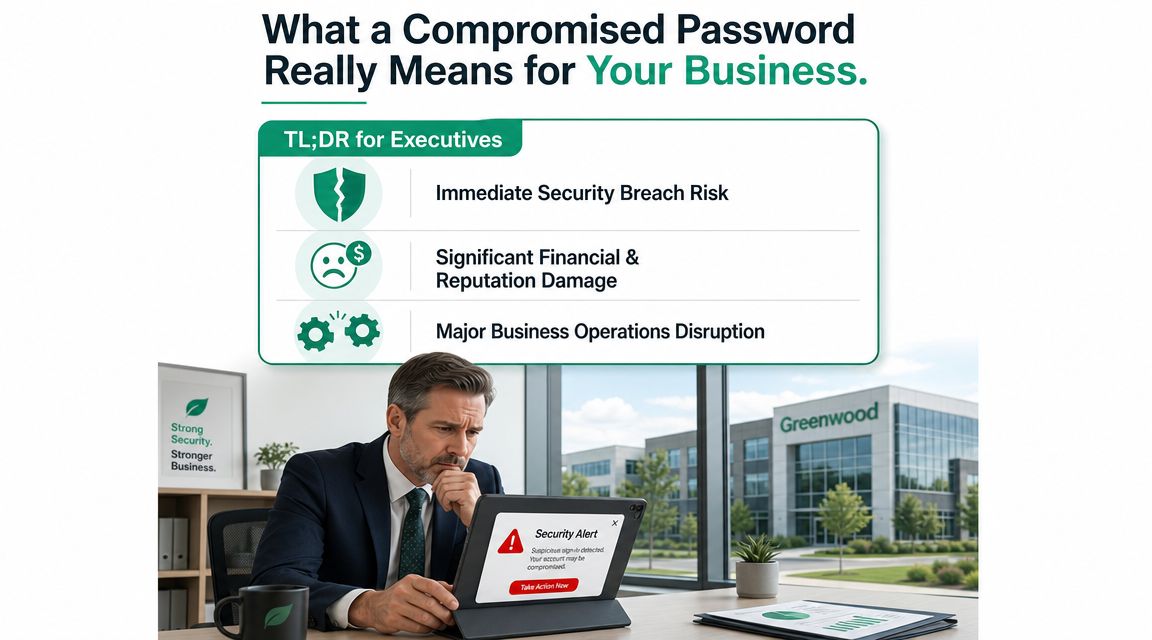
What a Compromised Password Really Means for Your Business
Monday starts with a password alert on one employee's phone. By lunch, your office manager is locked out of Microsoft 365, invoices are stuck in Drafts, and someone is asking whether payroll was touched. That is what a compromised password means for a Central Indiana small business. It is not a vague security warning. It is a direct threat to uptime, cash flow, and trust.
TL;DR
- A compromised password is no longer private. Someone outside your business may already have it from a breach, phishing message, malware, or password reuse.
- One exposed login can reach multiple systems. Email, Microsoft 365, VPN, payroll, cloud apps, and admin tools are all common targets.
- The cost shows up in lost time. Lockouts, fraud checks, forced resets, and cleanup pull your team away from normal work.
- The practical response is simple. Change the password, check where else it was used, force sign-outs, turn on MFA, and review account activity.
A compromised password is a credential exposed to someone who should not have it. In plain business terms, a key has left your control. The problem is not just the account tied to that password. The problem is every system that trusts it, every employee who depends on it, and every process that stops when access gets messy.
The Meaning Behind the Alert
For a medical practice in Greenwood, a contractor near Franklin, or a law office on the south side of Indy, a single password warning can carry real operational weight. Staff often reuse the same password, or a close variation, across email, vendor portals, accounting tools, and remote access. One exposed credential can turn into several account resets, service interruptions, and a long afternoon of checking what was accessed.
That is why I tell owners not to read these alerts as a minor user issue. Read them as an early sign that business continuity may be at risk.
Why business owners should care
A compromised password does not need to lead to ransomware to hurt your company. In many Central Indiana SMBs, the first damage is more ordinary than that, and still expensive.
- Email disruption can delay quotes, customer replies, approvals, and billing
- Finance or payroll access can trigger transaction reviews, bank callbacks, and extra verification steps
- Cloud account lockouts can stop work in Microsoft 365, shared files, and industry software
- Compliance exposure can create reporting and documentation problems for firms subject to HIPAA, CMMC, or NIST-based requirements
Those costs add up fast. Staff sit idle. Owners get pulled into approval chains and emergency decisions. Your IT support shifts from planned work to cleanup.
A compromised password warning is often the cheapest warning you will get before a much more expensive outage.
There is also a trade-off business owners need to hear plainly. Stronger password controls and MFA create a little friction for users. Recovering from a compromised account creates a lot more friction for everyone. I will take the extra 20 seconds at login over a half day of downtime every time.
If you want to measure that risk in business terms, not just technical ones, this business impact analysis template for downtime planning helps identify which systems stop revenue, scheduling, or patient and client service when credentials fail.
The Ways Your Passwords Are Being Stolen
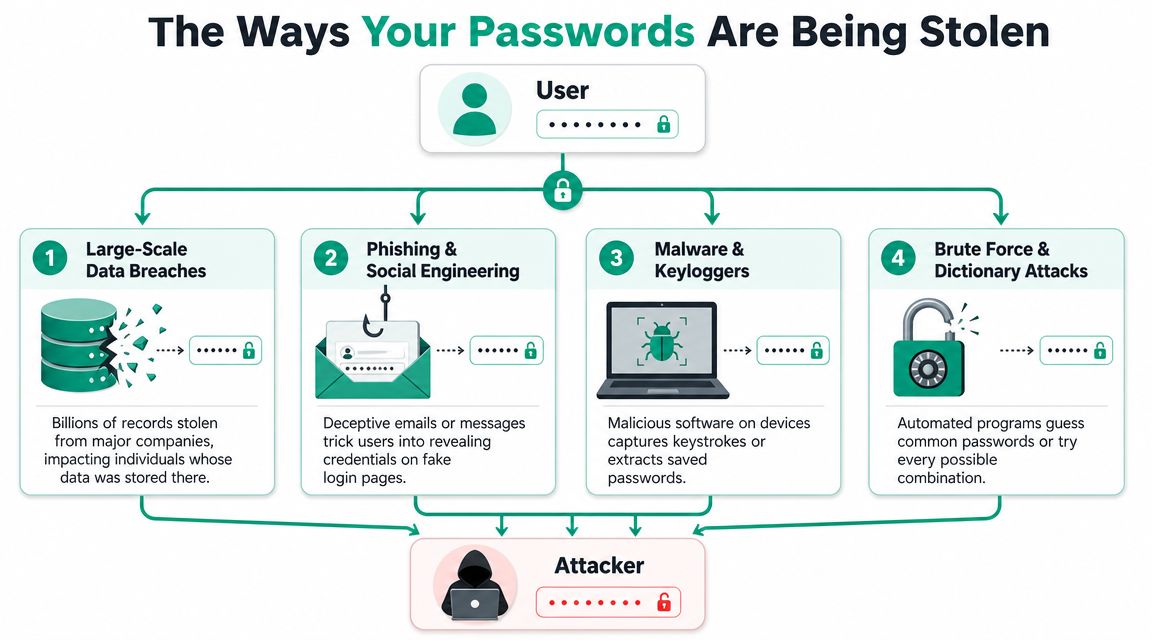
A Johnson County business usually does not lose passwords because some criminal sat there guessing them one by one. The common path is simpler. Someone reuses an old login, clicks a convincing email, saves credentials in a compromised browser, or signs in on a device that should not be trusted.
Breaches you didn't cause
A lot of password exposure starts outside your office. A vendor portal, payroll app, retailer, or industry tool gets breached. The stolen usernames and passwords get sold, shared, or tested against Microsoft 365, QuickBooks, VPNs, and line-of-business systems.
That creates a real problem for small and mid-sized companies in Central Indiana. You can do a decent job protecting your own network and still get hit because an employee reused a password on another site months ago.
Phishing that looks routine
This is still one of the fastest ways attackers get valid logins. Around here, it usually looks ordinary. A fake invoice from a known supplier. A Microsoft 365 sign-in notice. A shared document link. A payroll message sent at the worst possible time, usually when somebody is busy and trying to clear their inbox.
The pattern is familiar:
- Vendor impersonation: The message appears to come from a customer, supplier, contractor, or coworker your staff already knows.
- Urgency: The email pushes a reset, approval, payment review, or login check right now.
- Fake sign-in page: The page looks close enough to normal that a rushed employee enters credentials without slowing down.
For a plain-English training reference, this business guide to protecting against phishing attacks covers the warning signs that matter for busy teams.
Credential stuffing and reused passwords
This one is easy to miss because nobody inside the business sees the handoff. Attackers take passwords exposed in one breach and try them against other services. If the same password works on email, cloud storage, remote access, or finance tools, they get in with a valid login and draw a lot less attention.
I see this hit smaller companies more often than owners expect. The password may look strong on paper. If it already exists in breach data, it is no longer safe.
Malware on endpoints
Some passwords are stolen straight from the device. A malicious browser extension, fake software update, infected attachment, or remote access trojan can grab saved credentials or log keystrokes. In smaller shops, this often starts on the laptop of the person doing five jobs at once, because speed wins over caution on a busy day.
Practical rule: If a device looks infected, do not stop at cleaning the machine. Review and reset the credentials used on it, especially email, banking, Microsoft 365, VPN, and admin accounts.
Brute-force attacks still happen. Password spraying still happens too. But for criminals targeting SMBs in places like Greenwood, Franklin, and the rest of Central Indiana, stolen credentials are cheaper, quieter, and more profitable. That is why password theft turns into downtime, compliance trouble, and wasted labor so fast when one account has more access than it should.
The Domino Effect of a Single Compromised Password
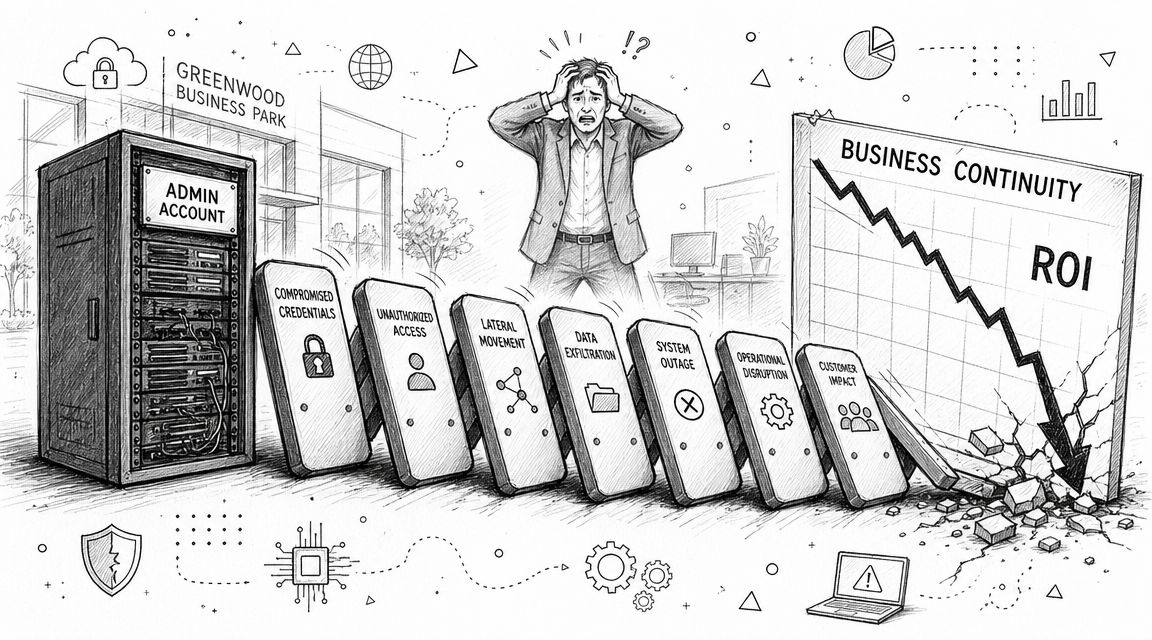
A single stolen login can turn a normal Tuesday into a full business interruption.
How one login becomes an operations problem
Start with a common Central Indiana SMB scenario. Someone in the office reuses a password for email and another business app. That password gets exposed elsewhere, an attacker signs in without tripping the usual alarms, and now the problem is no longer "just a password issue."
It spreads through the systems your team uses to keep the day moving.
- Email access gives an attacker a view into invoices, vendor threads, internal approvals, and password reset messages.
- Cloud apps can expose contracts, client files, HR records, and chat history.
- VPN or admin account reuse can lead to servers, remote desktops, backups, and network shares.
- Finance tools can be abused to change payment details, reroute funds, or fake approvals that look legitimate.
That sequence matters because valid logins create less noise than malware or smash-and-grab attacks. In small businesses, the first sign is often confusion. A vendor asks why banking details changed. A user gets locked out. A mailbox rule starts hiding messages. By then, the attacker may already be testing what else that same credential can reach.
If you want the bigger risk mapped clearly, a vulnerability assessment vs. penetration testing comparison helps show the difference between finding weak points on paper and proving how one exposed account can move through the business.
The costs business owners feel
Johnson County owners usually do not call me because they are worried about password theory. They call because work stopped.
Once staff can no longer trust email, shared files, or remote access, normal work slows down fast. Managers start checking account activity instead of running the business. Accounting pauses payments. Front office staff field customer questions with half the information they need. Leadership gets pulled into damage control, and payroll keeps running while productive work does not.
This is the point when revenue gets interrupted, not because every incident becomes a headline breach, but because even a limited account takeover burns hours across the company.
For a smaller shop in Greenwood, Franklin, or Whiteland, that lost time adds up quickly. Ten employees spending half a day sorting through a login incident is real money. So is the cleanup after fraudulent emails, rushed password resets, access reviews, and customer reassurance.
Compliance exposure for Indiana SMBs
The fallout gets worse in regulated environments because a password failure can become a documentation and reporting problem too.
| Business type | Likely pressure point | Why a compromised password hurts |
|---|---|---|
| Healthcare practice | HIPAA | Email and patient data access can trigger privacy reviews, reporting duties, and trust issues |
| Defense supplier | CMMC | Weak identity control raises questions about access discipline, account management, and audit readiness |
| General SMB | NIST CSF alignment | Poor credential hygiene makes broader risk management harder to enforce |
I see this pattern most often in businesses that grew fast and stacked tools on top of tools. An old VPN is still hanging around. Microsoft 365 is in place, but MFA is inconsistent. Former staff accounts were never fully cleaned up. A shared admin credential still exists because "that's how we've always done it."
That environment gives one compromised password too many places to land.
The fastest way to lose a workday is sometimes one valid login in the wrong hands.
Finding Your Exposed Credentials Before Attackers Do
You don't need a full security team to start checking for exposure. You do need a method. The businesses that handle this well don't wait for obvious account abuse. They look for signs early, then tighten controls before a login gets weaponized.
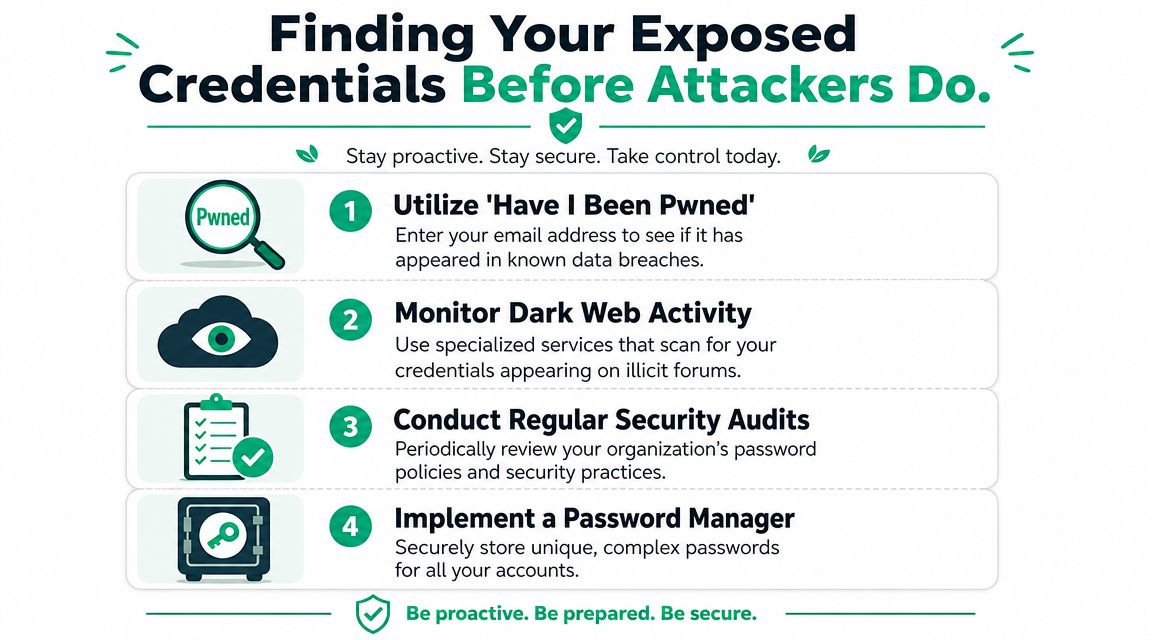
Start with public breach checks
For individuals and small teams, a simple first step is checking whether email addresses appear in known breach data. That won't tell you everything, but it gives you a fast signal that a credential may no longer be safe.
NIST's guidance has shifted in the same direction. NIST now explicitly recommends checking new passwords against lists of known-compromised credentials, as described in Enzoic's summary of the threat of compromised passwords. That's a major change from the old obsession with complexity rules alone.
Move from one-time checks to ongoing monitoring
Public checks are useful, but business environments need more than a spot test. For these needs, tools and managed monitoring earn their keep.
A practical stack often includes:
- Password manager controls to generate and store unique credentials
- Endpoint protection such as Bitdefender GravityZone to flag suspicious device behavior
- SOC-as-a-Service monitoring to review authentication anomalies
- Zero Trust architecture so a valid password alone doesn't grant broad trust
- Security assessments that test identity gaps before attackers do
If you're weighing broader testing, this comparison of vulnerability assessment versus penetration testing helps clarify what each does.
A short explainer is helpful before you keep going:
What good detection looks like
In a healthy setup, your business gets alerts for things humans miss. A sign-in attempt from an unusual location. A mailbox rule created after hours. A user authenticating in a way that doesn't match their normal pattern. A device suddenly trying to harvest credentials from browsers.
That doesn't require enterprise bloat. It requires consistency. Hamilton County companies growing fast often run into this problem. The staff count rises, cloud apps pile up, and nobody notices identity drift until there's a scare. Better monitoring catches the drift before it turns into a cleanup project.
Your First 60 Minutes After Discovering a Breach
Don't panic. Move in order.
In our 17 years supporting local businesses, the biggest mistake we see isn't always the original password reuse. It's the scramble afterward. People start changing random things, skip the core accounts, and lose the timeline they need to investigate.
First determine exposure or active compromise
Have I Been Pwned makes an important distinction. A password can be exposed in breach data without proof that your specific account was already accessed. An account is compromised when an attacker gets in. Their password guidance explains why this gap matters, because attackers automate login attempts using exposed credentials and turn exposure into account compromise, as described in Have I Been Pwned's password information.
That means your first hour is about triage.
The first-hour checklist
- Change the affected password immediately. Don't tweak the old one. Replace it with a unique one.
- Check reuse fast. If that same password touched email, VPN, payroll, QuickBooks, Microsoft 365, or admin consoles, rotate those too.
- Force sign-outs. Revoke active sessions where the platform allows it.
- Turn on MFA now. Especially for email and administrator accounts.
- Review recent account activity. Look for unfamiliar logins, forwarding rules, device enrollments, or permission changes.
- Isolate the device if needed. If malware or phishing may be involved, pull the machine off the network until it's checked.
- Prioritize core business systems. Email first, then finance, then file access, then remote access tools.
- Document what you find. Time matters. So do screenshots, logs, and user statements.
If the user says, “I clicked something weird yesterday,” treat the device as suspect until proven clean.
What not to do in the first hour
- Don't only change one password if you already know it was reused.
- Don't trust the endpoint yet if phishing or malware may be involved.
- Don't ignore mail rules and delegated access in Microsoft 365 or Google Workspace.
- Don't let fear delay action on high-value accounts.
A structured cybersecurity incident response plan template helps here because nobody thinks clearly when finance, operations, and leadership all want answers at once.
Building a Resilient Password Policy for Your SMB
Old-school password policy did a lot of theater. Forced resets. Complexity games. Sticky notes moved from monitor to desk drawer. That approach wastes employee time and still leaves gaps.
A better policy matches how modern attacks work. If you're aligning to NIST CSF, the identity side of the house should focus on exposed credentials, MFA, access control, monitoring, and recovery discipline.
What works now
A useful SMB policy has a few moving parts that support each other instead of fighting each other.
| Pillar | What It Is | Problem It Solves |
|---|---|---|
| Password manager | A secure system for generating and storing unique credentials | Stops reuse and weak human memory habits |
| MFA enforcement | A second factor on email, admin, cloud, and remote access accounts | Reduces the chance that a stolen password becomes a successful login |
| Breach screening | Checking passwords against known compromised datasets at creation and reset | Blocks already-exposed credentials from entering the environment |
| Access segmentation | Limiting what each account can reach | Keeps one stolen login from exposing everything |
| Monitoring and alerts | Reviewing suspicious authentication behavior and endpoint signals | Catches misuse earlier |
| Recovery controls | Immutable off-site backups and tested response procedures | Limits downtime when prevention fails |
What usually fails
Some controls look serious and still underperform.
- Frequent forced password changes often drive users toward weaker patterns.
- Shared logins kill accountability.
- Browser-only storage with no governance leaves too much to chance.
- MFA only on some systems creates obvious gaps.
- Flat access across the company gives one compromised account too much reach.
How the pieces fit together
A resilient setup isn't only about passwords. It's identity plus containment plus recovery.
For example, UniFi networking can support cleaner segmentation for office and guest access. Zero Trust architecture reduces the assumption that a known user or device should be trusted everywhere. Immutable off-site backups protect continuity when credentials still lead to disruption. That's how mature businesses reduce downtime instead of just reacting to the latest alert.
If you're tightening internal standards, these password management best practices for business use are a good operational checklist.
Good password policy should make the secure action the easy action for staff.
Take Control of Your Password Security Today
The compromised passwords meaning is simple once you strip away the jargon. The password is no longer secret, and your business has to act like that matters.
For Central Indiana SMBs, the primary danger isn't the wording of the alert. It's the chain reaction that follows when a reused credential touches email, payroll, cloud storage, remote access, or an admin account on old hardware. That's where revenue gets interrupted, staff time gets burned, and compliance questions start landing on leadership's desk.
The businesses that handle this well do three things consistently. They stop password reuse. They enforce MFA where it counts. They monitor identity activity closely enough to catch trouble before it becomes downtime. That turns security from a chaotic expense into a more predictable operating cost.
If your company is growing along the I-65 corridor, adding remote staff, or carrying HIPAA, CMMC, or NIST CSF pressure, this is not a corner to cut. Password security is one of the cheapest places to prevent a very expensive mess.
If your business is in the Greenwood or Indianapolis area and you want a second set of eyes on password risk, Finchum Fixes IT can help with a Free Network Assessment or a Security Risk Audit. It's a practical way to find exposed credentials, weak identity controls, and downtime risks before they turn into a bad week.