Hardware as a Service: A Guide for Indiana SMBs
Monday morning in Greenwood. The front desk can't stay connected to Wi-Fi, the owner is waiting on payroll to process, and the server in the back office is making that fan noise everyone has learned to ignore until something breaks. I see this a lot in Johnson County, especially in older office buildings and small business parks where the wiring is dated and the hardware refresh got pushed one year too long.
Hardware as a Service fixes that pattern by replacing big, unpredictable hardware purchases with a monthly agreement that includes the equipment and the work around it. In plain terms, you get current laptops, desktops, firewalls, switches, or servers, plus setup, support, replacement planning, and end-of-life handling, without tying up cash in gear that starts aging the day it arrives. If you're already dealing with old line-of-business software, it also pairs well with a legacy system modernization plan that supports business growth.
For Indiana SMBs, that matters for reasons that have nothing to do with trends. It matters because bad Wi-Fi in a downtown Franklin building still kills productivity. It matters because a machine that misses security updates can create real risk, and basic patch discipline still matters enough that I point clients to resources like Monro Cloud's guide for IT pros. It matters because shops along the I-65 corridor that work with defense contracts may need tighter asset control, documented refresh cycles, and stronger support for CMMC requirements than a buy-it-and-forget-it approach usually delivers.
Analysts expect the HaaS market to keep growing over the next several years, which tracks with what local businesses are already figuring out. Owning aging hardware sounds cheaper until you count downtime, surprise replacements, and the time your staff loses fighting equipment that should have been retired.
Stop Wasting Money on Aging Tech
A Greenwood accounting firm doesn't need a glamorous IT setup. It needs QuickBooks, tax software, stable file access, reliable backups, and a network that doesn't choke every afternoon. But when that office is still running on a server that should've been retired years ago, every slowdown turns into lost billable work.
The problem isn't just the hardware. It's the unpredictability. One month you're fine. The next month a drive starts throwing errors, the office manager can't print, remote access gets spotty, and now you're authorizing an unplanned spend because there's no good option left.
TL;DR
- Hardware as a Service turns large hardware purchases into predictable monthly operating costs
- It works best when you want fewer surprise failures, simpler refresh cycles, and less internal IT burden
- Good HaaS includes setup, maintenance, replacements, and secure retirement of old equipment
- For Indiana SMBs, it's especially useful in older buildings, growing offices, and compliance-heavy environments
- The value isn't just cheaper hardware. It's less downtime, tighter security, and cleaner budgeting
- If your team keeps losing time to aging PCs, bad Wi-Fi, or server issues, HaaS is worth evaluating now
What this looks like in the real world
In Johnson County, a lot of small businesses still treat hardware like office furniture. Buy it once. Keep it as long as possible. Hope for the best. That works until it doesn't.
A better approach is to stop thinking in terms of “How long can we keep this box alive?” and start asking, “How do we keep staff productive without surprise capital hits?” That's the business case for HaaS.
If your team is also struggling with old line-of-business apps that don't play nicely with modern infrastructure, this guide on legacy system modernization strategies that drive business growth is worth reading before you touch the hardware plan.
Why this has become a mainstream option
This isn't some weird financing gimmick anymore. Businesses moved toward HaaS because budgets got tighter, security requirements got stricter, and nobody wants to sink cash into equipment that starts aging on day one.
There's also a patching and vulnerability angle that gets ignored until something breaks. If you want a practical example of how fast routine hardware and operating system neglect turns into security exposure, Monro Cloud's guide for IT pros does a solid job showing why “we'll patch it later” is not a plan.
More Than Just Renting a Laptop
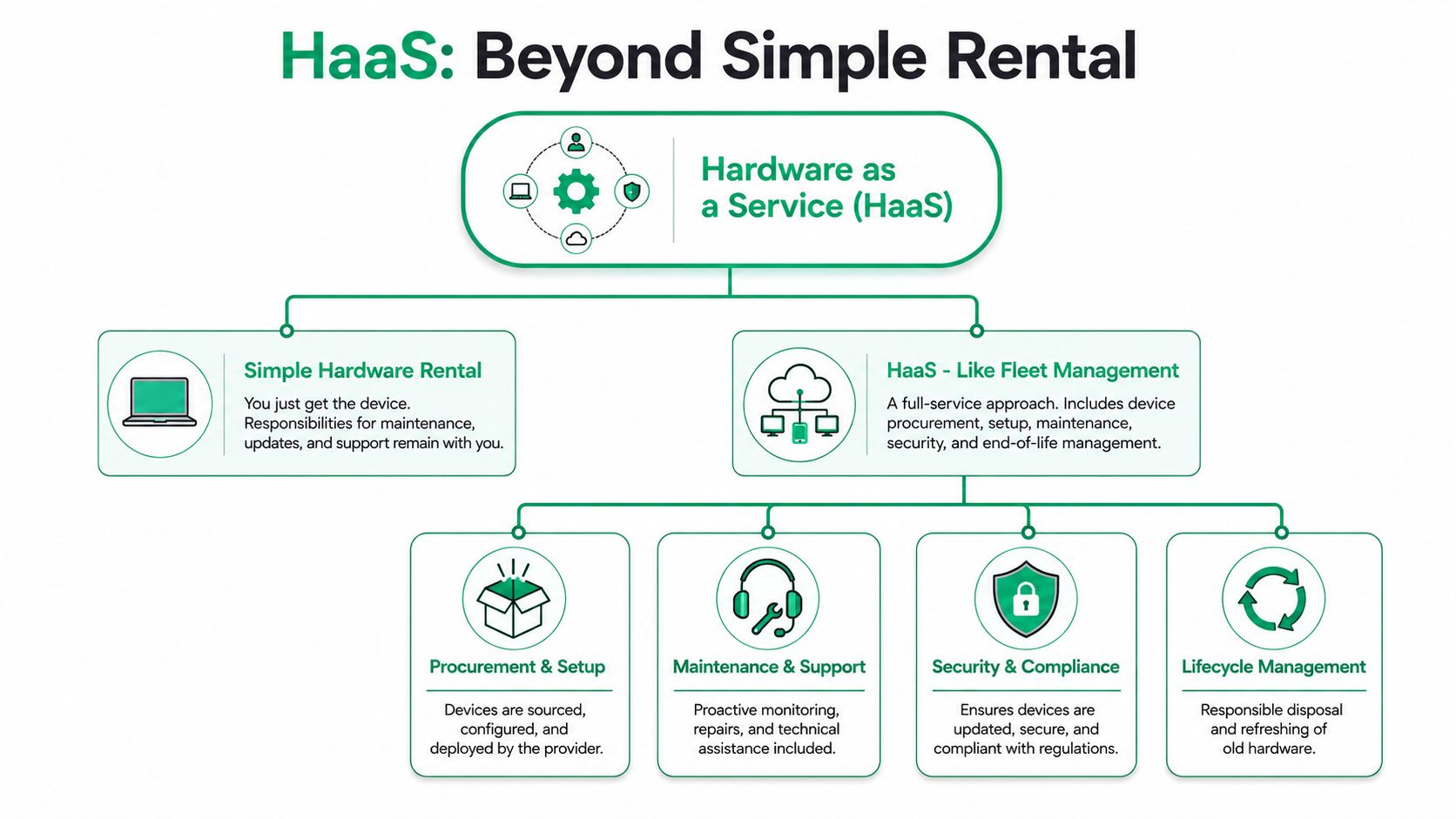
Most business owners hear “hardware as a service” and picture a laptop lease. That's too small. A real HaaS arrangement is closer to fleet management for company vehicles. You're not just paying for the car. You're paying for someone else to handle procurement, service schedules, repairs, replacement, and retirement.
What separates HaaS from a plain lease
In mature HaaS implementations, the provider takes on the full device lifecycle, including installation, ongoing maintenance, upgrades, warranty handling, replacement, decommissioning, and secure end-of-life removal (Meter's explanation of the full lifecycle model).
That matters because most Indiana SMBs don't struggle with buying hardware. They struggle with everything that comes after the purchase.
- Procurement drift: You end up with five different laptop models, three warranty statuses, and no clean standard.
- Break-fix chaos: Somebody's machine dies, and now your team is scrambling for a spare.
- Warranty confusion: Nobody knows what's covered, what isn't, or who to call.
- End-of-life risk: Old devices pile up in a closet with business data still on them.
The practical version for Indiana businesses
For a growing office along the I-65 corridor, HaaS can cover more than user devices. It can include servers, storage, firewalls, switches, access points, POS systems, and other gear that keeps the business moving.
That's where the model starts to earn its keep. If your provider supplies and manages standardized workstations, UniFi networking gear, replacement inventory, and documentation, your staff stops wasting time on scavenger-hunt IT. They work on current, supportable equipment.
Don't judge HaaS by the monthly fee alone. Judge it by how much internal nonsense it removes.
For a broader local view of how this fits into day-to-day support, this guide to managed services for Indiana businesses connects the hardware piece to the service desk, monitoring, and lifecycle planning that usually have to come with it.
What works and what doesn't
What works is a standard stack. Same endpoint policy. Same security controls. Same refresh process. Same replacement workflow.
What doesn't work is calling something HaaS when it's really just financed hardware with a help desk bolted on. If the provider isn't clearly responsible for maintenance, replacement, secure decommissioning, and supportability, you're still carrying too much of the burden.
The Financial Case for Predictable IT Spending
A Greenwood owner usually feels the problem before it shows up on a budget report. One month is quiet. The next month a front-office PC dies, Wi-Fi in an older downtown building starts dropping calls, and a server replacement lands right when cash needs to go toward payroll, inventory, or a new hire.
That is the financial argument for HaaS. Predictability.
Traditional hardware buying turns routine IT needs into surprise projects. For Indiana SMBs, especially shops along the I-65 corridor that are growing in uneven bursts, those surprises hit at the worst times. A manufacturer adding staff, a medical office opening another exam room, or a small defense supplier working toward CMMC cannot afford to have hardware costs arrive as a lump sum every few years.
Why steady monthly spending matters
HaaS shifts hardware from irregular capital purchases to a planned operating expense. That does not automatically make it cheaper. It makes it easier to forecast, easier to approve, and easier to line up with revenue.
For a Johnson County business owner, that usually means three practical benefits:
- cash stays available for the business itself
- hardware refreshes stop competing with other major purchases
- IT costs become easier to explain and track month to month
That matters more than people think. I have seen local companies hang onto aging switches, access points, and workstations because replacing everything at once would wreck the quarter. They end up paying in slower systems, support calls, and staff frustration anyway.
CAPEX vs HaaS for a small office
Here's the plain-English version of the difference for a 15-person Indiana company.
| Cost Item | Traditional CAPEX (Buy) | HaaS (Subscription) |
|---|---|---|
| Initial hardware spend | Large upfront purchase | Monthly recurring fee |
| Refresh cycle pain | Usually delayed until failure or budget approval | Planned refresh through contract |
| Repair surprises | Business absorbs most unexpected costs | Often bundled into service |
| Cash flow impact | Big hit when equipment is bought | More even monthly planning |
| Downtime risk | Higher if aging devices stay in service too long | Lower when replacement is built into lifecycle support |
| Internal admin burden | Procurement, warranty, disposal, spare tracking stay in-house | Much of that shifts to provider |
The trade-off is straightforward. Buying can cost less on paper if you run equipment for a long time and have internal staff who can support it well. HaaS tends to make more sense when downtime is expensive, growth is uneven, or the business does not want to keep tying up cash in depreciating gear.
That is common in central Indiana. A company in an older Greenwood business park may need network upgrades sooner than planned because the building fights every Wi-Fi improvement. A contractor near the I-65 corridor may need standardized, supportable devices to meet customer security requirements. In both cases, predictable spending is not just a finance preference. It helps the business keep operating without disruption.
The budget leak owners usually miss
The obvious cost is the hardware bill. The less obvious cost is the time your team burns working around old equipment.
An employee waits ten minutes for a machine to boot. Your office manager tracks serial numbers in a spreadsheet. Your IT provider spends billable hours keeping one failing server alive because replacement was pushed off again. None of that shows up neatly as a hardware purchase, but it still comes out of the business.
Practical rule: If old equipment keeps creating support tickets, delays, or one-off purchases, your budget is already unstable. It just does not look unstable yet.
For a broader framework on planning around those trade-offs, this guide to IT budget planning for ROI and resilience lays out how Indiana SMBs can compare predictable monthly IT costs against the bigger financial risk of reactive spending. For an outside-market example of how service bundles are framed, managed services for Philippine businesses offers a useful comparison.
Predictable spending is not the whole case for HaaS. It is the part owners feel first, because it replaces surprise with a plan.
Finding the Real Total Cost of Ownership
When discussing hardware as a service, the sales pitch usually gets slippery. Is hardware as a service cheaper? Sometimes yes. Sometimes no. If someone tells you it's always cheaper, they're skipping half the math.
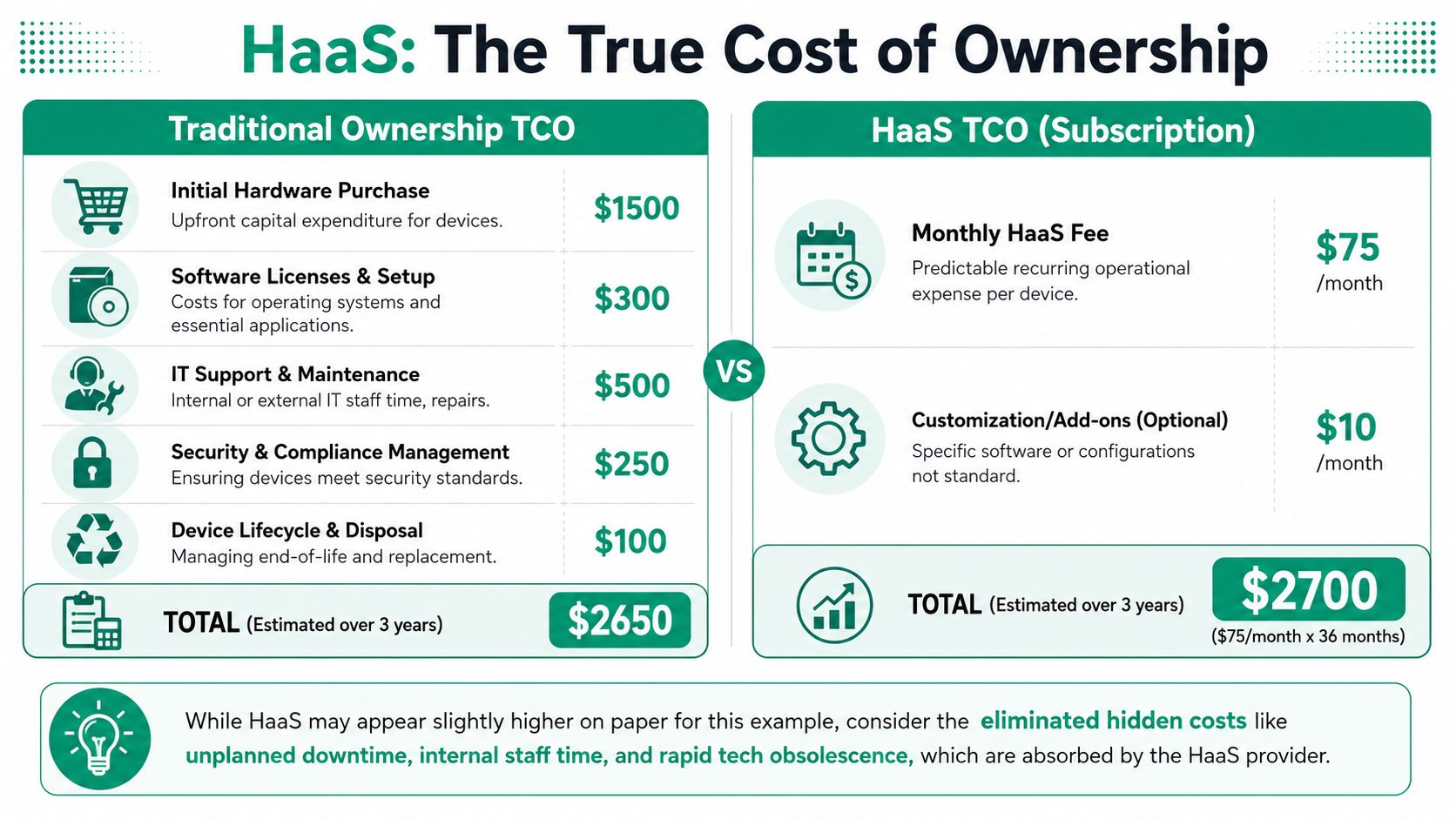
Monthly price is not total cost
A neutral way to look at it is this: HaaS can be financially attractive only when the service bundle cuts downtime, maintenance effort, and cybersecurity overhead. A PwC discussion cited in Dynamic Quest's write-up reported customer downtime reductions of about 25% to 30%, which suggests the value case is operational as much as financial (Dynamic Quest on HaaS trade-offs).
That tracks with what happens on the ground. If you compare only sticker price, buying may win. If you include refresh labor, user downtime, break-fix work, patch inconsistency, warranty juggling, and secure disposal, the answer gets more interesting.
Where HaaS usually wins
A logistics company near the I-65 corridor is a good example. Device counts shift. A new route team needs tablets. A branch warehouse needs extra scanners. Office staff grows faster than expected. In that kind of environment, fixed ownership can create overbuying or lag.
A more advanced HaaS model uses a pay-as-you-grow approach. Nozomi Networks describes a token-based mechanism where a set dollar purchase is converted into HaaS tokens that can be used on hardware and accessories during the contract term, with support, warranty coverage, and RMA available even beyond end-of-life (Nozomi's HaaS program guidelines). That kind of structure can make a lot of sense when your hardware footprint changes often.
Where HaaS can lose
HaaS is not a magic trick. It can be a bad deal when:
- Your environment is very stable: If you rarely change devices and have low operational complexity, outright purchase may pencil out better.
- You need unusual customization: Some businesses want very specific hardware standards or niche configurations that don't fit a provider's service catalog.
- The contract terms are sloppy: If replacement timing, offboarding, asset recovery, and data destruction aren't clear, you can end up with expensive friction later.
One more practical note. Not every device needs to be net-new. For lower-risk use cases, some companies mix HaaS with selected refurbished endpoints. If you're evaluating phone fleets for lighter-duty roles, even marketplaces that buy refurbished iPhones can help you think through where premium new hardware matters and where it doesn't.
For a cleaner decision process, pair the financial review with disciplined lifecycle tracking. These IT asset management best practices for Indiana businesses help keep that from turning into guesswork.
HaaS for a More Secure and Compliant Business
A lot of businesses first look at HaaS because of budget pain. They stay with it because security gets easier.

Why security improves when hardware is standardized
Recent industry commentary shows HaaS is shifting from simple rental into a fully managed lifecycle model that bundles software, monitoring, maintenance, and predictive operations. IBM also frames HaaS as useful for access to advanced cybersecurity protection through ongoing MSP-managed updates (Corsica Technologies on the security shift in HaaS).
That's the important part. Security controls work better when the environment is consistent. It's much easier to enforce Bitdefender GravityZone policies, MFA, conditional access, device encryption, and Zero Trust architecture when everyone is on supportable hardware with a known baseline.
Local compliance examples that hit home
For a healthcare office in Indianapolis, old unsupported endpoints are a HIPAA problem waiting to happen. If a workstation can't stay current, can't run modern endpoint protection well, or keeps falling out of patch compliance, it becomes a business risk, not just an IT annoyance.
For a defense contractor serving work near Crane or along the I-65 corridor, CMMC expectations make standardization even more important. You need tighter inventory control, cleaner asset handling, documented replacement processes, and less ambiguity around who maintains what.
For general business security, the same logic lines up well with NIST CSF thinking. Know your assets. Control access. Keep systems maintained. Recover cleanly after issues. HaaS doesn't solve those by itself, but it makes them easier to execute because the device lifecycle is managed instead of improvised.
Questions owners should ask about accountability
I'd push harder than most sales pages do. Ask blunt questions.
- Lost or stolen devices: Who handles recovery, remote wipe, and replacement?
- Unsupported hardware: Who decides when a device is no longer fit for secure use?
- Patch responsibility: Who owns updates for firmware, drivers, and endpoint tooling?
- End-of-life handling: How is data destruction documented?
- Monitoring: Is SOC-as-a-Service monitoring included, optional, or absent?
If your provider can't explain the chain of custody for a retired laptop, they're not ready to talk seriously about compliance.
A mature setup can combine managed hardware with endpoint detection, SOC monitoring, immutable off-site backups, and documented recovery procedures. That's what keeps a bad hardware event from turning into a business continuity event.
Your Implementation Checklist for HaaS
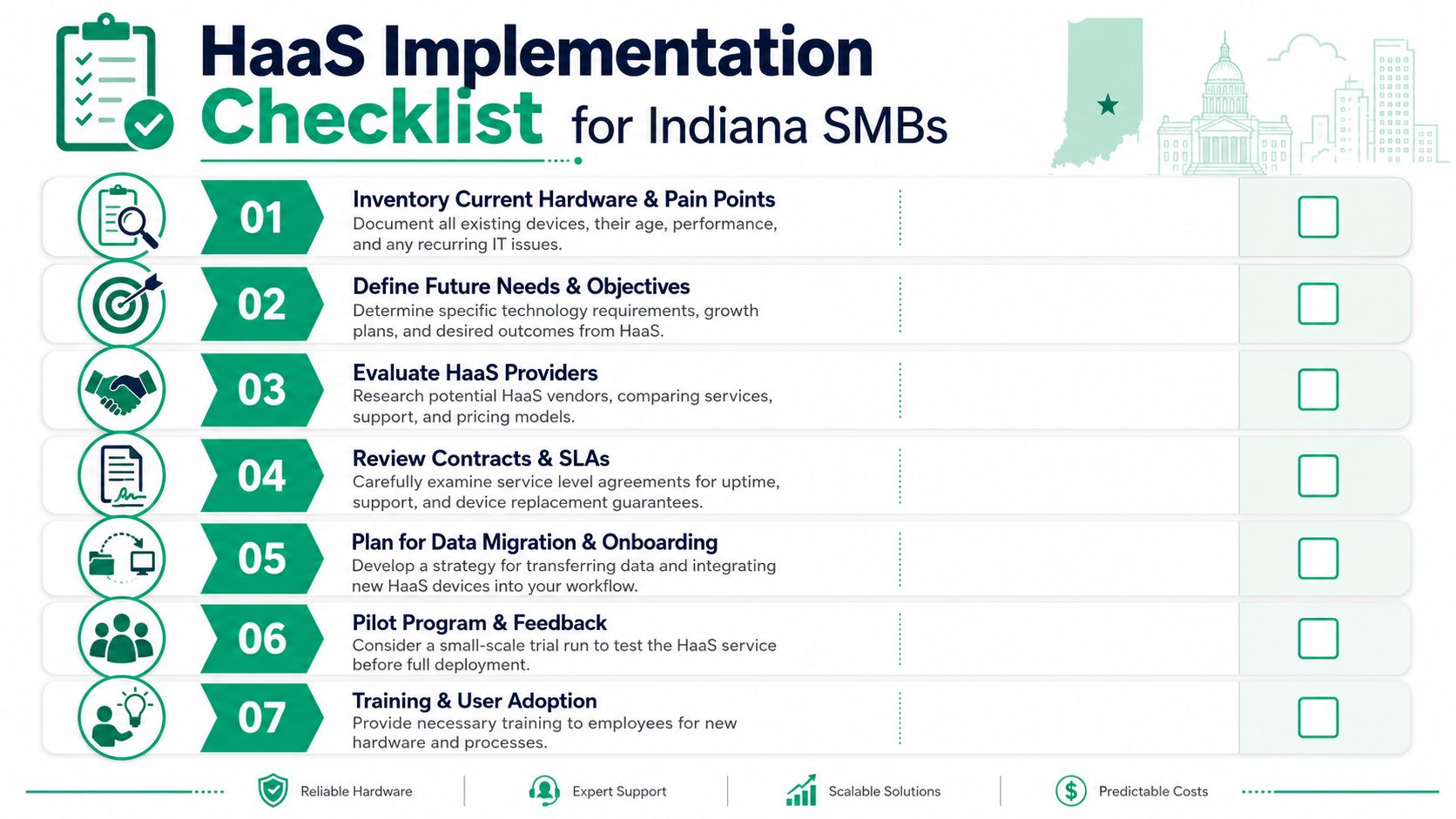
Most HaaS projects go sideways before deployment. Not because the hardware is wrong, but because the business didn't define the problem first.
Start with the mess you already have
Don't begin with product catalogs. Start with inventory.
- Document every device. List desktops, laptops, servers, switches, access points, printers, and specialty hardware. Note age, recurring issues, and which systems are business-critical.
- Flag pain by workflow. A flaky conference room PC is annoying. A failing production workstation, firewall, or line-of-business server is a revenue issue.
- Map your buildings. Older brick buildings around downtown Indy and parts of Greenwood often have Wi-Fi dead zones, odd cabling paths, and interference that need a real design fix, not just newer hardware.
Define what the next few years should look like
Many SMBs frequently undershoot. They buy for current headcount instead of business direction.
- Growth plans: Are you adding locations, field staff, or remote workers?
- Compliance needs: Do you need cleaner controls for HIPAA, CMMC, or a NIST CSF-aligned program?
- Support model: Do you want local hands available when a switch dies or a workstation fails?
Ask hard questions before you sign
When you evaluate providers, don't stay at the pricing summary. Drill into operations.
- Replacement workflow: How do you handle a failed device? What happens same day versus next business day?
- Data destruction: What is your process for end-of-life sanitization and documentation?
- Local support: Is support based near Indianapolis, or are you calling a distant dispatch queue?
- Security stack: Do you support Zero Trust policies, endpoint protection, and monitored response?
- Network quality: Can you design around latency-optimized mesh nodes or properly placed wired access points instead of guessing?
One option local businesses can evaluate is Finchum's managed services agreement guidance, which is useful for understanding how service language should read before you commit.
A good HaaS agreement should tell you exactly what happens on an ordinary Tuesday and on your worst Friday of the year.
Plan onboarding like a real project
Don't swap every device at once unless there's a strong reason. Pilot where the pain is highest. Migrate data carefully. Test line-of-business apps. Confirm backup integrity. If a device contains critical local data, validate the move with bit-level data recovery options in mind before retirement, not after something gets missed.
See How a Local Business Transformed Its IT
A manufacturing firm in a restored brick building near downtown Indy had the kind of setup that drives people crazy slowly. Spotty Wi-Fi on one side of the building. A mix of aging desktops. A firewall that nobody trusted. Staff saving files in too many places. Production delays whenever the network got moody.
The fix wasn't one hero device. It was a clean hardware as a service rollout tied to business continuity. The office moved to standardized workstations, current UniFi networking, managed endpoint security, and immutable off-site backups. The wireless design accounted for the building materials instead of pretending old brick behaves like drywall. The asset list finally matched reality.
The biggest change was boring in the best way. Problems stopped being dramatic. Hardware failures became replacement tickets instead of emergencies. Refresh timing became planned instead of emotional. The owner stopped wondering which aging machine would ruin the week.
That's the part people underestimate. Good HaaS doesn't make your office feel futuristic. It makes tech fade into the background so your team can do its job.
If your Greenwood office park has a server on borrowed time, or your Indianapolis building has Wi-Fi that falls apart every afternoon, it's probably time to stop patching around the edges and rebuild the lifecycle properly.
If your business is in Greenwood, Indianapolis, or anywhere along the south side and you want a straight answer on whether hardware as a service fits your environment, schedule a Free Network Assessment with Finchum Fixes IT. We'll look at aging hardware, security gaps, Wi-Fi issues, compliance pressure, and what a cleaner monthly model would look like before you commit to anything.