Emergency IT Support for Indiana Businesses: Your 2026 Guide

Emergency IT support is a tiered rapid-response service that typically arrives in under two hours for Indiana SMBs and bills between roughly $150 and $300 per hour, depending on retainer status, with the goal of stopping a per-minute loss that now averages about $9,000 for large organizations.
At 8 a.m., that distinction matters. A ticket sitting in a 24-hour queue won't restart a failed file server, restore a broken QuickBooks share, or tell your staff whether the outage is local or widespread. In Greenwood, the problem may be aging server hardware in a business park, while downtown Indy teams often fight finicky UniFi gear inside old brick buildings. The first fifteen minutes usually decide whether the morning becomes a controlled incident or a full operational mess.
When the Server Dies at 8 a.m. on a Monday
A Greenwood bookkeeping firm discovered its file server had failed two hours before direct deposit payroll was due to run. Staff could reach the frozen Windows login screen, but QuickBooks Enterprise refused to attach to the network share. The owner had clients waiting, payroll files trapped behind an unavailable system, and no time for a routine ticket queue.
That's the point of emergency IT support. It's a tiered rapid-response service that separates critical incidents from ordinary password resets, printer requests, and software questions. A competent provider acknowledges the call, establishes business impact, contains unsafe activity, and assigns the right engineer instead of placing the problem into a general queue.
The financial pressure is immediate. Industry reporting cites a long-standing Gartner benchmark of about $5,600 per minute, while newer enterprise research summarized by IT downtime statistics and cost analysis places the median for large organizations closer to $9,000 per minute. For a smaller company, the actual figure may be lower, but lost staff productivity, halted transactions, missed calls, and delayed customer work still turn every idle minute into a business decision.
| Business Size | Employees | Cost per Minute | 1-Hour Outage Impact |
|---|---|---|---|
| Small business | 10 to 25 | Qualitatively lower than enterprise exposure, but still material | Lost labor, transactions, and customer access |
| Mid-sized business | 26 to 50 | Higher exposure across departments and systems | Broad operational interruption |
| Large organization | Enterprise scale | About $9,000 per minute, as summarized in industry downtime reporting | About $540,000 per hour, using the same cited benchmark |
The owner's first decision isn't “Can someone repair the server?” It's “Which systems must be restored first, and what action could make recovery harder?” Unplugging a damaged network device can protect the rest of the environment. Repeatedly restarting a failing storage array can worsen the situation. A routine server maintenance service for Indiana SMBs can prevent some failures, but maintenance doesn't replace a response plan.
Break-fix isn't the same as emergency response
Break-fix usually begins when a technician becomes available. Emergency response begins with severity classification. A payroll system, point-of-sale platform, VoIP service, or production database receives priority because the business can't continue normally without it.
The provider should explain who is responding, whether remote containment starts immediately, when an on-site engineer can arrive, and what information the owner should preserve. “We'll get back to you” isn't a response plan. It's a delay wearing a polite shirt.
Practical rule: If the outage affects payroll, revenue collection, patient access, regulated data, or every workstation, treat it as a business continuity incident, not a normal help-desk ticket.
The First 15 Minutes Before Help Arrives
The first fifteen minutes aren't for heroic repair attempts. They're for detecting scope, documenting evidence, and prioritizing business impact. That sequence follows the logic of NIST incident handling, which calls for analysis, documentation, prioritization, evidence preservation, containment, eradication, and recovery.
Detect what actually failed
Start with scope. Ask one person to test a second workstation while another checks the same application. If only one computer is affected, the server may be healthy. If every workstation is offline, inspect the network gateway, switch, wireless controller, or internet circuit.
From a Windows workstation, open Command Prompt and run:
ipconfig /all
Record the default gateway, DNS settings, and adapter status in a phone photo. Don't publish internal addressing in a group chat or social post. From the same machine, run:
ping 8.8.8.8
A successful response suggests the workstation can reach the public internet, though it doesn't prove that internal applications or DNS are working. A failed response helps establish that connectivity is impaired, but it doesn't identify the failed component by itself.
If you can reach the UniFi controller, screenshot the device map, switch status, access point status, and any adoption or uplink warnings. In an old brick building downtown, thick walls and poor access point placement can create a Wi-Fi outage that looks like an internet failure.
Document before changing anything
Capture the exact error message, the affected user, the last known working time, and the timestamp. Put one short note in a shared Teams, Slack, or secure note location:
08:12, all front-office PCs cannot open QuickBooks share. Payroll file last confirmed available at 07:55. Internet test from cellular is working. No server reboot attempted.
That sentence gives the responding technician a usable starting point. A blurry recollection from three people rarely does.

Prioritize, isolate, and stop improvising
Write down the order of restoration:
- Payroll or payment processing: Protect the next revenue or payroll deadline.
- Core network: Keep the provider's remote access path available if it remains safe.
- VoIP and email: Preserve customer communication.
- File shares and line-of-business software: Restore work access after the underlying platform is stable.
If a switch, server, or storage device is visibly failing, disconnect it from the network only when you can do so safely and label the cable. Never keep power-cycling a device that is clicking, overheating, or producing unusual alarms. Run gpupdate /force only on a workstation when policy refresh is relevant. It won't repair a failed switch or revive a dead server.
Don't reboot the server more than once unless the responding technician directs it. Don't run an untested restore because someone found an old backup button. Good triage preserves choices. The Indiana SMB network troubleshooting workflow should begin with evidence, not guesses.
How a Real Emergency IT Response Actually Works
A mature response has two clocks. MTTA, mean time to acknowledge, measures how quickly a live person accepts responsibility for the incident. MTTR, mean time to repair or restore, measures how long it takes to return the affected service to an agreed operating state. A provider can close a ticket quickly by declaring a workaround, but that doesn't mean the business has recovered.
The provider's first target should be a human acknowledgment, incident number, severity rating, and immediate containment advice. A response window advertised as “under two hours” needs clarification. Does that mean a technician calls within two hours, arrives within two hours, or restores service within two hours?
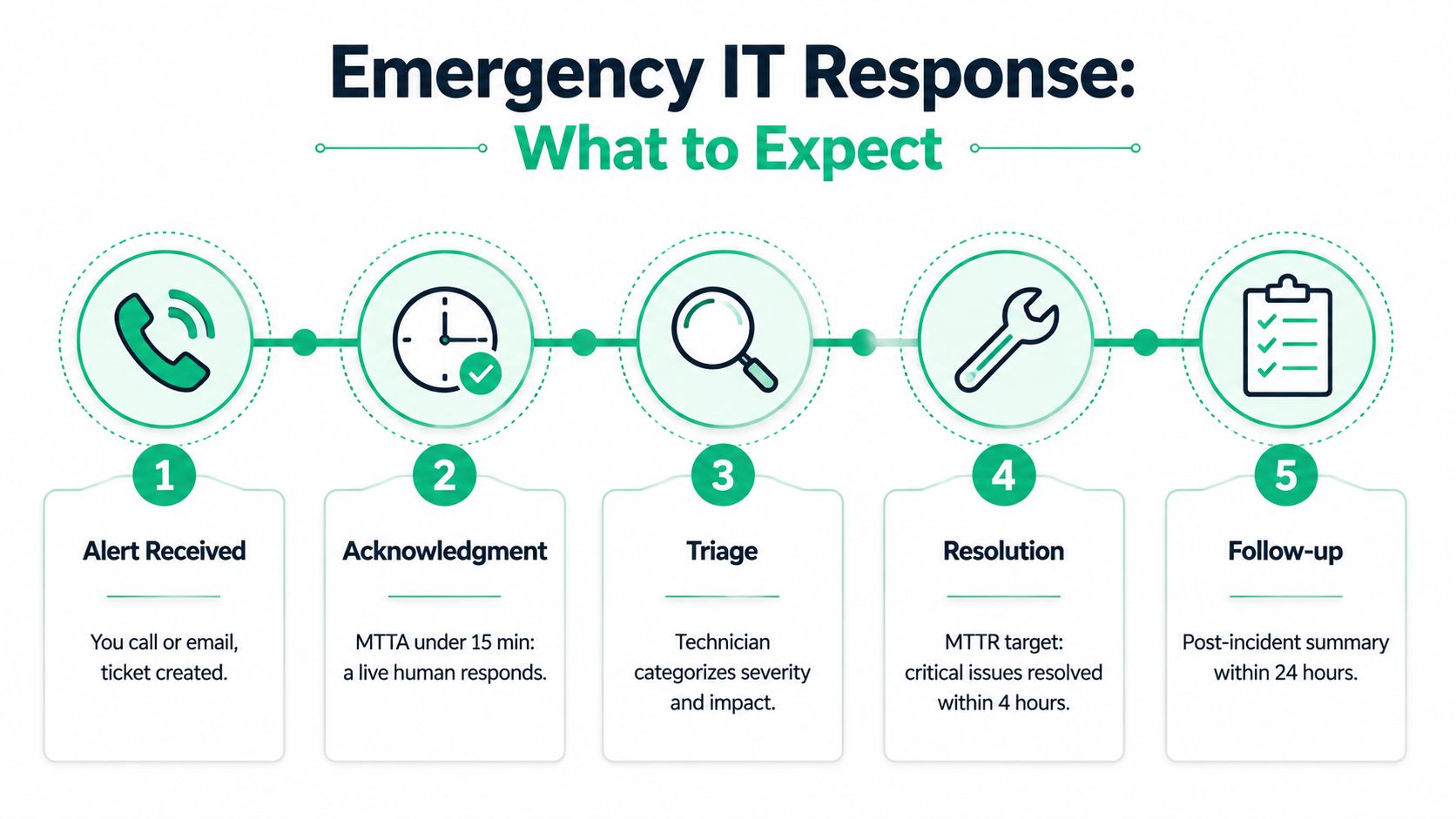
Four phases separate professionals from guesswork
Triage and remote containment starts with the business impact, not the device model. The engineer checks whether the incident is isolated, blocks suspicious accounts or traffic when necessary, and keeps staff from making destructive changes.
On-site dispatch should include an actual ETA, technician identity, access requirements, and a list of tools or replacement hardware being considered. A Greenwood provider may send an L1 technician for endpoint work, an L2 engineer for server and network diagnosis, or an L3 senior architect when the incident involves infrastructure design, security, or complex recovery.
Root-cause isolation means separating symptoms from the failure. A dead application may be caused by storage, authentication, DNS, virtualization, a switch uplink, or ransomware. Swapping parts without collecting logs can restore service temporarily while leaving the defect in place.
Stabilization and handoff ends the emergency phase with a working service, documented temporary measures, and ownership for follow-up. The owner should receive an incident timeline, root cause or current root-cause hypothesis, remediation steps, and prevention recommendations.
The response should also preserve evidence where security may be involved. NIST-aligned incident response planning for EU teams is useful reading for organizations that need defined roles, escalation paths, and documented handling rather than improvised decisions.
Read the SLA like an owner
Scrutinize exclusions, after-hours coverage, response windows, travel terms, hardware replacement limits, and escalation rules. Separate RTO, the target time to restore a service, from RPO, the amount of data the business can afford to lose. A short RTO with a weak RPO can still leave a company missing critical transactions.
Ask whether the SLA covers emergency cybersecurity, cloud access, network outages, data recovery, and vendor coordination. Also ask whether the provider documents the incident in a practical cybersecurity incident response plan template, or closes the ticket after the lights come back on.
Break-Fix Hourly Rate vs Managed Retainer
Break-fix pricing looks attractive while every system is running. At 8 a.m. on a Monday, an aging server in a Johnson County strip mall turns that calculation into an operations problem. A finicky UniFi device in an old brick building downtown can create the same pressure, especially when nobody has current documentation or tested backups.
For Indiana SMB planning, an emergency break-fix visit may run from $185 to $310 per hour, with a typical on-site engagement lasting four hours. Treat those figures as planning ranges, not verified industry statistics from the provided source set. The contract should state the actual rate, after-hours multiplier, travel charge, minimum billing period, and hardware terms. One incident can pass $1,500 before replacement equipment appears on the invoice.
A managed retainer shifts spending from emergency labor toward operational readiness. The monthly fee may cover monitoring, patching, backup checks, quarterly failover testing, and priority response. Pricing depends on users, devices, locations, compliance requirements, and coverage hours. The benefit is not that every incident becomes free. It is that the provider already knows the environment, its weak points, and the recovery plan.
| Cost Factor | Break-Fix | Managed Retainer |
|---|---|---|
| Billing | Hourly emergency labor | Predictable recurring fee |
| Response | Subject to availability and queue position | Defined priority and escalation path |
| Preventive work | Usually separate | Often included by contract |
| After-hours service | May carry additional charges | May be included or priced by tier |
| Backups | Usually investigated after failure | Can include monitoring and restore tests |
| Business planning | Reactive | Supports continuity, compliance, and budgeting |
The break-even question
Use downtime cost, not the invoice alone. Industry reporting places many large-organization outages near $9,000 per minute. The Atlassian downtime cost reference also cites a Gartner baseline of about $5,600 per minute and small-business estimates ranging from roughly $137 to $427 per minute.
For a 10-to-50-seat company, calculate the value of restored operations from actual payroll processing, missed transactions, billable labor, customer penalties, and compliance exposure. Compare that exposure with the annual retainer. A retainer may pay for itself if it prevents one serious outage, shortens several smaller incidents, or supplies tested recovery the company could not build internally. Break-fix can remain reasonable when systems are stable, backups are mature, regulatory pressure is low, and the company accepts recurring response uncertainty.
Contract test: Choose a retainer when the business needs priority, prevention, and predictable budgeting. Choose break-fix only when the company can tolerate response uncertainty and already owns the prevention work.
Before signing, compare managed IT service pricing in Indiana with the provider's actual SLA. Payroll proximity, HIPAA or CMMC exposure, backup maturity, and the number of locations should drive the decision, not a generic per-user quote.
Communication Templates and Data Recovery Triage
During an outage, staff need direction, customers need a truthful update, and vendors need technical facts. Keep each message short. Don't promise a restoration time until the responding engineer has established a credible recovery path.
Internal staff message
Post this in Teams or Slack:
We are experiencing an outage affecting [system or location]. IT is working on it. Please don't reboot servers, reconnect failed equipment, or attempt restores. Save local work if possible and post urgent business-impact details in this thread. The next update will be posted at [time].
This prevents well-meaning employees from changing evidence or creating parallel troubleshooting paths. Ask staff to report what they can't access, not what they think caused the failure.
Customer-facing status note
Use email, your website status page, or both:
Subject: Service disruption update
We're working on a service disruption affecting [service]. Our technical team has confirmed the issue and is coordinating recovery. We expect to provide the next update by [time]. If your request is urgent, contact [approved alternate channel]. We're sorry for the interruption and will share confirmed information as it becomes available.
Avoid saying “cyberattack,” “hardware failure,” or “data loss” until those facts are confirmed. A precise correction later is better than a confident mistake now.
Vendor or ISP escalation
Send a structured message:
Subject: Urgent outage escalation for [account or circuit]
Business: [legal business name]
Location: [service address]
Service or circuit ID: [identifier]
Outage began: [local date and time]
Scope: [one site, multiple sites, selected users]
Symptoms: [exact error or connectivity behavior]
Tests completed: [device, gateway, public connectivity, controller status]
Equipment affected: [model and status]
Business impact: [payroll, payment processing, phones, customer access]
Request: Please confirm known incidents, escalation level, assigned engineer, and next update time.
The carrier needs identifiers and timestamps. “The internet is broken” usually sends a ticket into a script. “All wired and wireless clients lost upstream connectivity at 08:12, circuit ID recorded, gateway unreachable from two tested workstations” gives the vendor something to investigate.
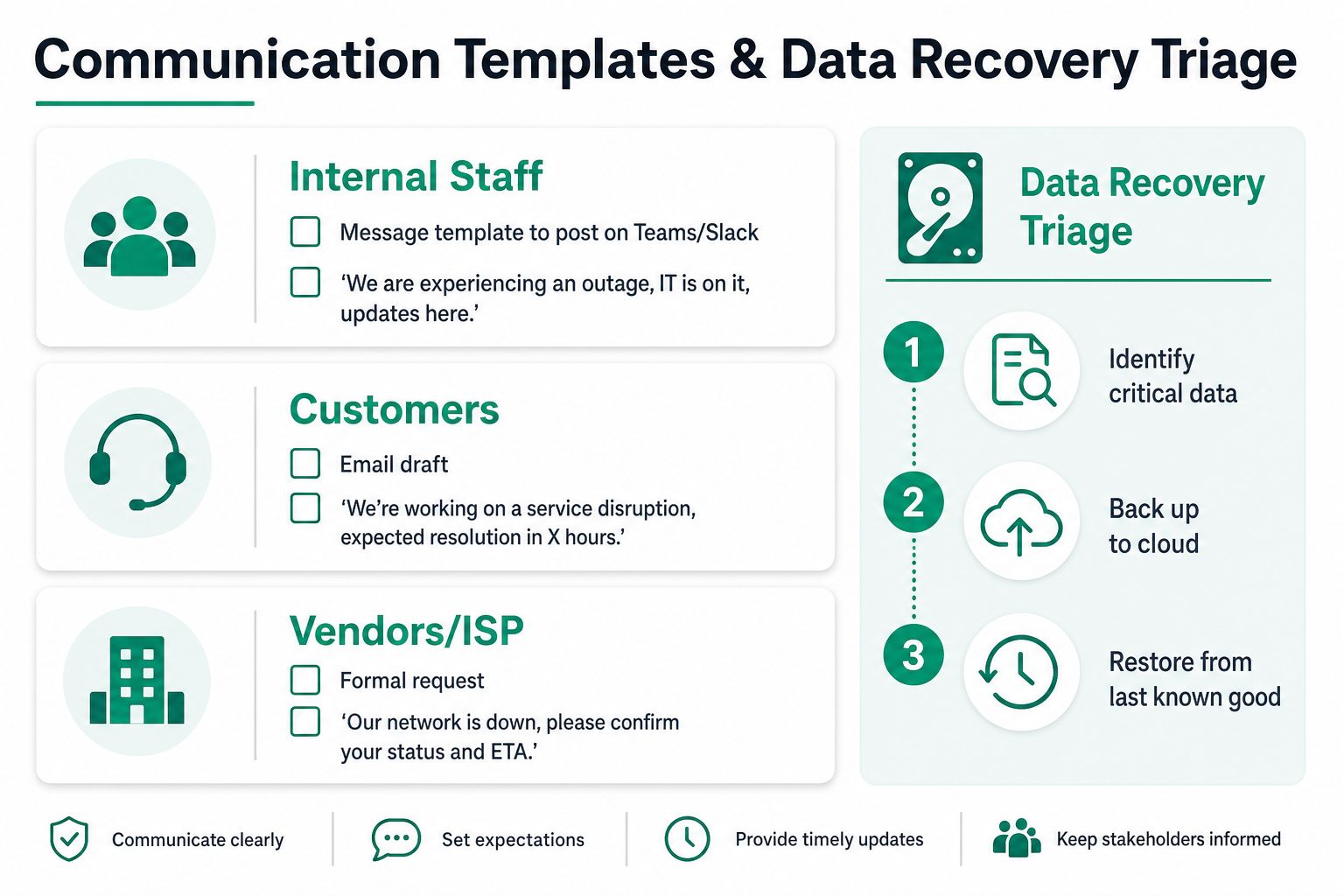
Data recovery starts when the hardware stops
If a drive clicks, grinds, disappears from the controller, or reports repeated read errors, power it down. Don't reboot it repeatedly. Photograph any ransomware note, including the screen, filename, timestamp, and contact instructions. Preserve the image as evidence, but don't contact the attacker or execute their instructions without a documented incident process.
Identify the latest clean backup and verify both its date and integrity. An immutable off-site backup protects against an attacker or administrator deleting the only usable copy, but it still needs a restore test. Check whether the backup contains the database, application data, permissions, and configuration required to resume work.
A tested image is usually the sensible recovery path when the storage hardware remains readable and the recovery point meets the business requirement. Bit-level data recovery through a cleanroom partner becomes more appropriate when the drive has mechanical failure, the storage controller can't read the media, or the missing data has no usable backup. It costs more and can take longer, but repeated attempts on damaged media can destroy the remaining chance of recovery.
Data is often inaccessible rather than gone. A failed permission database, disconnected volume, corrupted boot record, or damaged application index may hide intact files. True loss becomes more likely when the media has severe physical damage and no verified copy exists. Let a recovery specialist make that determination.
Turning a Crisis into a Hardening Plan
The truck leaving the parking lot isn't the finish line. It's the point where the business has enough information to stop repeating the same failure.
Start with a written timeline. Record the first symptom, first report, provider acknowledgment, containment action, restoration milestone, and final validation. Classify the root cause as hardware, software, network, identity, human error, security, vendor, or process. Name the failed control, not the technician. “The technician missed the warning” may be true, but “no alert monitored storage health” leads to a fix.
Build controls around the actual failure
A Greenwood or Indianapolis hardening plan should match the environment:
- Zero Trust architecture: Separate front-office workstations, guest Wi-Fi, administrative systems, cameras, and back-office servers. Users and devices should receive only the access their role requires.
- Bitdefender GravityZone: Roll out centrally managed endpoint protection with ransomware behavioral detection, policy control, and clear alert ownership.
- UniFi redesign: Replace aging switches, correct access point placement, document uplinks, and add latency-optimized mesh nodes only where wired connectivity isn't practical. Old brick buildings downtown punish weak radio planning.
- Immutable off-site backups: Keep protected copies outside the primary environment and test restores for the systems that matter to payroll, billing, patient records, or production.
- Identity controls: Enforce multifactor authentication, remove unused accounts, and review privileged access after staff changes.
For healthcare organizations, map the response and recovery controls to HIPAA safeguards. Defense contractors should consider CMMC requirements. General businesses can use the NIST CSF to organize governance, identification, protection, detection, response, and recovery without treating security as a pile of disconnected products.
The 30-day plan should assign an owner to each action. Week one can address patches and firmware. The next review should test backup restoration. Then examine access and MFA, followed by staff training focused on phishing, suspicious prompts, and reporting speed.
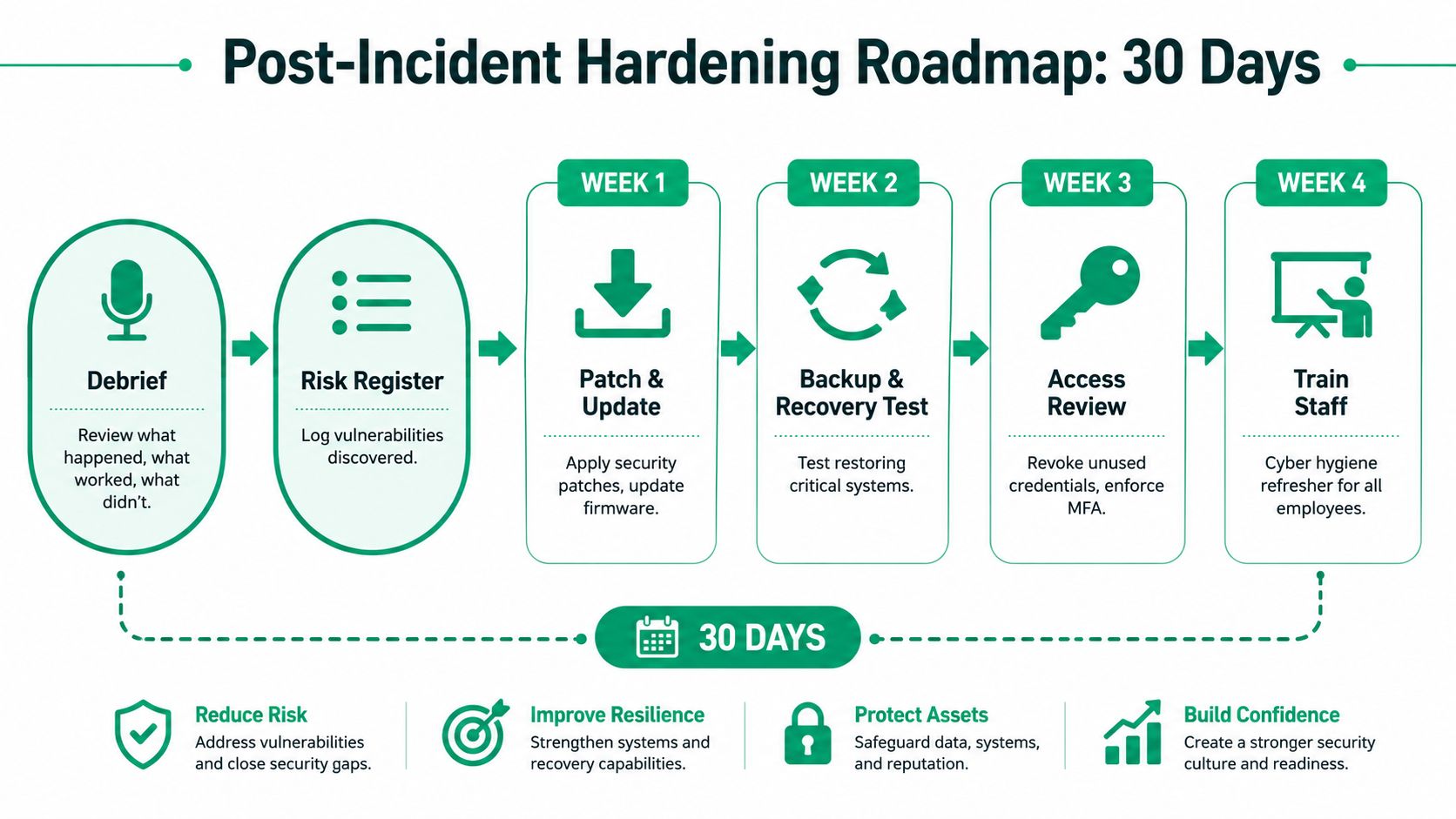
Measure whether the fix works
Track restore time, backup success, unresolved alerts, privileged accounts, patch status, and the results of phishing exercises. A security control that isn't monitored becomes a checkbox. A backup that hasn't been restored is an assumption.
In our 17 years of local service, the recurring pattern is familiar: an aging server in a Johnson County strip mall, a neglected switch cabinet, or a backup that was never tested. Finchum Fixes IT provides urgent technical support, cybersecurity, networking, data recovery, and managed IT services for Indiana businesses that need the next incident handled with less confusion and less lost work. A practical Indiana IT disaster recovery plan template can help turn the post-incident notes into assigned actions.
The next outage shouldn't be the first time you discover who has authority to shut down a server, where the clean backup lives, or which vendor owns the failing circuit. Greenwood business owners and Indianapolis teams can schedule a Free Network Assessment or Security Risk Audit with Finchum Fixes IT to identify fragile infrastructure, recovery gaps, and emergency response priorities before the next morning starts badly.