Find Your Example of an It Strategic Plan: 8 for Indiana

TL;DR
- Downtime hits revenue fast, so an IT strategic plan protects operations, cash flow, and customer trust.
- The strongest example of an IT strategic plan usually covers a three to five year horizon, with regular reviews as the business changes.
- For Central Indiana SMBs, the smartest plans usually focus on eight areas: Zero Trust security, hybrid cloud, disaster recovery, network upgrades, EDR plus SOC, compliance, automation, and managed IT support.
- Good plans tie projects to KPIs, budget, ownership, and risk reduction.
- Weak plans stay vague and miss common local problems like old building Wi-Fi, aging hardware, backup testing gaps, and compliance pressure.
- In Greenwood, Carmel, and Indy, the right plan turns lost time and surprise repair bills into steadier operations and clearer monthly costs.
IT failures rarely stay small. One bad switch, one dying server, or one missed backup job can stall payroll, phones, dispatch, and customer service in the same morning.
That is why an IT strategic plan matters. It gives a Central Indiana business a structured roadmap for what to fix first, what to budget next, and what can wait. I see this across Greenwood, Carmel, and Indianapolis all the time. Shops that treat IT like a break-fix chore stay stuck in expensive cycles. Shops that plan ahead usually recover faster, spend with more discipline, and make fewer rushed decisions.
A strong example of an IT strategic plan is not a glossy document built for a boardroom shelf. It connects business goals to specific systems, owners, timelines, and risks. It also has to hold up in practice here in Indiana. That might mean solving dead Wi-Fi zones in an older brick office near Madison Avenue, replacing workstations that should have been retired two budgets ago, or setting up access controls that fit how a growing team operates. If identity is part of the problem, start with the best identity and access management tools for SMBs before buying more security products.
The eight examples below are built for small and midsize businesses in Central Indiana. They cover cybersecurity, networking, cloud systems, disaster recovery, software strategy, and day-to-day IT support with clear business intent behind each one. The goal is simple. Give you practical templates that make sense for a Greenwood manufacturer, a Carmel professional office, or an Indy nonprofit dealing with aging infrastructure and limited internal IT time.
1. Zero Trust Security Architecture Strategic Plan
If your current security model says, “they're inside the network, so they must be safe,” that plan is already old.
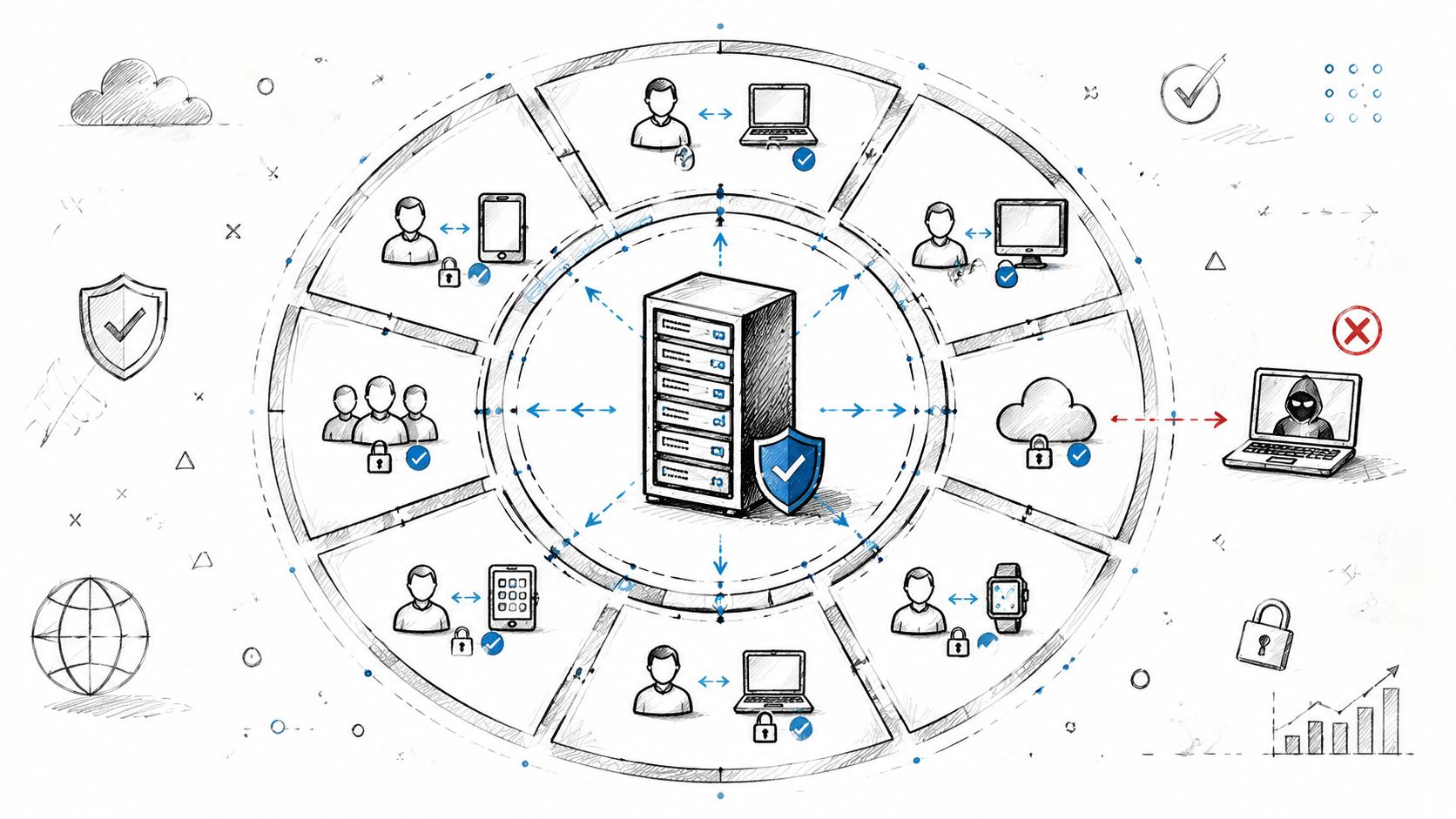
That's the problem I still see in offices around Greenwood and downtown Indy. Somebody logs in through VPN, reaches a file share, and suddenly the whole network acts like trust has been earned forever. Zero Trust flips that. Every user, device, and request gets verified continuously.
What goes in the plan
A practical Zero Trust plan for a Johnson County healthcare office or an Indy financial firm starts with identity, not firewalls. You inventory every endpoint, map traffic flows, turn on MFA, tighten least-privilege access, and segment the network so one compromised account can't wander into everything else.
For healthcare, that usually means wrapping tighter controls around EHR access and HIPAA-sensitive systems. For defense contractors, it lines up cleanly with CMMC expectations. For general business security, it gives you a cleaner path into NIST CSF maturity because access control, logging, verification, and segmentation are all front and center.
Practical rule: Start in report-only mode before enforcing segmentation rules. It's a lot cheaper to review blocked behavior than to break a line-of-business app on Monday morning.
What works in the real world
The strongest plans phase this in. Remote access first. Then admin accounts. Then server-to-server traffic. Then internal segments. Pair that with an EDR platform such as Bitdefender GravityZone or Microsoft Defender for Endpoint, plus SOC-as-a-Service monitoring to catch strange behavior fast.
What doesn't work is trying to secure everything at once with no asset map. That's how teams lock themselves out of printers, scan folders, and legacy apps that somebody in accounting still needs. If you need a starting point for tooling, this roundup of identity and access management tools is a solid place to compare options.
For a local manufacturer, I'd split operational technology from office IT right away. For a medical group, I'd make internal encryption, conditional access, and audit logging mandatory. Zero Trust isn't flashy. It just keeps one stolen password from turning into your worst week of the year.
2. Hybrid Cloud Migration and Multi-Cloud Strategy
Nearly every SMB I talk to around Greenwood and Indy is already paying for both worlds. They still maintain local servers, and they also pay for Microsoft 365, cloud backup, SaaS apps, or hosted line-of-business tools. The problem is not whether they use cloud. The problem is that they use it without a plan.
That gets expensive fast.
A manufacturer in Greenwood may need to keep an ERP system on-site because the software is old, the licensing is messy, or the plant floor cannot tolerate latency. A Carmel professional services firm usually has a different mix. Microsoft 365, cloud file storage, and a hosted line-of-business app often make more sense there. The right strategy is workload-by-workload, based on uptime, security, cost, and how the staff works.
The smart split between on-prem and cloud
Hybrid cloud works best when each system has a clear reason for where it lives. Keep latency-sensitive apps, specialty hardware dependencies, or hard-to-replace legacy systems local for now. Move collaboration tools, backup targets, disaster recovery replicas, and elastic workloads into Azure, AWS, or a private cloud where scaling is easier.
Multi-cloud can help too, but only when there is a business reason. I usually recommend it for one of three cases. You need to avoid putting every critical system with one vendor. You have a specific app that runs better in one platform than another. Or you want cleaner recovery options if a provider outage hits. If none of those apply, adding another cloud often adds more management overhead than value.
Old Indiana buildings add another wrinkle. Plenty of offices in downtown Indy, Broad Ripple, and older Greenwood properties still have weak cabling, patchy Wi-Fi, and server rooms that were clearly former supply closets. In those environments, pushing some workloads to the cloud can reduce local hardware strain. It does not fix bad connectivity. If the internet link is unstable, users will blame the cloud when the underlying issue is the building.
The trade-offs most plans ignore
Hybrid cloud gives a business flexibility, but it also creates more points of failure. Identity has to stay clean across on-prem Active Directory, Microsoft 365, and any third-party SaaS platform. Network routing has to be intentional. Backup policies have to cover local servers, cloud workloads, and the data hiding inside SaaS apps.
Performance matters too. If a cloud app constantly queries an on-prem database over a mediocre connection, staff will feel it in every screen load and report run. I have seen this in local accounting and distribution firms that moved the front end of an app but left the database in the server closet. On paper, they were "in the cloud." In practice, they built a slower system.
A better plan sorts every application into four buckets: keep, rehost, replace, or rebuild. That review should include business impact, not just technical fit. If your team needs a starting point, this business impact analysis template for prioritizing systems before migration helps separate mission-critical workloads from the stuff that can wait.
If you want a practical migration sequence for local SMBs, this guide on cloud migration best practices for Indiana businesses lays out the process clearly.
Written plans matter here because they prevent expensive half-migrations. Around the I-65 corridor, the companies that budget cloud moves properly usually avoid the worst mistakes: surprise bandwidth upgrades, duplicate licensing, emergency hardware purchases, and six-month projects that should have taken eight weeks.
3. Disaster Recovery and Business Continuity Plan
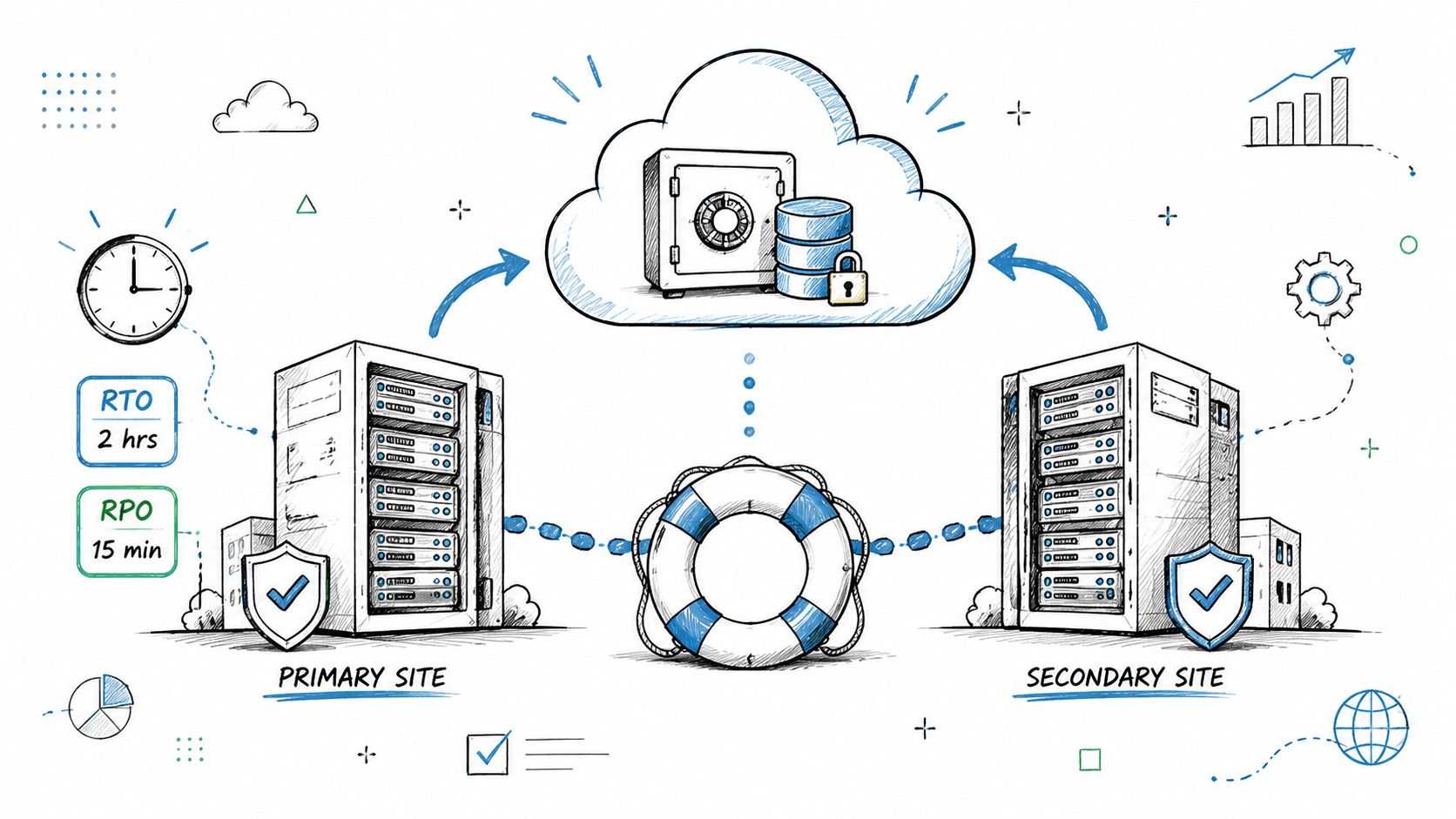
A surprising number of SMBs around Greenwood and Indy still treat "backups are running" as the whole plan. It isn't. A real recovery strategy spells out how the business keeps operating when the server closet floods, ransomware locks shared files, or a key app dies at 8:12 on a Monday.
Backups protect data. Business continuity protects the company.
What the plan should define
Start with recovery time objectives and recovery point objectives for each system. Payroll gets one target. ERP gets another. Email may tolerate a longer outage. A medical practice in Carmel has very different recovery requirements than a small manufacturer off Emerson or a distributor near I-465.
That is where a lot of Indiana SMBs get burned. They buy a backup appliance, set schedules, and assume they're covered. Then an outage hits and nobody has decided which systems come up first, who owns the restore, where clean copies live, or how remote staff reconnect if the office internet is down.
A usable plan for Central Indiana businesses usually includes immutable off-site backups, fast local image-based backups for bare-metal restores, documented failover options in a second location or cloud environment, and clear communication steps for staff and customers. If your office has dead zones or an older building that makes emergency remote work harder, this guide on improving Wi-Fi coverage for Indiana businesses helps close one of the gaps that often shows up during continuity testing.
What separates a real plan from a fake one
Testing.
Monthly restore checks catch bad jobs, corrupt backups, expired credentials, and storage problems before they become a crisis. Quarterly failover exercises show whether the written plan matches reality. I have seen firms in Greenwood discover during a test that the backup worked fine, but DNS records were outdated, firewall rules were missing, and no one had current admin access to a cloud tenant. The data was there. The business was still down.
Your runbook should be plain and specific. List the recovery order, credentials escrow process, vendor contacts, DNS settings, firewall configs, backup appliance access, SaaS admin accounts, and the exact steps users follow to get back in. Hidden dependencies are what stretch a two-hour incident into an all-day mess.
If nobody has performed a full restore lately, you don't have confidence. You have hope.
For budgeting, a business impact analysis template helps tie each system to downtime, labor disruption, missed revenue, and client impact. That gives owners in Greenwood, Carmel, and Indianapolis something better than vague "risk reduction." It gives them a plan they can price, test, and defend.
4. Network Infrastructure Modernization
Southside problem first. You've got a solid business in an older brick building near Greenwood. The walls are thick, the wiring is old, conference calls stutter, and the back office loses Wi-Fi every afternoon.
That's not an annoyance anymore. It's a productivity tax.
The right modernization template
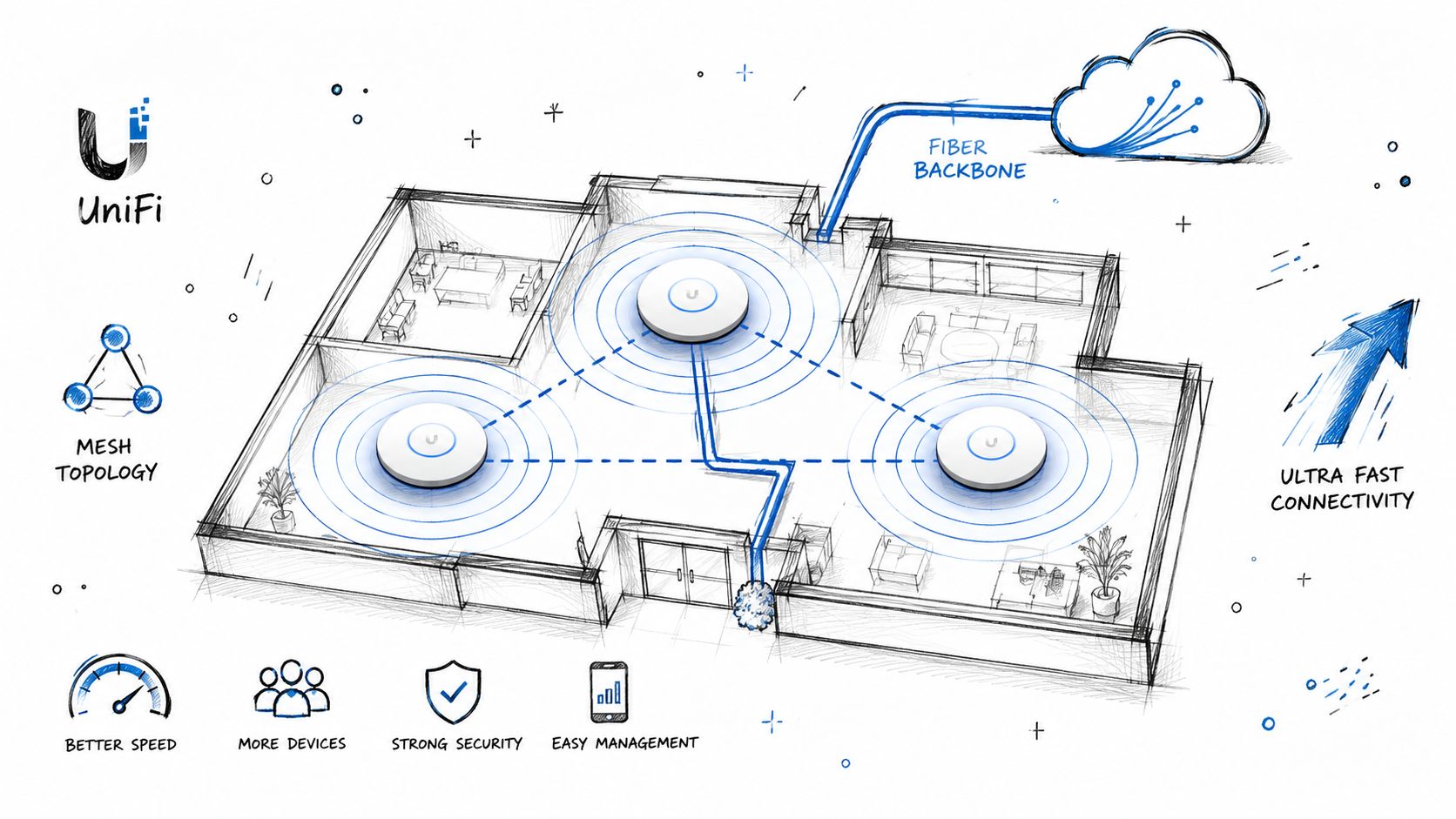
A strong network strategy replaces guesswork with design. That means a site survey, heat mapping, proper access point placement, VLAN segmentation, clean switching, and controller-based management. In many SMB environments, UniFi networking is a smart fit because it gives centralized visibility without enterprise pricing that makes owners flinch. In other sites, Cisco Meraki may make more sense.
If the building layout is hostile to signal, add latency-optimized mesh nodes where cabling isn't practical. If the backbone is weak, improve the wired side first. New access points won't save a network that still relies on tired switching or bad copper runs.
What to prioritize first
Use this sequence:
- Survey before buying: Run a proper Wi-Fi assessment so you're not solving dead zones with random hardware purchases.
- Segment traffic: Separate guest access, office traffic, cameras, VoIP, and IoT devices with VLANs.
- Tune for density: In dense offices, careful channel planning matters more than raw radio power.
- Manage centrally: Controller-based updates, logs, and SSID policies save hours later.
A lot of businesses around downtown Indy tech hubs and Hamilton County growth areas still try to patch together consumer gear. That approach dies the minute telemedicine, large file sync, cloud apps, and hybrid work all hit the same network. If your office is fighting that exact problem, this guide on improving Wi-Fi coverage for Indiana businesses is the practical next read.
Reliable networking isn't glamorous. But when your phones, cameras, cloud apps, and teams all depend on it, it's one of the clearest examples of an IT strategic plan paying for itself.
5. Managed Endpoint Detection and Response Plus SOC
Traditional antivirus still has a role, but by itself it's not enough. Attackers don't politely drop a known file signature and wait to be caught. They use stolen credentials, abuse legitimate tools, move laterally, and try to blend in.
That's where managed EDR plus a SOC changes the picture.
Why this belongs in the roadmap
Endpoint Detection and Response watches behavior, process activity, memory events, and suspicious connections on each endpoint. Pair it with a SOC-as-a-Service team and now somebody is reviewing alerts, triaging them, and deciding whether to quarantine, block, isolate, or escalate.
For SMBs in Greenwood and Indianapolis, this is often the fastest path to enterprise-grade visibility without hiring a full in-house security team. It also supports compliance work. HIPAA cares about safeguards and logging. CMMC cares about controlled access and monitoring. NIST CSF rewards mature detection and response practices.
What a good implementation looks like
The plan should require coverage on every endpoint, not just servers. User laptops are often where an attack starts. You baseline normal behavior, tune alert thresholds, define after-hours escalation rules, and set expectations for who acts when the SOC flags something serious.
One issue I see a lot is partial rollout. A company protects servers, forgets remote laptops, and then gets surprised when an attacker walks in through a salesperson's machine at a hotel. Another common failure is alert fatigue. If every harmless PowerShell action trips alarms, your team starts ignoring the console.
Field note: Good SOC reporting should tell you what changed, what got blocked, what needs a decision, and which trends justify next quarter's budget.
If you're mapping this into your stack, start with these endpoint security best practices for Indianapolis SMBs. Done right, EDR plus SOC turns vague cyber fear into a managed operating process with clear ownership and faster response.
6. Cybersecurity Compliance Roadmap
A compliance roadmap is where a lot of business owners either get serious or get burned.
Healthcare groups around Indy need HIPAA. Defense contractors need to think in CMMC terms. General businesses that want a sensible security structure often build around NIST CSF. None of those should live in a binder on a shelf. They should drive actual technical decisions.
How to make compliance useful
Start with a gap assessment. Not a fake one. A real review of access control, logging, encryption, endpoint management, email security, vendor risk, incident response, backup protection, and policy ownership. Then rank findings by business risk and implementation effort.
Many plans fail at this stage because they remain abstract. One of the sharper points coming out of IT manager discussions is that many strategic plans still don't tie work to measurable outcomes, and 68% of IT strategic plans lack measurable outcomes tied to organizational success. That's exactly why budget requests get challenged.
What belongs on the roadmap
A practical compliance roadmap should include:
- Access controls: MFA, role-based access, and privileged account review.
- Email security: SPF, DKIM, and DMARC matter more than most firms realize, especially for impersonation defense. For that piece, solid email authentication guidance is worth reviewing.
- Logging and evidence: Keep logs where auditors and investigators can effectively use them.
- Backup resilience: Immutable off-site backups support both recovery and audit confidence.
- Policy to platform mapping: Every written requirement should connect to a real system or process.
For a Greenwood clinic, that may mean HIPAA-aligned device encryption and access review. For a machine shop serving defense work along the I-65 corridor, it may mean documenting controls in a way that supports CMMC readiness. Compliance isn't just about avoiding pain. It's often the cleanest way to standardize security across the business.
7. AI-Powered Automation and Custom Software Development Strategy
Some of the worst waste in SMB IT isn't flashy. It's small, daily drag. Staff retyping forms. Managers chasing approvals in email. Teams exporting CSVs from one app and uploading them into another. That kind of waste bleeds hours.
A strong automation strategy fixes the process first, then the toolset.
Where automation actually pays off
Start by finding repetitive workflows with clear inputs, outputs, and owners. Good candidates include invoice handling, onboarding tasks, service desk triage, quote generation, intake forms, and data sync between systems. For lighter needs, Power Automate or Zapier may be enough. For custom workflows, a Python or Node.js backend with a React front end gives you room to build a custom solution.
This part of the roadmap should also spell out what stays human. Approvals with legal risk, financial signoff, and edge-case exceptions still need people involved. Automation helps when rules are clear. It creates a mess when the process itself is already broken.
Tie software work to business goals
An effective example of an IT strategic plan doesn't just say “use AI.” It ties each build to business outcomes, owner, timeline, and operational metric. That aligns with the standard six-step strategic planning framework that includes defining goals, assessing current capability, identifying weaknesses, selecting initiatives, setting a timeline, and measuring with KPIs. That same framework also points to a three-year horizon and measurable goals such as increasing operational efficiency by 20%, boosting business revenue by 30%, reducing IT spending by 25%, and accelerating employee onboarding by 20% when the plan is structured well, according to this IT strategy plan example framework.
I've seen local firms waste money by commissioning oversized custom platforms before documenting the workflow. Don't do that. Build the smallest useful version first, then improve it once users prove what they need.
For teams exploring fast internal tools and prototypes, it's worth exploring Appjet.ai's platform as one option in the broader build-versus-buy discussion.
8. Managed IT Services Contract With Tiered Support and SLAs
For a lot of Central Indiana SMBs, outsourced IT beats hiring a full internal team too early.
That is especially true for companies in Greenwood, Carmel, and Indy that need day-to-day coverage but cannot justify a full bench of specialists for security, cloud, networking, support, and vendor management. A good managed IT contract gives you predictable support, documented response times, and someone accountable when the office Wi-Fi drops in a 1970s brick building off Madison Avenue or a server dies during month-end.
Why this model works for SMBs
True value lies in execution.
A strategy only helps if someone owns the work, answers tickets, patches systems on schedule, tracks backups, and pushes projects over the finish line. Managed IT fills that gap. It gives smaller companies a delivery team with defined responsibilities instead of informal support that depends on one overloaded employee or a break-fix vendor who shows up after the problem has already cost you money.
That structure matters. So do the trade-offs. You give up some direct control, and a weak provider can bury you in vague reports and contract language. The answer is not avoiding managed services. It is buying a contract that spells out scope, priorities, escalation paths, and business review cadence in plain English.
What to demand before signing
Use this checklist before you sign:
- Response standards: Define first response times, escalation rules, and who owns after-hours incidents.
- Tiered support: Separate basic help desk, advanced engineering, security work, and project labor so you know what is included and what triggers extra billing.
- Security visibility: Require access to backup status, endpoint health, patch compliance, and major alerts.
- Quarterly planning: Ask for business reviews tied to refresh cycles, risk, and budget, not just closed ticket counts.
- Local fit: A provider serving Johnson County should understand old office layouts, spotty cabling, small warehouse networks, and the practicalities of getting parts and onsite help quickly around Indy.
- Recovery capability: Ask what happens during an actual failure. If a RAID array degrades or a line-of-business server will not boot, you need more than password resets and script reading.
One more point gets missed all the time. The SLA should define what “resolved” means. Closing a ticket because the printer came back online for ten minutes is not resolution. The issue is resolved when the root cause is identified, documented, and fixed well enough that it stays fixed.
A strong contract also separates support from improvement work. Password resets, patching, backup checks, and user adds belong in the monthly agreement. Firewall replacements, office moves, major Microsoft 365 cleanup, and network redesign usually belong in scoped projects. If those lines are blurry, expect billing fights.
For firms building internal tools alongside managed support, it can also help to explore Appjet.ai's platform as one option for lightweight apps and prototypes without forcing your MSP to become a custom software shop.
The best local contracts are boring in the right way. Clear SLAs. Clear ownership. Clear limits. That is how a Greenwood manufacturer, a Carmel professional office, or an Indy nonprofit gets predictable IT costs and fewer ugly surprises.
8-Point IT Strategic Plan Comparison
| Solution | Implementation Complexity 🔄 | Resource & Cost ⚡ | Expected Outcomes / Impact 📊 ⭐ | Ideal Use Cases 💡 |
|---|---|---|---|---|
| Zero Trust Security Architecture Strategic Plan | High, phased 6–12 weeks, micro‑segmentation & continuous tuning 🔄 | Upfront $15K–$40K + ongoing EDR/SOC subscriptions and training ⚡ | Containment of breaches (~95% reduction), minutes‑level response, strong compliance alignment 📊⭐ | Healthcare, finance, hybrid workforces, third‑party access |
| Hybrid Cloud Migration & Multi‑Cloud Strategy | Medium–High, app assessment, lift‑and‑shift & refactor efforts 🔄 | Migration effort + ongoing cloud spend; capex cut 60–70% but finops required ⚡ | Elastic scaling, disaster recovery readiness, typical ROI 2–3 years 📊⭐ | Mixed legacy + cloud workloads, compliance‑sensitive data, seasonal scale |
| Comprehensive Disaster Recovery & Business Continuity Plan | Medium, RTO/RPO definition, DR sites, regular testing 🔄 | Ongoing standby costs $2K–$8K/month; testing and bandwidth expenses ⚡ | Minimized downtime (minutes vs hours), immutable backups, regulatory compliance 📊⭐ | Manufacturing, healthcare, e‑commerce, any high‑downtime cost environment |
| Network Infrastructure Modernization (Wi‑Fi 6E, Mesh, UniFi) | Medium, site surveys, cabling, AP placement and tuning 🔄 | Capex $15K–$50K depending on building; installation disruption ⚡ | 3–5x throughput, fewer dead zones, productivity +15–20% 📊⭐ | Older buildings, hybrid workplaces, video/VoIP heavy offices, IoT deployments |
| Managed Endpoint Detection & Response (EDR) + SOC | Low–Medium, agent rollout, baseline tuning, SOC integration 🔄 | Subscription $8–$15 per endpoint/month; SOC adds predictable monthly cost ⚡ | Faster detection (<1 day → minutes), prevents lateral movement, audit logs 📊⭐ | SMBs without security staff, regulated providers, firms needing 24/7 monitoring |
| Cybersecurity Compliance Roadmap (HIPAA, CMMC, NIST CSF) | Medium, gap assessments, remediation plans, audits 🔄 | Annual audits $5K–$25K; compliance officer/contractor costs ongoing ⚡ | Avoids fines, enables contract eligibility (CMMC), improves security posture 📊⭐ | Healthcare, defense contractors, firms bidding on regulated contracts |
| AI‑Powered Automation & Custom Software Strategy | Medium, process discovery, RPA/AI integration or custom dev 🔄 | Development $20K–$100K+; ROI 6–18 months; maintenance required ⚡ | Labor savings, faster throughput, fewer errors; scalable operations 📊⭐ | High‑volume repetitive workflows, document processing, invoice/claims automation |
| Managed IT Services (MSP) with Tiered SLAs | Low–Medium, vendor onboarding, SLA negotiation, transition 🔄 | $150–$400 per user/month for SMBs vs ~$120K/year for single hire ⚡ | Predictable OPEX, faster response SLAs, built‑in redundancy and advisory 📊⭐ | Small–mid businesses lacking internal IT, firms needing predictable support |
Stop Reacting. Start Planning.
Businesses that plan their IT spend and priorities usually waste less time on avoidable fires. That matters in Central Indiana, where a single aging switch, bad backup job, or dead access point in an older Greenwood office can throw off a full day of work.
A real IT strategic plan gives you an order of operations. It shows what to secure first, what to replace next, what to keep for now, and where each dollar should go. For SMBs in Greenwood, Carmel, and Indianapolis, that kind of clarity keeps IT tied to revenue, staffing, service delivery, and risk instead of whoever complained loudest this week.
The practical timeframe is usually three to five years, reviewed every year. That is long enough to budget for server replacements, cloud migrations, wireless upgrades, and security tooling. It is also short enough to adjust when your business adds a location, takes on compliance requirements, or outgrows old hardware that should have been retired two budget cycles ago.
The eight examples in this article work because they solve different problems without pretending every company needs the same stack. A medical office near Indy may need tighter access controls and a clearer HIPAA roadmap. A manufacturer in Greenwood may care more about uptime, backup testing, and replacing hardware before it fails on a Monday morning. A growing Carmel firm with a small internal IT team may get the best return from managed support with clear SLAs and outside security monitoring.
That is the point. Good strategy is specific.
It accounts for old building Wi-Fi that never handled modern device density. It accounts for line-of-business apps that cannot move to the cloud overnight. It accounts for budgets that are real, not theoretical. The best plan is the one your team can execute, measure, and update.
Finchum Fixes IT offers a complimentary, no-obligation Free Network Assessment and Security Risk Audit for businesses in the Greenwood and greater Indianapolis area. We identify weak spots, rank the biggest operational risks, and map out a practical path using the systems you already have and the upgrades you need. If your backups have not been tested, your firewall rules have grown messy, your compliance posture is unclear, or your network in that older brick building off Main Street keeps dropping calls, now is a good time to fix it.
If you're a business owner in Greenwood, Indianapolis, Carmel, or anywhere nearby, Finchum Fixes IT can help you turn a messy IT environment into a practical roadmap with better security, stronger continuity, and fewer surprise outages. Schedule a Free Network Assessment or Security Risk Audit and get a clear picture of what needs attention first.