Google Workspace Setup for Indiana Businesses
A lot of Indiana business owners are in the same spot right now. There's an old server humming in a back room, somebody's shared drive has turned into a junk drawer, email is tied to old habits nobody trusts, and every tech hiccup steals time from real work. The problem usually isn't one dramatic failure. It's the steady drag of small interruptions, avoidable risk, and staff burning hours on systems that should've been retired years ago.
That's where a proper Google Workspace setup changes the conversation. Done right, it replaces brittle on-prem hardware with a cleaner operating model for email, files, meetings, identity, and policy control. Done poorly, it creates mail outages, broken logins, sync messes, and angry users by Friday afternoon. For Johnson County business owners, the difference comes down to planning, sequencing, and security discipline.
A cloud migration isn't a software purchase. It's a business continuity project with usernames attached.
TL;DR
- Old server setups create downtime risk: Every outage pulls owners and staff away from revenue work, and downtime can cost up to $9,000 per minute.
- Google Workspace setup is a phased project: Start with domain verification, DNS, user structure, and migration planning before touching cutover.
- For many SMBs, Business Standard fits well: Google notes it supports up to 300 users in its setup guidance.
- Security isn't optional: Enable 2-Step Verification, publish SPF, DKIM, and DMARC, and lock down admin roles early.
- DIY often gets expensive fast: Lost time, migration mistakes, and cleanup work usually cost more than a managed rollout with a predictable budget.
Is Your Old Server Holding Your Business Hostage
In Greenwood and across the I-65 corridor, I still walk into offices where the “server room” is a janitor closet with a tower server, dusty UPS, and a prayer. It's loud, hot, overdue for replacement, and everybody knows it. Nobody wants to be the one there when it finally quits.

The owner usually says some version of the same thing. “It still works, mostly.” That word, mostly, is where the cost lives. One flaky mail server, one failed drive, one bad login issue, and your office stops acting like a business and starts acting like a help desk.
The real cost isn't the hardware
Business continuity holds greater importance than the gear itself. If your team can't access email, calendars, shared files, or line-of-business documents, work stalls. Phones still ring, customers still need answers, and your staff starts improvising around the outage. That's expensive. The author brief is right to frame it bluntly. Downtime can cost up to $9,000 per minute.
For a lot of small and midsize companies, Google Workspace is appealing because it moves core collaboration off that aging box in the closet and into a predictable monthly operating expense. That's usually a better business decision than waiting for a server, RAID controller, or backup appliance to force your hand.
If you're retiring hardware as part of the move, it helps to review IT asset recovery essentials before anything leaves the building. Too many businesses wipe data inconsistently, forget chain-of-custody, or keep dead gear piled up in storage for no good reason.
Modernizing without breaking the shop
The trap is thinking Google Workspace setup is just “make some accounts and move email.” It isn't. It touches identity, security, document access, mobile devices, and how your people work day to day.
That's why older platform transitions go smoother when owners think in terms of modernization, not just migration. If that broader shift is on your radar, this guide on legacy system modernization strategies that drive business growth is worth reading alongside your cloud plan.
Practical rule: If your current system depends on one aging server and one employee who “knows how it works,” your business is carrying concentrated risk.
A clean Google Workspace setup gives you a chance to fix old problems permanently. Not cosmetically. Permanently. You can standardize file ownership, reset sharing habits, tighten authentication, and stop treating email as a machine in a closet.
The Blueprint Before You Build Your Workspace
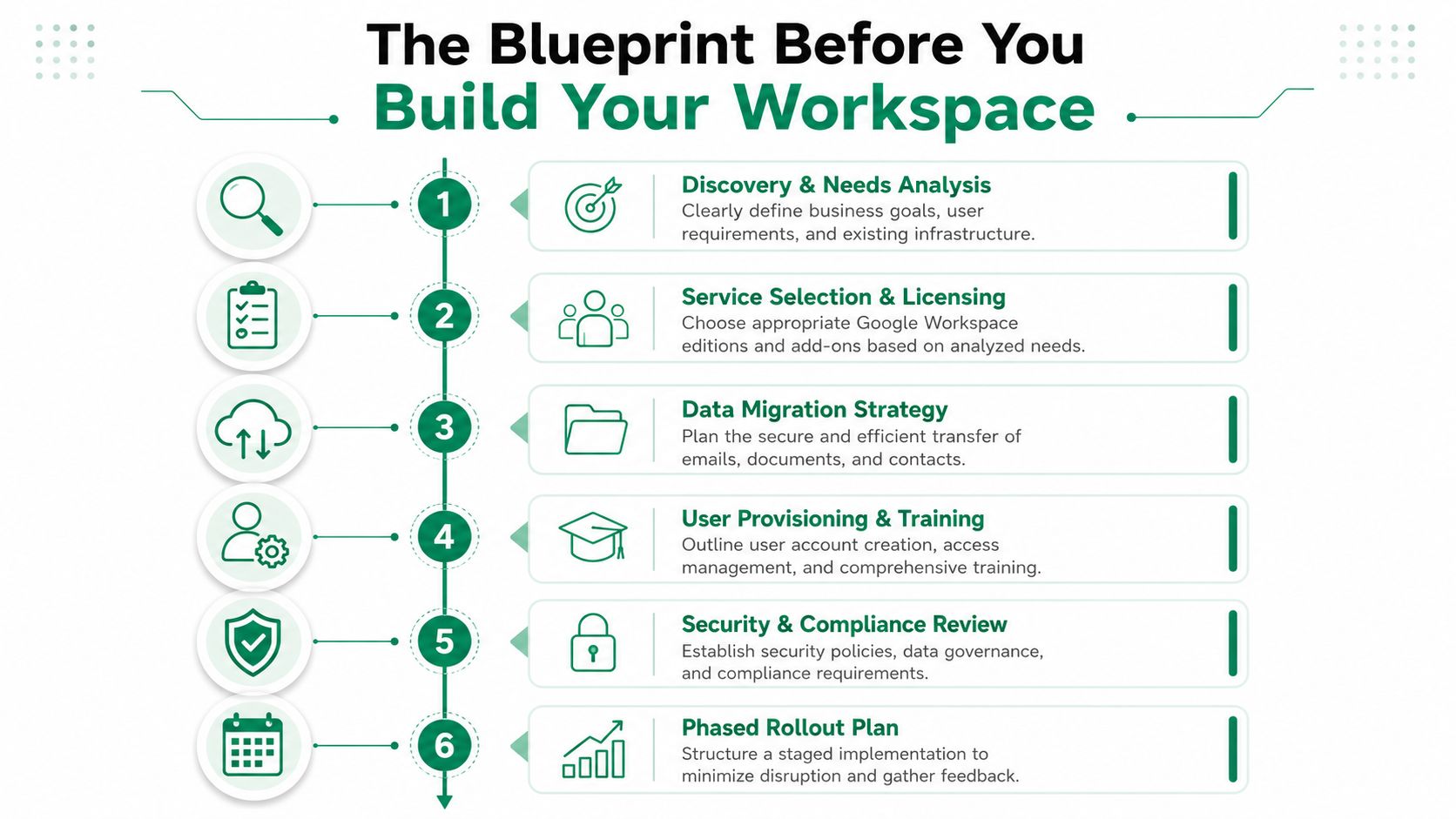
Most bad migrations start with optimism and no blueprint. Somebody signs up, pokes around the admin panel, buys licenses, and assumes the rest will sort itself out. Then DNS gets changed at the wrong time, users are created with the wrong naming scheme, and file permissions turn into a scavenger hunt.
A better Google Workspace setup starts on paper. Before anyone clicks anything, decide what's being moved, who owns the project, which users need what access, and how cutover will happen without kneecapping the business.
Pick the right edition first
Google's own setup guidance distinguishes between smaller deployments and larger rollouts. It also notes that Business Standard supports up to 300 users and is often the practical starting point for many small and midsize businesses, while organizations with 300+ users are pointed toward a 90-day rollout plan in Google's official guidance (Google Workspace setup guidance).
That matters because it tells you something operational, not just commercial. Up to that threshold, many Indiana SMBs can stay out of enterprise-grade deployment complexity if they plan carefully. Past it, governance, migration sequencing, user communication, and testing need a more formal project rhythm.
What should be decided before purchase
You don't need a giant PMO binder. You do need answers to the basics.
- Naming standards matter: Decide user naming, aliases, groups, and shared mailbox replacements before accounts go live.
- Data scope matters more: Not every dusty archive needs to move on day one. Keep active data and compliance needs at the center.
- Ownership must be explicit: Assign an internal decision-maker who can approve changes fast.
- Support path needs to exist: Users need to know who to call when mail on a phone stops syncing or Drive access looks wrong.
A lot of this planning ties directly back to DNS and identity. If the records behind your domain feel murky, get clear on the basics first with this plain-English guide to what DNS is and how it works.
A phased rollout beats a heroic weekend
The small-business mistake is trying to compress the whole migration into one late-night sprint. That usually creates Monday morning surprises. A phased approach works better because it gives you time to validate mail flow, test sharing, confirm permissions, and fix edge cases before they hit everybody.
Here's the pattern that tends to work in practice:
| Phase | Focus | Why it matters |
|---|---|---|
| Planning | Scope, users, data, devices, compliance | Prevents random decision-making |
| Foundation | Domain, admin roles, DNS prep | Keeps cutover controlled |
| Pilot | Small user group first | Catches problems before broad impact |
| Rollout | Department by department or staged user sets | Reduces disruption |
| Stabilization | Support, training, cleanup | Turns adoption into ROI |
The businesses that get the best return aren't the ones moving fastest. They're the ones creating the fewest surprises.
For Greenwood shops, downtown Indy professional firms, and growing Hamilton County teams, the ROI comes from avoiding rework. Every hour your office manager spends untangling access issues is an hour not spent on billing, payroll, scheduling, or customer communication. Planning is how you convert wasted tech time into productive time.
Laying the Digital Foundation with Domains and Users
The first real gate in a Google Workspace setup is proving you own your domain. Until that's done, the rest is just drafting on a whiteboard. Google typically uses a TXT record for domain ownership checks, and common admin guidance describes the wait as 15 to 60 minutes in many cases, though DNS propagation can take longer depending on the provider and environment (day-by-day small business setup pattern).
That timing catches people off guard. Business owners expect instant results because the admin console is fast. DNS doesn't care about your schedule.
Start with structure, not user creation
Before adding accounts, set up your organizational logic. Departments, locations, leadership, field teams, shared devices, and contractors should all have a place in the structure. In Google terms, that usually means thinking carefully about Organizational Units before provisioning users.
If your company is coming from a Windows domain environment, it helps to map old habits to new controls. This explainer on Active Directory management for Indy SMBs is useful because it highlights the access-control mindset many businesses need to carry over.
A staged sequence saves cleanup later
One practical implementation pattern is simple and effective:
- Day 1: Sign up and verify the domain.
- Day 2: Configure email-related DNS and core user accounts.
- Next steps: Move into collaboration settings and security hardening after the basics are stable.
That sequence works because each layer depends on the one before it. If you create everybody first and fix structure later, you end up changing permissions, groups, and exceptions after users are already working. That's backwards.
For larger user lists, admins can provision accounts individually or use CSV imports. Google's education quickstart notes support for up to 500 users per CSV batch after the organizational structure is defined (Google's quickstart for user provisioning).
Where DIY admins usually trip
I see the same foundation mistakes repeatedly:
- Users created before OUs: Permissions become inconsistent and harder to audit.
- Old aliases ignored: Mail stops reaching addresses people still hand out to customers.
- Too many super admins: Convenience wins early, then security loses later.
- No migration map: Shared folders and old mail archives end up orphaned.
If you want a practical outside perspective on sequencing the move itself, this piece on planning Google Workspace migration is worth a look.
Build the org chart in the platform before you invite people into it. Cleaning up after live users is always slower.
For local SMBs, this is the stage where the project still feels calm. Keep it that way. Domain first. Structure second. Accounts after that. Not the other way around.
Securing Your New Digital Headquarters
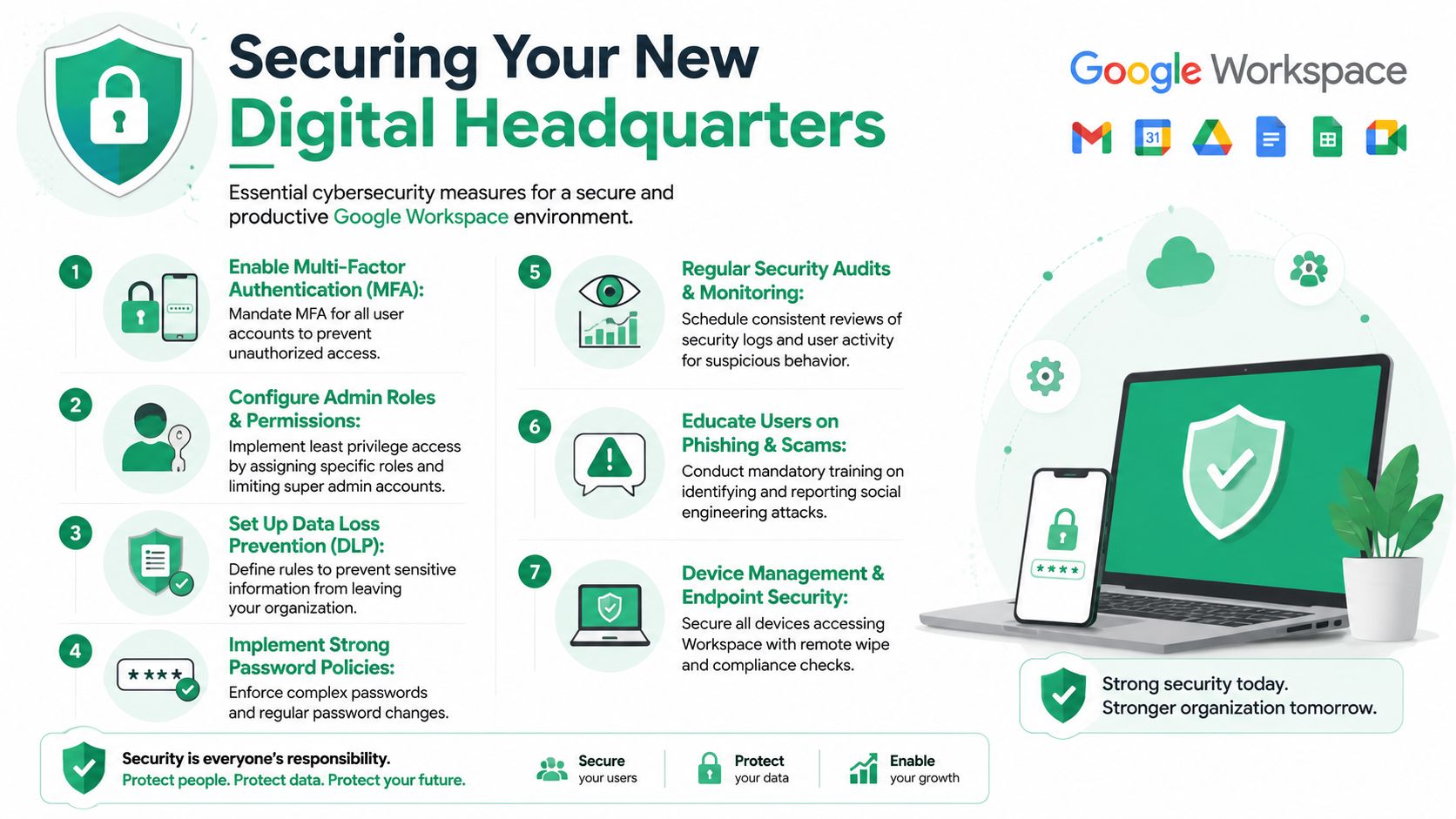
A Google Workspace setup that isn't locked down from the start is just a cleaner-looking risk surface. New cloud tools don't magically create security. They give you better places to enforce it, if you do the work.
For healthcare offices dealing with HIPAA, defense-adjacent shops thinking about CMMC, and general businesses following a NIST CSF mindset, the baseline is the same. Identity comes first. Access should be intentional. Email trust has to be established, not assumed.
Two-Step Verification is not optional
If there's one setting that should never be treated as “we'll get to it later,” it's 2-Step Verification. Passwords get reused, phished, guessed, and exposed. A second factor changes the economics for attackers fast.
That's not just checkbox security. It's part of a Zero Trust architecture mindset. Every login should prove itself. Every admin account should be tightly controlled. Every privilege should be justified.
If you want a practical checklist for rollout and enforcement, this guide to multi-factor authentication best practices complements a Workspace deployment well.
SPF, DKIM, and DMARC protect your reputation
These three records are where many DIY setups get sloppy. Then the owner starts asking why sent mail lands in spam, why customers received fake invoices from a lookalike address, or why the domain suddenly looks suspicious to other mail systems.
Here's the plain-English version:
- SPF helps receiving servers understand which systems are allowed to send mail for your domain.
- DKIM cryptographically signs outgoing mail so recipients can validate authenticity.
- DMARC tells receiving systems how to handle messages that fail those checks and gives your business visibility into spoofing attempts.
Google Workspace admins generate the DKIM key inside the Admin Console, then publish the record in DNS. Practical guidance notes that administrators should plan for 24 to 48 hours of propagation before DKIM can be fully activated and tested (secure DNS setup guidance).
That delay matters. If you don't account for it, you'll test too soon, assume something is broken, and start making unnecessary changes.
Field note: Email authentication records are not “advanced extras.” They're part of the minimum responsible setup for a business domain.
Security controls that pay for themselves
Security done right supports uptime and ROI. It keeps staff from losing access, reduces account compromise risk, and protects the trust attached to your domain.
A practical starting stack looks like this:
| Control | Business reason |
|---|---|
| 2-Step Verification | Stops many account takeover attempts from becoming incidents |
| Limited admin roles | Reduces blast radius when one account is compromised |
| Email authentication | Protects brand trust and deliverability |
| Sharing controls | Keeps sensitive files from drifting outside the business |
| Endpoint standards | Aligns user devices with your access policy |
If you're already running Bitdefender GravityZone on endpoints, SOC-as-a-Service monitoring, or conditional access through another identity layer, tie Workspace into that model. Don't leave it as the loose plank in the floor.
Common Pitfalls and Advanced Configurations
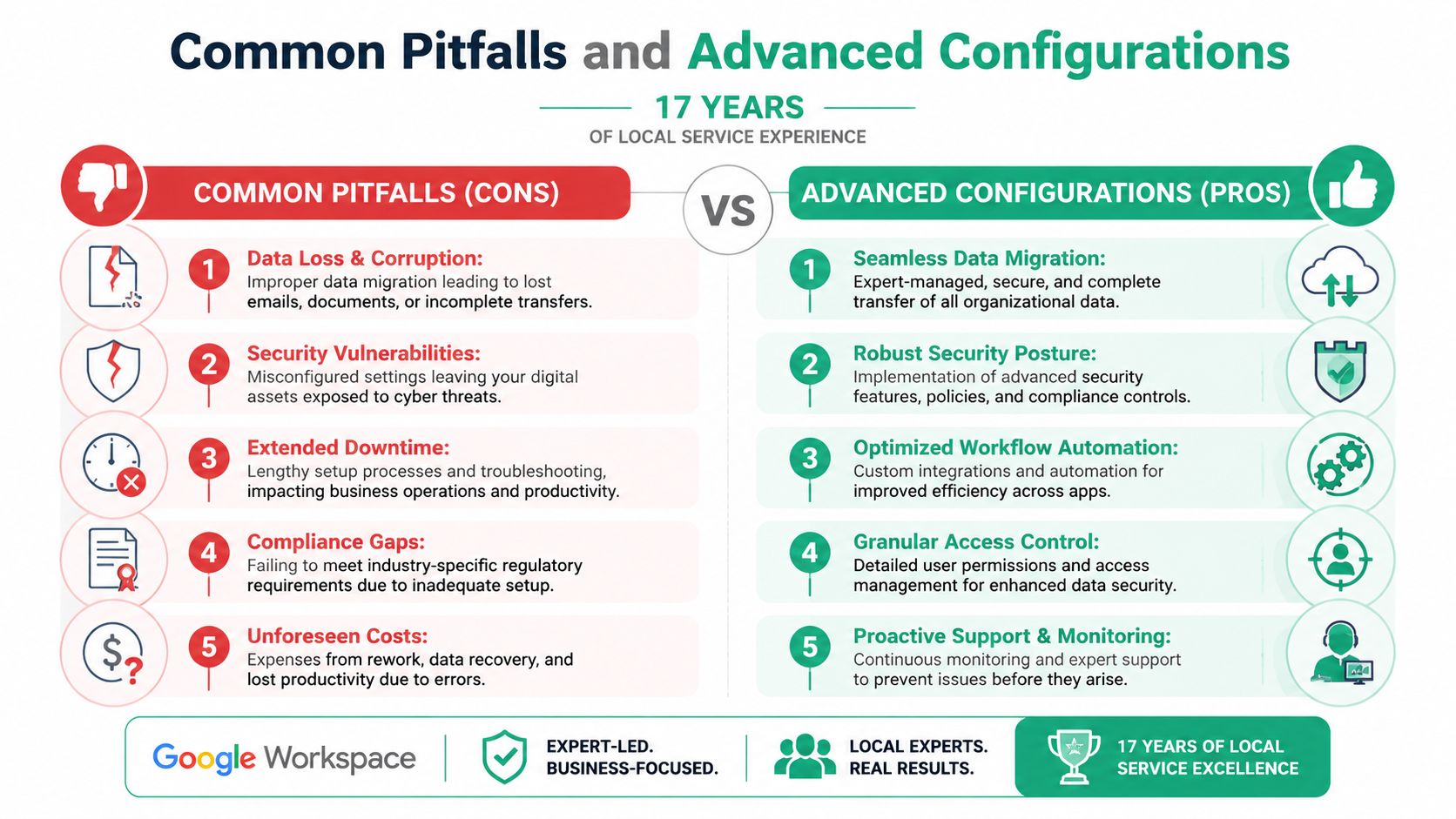
In our 17 years of local service, the ugliest Google Workspace recoveries haven't come from Google failing. They've come from rushed decisions around migration, permissions, and device policy overlap. A platform can be solid and the rollout can still be a mess.
That's especially true in older Indy metro buildings with mixed Wi-Fi, roaming users, and a blend of company-owned and personally owned devices. The environment is never as clean as a setup wizard suggests.
Migration mistakes create long-tail problems
The obvious failures get noticed fast. Missing email. Broken calendars. Lost contacts. The more dangerous failures are quieter. Wrong document ownership. Shared folders nobody can access after an employee leaves. Conflicting retention expectations. Field staff opening stale files because sync behavior was never explained.
Those aren't “cloud issues.” They're project issues.
A better migration approach separates active data from junk, maps ownership before moving files, and validates business-critical items with department leads before cutover. If a medical practice, law office, or contractor has records tied to compliance expectations, migration has to follow that reality. You can't improvise around HIPAA sensitivity or CMMC documentation just because the old file share is messy.
The MDM conflict most guides skip
One of the more nuanced problems shows up when a business already uses another EMM or MDM platform for phones, tablets, or laptops. In that setup, Google Endpoint Management can become a source of conflict if it's left partially on.
Third-party admin guidance is clear on this point. For organizational units managed by another EMM, Google Endpoint Management should be fully turned off, not merely set to Basic, because Basic can still apply policies and collect inventory, which can trigger conflicts and enrollment confusion (Workspace with third-party EMM setup guidance).
That sounds like a small checkbox. It isn't. It can cause duplicate policy enforcement, enrollment loops, and inconsistent compliance reporting. For businesses running Microsoft Intune, another EMM, or a layered device strategy, that detail matters a lot.
If two systems think they're in charge of the same phone, the user loses and support tickets multiply.
Google Workspace is not your backup strategy
This is another place where owners get surprised. Cloud access is not the same thing as independent backup. If a file is deleted, maliciously encrypted from a synced endpoint, or retained incorrectly, your recovery options may not meet your business continuity needs.
For true resilience, many businesses pair Workspace with immutable off-site backups and clear retention policies. That matters even more for firms under compliance pressure or with thin tolerance for data loss. The same mindset applies whether you're protecting email, shared drives, or exported records needed for audits and legal holds.
If your environment also includes UniFi networking, remote users, and mixed endpoints, treat Workspace as one layer in a broader stack. Security, backup, identity, endpoint control, and monitoring have to agree with each other.
When DIY Costs More Than a Managed Setup
A lot of owners try to save money on Google Workspace setup by assigning it to the most tech-comfortable person in the office. That's usually the controller, operations manager, or “the guy who used to build PCs.” Good intentions. Bad economics.
While they're wrestling with DNS timing, user imports, mail cutover, shared drive cleanup, phone enrollment issues, and security settings, they're not doing the work you employ them to do. That's the hidden cost of DIY. It doesn't show up as a line item. It shows up as delayed billing, distracted staff, and support chaos after go-live.
Predictable cost beats open-ended cleanup
A managed setup usually costs less than the combination of internal labor, disruption, and post-migration repair work. It also gives you a sequence that protects uptime. Plan first. Pilot the right users. Lock down security. Validate mail flow. Support users after cutover. That's how you keep a migration from turning into a week of apologies.
If you're weighing your options, this article on how to choose a managed service provider is a solid starting point for evaluating who should handle the project.
What good help actually changes
Professional setup isn't about paying someone to click faster. It's about lowering risk and reducing interruption.
- Less downtime: Cutover happens in a controlled sequence, not a panic.
- Better security: Identity, email authentication, and role separation are built in early.
- Cleaner adoption: Users get a system that makes sense on day one.
- Stronger continuity: Backup, policy, and endpoint considerations are handled as part of the environment, not after an incident.
That's the ROI. Fewer surprises. Faster user adoption. More billable time preserved. A monthly budget you can forecast instead of an outage you can't.
Google Workspace can absolutely be the right move for an Indiana SMB. But the value comes from the setup, not the logo on the sign-in page.
If your business is in Greenwood, Indianapolis, or anywhere along the I-65 corridor, Finchum Fixes IT can help you make the move without the usual DNS mistakes, security gaps, and migration cleanup that burn time and money. If you want a straight answer on what your environment needs, schedule a Free Network Assessment or Security Risk Audit and get a practical plan built around uptime, compliance, and a predictable budget.