IT Managed Services: A Guide for Indiana Businesses
Many Indiana business owners face the same situation today. The office depends on email, cloud applications, printers, file shares, phones, Wi-Fi, and several line-of-business systems that no one wants to modify because "that server still works." Then a difficult Monday arrives. The server freezes. Wireless connectivity fails in the back office. Microsoft 365 begins timing out. An employee opens a dangerous attachment. Suddenly, the primary issue is not technology. It is payroll, scheduling, customer service, and whether your team can perform any productive work before lunch.
That's why it managed services matter. Not as a fancy IT label. As a practical way to keep a Greenwood clinic, a Johnson County manufacturer, or a downtown Indy law office running without the constant drama of reactive support.
Your Business Runs on Tech So Who Is Running Your Tech
TL;DR
- it managed services means ongoing monitoring, maintenance, security, backup, and support instead of waiting for things to break.
- Reactive IT costs more than the invoice. Downtime burns staff time, customer trust, and momentum.
- Proactive support improves ROI by turning surprise repair bills into predictable monthly operating costs.
- Good providers cover more than help desk work. They handle cybersecurity, networking, cloud systems, backup, recovery, and planning.
- Local fit matters. A provider serving Greenwood and Indianapolis should understand on-site response, old buildings, compliance needs, and growth along the I-65 corridor.
- Vendor selection is where many businesses get burned. Ask hard questions about response times, HIPAA, NIST CSF, CMMC, backup testing, and contract scope.
A Greenwood business owner doesn't usually call about “digital transformation.” They call because the server froze during a busy week, QuickBooks won't open over the network, and the team is standing around waiting for someone to fix it. That's not an IT inconvenience. It's a business continuity problem.
The old way of handling this was simple. Wait until something fails, then call someone. If they answer, great. If they're booked, your people wait. If the issue is ugly, you pay more and lose more time.
The cost isn't just the repair
Most owners don't measure tech trouble in terms of tickets. They feel it in missed shipments, delayed invoices, patient scheduling chaos, and staff wasting half a day rebooting machines. Tech failures spill into every department fast.
That's one reason the market has moved hard toward managed support. The global managed services market was valued at USD 401.15 billion in 2025 and is projected to nearly double by 2033, with North America accounting for over 33% of the market, according to Grand View Research's managed services market analysis. Businesses are shifting from reactive fixes to proactive management because they're tired of chaos.
What this means for a local owner
If your company depends on stable internet, secure endpoints, line-of-business apps, cloud storage, or remote access, then IT is already part of operations. It belongs in the same category as accounting, payroll, and physical security. Nobody treats the front door lock as optional. Your firewall, backups, and network monitoring shouldn't be optional either.
A company can survive a bad router once. It usually can't thrive if every month includes a different preventable tech problem.
In Central Indiana, the pattern is familiar. A growing company in Greenwood outgrows the one-person setup that worked when there were eight employees. A firm in Hamilton County adds remote staff and cloud apps but never redesigns access controls. A business in an older brick building near downtown Indy keeps fighting dead Wi-Fi zones because nobody ever reworked the network layout. Managed services step in before those small annoyances become expensive outages.
Defining IT Managed Services Beyond Break-Fix
Break-fix support is like calling a plumber after a pipe bursts and floods the office. it managed services are closer to having a building superintendent who checks the pipes, replaces worn parts, watches pressure, and fixes the weak point before water ends up on the floor.
That distinction matters because reactive IT rewards delay. If nothing looks broken today, nobody wants to spend money today. The problem is that servers, switches, backup jobs, endpoint protections, and access policies rarely fail all at once. They weaken gradually. Then one trigger exposes the whole stack.
What managed services actually include
At the practical level, managed services mean a third party takes responsibility for keeping your environment stable, secure, and supportable on an ongoing basis. That usually includes:
- Monitoring and alerting so failed drives, offline devices, suspicious logins, and storage issues get flagged early
- Patch and update management for operating systems, business software, and security tools
- Help desk support for users who can't print, connect, sign in, or sync files
- Cybersecurity administration such as endpoint protection, policy enforcement, and response workflows
- Backup and recovery oversight so restore points exist before you need them
- Vendor coordination when your internet provider, software vendor, or phone system provider starts pointing fingers
A break-fix shop can repair a failed machine. A managed provider is supposed to reduce the number of failures in the first place.
Why owners usually switch
The trigger is often financial. IT disruptions cost businesses an average of $427 or more per minute, and 46% of businesses that adopted managed IT services reduced their overall annual IT budgets, according to RapidScale's review of managed services and downtime costs. That's the piece many owners miss. You're not just buying technical labor. You're buying fewer emergencies.
The author brief mentions a higher per-minute downtime figure, but the verified data available here supports the $427 or more per minute figure, and that number is enough to make the point. Once staff can't work, the meter is running.
Practical rule: If your current IT setup only becomes visible when something breaks, you don't have an IT strategy. You have an interruption strategy.
What works and what doesn't
What works is a flat, predictable operating model. Monthly support, documented systems, routine review, tested backups, and a provider that knows your environment before the emergency call comes in. That turns “wasted tech time” into scheduled maintenance and faster recovery.
What doesn't work is paying a technician to put out one fire at a time while the larger causes stay in place. Old switch firmware. No MFA enforcement. Shared admin passwords. Backup jobs that haven't been tested in months. That's how businesses stay stuck in a loop of “fixed” issues that keep returning.
If you want a deeper look at the business side of uptime, this guide on IT infrastructure management and reducing downtime connects the technical work to real operating impact.
The Managed Services Menu Common Offerings and Pricing
When owners hear “managed IT,” they often picture a help desk and antivirus. That's too narrow. A solid managed setup usually touches cybersecurity, networking, cloud administration, endpoint support, backups, user access, and policy. The menu matters because each service solves a different business problem.
The services that actually move the needle
Some offerings are table stakes. Others are what separate a stable environment from one that keeps wobbling.
-
Managed cybersecurity
This should go beyond basic antivirus. In a real-world SMB environment, that can include Bitdefender GravityZone for endpoint protection, Zero Trust architecture for access control, multifactor authentication, email filtering, vulnerability remediation, and SOC-as-a-Service monitoring for suspicious behavior. If you're in healthcare, retail, or defense-adjacent work, the conversation has to include HIPAA, PCI-related controls, or CMMC expectations. -
Managed networking
This covers firewall administration, switch management, wireless design, VLAN planning, and performance tuning. In older Indianapolis buildings with thick walls and awkward floorplans, a proper UniFi networking design with latency-optimized mesh nodes can solve the “front conference room works, back office doesn't” problem that kills calls and cloud app performance. -
Cloud and Microsoft 365 administration
Moving to cloud tools doesn't mean you're done managing IT. Someone still has to handle user onboarding, licensing, SharePoint permissions, conditional access, device compliance, and mailbox recovery. A sloppy Microsoft 365 setup creates just as many problems as an old server closet. -
Backup and disaster recovery
Good backup work means more than copying files somewhere. Businesses should ask about immutable off-site backups, restore testing, retention, ransomware isolation, and whether the provider can support bit-level data recovery when a drive or array fails. -
User support and endpoint management
This is the part employees notice most. Laptop issues, printer mapping, remote access, software installs, patching, and device replacement all live here. Done right, it reduces friction across the day instead of forcing users to invent workarounds.
How pricing usually works
The three pricing models most businesses see are per-user, per-device, and tiered pricing, and they're built for scalability. That structure helps companies avoid the upfront cost of building an internal team, which can run $70,000–$120,000 annually per IT professional, while 45% of companies cite cost savings as a primary reason for hiring an MSP, according to Greystone Technology's breakdown of managed IT pricing models.
Here's the plain-English version:
| Pricing model | Best fit | Watch out for |
|---|---|---|
| Per-user | Offices where each employee uses multiple devices and cloud apps | Scope needs to be clear so “covered” support doesn't get fuzzy |
| Per-device | Shops, warehouses, and environments with shared workstations or specialized hardware | User support can get messy if only certain devices are included |
| Tiered | Growing businesses that want room to add security, compliance, and after-hours support | Cheap entry tiers can leave out the protections you actually need |
The trade-offs owners should ask about
Price alone doesn't tell you much. A low monthly fee can still be expensive if it excludes after-hours support, backup testing, firewall work, or on-site service in Greenwood and Indianapolis.
Ask these questions before comparing proposals:
-
What's included in security
Is it just endpoint software, or are they also handling policy, review, alerts, and response? -
How backups are managed
Are they watching backup jobs every day, or only setting them up once and hoping for the best? -
Whether strategic work is covered
Some providers support tickets well but never address aging hardware, cloud sprawl, or access control drift. -
How growth is handled
A Hamilton County company adding staff quickly needs onboarding, licensing, wireless expansion, and security standards that don't fall apart every quarter.
For Indiana owners trying to pin down local budgeting, this article on the real managed IT services cost in Indiana is a useful companion.
Finchum Fixes IT is one local option businesses evaluate when they need managed support covering cybersecurity, networking, repair, and ongoing administration in the Greenwood and Indianapolis market.
Comparing IT Support Models Which Is Right for You
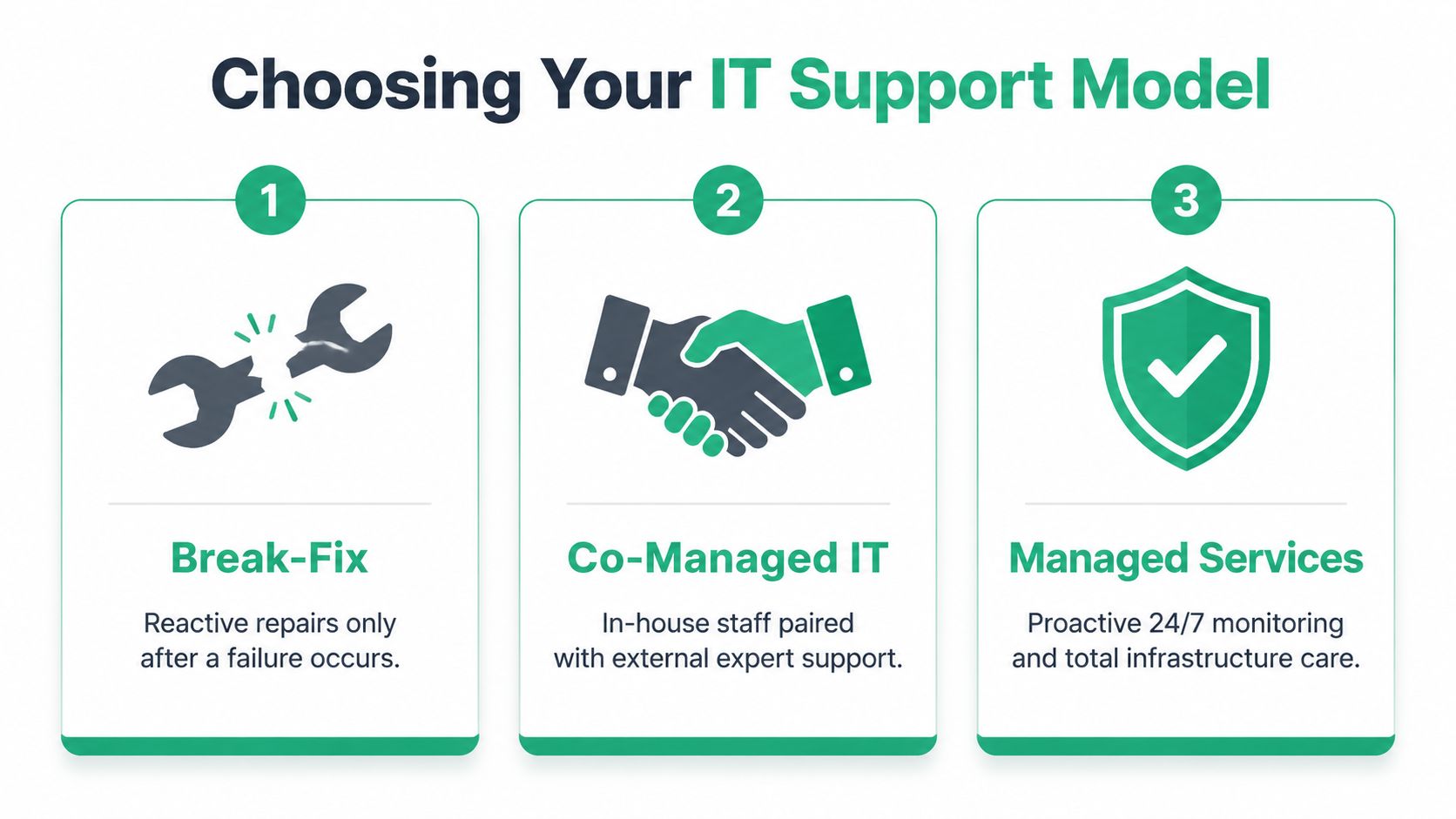
A lot of confusion comes from treating all IT support like the same thing with different labels. It isn't. Break-fix, co-managed IT, and fully managed services solve different problems and create different risks.
The quick reality check
Break-fix is reactive. Co-managed IT splits responsibility between your internal staff and an outside partner. Managed services put primary operational responsibility with the provider under an ongoing agreement.
That sounds simple. The details are where owners either gain control or inherit a mess.
A visual helps before we get into the nuance:
| Criterion | Break-Fix | Co-Managed IT | Managed Services |
|---|---|---|---|
| Cost structure | Unpredictable | Mixed | Predictable monthly spend |
| Response style | After failure | Shared responsibility | Ongoing monitoring plus support |
| Best fit | Very small firms with low dependence on tech | Businesses with internal IT staff | SMBs that need broad coverage and continuity |
| Strategic guidance | Minimal | Partial | Usually built into the relationship |
| Security posture | Inconsistent | Depends on role clarity | More standardized and enforceable |
| Business continuity | Weakest | Better if roles are defined | Strongest when backups, monitoring, and process are mature |
Break-fix works until it doesn't
The appeal is obvious. No monthly bill. Call only when needed. If your environment is tiny and downtime barely matters, that can be tolerable.
But break-fix falls apart once your systems become central to daily revenue, scheduling, compliance, or customer communication. It also creates a perverse incentive. Problems stay invisible until they become urgent enough to justify the call. That means deferred patching, weak documentation, and no one watching for early signs of failure.
Co-managed IT can be a strong middle ground
If you already have an internal IT person or a small internal team, co-managed support often makes sense. The internal team keeps hands on the business, while the outside partner fills in specialized gaps like advanced cybersecurity, cloud migrations, backup architecture, after-hours support, vendor escalation, or compliance planning.
This model can work very well, but only if responsibilities are written down. If everyone assumes someone else owns the firewall, the backup verification, or the onboarding process, issues slip through the cracks.
Later in the evaluation process, many owners find it helpful to hear the same idea explained verbally:
Fully managed services fit growth-minded SMBs
This is the best fit for many companies along the I-65 corridor that don't want to build an internal IT department but still need enterprise-grade habits. The provider handles monitoring, patching, endpoint support, security administration, backup oversight, and planning. You get one accountable party instead of a chain of finger-pointing.
The model matters less than clarity. A mediocre managed contract can fail. A well-scoped co-managed arrangement can work beautifully. A vague break-fix setup usually ages badly.
How to decide
Use this short filter:
- Choose break-fix if your environment is simple, downtime is rare, and you can tolerate inconsistency.
- Choose co-managed IT if you trust your internal IT staff but need depth, coverage, or after-hours support.
- Choose managed services if technology is now too important to leave in a reactive state.
If you're running compliance-heavy systems, multiple locations, cloud apps, hybrid staff, or production equipment tied to the network, full management usually reduces risk fastest. Not because it's trendy. Because shared ambiguity stops working when the stakes go up.
How Managed IT Solves Real Problems for Indiana Businesses
Theory is fine. Local problems are better.
Southside businesses tend to run into a few repeat issues. Aging server hardware in a Greenwood business park. Wireless dead zones in an old brick office. Cloud apps layered on top of old permissions. Backup systems that exist on paper but haven't been tested under pressure. That's where managed services stop sounding abstract.
Greenwood manufacturing and the failing RAID array
A manufacturer in the Greenwood area had a classic problem. Production didn't stop outright, but the core file and application systems dragged every day. Staff blamed the internet. Management blamed the old server. Both were partly right.
After disassembling a failing RAID array and checking the storage behavior more closely, the bigger problem became clear. The company had a single overloaded point of failure handling more work than it should, plus weak recovery planning if the array finally gave up. That kind of setup limps along until it doesn't.
The fix wasn't “buy a new box and hope.” The durable fix was a managed approach. Migrate critical workloads into a better-structured hybrid environment, clean up permissions, put active monitoring in place, verify backup integrity, and document recovery priorities by business function instead of by hardware label.
Why that approach works
Proactive monitoring is the core technical benefit of managed services. By using real-time traffic analysis and automated security protocols, an MSP can reduce MTTR from hours to minutes. Given that 68% of SMBs lack a formal disaster recovery plan, this proactive stance is critical, according to Genatec's discussion of managed services for small businesses.
That lines up with what happens in the field. The more mature the monitoring and recovery process, the less likely a hardware problem turns into a full business stoppage.
Backup is not the goal. Recovery is the goal. If nobody has tested restore order, application dependency, and user access, the backup system is only half-finished.
For a useful distinction many owners mix together, this explanation of business continuity versus disaster recovery is worth reading. Continuity is how work keeps moving. Recovery is how systems get restored.
Downtown Indy law office and terrible Wi-Fi
A second case looked less dramatic but hurt productivity all day. A law office in an older downtown Indy building kept dropping calls and losing cloud access in specific rooms. Staff had learned to walk documents to the front office because wireless performance changed depending on which conference room they were using.
That's common in historic buildings with thick walls, awkward additions, and consumer gear that was never designed for business density. Slapping in one more access point doesn't solve it. It often makes roaming worse.
The right fix was a managed network redesign. Survey the space, map interference, tune channel use, deploy latency-optimized mesh nodes where they belong, and build a UniFi layout that treats the building as it is, not as a generic open office. After that, support doesn't stop. The network still needs firmware management, visibility, and periodic adjustment as devices and floor use change.
The local lesson
This is what business owners across Central Indiana need from it managed services. Not vague promises. Real engineering choices tied to uptime, user experience, and recoverability. Local knowledge helps too. A provider serving Johnson County and downtown Indy should know the difference between a warehouse with shared stations, a clinic with HIPAA exposure, and a professional office stuck inside an old building envelope.
A Checklist for Choosing Your Indianapolis IT Partner
The wrong provider can waste months. Not because they're malicious. Because they oversell, underscope, or speak in broad marketing language when your business needs operational detail.

Start with the questions most providers hope you won't ask
A major issue in this industry is expectation mismatch. 68% of leaders feel cybersecurity risks are increasing, and businesses in regulated industries need more than a provider that says it “does security,” as discussed in this review of managed IT service challenges and compliance fit. If your business has HIPAA obligations, NIST CSF goals, or CMMC pressure, generic security talk isn't enough.
Use this checklist in your first meeting.
-
How fast can you be on-site in Greenwood or Indianapolis for a serious outage
Remote support is great until a switch dies, a firewall locks up, or a workstation handling critical workflow won't boot. Ask for the actual process, not a vague promise. -
Show me how you handle compliance requirements
If you're in healthcare, ask how they support HIPAA safeguards. If you serve defense contractors, ask how they map controls to CMMC expectations. For broader risk management, ask how they structure around NIST CSF. The provider should be able to describe process, documentation, and accountability. -
What security tools and practices are included by default
Ask about endpoint protection, MFA, log review, backup isolation, privileged access, and incident response. If they can only name a single antivirus product, keep digging.
Look for process, not personality
A likable technician isn't the same as a reliable service organization. You want repeatable process.
| What to ask | Good sign | Red flag |
|---|---|---|
| How are backups verified | They describe test restores and review routines | They say backups are “set and forget” |
| How do you document client environments | They maintain current device, access, and vendor records | Knowledge lives in one person's head |
| What happens during onboarding | They have a staged discovery and cleanup process | They “just start taking tickets” |
| Who owns strategic planning | They schedule recurring reviews | They only respond when something breaks |
Certifications and local references matter
You should also ask who is doing the work. Microsoft, CompTIA, and Cisco certifications don't guarantee excellence, but they do show a baseline commitment to current standards. More importantly, ask for references from local businesses with a similar environment. A provider that handles a two-location medical office may not be the right fit for a manufacturer with plant-floor endpoints and line-of-business equipment.
Ask every provider to explain one recent problem they solved that looks like yours. If they stay generic, they may not have done it.
Contract review matters too. Scope gaps hide in managed agreements all the time. This guide to a bulletproof managed services agreement template can help you read the fine print with a more skeptical eye.
The shortlist should get smaller fast
If a provider can't clearly answer questions about response time, backup testing, compliance workflow, documentation, escalation, and strategic planning, they're not ready to run business-critical systems. You're not hiring somebody to reset passwords. You're choosing who helps keep revenue moving when tech gets ugly.
Secure Your Business and Stop Worrying About IT
Most Indiana businesses don't need more gadgets. They need fewer surprises.
That is the primary value of it managed services. Stable systems. Cleaner security. Faster recovery. A monthly budget that makes sense. You stop paying for the same preventable failures in slightly different forms. You stop hoping the Wi-Fi holds together for one more quarter. You stop finding out your backup plan had holes in it after an incident.
Good managed support changes the operating rhythm
When support is proactive, your team spends less time chasing glitches and more time doing billable work, serving customers, and moving projects forward. Cybersecurity becomes an operating discipline instead of a scramble after a suspicious email. Cloud systems get administered instead of merely installed. Networking gets designed instead of improvised.
That shift is especially important in this region. Businesses from Greenwood to downtown Indy to the fast-growth pockets of Hamilton County are carrying more risk than they used to. More cloud dependence. More remote access. More compliance pressure. More devices competing for the same aging network.
Build a system you can trust
One useful next step is formalizing how you identify and review risk. If you're looking at automating IT risk assessments, that resource does a good job showing why manual, one-off reviews often miss important exposure over time.
You should also treat ransomware planning as part of routine operations, not as a separate emergency binder. This guide on how to prevent ransomware attacks for Indiana businesses is a practical place to start if that risk has been sitting in the “we really need to deal with this” pile.
If you're tired of reacting to tech problems after the damage is already done, a managed approach is usually the cleaner path. It gives you accountability, continuity, and a clearer handle on cost.
If you're a business owner in Greenwood, Indianapolis, or anywhere along the Southside who wants fewer outages, tighter security, and a more predictable IT budget, talk with Finchum Fixes IT about a Free Network Assessment or Security Risk Audit. It's a straightforward way to find the weak spots before they become downtime.