Networking Cabling Services for Your Indy Business

A Greenwood business owner usually calls after the same pattern shows up for weeks. Teams calls break up. The POS terminal hangs at the worst time. One side of the office works fine, while the back offices crawl.
That pattern points to infrastructure, not bad luck.
TL;DR
- Slow Wi-Fi often starts with the cabling behind it. In many Greenwood and Indianapolis buildings, weak performance traces back to aging cable, bad terminations, poor labeling, or switch closets that grew without a plan.
- Networking cabling services cover the full physical layer. That includes design, cable runs, patch panels, racks, labeling, testing, and documentation.
- Cat6A is a strong fit for many Indiana offices that need stable bandwidth, PoE headroom, and room to grow without reopening walls in a few years.
- Fiber costs more upfront, but it makes sense for longer runs, higher bandwidth, electrical isolation, and facilities that expect heavier data demands over time.
- Poor installation work leads to packet loss, unstable VoIP, repeat support calls, and staff losing time while waiting on systems that should respond instantly.
- Certified testing, clean rack layouts, and a real site survey reduce downtime and make adds, moves, and changes cheaper later.
If your staff keeps dropping off calls, cloud apps lag in the afternoon, and devices randomly disappear from the network, the issue is usually the same across Johnson County, the Southside, and older commercial buildings around Indianapolis. The symptom shows up over Wi-Fi. The cause is often in the wall or the closet.
I see this a lot in buildings that have been remodeled in stages. A contractor adds a few drops. Someone else extends a run. An access point gets mounted wherever power was easy. Years later, nobody has a map, labels do not match, and the network gets blamed for problems the cabling plant created.
Owners who understand what structured cabling is and why a business needs it usually make better upgrade decisions because they stop chasing symptoms and start fixing the foundation. That matters even more in operations that depend on sensors, cameras, scanners, and connected equipment. Manufacturers already see the critical role of IoT in modern factories, and those devices are only as reliable as the cabling feeding them.
Proper cabling is not a cosmetic upgrade. It protects uptime, improves employee productivity, and keeps future expansion from turning into another patchwork repair job.
Your Business Runs on Data Is Your Cabling Keeping Up
A Greenwood office in an older brick building usually has a familiar stack of complaints. The conference room drops calls. The warehouse scanner loses sync. One side of the office is fine, the other side crawls. Staff restart laptops, reboot access points, and open support tickets that never quite solve the problem.
That’s the Southside version of death by a thousand cuts.

Slow Wi Fi often starts in the wall
Most owners call and say, “Our Wi-Fi is slow.” What they often have is a cabling problem with a wireless symptom.
A bad punchdown, a poorly terminated patch panel, old cable that’s been bent too tightly, unlabeled runs, cheap patch cords, or a switch closet that grew by accident over the years can all create the same outcome. Users feel lag. Phones sound choppy. Cloud apps stall. File access gets weirdly inconsistent.
When access points are fed by bad cabling, no amount of controller tweaking fixes the root cause.
This matters more now because offices run more over the network than they used to. Phones, security cameras, door access, cloud backups, hybrid work traffic, UniFi networking gear, Bitdefender GravityZone updates, printers, SaaS apps, and sometimes production equipment all compete for a clean, stable path.
That’s one reason the structured cabling market keeps growing. The market was valued at USD 14.3 billion in 2025 and is projected to reach USD 21.26 billion by 2031, with data centers accounting for 45.23% of demand in 2025, according to Million Insights’ structured cabling market analysis.
What this looks like in Indianapolis area buildings
Older Southside properties are rough on networks. Thick walls, patched renovations, mixed tenant improvements, and years of “just get it working” changes leave ugly infrastructure behind.
Common signs the cabling is the problem:
- Random dead spots: Access points are mounted in decent places, but one or more are fed by unstable cable runs.
- Server slowness at odd times: The server isn’t always overloaded. Users are hitting retransmissions and physical layer issues.
- Trouble tickets that repeat: If the same desks, same printer area, or same wing of the office keeps breaking, that’s a pattern.
- Messy closets: If the rack looks like a bowl of spaghetti, troubleshooting takes longer and mistakes multiply.
If you’re trying to add smart devices, sensors, or industrial equipment, the problem grows. Manufacturers and logistics firms around Indy are packing more connected devices onto aging infrastructure. That’s why it helps to understand the critical role of IoT in modern factories. More connected endpoints means your physical network has less room for sloppy work.
The permanent fix
The permanent fix is a planned, tested, documented cabling system. Not another access point thrown at the ceiling. Not another reboot. Not another “temporary” patch cable stretched across the room.
A structured system gives every run a purpose and every port a label. That changes support from guesswork to engineering.
For a plain-English explanation of what that means, this breakdown of https://finchumfixesit.com/blog/what-is-structured-cabling-and-why-your-business-needs-it is worth reading before you spend money in the wrong place.
Beyond Wires What Professional Cabling Services Include
“Networking cabling services” sounds simple until you see what happens when nobody plans the system. Then you get a network closet full of mystery cables, half-used patch panels, daisy-chained switches, and nobody willing to unplug anything because they’re afraid payroll or phones will die.
In our 17 years of local service, we’ve seen plenty of server closets across Central Indiana that looked fine from the doorway and were a disaster once you opened the rack.
A real cabling system has structure
A professional installation works like a building’s central nervous system. Data has a defined path. Equipment has a defined home. Expansion doesn’t require improvisation.
That usually includes:
- Site mapping: Identify where users, printers, cameras, access points, phones, and specialty equipment reside.
- Horizontal cabling: These are the runs from the telecom closet to desks, conference rooms, access points, and wall plates.
- Backbone cabling: This ties closets, floors, and server rooms together. In larger buildings, fiber often becomes relevant.
- Rack and patch panel buildout: Switches, firewalls, UPS units, cable managers, and patch panels need a layout, not a pile.
- Termination and labeling: Every drop gets terminated correctly and labeled so future work doesn’t turn into detective work.
- Testing and documentation: If no one certifies the runs and updates the map, the next technician starts blind.
What doesn’t work
Ad hoc wiring feels cheaper until you have to support it.
A few bad habits cause most of the pain:
-
Running one-off cables every time a problem pops up
That creates no standard, no clean pathway, and no reliable documentation. -
Skipping labels because “we’ll remember it”
You won’t. Neither will the next technician. -
Mixing old and new cabling without a plan One part of the office performs well. Another creates a subtle drag on operations.
-
Stuffing closets with no cable management
Heat, strain, accidental disconnects, and ugly troubleshooting follow.
Practical rule: If finding a single user’s cable takes longer than a quick glance at the panel map, the closet is already costing you money.
What business owners should expect from networking cabling services
You’re not paying someone to just pull wire. You’re paying for a repeatable system that supports uptime, growth, and faster support.
A solid provider should handle the work in layers:
| Service area | What it should include | Why it matters |
|---|---|---|
| Planning | port counts, pathways, rack layout, growth planning | prevents rework |
| Installation | proper pulls, bend management, clean terminations | avoids physical layer faults |
| Closet build | patch panels, cable managers, labeled ports | shortens repair time |
| Documentation | as-builts, labels, test results | protects future changes |
There’s also a difference between repair work and engineered work. If you only need an emergency fix, that’s one thing. If you want the network to stop stealing hours from your team every month, the system has to be cleaned up end to end.
When a cable is damaged mid-run, a careful repair can help in the short term, but it has to be done with eyes open. This practical guide to https://finchumfixesit.com/blog/a-pros-guide-to-splicing-network-cable-without-downtime shows why shortcuts during repair often create the next outage.
The payoff is operational, not cosmetic
A clean rack looks good. That isn’t the main reason to do it.
The main reason is that your IT support team can isolate faults faster, replace hardware without confusion, extend the network cleanly, and keep systems aligned with compliance expectations such as HIPAA for clinics, CMMC for defense-related firms, and NIST CSF controls for general business security programs.
Good cabling also supports the higher-level pieces owners care about. Zero Trust architecture, SOC-as-a-Service monitoring, latency-optimized mesh nodes, immutable off-site backups, and secure cloud connectivity all depend on the physical network behaving predictably.
Copper vs Fiber Choosing the Right Cable for Your Indiana Business
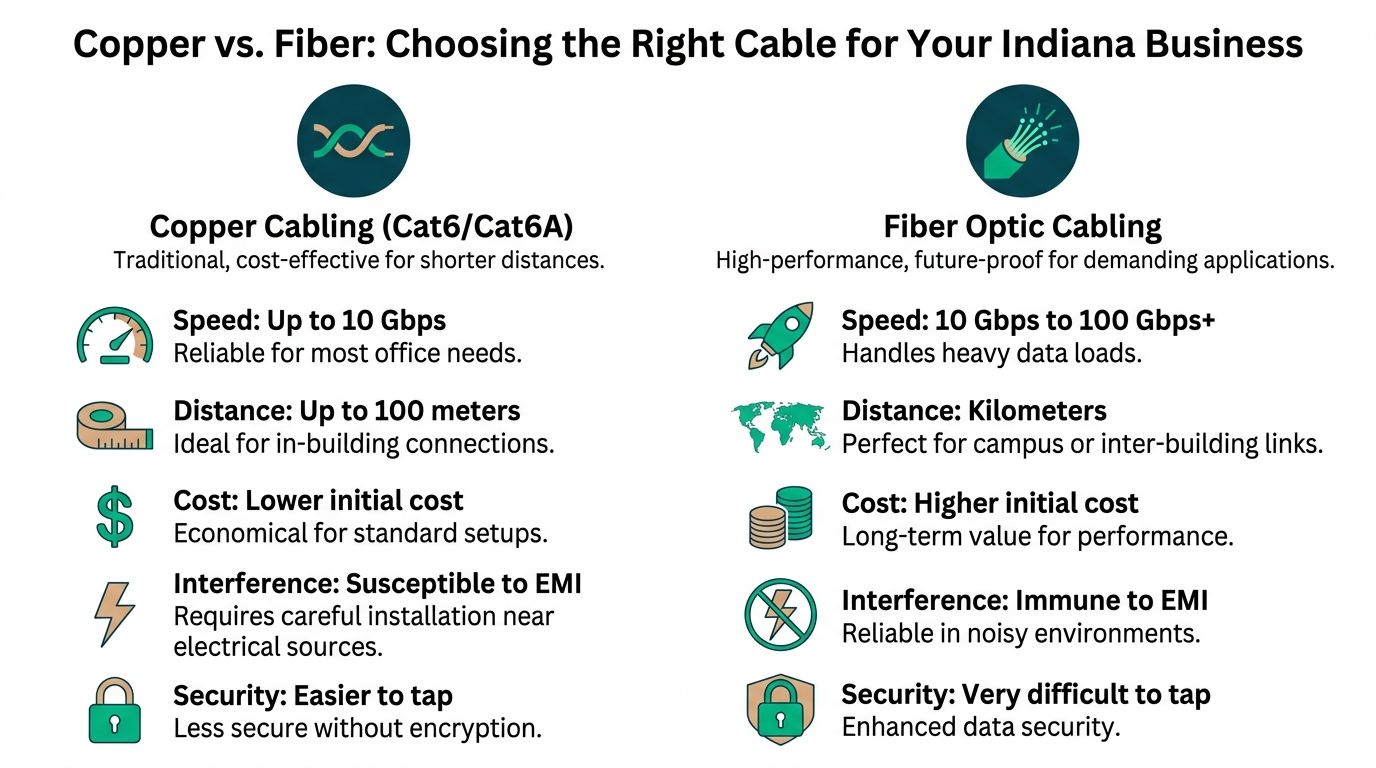
This is the question most owners ask after they realize the network needs real work. Do we run copper, fiber, or both?
The answer depends on distance, building layout, interference, budget, and how long you want this upgrade to last before you’re opening walls again.
Where copper still makes sense
Copper is still the practical choice for a lot of office work.
For standard workstation runs, printers, phones, and access points inside a single office footprint, Cat6A is often the sweet spot. It supports 10 Gigabit Ethernet over 100 meters, which is why it remains the practical workhorse for new office runs, according to Mordor Intelligence’s structured cabling market report.
Cat6A is especially useful in:
- Older downtown Indy buildings: You need strong performance without turning the entire project into a major construction event.
- Medical and legal offices: Stable workstation connectivity matters more than chasing the newest headline.
- High-density Wi-Fi deployments: Access points need a stable wired uplink or the wireless layer underperforms.
Cat6 can still have a place where budgets are tight and demands are modest, but it’s harder to justify for fresh installs when you know the office will keep adding cloud traffic, wireless devices, cameras, and collaboration tools.
Where fiber earns its keep
Fiber is the better answer when you have distance, bandwidth growth, or noisy environments.
The same market report notes that fiber captured 64.12% of structured cabling revenue in 2025 and is growing rapidly. That tells you where serious infrastructure planning is heading.
Fiber is a strong fit for:
- Backbone links between closets or floors
- Inter-building runs on a campus
- Manufacturing spaces with electrical interference
- Businesses planning around future expansion instead of current minimums
Fiber isn’t overkill when the building or business model points that way. It’s often the cheaper decision once you count future changes.
That’s why a new build in Hamilton County or a multi-building operation near the I-65 corridor should at least price a fiber backbone, even if desktop drops remain copper.
Cable Comparison Cat6 vs Cat6A vs Fiber
| Cable Type | Max Speed (at 100m) | Best Use Case | Relative Cost |
|---|---|---|---|
| Cat6 | lower than Cat6A at full 100m for 10 Gig use | legacy environments, lighter office demand | lower |
| Cat6A | 10 Gbps | new office runs, high-density Wi-Fi, longer-term office upgrades | medium |
| Fiber | depends on design and optics, commonly used for much higher-capacity links | backbone, inter-building, long-distance and future-focused deployments | higher |
The trade off Indiana owners actually care about
Here’s the plain version.
If you run a professional office in Greenwood with normal room-to-room distances, Cat6A usually gives you the best balance of performance and cost. If you operate a warehouse, large facility, healthcare campus, or multi-tenant property with longer runs or harsh electrical conditions, fiber starts winning fast.
A hybrid design is often the smartest move. Copper to endpoints. Fiber where distance, backbone load, or future expansion justifies it.
That’s also where private building-to-building connectivity enters the discussion. If your operation spans structures or remote areas of a property, this article on https://finchumfixesit.com/blog/point-to-point-networking-your-private-data-highway-for-business-uptime explains when a point-to-point design can solve uptime problems without relying on public internet paths.
What I’d avoid
I wouldn’t let a contractor pick the cable type based only on what’s easiest for their crew or what they have on the truck.
Bad reasons to choose copper:
- “It’s cheaper today.”
Bad reasons to choose fiber:
- “It sounds future-proof.”
The right question is simpler. What supports the applications you run now, the growth you expect, and the downtime risk you can tolerate?
The Blueprint for a Flawless Network Installation
Monday morning in Greenwood. Staff are in, calls start stacking up, and the Wi-Fi slows to a crawl the moment everyone logs on. In a lot of offices, the access points get blamed first. After enough service calls, the cabling turns out to be the problem. Weak terminations, poor pathway planning, unlabeled drops, or a rack that grew one patch cord at a time.
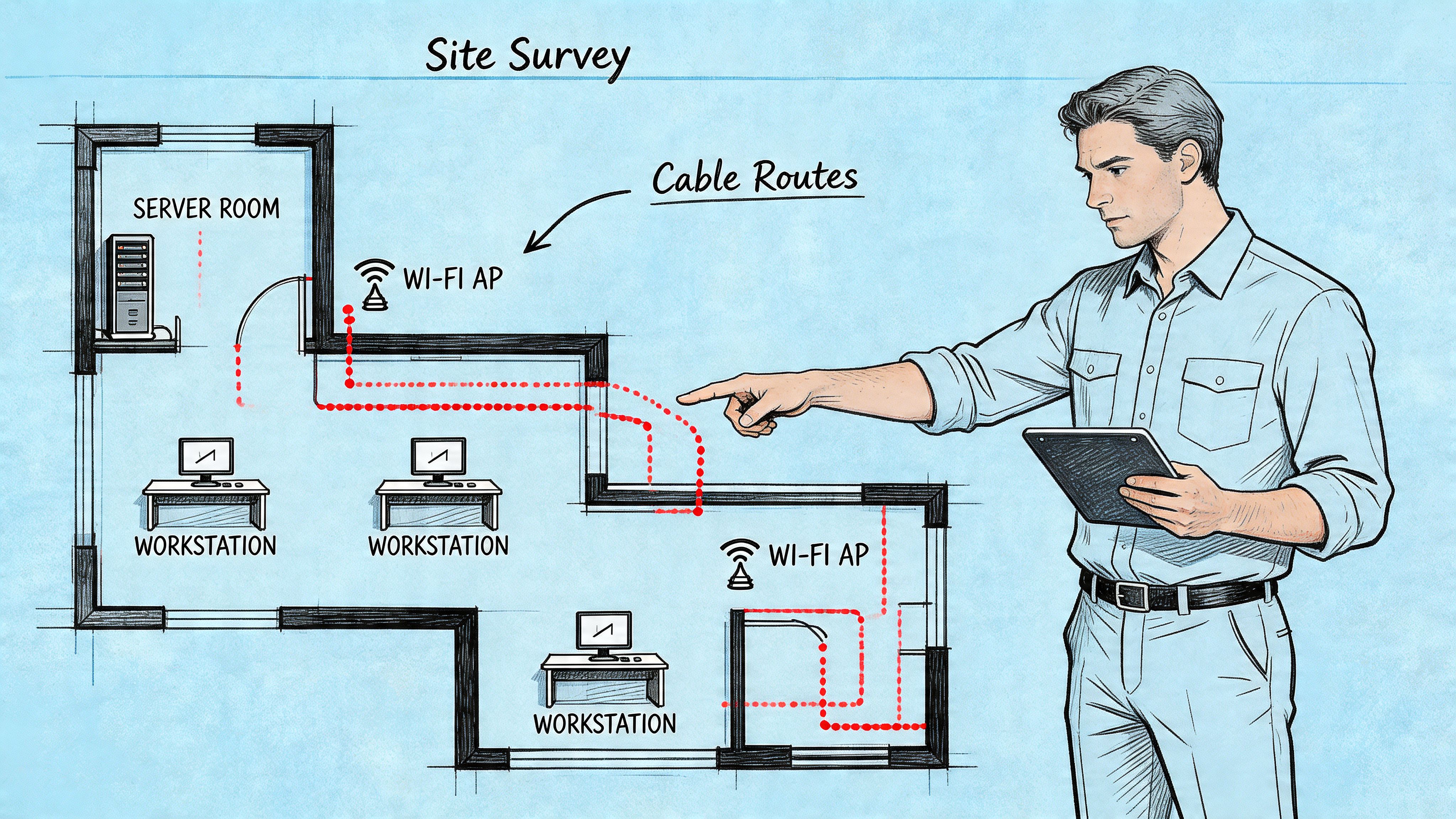
A good project starts with field work, not assumptions. If the design is rushed, you pay for it during install and then keep paying for it every time your IT provider has to chase intermittent issues.
Step one is a proper site survey
A proper site survey means walking the building and dealing with the conditions that exist in Indianapolis area properties. That includes pathway access, wall construction, risers, rack space, power, ISP handoff location, device counts, and where users and wireless access points need coverage.
Older buildings around Greenwood and the Southside often have the same trouble spots. Tight conduit. Mixed-use utility areas. Block walls. Strange remodels from prior tenants. Limited space above ceilings. Those details affect labor, materials, and long-term reliability.
If Wi-Fi complaints are part of the reason for the project, the cable plan and wireless plan need to match. A wireless network site survey for Wi-Fi and cable backhaul planning helps prevent the common mistake of mounting access points where coverage looks good on paper but cabling, power, or switch capacity were never planned correctly.
Design has to fit how the business operates
Port counts are only part of the design.
A solid design also accounts for how the business uses the network every day and what failure costs when things go wrong. A medical office, light industrial space, law firm, and multi-tenant property do not need the same layout, labeling discipline, or segmentation support.
The design should address questions like:
- Compliance and documentation: Do you need cleaner records and traceability for regulated workflows?
- PoE load: Are phones, cameras, access points, or door systems driving switch and cable decisions?
- Growth: Will you add staff, scanners, security devices, or new rooms within the next few years?
- Resilience: Do key areas need backup paths, cleaner rack power, or isolated guest and vendor traffic?
Facility teams often get pulled into these decisions too, especially in shared buildings and remodels. This guide to hiring a facility service company is useful if you are coordinating network work with broader building changes.
Installation quality determines whether the design holds up
Specs on paper do not protect a bad install. Crews do.
Good installers protect bend radius, support cable correctly, keep separation from interference sources, terminate cleanly, and build racks that another technician can service six months later without creating a new problem. That discipline matters more than many owners realize, because a cable plant can pass traffic and still create slowdowns, drops, and hard-to-isolate issues under load.
I see four areas make the biggest difference in the field:
-
Pathway discipline
Cables need support, protection, and clean routing. -
Termination quality
Pair integrity, jacket prep, and panel work need to be consistent. -
Labeling
Every drop should map clearly from faceplate to patch panel. -
Rack organization
Cable managers, panels, switches, and patch cords should reduce service time, not add to it.
Cabling problems often stay hidden until peak usage, a phone rollout, new cameras, or a switch replacement puts more stress on the links.
A short video can help visualize what disciplined field work looks like in practice:
Certification is required
Certification separates network engineering from “it lights up, so it must be fine.”
Every run should be tested and documented. That includes certification results, labels, as-builts, and panel mapping. Without that documentation, future adds, moves, and troubleshooting take longer and cost more.
For Indianapolis businesses using Cisco switches, UniFi access points, VoIP, cameras, or mixed copper and fiber environments, certification protects the rest of the stack from getting blamed for a layer one problem. It also gives owners something concrete. Proof the install was done to spec, and a record your next IT team can use instead of starting from scratch.
One local option for this type of work is Finchum Fixes IT, which provides network install, wiring repair, troubleshooting, and Wi-Fi design in the Greenwood and Indianapolis area.
Budgeting for Your Network Upgrade Costs and ROI
A Greenwood office adds cloud phones, a few new access points, and security cameras. Then the complaints start. Calls clip. Wi-Fi slows down at the busiest hour. Staff blame the internet, but the actual problem is often behind the wall. Cabling that was “good enough” for a smaller business is now limiting everything on top of it.
That is why budget conversations need to start with business impact, not just install price. The total cost depends on square footage, pathway access, wall type, number of drops, rack cleanup, patch panels, and whether the job needs copper, fiber, or both. An older Southside building with tight pathways and past DIY work usually costs more to correct than a newer office suite in a business park.
The wrong way to budget
Low bid comparisons miss the costs that show up later.
I see the same pattern across Indianapolis area businesses. A cheap install often means poor terminations, weak labeling, little documentation, and cable choices that fit the invoice instead of the workload. The project closes fast, then your staff and IT provider keep paying for it month after month.
Those costs usually show up in three places:
- Lost employee time: People wait on slow file access, dropped calls, unstable docks, or dead wall ports.
- Higher support labor: Internal IT or your outsourced team spends hours chasing repeat issues that trace back to layer one.
- Disruptive outages: Small cabling faults turn into urgent service calls during your busiest hours.
If you are trying to separate one-time infrastructure spending from recurring support costs, this guide to managed IT services cost in Indiana helps frame that decision clearly.
Copper vs fiber from an ROI angle
The ROI question is not “Which cable is better?” The key question is which cabling standard fits the building, the distance, the bandwidth demand, and the growth plan without forcing another rip-and-replace in a few years.
Copper still makes financial sense for many offices. It works well for desk drops, phones, printers, and many access point runs. Fiber earns its keep in longer runs, inter-building links, MDF to IDF backbones, and high-density environments where you expect more bandwidth demand over time.
The trade-off is simple. Copper usually lowers the initial invoice. Fiber often lowers future constraints. In a Greenwood warehouse, for example, I would not price a backbone the same way I would price a small front-office suite. One may need room for cameras, scanners, and future expansion. The other may just need clean, reliable copper to every workstation.
ROI lens: The better design is the one that reduces outages, limits future rewiring, and cuts recurring support time, even if the first invoice is higher.
How to evaluate return
Ask what the network failure is costing now.
- How many work hours disappear each week because staff lose connectivity or wait on slow applications?
- How often is your IT team troubleshooting the same ports, drops, or switch complaints?
- Will you add users, cameras, access control, or more access points during the next lease term?
- What does one hour of phone or application downtime cost during peak business?
Owners in Indianapolis usually get the best return when they treat cabling as a long-life asset, not a disposable line item. A properly planned upgrade improves daily productivity, lowers support noise, and gives the rest of your network a stable foundation. That is where the ROI becomes real. Fewer interruptions, fewer repeat tickets, and less money lost to avoidable downtime.
Why Your Choice of Cabling Partner Matters in Indianapolis
A lot of firms can pull cable. Fewer can design a system that survives growth, audits, remodels, and years of support changes.
That difference matters in Indianapolis because buildings vary wildly. A medical office in Greenwood, a warehouse off the interstate, and a renovated downtown brick property all demand different decisions. A crew that treats them the same will leave money and reliability on the table.

What to look for in a provider
Use a checklist, not a sales pitch.
-
Local building experience They should understand old brick walls, shared utility spaces, business park layouts, and the practicalities of the Indy metro construction mix.
-
Technical depth
Ask how they test runs, document ports, handle PoE planning, and integrate switching, wireless, and security requirements. -
Compliance awareness
Healthcare, legal, manufacturing, and defense-adjacent firms can’t afford vendors who ignore HIPAA, CMMC, or NIST CSF concerns. -
Clean documentation
If they can’t show labeling standards, test results, and as-built discipline, future support gets harder. -
Outcome focus
The right partner talks about uptime, expansion, supportability, and risk reduction. Not just cable types.
Why local context changes the job
Based on our experience helping Greenwood-area firms clean up recurring connectivity problems, local context changes everything. A modern office shell near a new development is one kind of project. A retrofitted building with years of layered tenant improvements is another.
That’s why generic low-voltage crews often miss the mark. They may complete the install but leave a network that’s harder to support, harder to secure, and harder to expand.
If you want a broader operations lens when evaluating vendors, this guide to hiring a facility service company is a useful companion read because it frames how to judge service partners on process, accountability, and long-term fit.
Red flags I’d take seriously
- No mention of testing or certification
- No rack labeling standard
- No documentation handoff
- No discussion of Wi-Fi backhaul, switch capacity, or PoE
- A quote that only talks about feet of cable and labor hours
A cabling contractor should make your future IT support easier. If their process adds mystery, they’re building tomorrow’s outage.
Good providers think beyond the cable plant itself. They understand how structured cabling supports cybersecurity segmentation, cloud access, voice quality, camera retention, and business continuity planning. That’s the difference between a labor crew and a technology partner.
Common Questions About Networking Cabling
Can we just keep using old Cat5e
Maybe for some low-demand devices, but that’s usually the wrong move for a modern business. If you’re already opening ceilings, moving furniture, or upgrading switches and Wi-Fi, reusing marginal cabling locks old limitations into a new project. It saves money once and costs you repeatedly.
How long does a cabling project take
It depends on building access, wall construction, number of drops, and whether work has to happen around business hours. A clean office expansion moves faster than a live production floor or medical suite. The right expectation is phased planning, not a wild guess.
What makes a system “structured”
Structured means the runs are planned, labeled, terminated cleanly, tested, and documented. Every port has a known path. Every closet has order. Future adds don’t require guesswork.
Why does bad cabling make Wi Fi feel slow
Because wireless access points still depend on wired uplinks. If the cable feeding the access point is unstable, the wireless network inherits that weakness.
Should we choose copper or fiber
For many offices, Cat6A to endpoints and fiber in the backbone is the right blend. The best answer depends on distance, density, budget, interference, and growth plans.
Is certification testing really necessary
Yes. A cable that appears to work can still have hidden faults. Certification proves the run meets performance expectations and gives your support team a trusted baseline when problems show up later.
If your Greenwood or Indianapolis business is dealing with recurring drops, slow Wi-Fi, messy network closets, or expansion plans that your current wiring can’t support, schedule a Free Network Assessment with Finchum Fixes IT. We’ll identify where the true bottlenecks are, map the risks to uptime and productivity, and give you a clear path to a cleaner, faster, more supportable network.