Managing Cloud Security for SMBs: A Practical Guide
A cloud problem in a Greenwood office rarely starts with a dramatic breach screen. It usually starts with a quiet mistake, a broad role, a bucket nobody reviewed, or a backup job nobody tested, then turns into downtime, client calls, and a weekend nobody planned to work. Managing cloud security means owning those weak points before they own your month.
Why Cloud Security Hits Different for Indiana SMBs
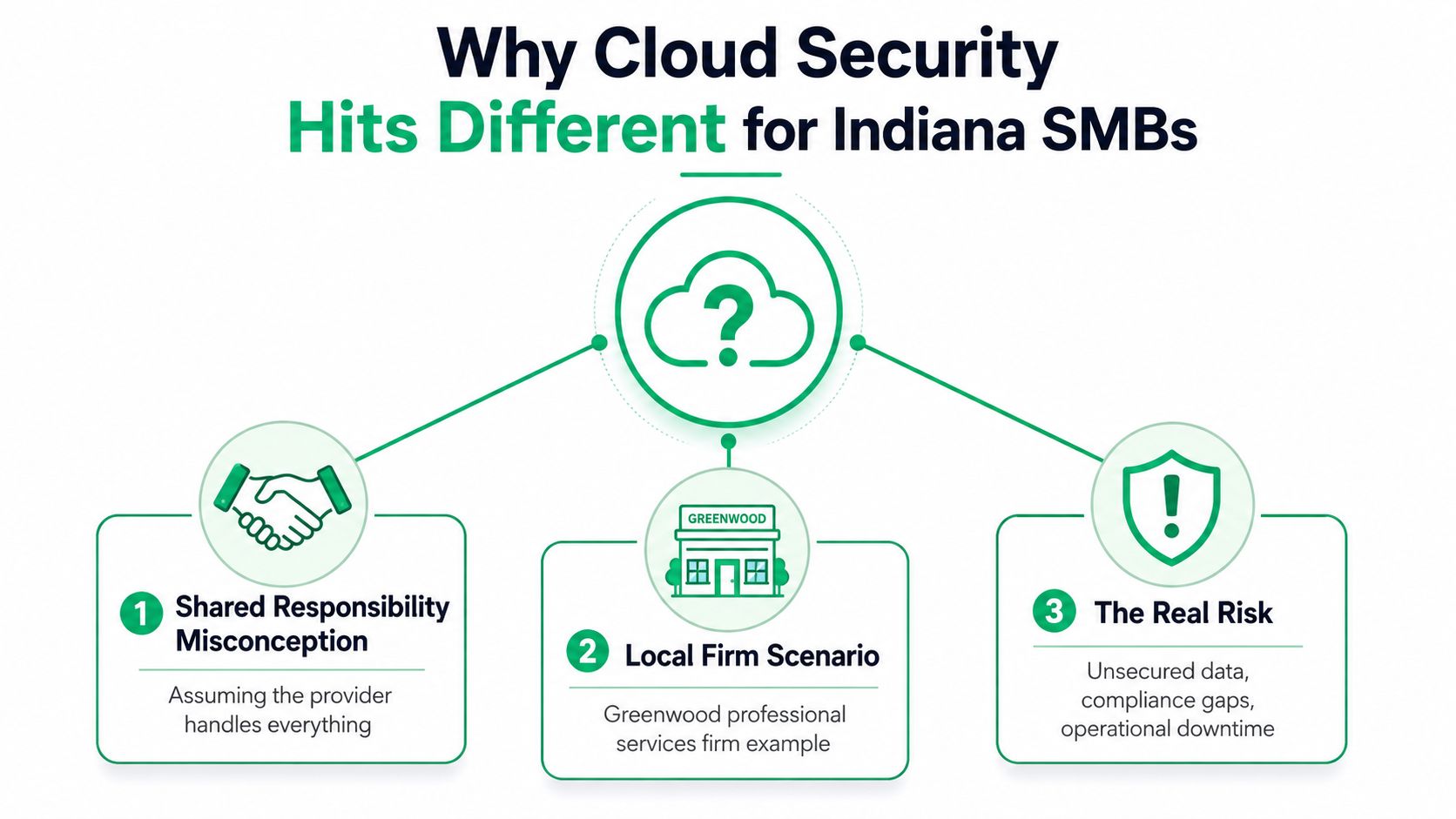
A Greenwood professional services firm can do everything right on paper and still expose client contracts because one cloud storage setting drifted from safe to public. That is the part many owners miss. The cloud provider secured the underlying platform, but the firm still owned the data, the access rules, and the configuration that left the door open.
That is the shared responsibility model in plain English. The provider secures the cloud infrastructure, while the customer is still responsible for identities, configurations, data protection, and application controls, as reflected in the NSA's Cloud Security Playbook and CSA guidance on layered controls (NSA Cloud Security Playbook). Small teams need that ownership mapped clearly. The IT lead, the MSP, and sometimes the operations manager all need to know who approves access, who reviews exposure, and who signs off on recovery.
The risk shows up in real operations, not just policy documents. A cloud environment with weak identity controls, exposed storage, or inconsistent encryption can keep a team busy for days, and the cleanup often lands on the same people who are also trying to keep billing, support, and customer work moving. The Thales cloud security study reports that 64% of enterprises see cloud security as a pressing discipline, 55% say cloud security is more complex than on-premises security, and only 8% encrypt 80% or more of cloud data. Exabeam's cloud security summary says more than 60% of organizations experienced public cloud-related incidents in 2024 and 82% of breaches in 2023 involved cloud-stored data (Exabeam cloud security statistics).
Practical rule: if the business cannot name the owner for identity, configuration, data, and recovery, it does not really have cloud security yet.
For Indiana SMBs along the I-65 corridor, the business impact is bigger than a security score. A misconfigured environment can interrupt billing, slow client delivery, and force staff into wasted tech time that should have been billable hours. IBM's cost of breach reporting is often used to frame outage and recovery impact, and the kind of downtime that drags on in a small business can quickly turn into a cash-flow problem, a client-trust problem, and a weekend full of remediation work.
Operational ownership is the part that changes the outcome. Someone needs to review the cloud settings, someone else needs to validate the data path, and a third person needs to know what happens if the environment goes sideways during a critical quarter. That is where small teams stay ahead of trouble, by routing findings to the right owner, proving the fix, and keeping the recovery path clear before the next change lands.
Identity and Access Management That Actually Works
Most cloud incidents start with identity, not with some Hollywood-style breach. Recent cloud-security summaries report that more than 70% of cloud breaches stem from compromised identities, and a separate benchmark notes that roughly half of AWS EC2 instances still allow IMDSv1, which raises exposure to metadata theft unless teams enforce IMDSv2 and test for SSRF-style abuse (Deepstrike cloud security statistics). That's why IAM should be the first thing a small team tightens.
Start with MFA, then make access boring
Turn on MFA everywhere, including admin accounts, finance users, and any account that touches production. Don't stop at the login screen, though. Tie conditional access to device posture and location, then shorten session timeouts for privileged users so a stolen browser session doesn't sit open all afternoon.
Next, move away from one-off permissions attached to individual people. Build access around groups and roles, then give users the least privilege they need to do one job. If someone changes roles, move them between groups instead of rebuilding permissions from scratch.
A clean small-team sequence looks like this.
- MFA first: enforce it on every cloud account and admin path.
- Least privilege next: assign roles through groups, not personal grants.
- Privileged access third: create a separate approval path for sensitive actions.
- Identity provider integration: centralize sign-in with Microsoft Entra ID or an equivalent identity source.
- Break-glass handling: keep emergency admin accounts locked down, monitored, and documented for actual outages, not convenience.
For a practical tooling overview, the best identity and access management tools guide is a useful companion when you're choosing what fits a smaller environment.
Keep admin access rare, logged, and time-bound. If a person uses it every day, it isn't privileged access anymore, it's just normal access with a bad label.
Make federation and cloud controls line up
If your business is already on Microsoft 365, use that identity source to federate cloud sign-ins rather than building a second directory nobody wants to maintain. Then add conditional access policies for risky logins, geo-anomalies, and unmanaged devices. That keeps the control plane simple, which matters when your IT team is also handling support tickets, laptops, and the printer that only fails during payroll week.
Don't forget the instance layer either. Even an Azure-first shop needs to check AWS exposure if the company runs a few services there. Enforce IMDSv2 on EC2, review role trust relationships, and test the application's dependency on metadata access before you lock it down.
The point isn't fancy identity tooling. The point is reducing the number of ways a stolen credential can turn into a cloud incident, a compliance headache, or a long night in the office.
Encryption and Network Controls as a Layered System
Encryption gets oversold as a checkbox, then left half-managed in daily work. The Thales cloud security study shows how messy that can get, with many organizations spreading key control across too many systems instead of keeping one clean ownership model. For a limited-budget SMB, that shape of complexity creates more support work than protection.
Treat keys, storage, and traffic as one stack
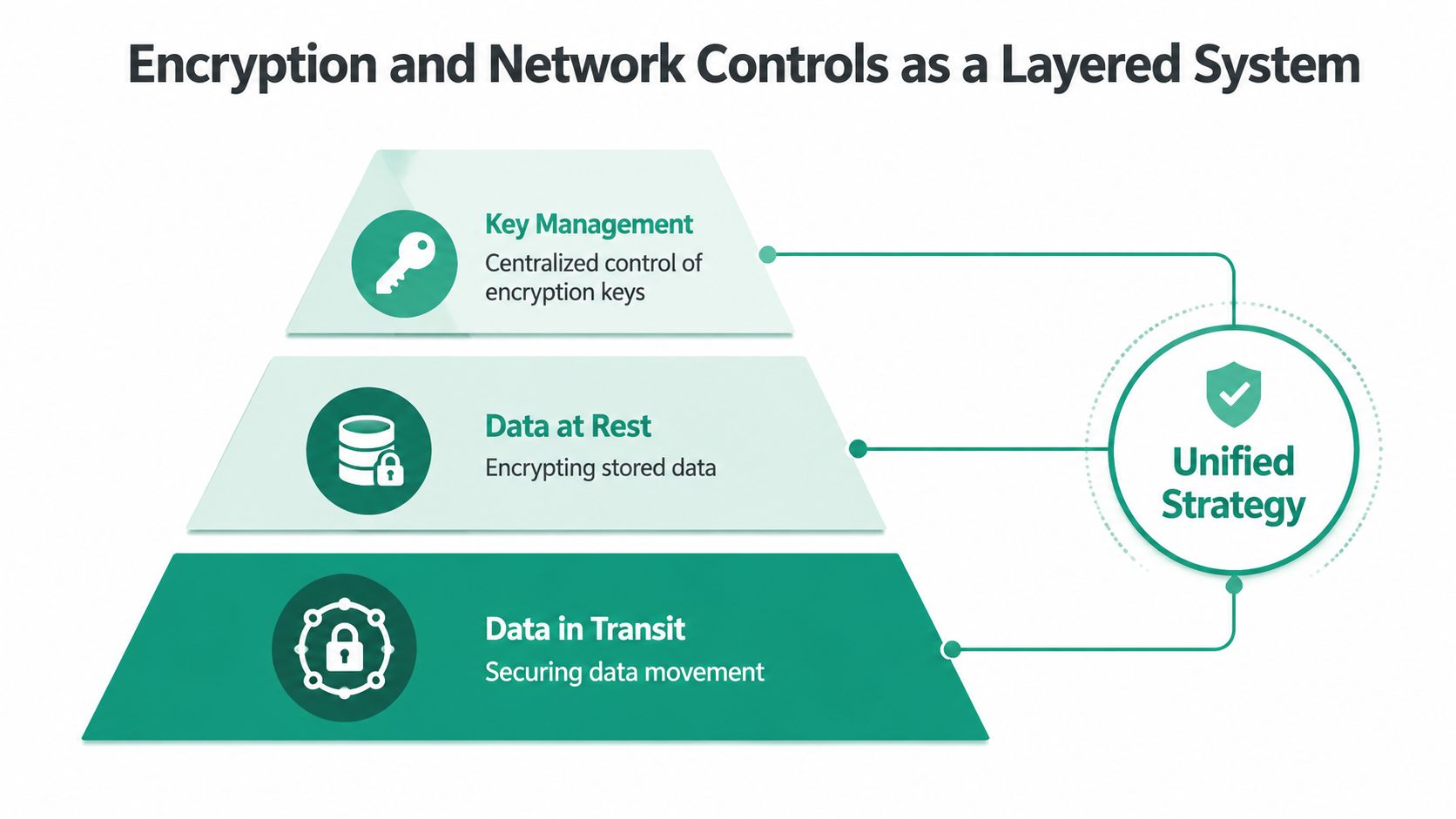
If the team splits encryption into three disconnected purchases, nobody owns the whole picture. Start by deciding who manages keys, where data is encrypted at rest, and how traffic is protected in transit. Platform-managed keys are fine for some workloads, but customer-managed keys make sense when compliance, segregation, or auditability matters more than convenience.
Use a single rule that the team can follow. If the data is sensitive, the key path should be documented, the storage layer should be encrypted, and the transport path should be locked down. That is the practical version of a layered control strategy, and it makes remediation routing easier when a finding lands on a small team.
Build network segmentation that fits the office
Cloud networking should follow Zero Trust thinking, not old perimeter habits. Segment workloads with private endpoints, restrict east-west movement, and stop exposing services just because it was easier during migration. In distributed Indiana offices, latency matters too, so mesh nodes need to be placed for performance, not just coverage.
For an older brick building on the south side or a second-floor office near downtown Indy tech hubs, the local network can become the weak link if Wi-Fi coverage is sloppy. UniFi networking and latency-optimized mesh nodes usually work better than a patchwork of consumer hardware. The goal is stable access to cloud apps without spraying traffic across networks that never needed to be open in the first place.
The network side should also include guardrails around public exposure. Private endpoints, service controls, and firewall policy review matter more than generic secure-the-network advice. If you are not sure how your encryption and segmentation choices fit together, the design is probably too loose.
Operational shortcut: pick one team or vendor to own key management, because scattered ownership turns encryption into a support problem instead of a protection layer.
For the operational side of routing findings, a small team also needs a clear way to decide who gets the alert and what gets checked first. The threat detection and response guide for Indiana businesses is a practical companion for that handoff, especially when a cloud finding touches identity, storage, or an AI workload that relies on sensitive training data. If the issue is tied to uptime checks or external availability tests, the PageSpeed Plus monitoring guide is a useful reference for separating application health signals from actual security work.
Monitoring and Logging as an Operational System
A cloud alert is rarely the hard part. The hard part is deciding who owns it, what gets checked first, and how the fix gets verified without turning the whole thing into a group chat guessing game. In a small Indiana shop, that usually means one person on the security side, one person in IT ops, and a clear path for anything that touches production, identity, or sensitive data.
The better model is to treat logging as a live system with owners. Recent guidance from the NSA and cloud-security practice writeups frames logging as an operational process, not an archive, with continuous evidence collection and checks that catch drift before deployment (NSA cloud mitigation guidance). That matches the practical advice in SentinelOne's cloud security best practices, which stress repeated backups, recovery exercises, and automated policy checks because cloud resources are ephemeral (SentinelOne cloud security best practices).
Route findings by owner and impact
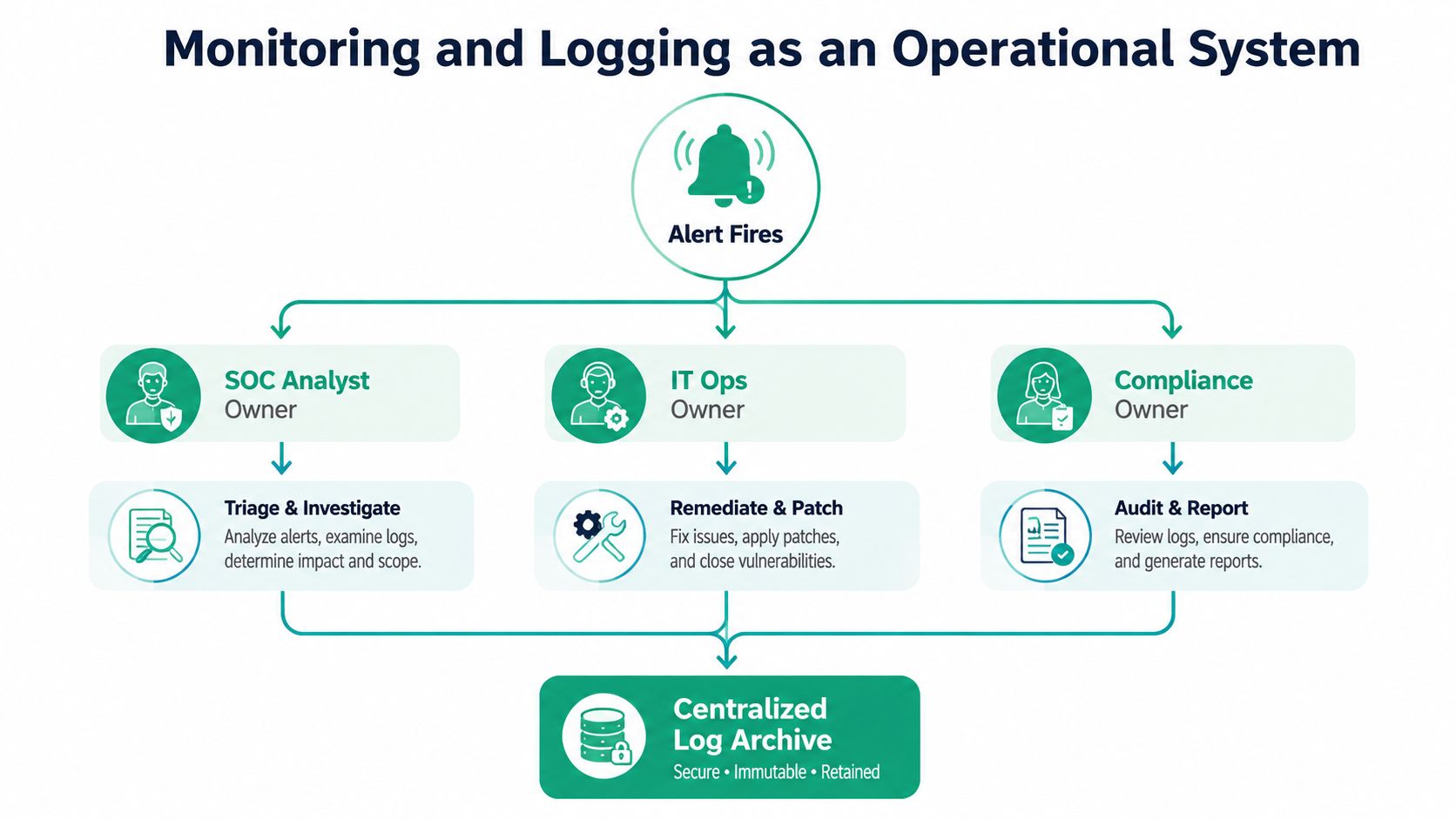
If the alert came from identity, send it to the identity owner. If it came from a public storage setting, send it to the cloud admin and tag the business unit that owns the data. If it affects billing, production, or regulated records, it needs faster handling than a noisy test environment.
That routing decision is what keeps a small team from wasting time. A storage exposure might go to cloud ops for containment, then to the data owner for review, then to compliance if records were exposed. An identity alert may need immediate account lockout, a token review, and a check for lateral access across other cloud accounts or AI-enabled tools that share the same credentials.
A clean workflow usually looks like this.
- Alert fires, the event lands in centralized logging.
- Owner is assigned, based on environment and system.
- Impact is tagged, based on business risk and data sensitivity.
- Ticket is created, with the fix attached to the same trail.
- Closure is verified, not assumed.
That last step matters. A closed ticket without validation is just paperwork.
For teams that do not run a full SOC, the concept still works through SOC-as-a-Service monitoring. The analyst triages, IT ops remediates, and compliance gets proof that the issue was handled. For a plain-English primer on synthetic checks and how they fit beside the logging stack, the PageSpeed Plus monitoring guide is a useful read. The same split matters in practice, because uptime checks can tell you a service is slow while security logs tell you whether the slowdown came from a misconfig, a bad deploy, or an account that should not have been there.
If you need a field-tested handoff path for findings that cross identity, storage, or AI workloads, threat detection and response strategies for Indiana businesses give a useful framework for routing the alert to the right owner and proving it was handled.
A dashboard does not fix anything by itself. A routing decision, a ticket, and a verified closeout fix things.
Cloud Incident Response Without the Panic
A cloud incident moves fast because the environment moves fast. An exposed object gets copied, a role gets abused, or a workload gets changed before lunch and the evidence disappears by dinner. The response plan has to assume that cloud-native data is volatile and that the first few minutes matter most.
Contain first, then preserve evidence
The immediate move is containment. Disable the compromised identity, isolate the affected workload, and cut off public exposure if that's the path in. Don't spend ten minutes writing a perfect status note while the attacker keeps moving.
Then preserve what you can. Capture logs, configuration snapshots, and change history before the environment shifts again. In cloud, you're not bagging a physical server. You're collecting distributed evidence from APIs, audit trails, and service logs that can disappear when autoscaling or cleanup runs.
For a working template, the security incident response plan resource from MD TECH TEAM is a solid companion because it keeps the process grounded in actual actions rather than generic policy language.
Recovery needs to be tested, not hoped for
Backups are only useful if restores work. Run recovery drills often enough that your team knows where RPO and RTO really land, not where the slide deck says they should land. Use immutable off-site backups for the data that would hurt most if it were altered or deleted.
A practical recovery rhythm includes:
- Containment steps: stop the spread and preserve access logs.
- Forensic capture: snapshot key assets before cleanup.
- Provider coordination: open support cases early and document every action.
- Restore validation: prove the application, data, and permissions all come back clean.
- Post-incident review: update the runbook so the same gap doesn't return.
If your team hasn't run a tabletop exercise recently, the plan is incomplete. The best runbooks I've seen in Indiana businesses are the ones that name the people who call legal, the person who notifies customers, and the one who confirms the production restore is usable. For a practical template approach, the cybersecurity incident response plan template is worth keeping in the toolbox.
The first 30 minutes of an incident should feel scripted, not improvised.
Compliance That Maps to Indiana Industries
Compliance gets traction when it helps the business, not when it creates another folder full of screenshots. For healthcare practices along the I-65 corridor, HIPAA is about protecting patient data and proving that access, logging, and recovery are controlled. For defense subcontractors in Johnson County, CMMC pushes the same discipline into a more formal security posture. For growing professional services firms in Hamilton County, NIST CSF gives leadership a language for risk, maturity, and operational consistency.
The best way to treat these frameworks is as guardrails. They tell you what controls need to exist, but they also help you build the evidence once and reuse it. That saves time during audits and removes a lot of one-off work that would otherwise eat billable hours.
The table below keeps the mapping simple.
| Framework | Primary Cloud Controls | Indiana Industry Fit |
|---|---|---|
| HIPAA | Access control, encryption, logging, recovery validation | Healthcare practices and clinics along the I-65 corridor |
| CMMC | Identity hardening, segmentation, evidence retention, change control | Defense subcontractors and manufacturers in Johnson County |
| NIST CSF | Risk-based controls, monitoring, backup discipline, governance | Professional services firms and SMBs across Hamilton County |
When compliance is operationalized, monthly IT costs get easier to predict because the team isn't scrambling once a year. That's also where tools like Bitdefender GravityZone, centralized logging, and tested backups start paying off as working controls instead of shelfware.
If you want a broader look at how compliance maps into day-to-day security work, the compliance and security for Indiana SMBs article is a strong reference point.
Migration Moves and the 90-Day Operational Checklist
Cloud migration goes wrong when teams treat security like a post-move cleanup job. Start with a baseline before anything shifts. That means knowing what identities exist, what data is sensitive, what encrypts today, and which workloads would break if access changed. If you're moving AI-enabled workloads or splitting services across multiple providers, that baseline matters even more because visibility gets messy fast.
The migration path should include a secure landing zone, logging from day one, and access rules that already match the current operating model. After that, the 90-day checklist keeps the rollout grounded in routine instead of guesswork. If you want a migration planning framework tied to local business realities, the Indiana cloud migration plans step-by-step playbook is a good companion.
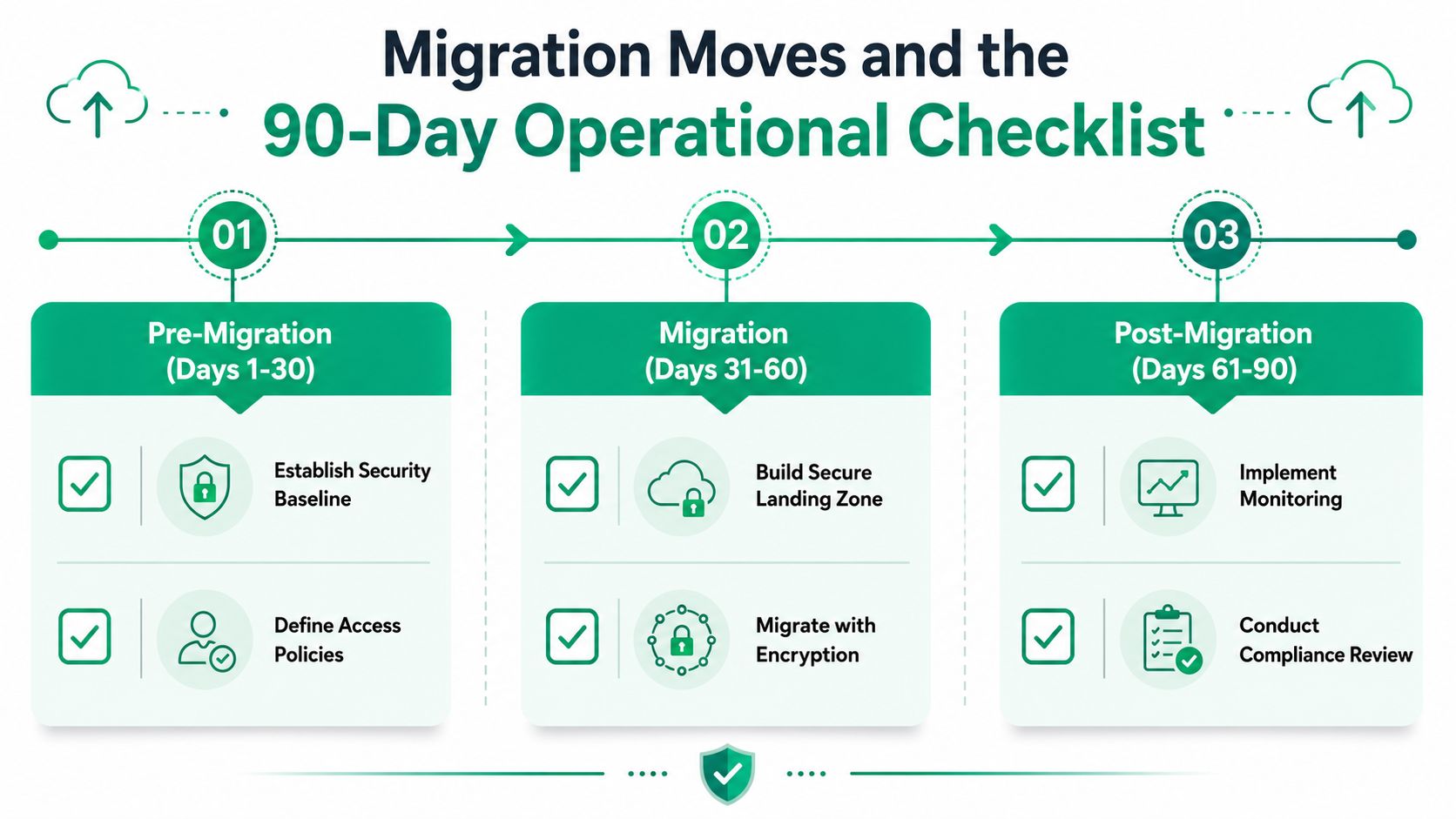
The 90-day checklist
- Days 1 to 30, establish the baseline: confirm identities, review access, and document sensitive systems.
- Days 31 to 60, secure the landing zone: apply encryption, logging, and network restrictions before workloads go live.
- Days 61 to 90, validate operations: run a misconfiguration scan, test backups, and schedule a tabletop exercise.
That sequence works because it turns migration into a controlled operating state, not a one-time event. It also reduces the risk of drifting into a multi-cloud mess where no one knows which provider owns what, especially once AI tools start moving data between systems and teams.
In our 17 years of local service, the pattern is always the same. The businesses that win don't buy the fanciest stack first. They assign ownership, close the obvious gaps, and keep validating the environment after the migration hype is over.
If your Greenwood or Indianapolis business wants cloud security that holds up under daily use, Finchum Fixes IT can help you sort out identity, monitoring, recovery, and compliance without wasting time on the wrong fixes. Visit Finchum Fixes IT to ask about a Free Network Assessment or a Security Risk Audit built for your environment, your budget, and the way your team really works.