Threat Detection and Response for Indiana Businesses
Threat detection and response means actively watching your systems for signs of attack, then moving fast to contain and remove the threat before it turns into a shutdown, ransom event, or compliance mess. In 2025, 76% of organizations planned to expand AI and machine learning in threat detection, which tells you this has shifted from nice-to-have to standard practice.
If you own a business in Greenwood, along the I-65 corridor, or anywhere around downtown Indy, you've probably felt this already. An old server is still humming in a back office. Wi-Fi drops in an old brick building. A staff member clicks something they shouldn't. Then everyone stops working while your team scrambles.
That is the essential reason threat detection and response matters. It's not about collecting security tools like baseball cards. It's about preventing downtime, protecting cash flow, and keeping a small issue from turning into a business-ending disaster.
What Is Threat Detection and Response Anyway
A lot of Johnson County business owners are running into the same problem. The server in the Greenwood business park closet is older than it should be. It still handles files, user logins, maybe a line-of-business app. Nobody wants to touch it because it's “working.” That same box often has weak logging, stale admin accounts, old backup habits, and no one checking for suspicious activity after hours.
That's where threat detection and response comes in. It's the practice of monitoring your computers, network, cloud apps, and security logs so you can spot an attack early and shut it down quickly. The goal is simple. Catch trouble while it's still small enough to contain.
Early detection matters because it cuts attacker dwell time, limits breach damage, and supports business continuity while helping with compliance requirements like HIPAA and broader security programs built around frameworks such as NIST CSF, as Fortinet explains in its overview of early threat detection and response for business continuity.
Why Indiana SMBs feel this harder
Big companies can throw a full security team at the problem. Most Indiana SMBs can't. In our 17 years of local service, the pattern has been pretty consistent. A business doesn't usually fail because of one dramatic movie-scene hack. It gets buried by downtime, confusion, lost productivity, and the cost of making rushed decisions under pressure.
When systems go down, the damage spreads fast. Staff can't bill. Orders stall. Phones still ring. Customers still expect answers. If you're in healthcare, you've also got HIPAA concerns. If you do work tied to defense supply chains, CMMC questions show up right behind the technical issue.
Practical rule: If your current plan depends on someone “noticing something weird,” you don't have threat detection and response. You have hope.
The business case is straightforward. A solid TDR program turns random IT firefighting into a predictable operating cost. It also cuts wasted tech time. Your office manager stops playing accidental help desk. Your internal admin stops chasing mystery popups. Your team gets back to billable work.
What works and what doesn't
What works:
- Continuous monitoring: Someone or something watches endpoints, logs, and network activity all the time.
- Fast containment: Infected devices get isolated before the whole office gets hit.
- Recovery planning: Immutable off-site backups, tested restores, and documented response steps.
- Compliance alignment: Security controls matched to HIPAA, CMMC, or NIST CSF expectations.
What doesn't:
- Buying tools and never tuning them
- Relying on antivirus alone
- Undocumented admin access
- Assuming backups solve security by themselves
A good outside perspective can help business owners compare their local risk picture with what companies in other markets face. This piece on how firms mitigate Atlanta company cyber risks does a good job showing how common these operational weak spots are.
If you want the Indiana version of that same conversation, this guide to security threats to a network for Indiana businesses is worth reading next.
Your Digital Watchdogs The Tech That Spots Trouble
A working TDR stack should feel less like a mystery appliance and more like a modern building security system. You've got locks on the doors, cameras in the hallways, motion sensors inside, and a control room that ties it all together. Your business network needs the same layered setup.
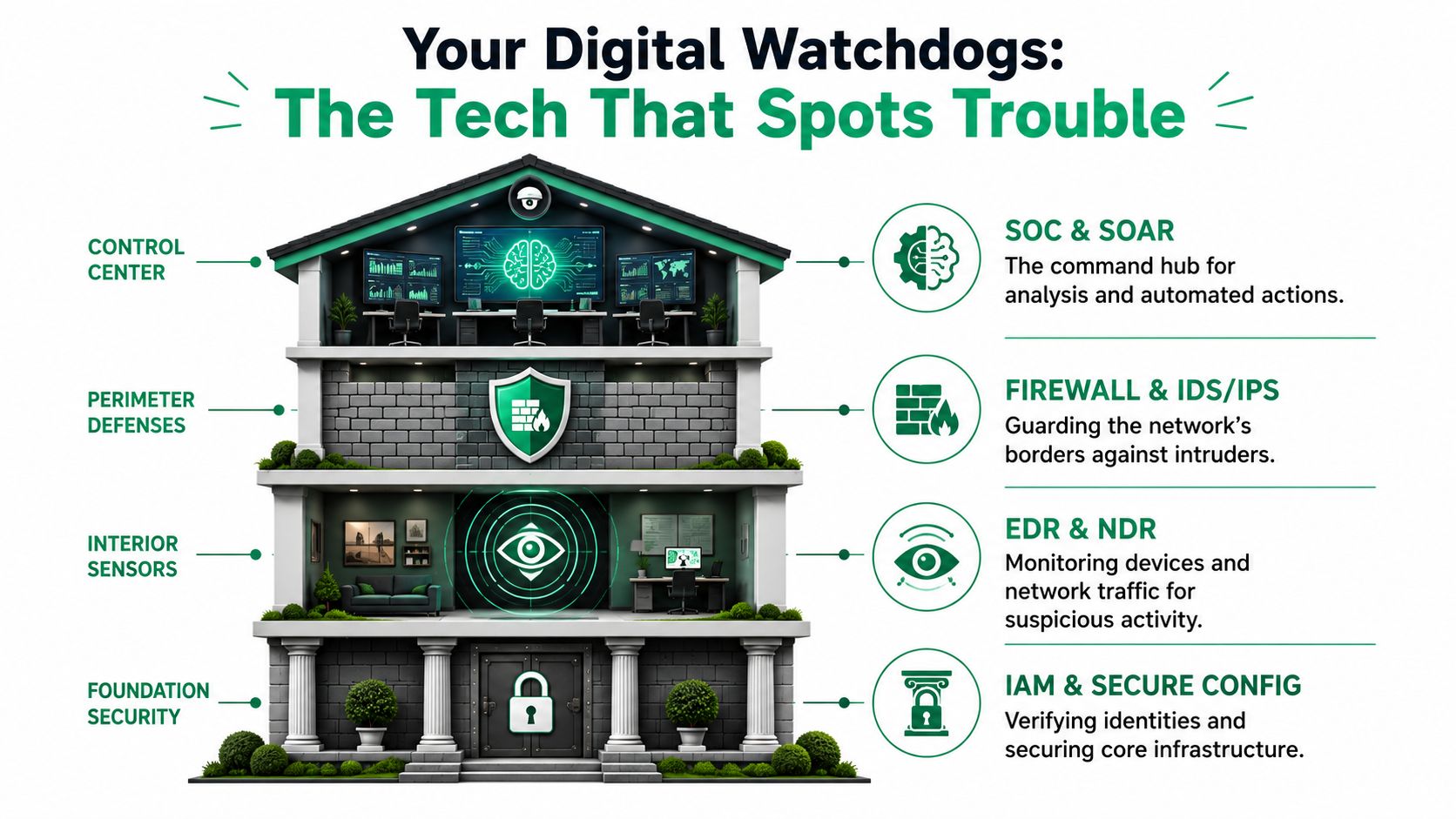
Rapid7 puts the technical side plainly. Effective detection depends on visibility from security events, network traffic patterns, and endpoint activity, all working together in one picture, as described in its guide to threat detection fundamentals across logs, network traffic, and endpoints.
The tools that actually do the work
Start with the endpoint. On a Windows 11 Pro workstation or Windows Server environment, an EDR platform like Bitdefender GravityZone acts like a camera and motion sensor on every machine. It watches processes, suspicious script activity, file changes, login behavior, and attempted tampering.
At the network layer, gear such as UniFi networking gives you visibility into traffic flows, VLAN separation, wireless behavior, and unusual connection patterns. UniFi isn't a full enterprise NDR platform by itself, but paired with firewall logs and proper monitoring, it gives SMBs a practical view of what's moving through the building.
Then you need the control center. That's your SIEM or SOC-as-a-Service monitoring layer. It pulls in logs from Microsoft 365, servers, endpoints, firewalls, switches, backup systems, and cloud apps so somebody can correlate the story instead of staring at disconnected alerts.
A Zero Trust view in plain English
Zero Trust architecture means no device, user, or connection gets a free pass just because it's already inside your network. That matters in Indiana offices where a printer closet server, a forgotten laptop, or a personal phone on guest Wi-Fi can become the weak point.
Here's a simple workflow we use when diagnosing suspicious behavior on a business PC:
-
Check endpoint health
- Open PowerShell as admin and run
Get-MpComputerStatuson Microsoft Defender-managed systems to confirm protection status. - Verify the EDR agent is running and hasn't been disabled.
- Open PowerShell as admin and run
-
Review active connections
- Run
netstat -anoto look for unexpected outbound sessions. - Cross-check process IDs in Task Manager or with
Get-Process.
- Run
-
Check event logs
- Run
wevtutil qe Security /c:20 /f:textfor a quick look at recent security events. - Review Windows Event Viewer for log clearing, failed logins, and service changes.
- Run
-
Validate startup persistence
- Use
schtasks /query /fo LIST /vto inspect scheduled tasks. - Review startup items and services for anything out of place.
- Use
-
Contain first if needed
- Pull the device off the network or isolate it through the EDR console before digging deeper.
A flashy dashboard doesn't protect your business. Clean telemetry, tuned alerts, and someone who knows how to act on them does.
For owners trying to make sense of newer attack patterns, this breakdown of combating AI threats in 2026 adds useful context on where monitoring is heading.
If you want a local angle on automated monitoring, this article on AI threat detection for Indiana businesses connects those ideas to real SMB environments around Indy and Hamilton County growth corridors.
The Anatomy of a Cybersecurity Response
A response plan only proves its value when a real incident hits at the worst possible time. Let's use a realistic example. A Hamilton County medical practice opens on a Monday, staff can't access patient files, and one workstation starts throwing ransom notes. That's not just an IT problem. That's patient care, scheduling, billing, and HIPAA exposure all at once.
The response needs structure, not panic.
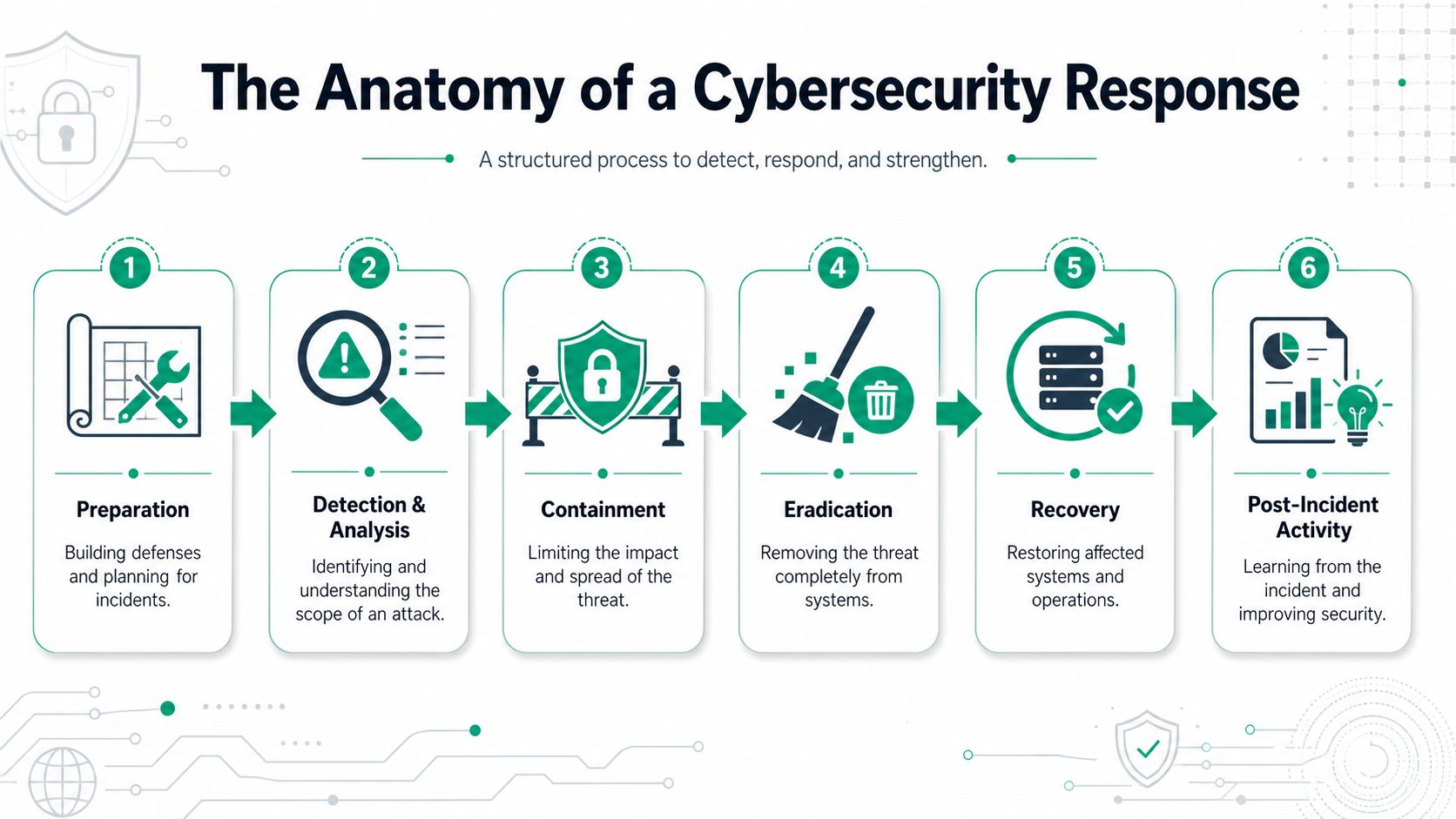
Step one is done before the attack
Preparation decides whether Monday becomes a bad day or a full shutdown. The practice should already have asset lists, admin access rules, EDR on endpoints, protected Microsoft 365 accounts, immutable off-site backups, and a simple incident playbook. If you don't know which systems handle patient data, you can't protect them in a crisis.
When we've helped recover damaged environments over the years, the biggest difference wasn't the brand of firewall. It was whether the business had a written sequence of actions and somebody authorized to trigger them immediately.
Detection and containment under pressure
At 8:07 a.m., the first signal might come from a workstation launching unusual PowerShell activity, a burst of file renames, or failed access attempts on a file share. The right response is not “wait and see.”
It's:
- Isolate the affected machine
- Disable the compromised account if one is involved
- Block known malicious activity at the firewall
- Preserve logs and evidence
- Check whether backup systems were touched
Bitsight notes that top threat actor behaviors in 2025 include disabling Microsoft Defender, tampering with EDR processes, and deleting event logs to hide forensic traces, which is why a response plan has to assume the security tools themselves may be under attack, not just the data, in its review of 2025 threat actor behaviors and EDR tampering.
That changes how you respond. If the endpoint says “all clear” but event logs suddenly stop, that's not comfort. That's a warning.
A practical incident response explainer for local companies is this guide to incident response planning for Indy SMBs.
A short visual overview helps here before we get to the last stages.
Eradication, recovery, and lessons
Once containment holds, the team removes the persistence mechanism, resets passwords, checks for lateral movement, and validates that no shadow systems were affected. On Windows devices, that often means reviewing services, startup items, scheduled tasks, and Group Policy changes before deciding whether to clean or reimage.
Recovery has to be deliberate. Restore from known-good backups. Reconnect devices in phases. Confirm the practice management system, email, and line-of-business software are clean before normal traffic resumes.
In healthcare, “back online” isn't the finish line. “Back online safely with patient data protected” is the finish line.
The post-incident review matters just as much. That's where you tighten policy, tune detections, improve user training, and close the gap that let the attacker in.
Your TDR Implementation Plan
Most downtown Indy and Greenwood businesses don't need a giant enterprise security program. They need a checklist they'll adhere to. The biggest gap for SMBs isn't always buying software. It's the space between coverage and effectiveness.
CSO Online points out the core problem well. Many SMB detection processes are still manual and undocumented, and the pertinent question becomes, “Do we detect the threats we care about?” The practical fix is threat-informed detection engineering, which means mapping your rules and monitoring to attacker techniques in frameworks such as MITRE ATT&CK, as explained in its article on threat detection coverage and effectiveness challenges for SMBs.
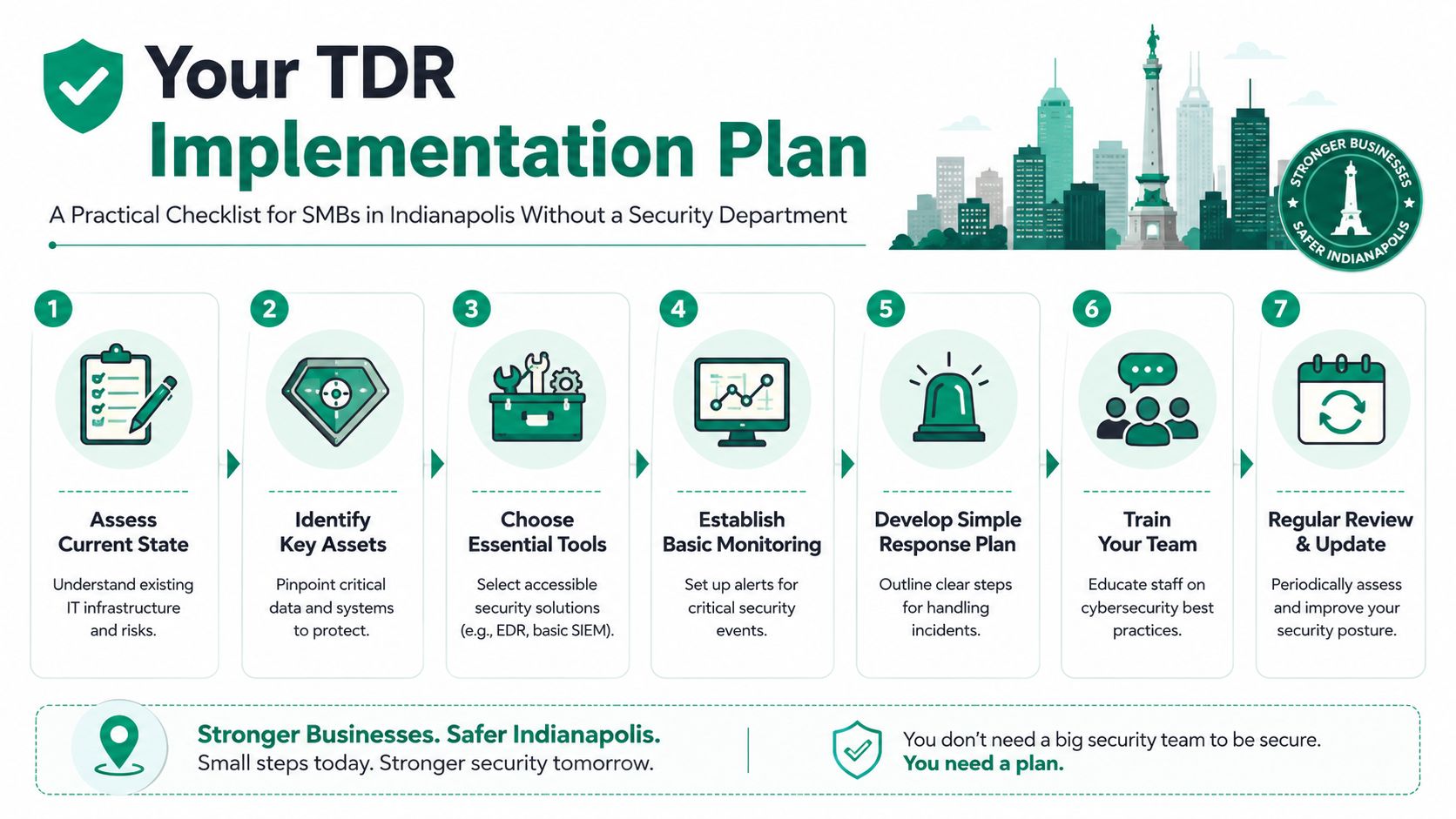
The checklist that makes sense for Indiana SMBs
-
List what you have Build an asset inventory. Servers, laptops, Microsoft 365 tenants, line-of-business apps, UniFi gear, firewalls, backup targets, vendor remote access, and any cloud workloads. You can't monitor what you haven't identified.
-
Rank what would hurt the most
Your EMR platform, accounting system, CAD files, scheduling system, and customer data don't all carry the same business impact. Start where downtime hurts hardest. -
Align controls to a framework
Use NIST CSF as the baseline. If you're in healthcare, layer in HIPAA security requirements. If you support defense work, keep CMMC in view. Frameworks stop security from turning into guesswork.
The hands-on technical setup
Many businesses stall at this stage. They install tools but never finish the configuration.
- Deploy endpoint protection properly: Install Bitdefender GravityZone or your chosen EDR across all supported endpoints and servers.
- Harden identity controls: Enforce MFA, remove stale admin accounts, and review conditional access where available.
- Separate the network: Put guest Wi-Fi, business devices, VoIP, cameras, and servers on separate VLANs using managed switching and UniFi networking where appropriate.
- Protect backups: Use immutable off-site backups and test restore procedures.
- Centralize logs: At minimum, collect firewall, endpoint, server, and Microsoft 365 events somewhere reviewable.
On Windows systems, basic validation can be simple and useful:
- Run
gpresult /rto confirm Group Policy is applying as intended. - Run
Get-Servicein PowerShell to verify key security services are active. - Use
sfc /scannowwhen system file integrity is in doubt during cleanup. - Check Windows Defender event channels or your EDR console for tampering alerts.
Write short playbooks, not giant binders
Most SMBs don't need a 100-page incident manual. They need clear instructions for the most likely scenarios.
Create one-page playbooks for:
- Phishing and credential theft
- Ransomware on a workstation
- Lost or stolen laptop
- Suspicious Microsoft 365 login
- Server encryption or file share abuse
Field note: The best response plan is the one your office manager and IT lead can both use under stress.
Test those playbooks. Run tabletop exercises. Confirm who calls whom, who can disable accounts, and who approves restoring from backup. If you want a starting point, this cybersecurity incident response plan template is a practical place to begin.
How You Know Your Cybersecurity Is Working
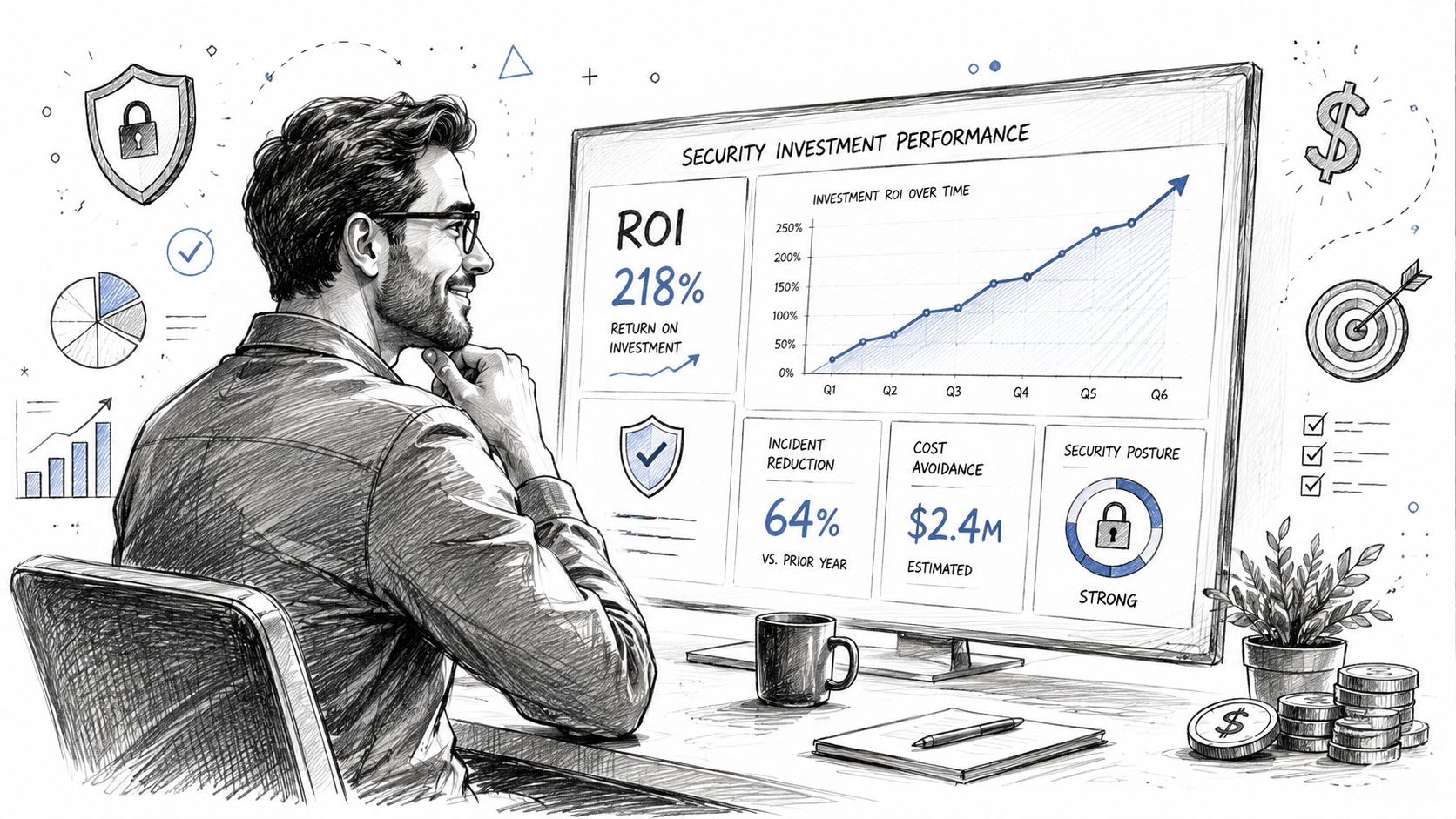
Most security reporting is built to impress technicians. Business owners need a simpler question answered. Are we catching bad activity faster, containing it sooner, and avoiding expensive cleanup?
That's why the most important TDR metric is attacker dwell time. It measures how long an intruder stays in your environment before you detect and act. ArticSledge notes that organizations that cut dwell time from days to minutes see a 60–70% reduction in incident remediation costs, because the attacker has less time to move laterally and exfiltrate data, in its analysis of why attacker dwell time is the key TDR metric.
Translate the jargon into business language
Security teams throw around terms like MTTD and MTTR. Here's the plain-English version:
| Metric | What it means to a business owner |
|---|---|
| MTTD | How fast you spot the break-in |
| MTTR | How fast you contain and clean it up |
| Dwell time | How long the attacker gets to roam around |
| Coverage | Whether your important systems are even being watched |
| Recovery confidence | Whether you can restore data and resume operations cleanly |
If your team can spot suspicious logins, isolate a PC, and recover from backup without improvising, your investment is doing real work. If every incident still becomes a scramble, the tools may be installed but the program isn't mature.
The ROI signs worth watching
A healthy TDR program usually shows up as operational stability:
- Fewer surprise outages
- Less wasted staff time
- Cleaner audit preparation for HIPAA, CMMC, or insurance reviews
- More confidence in backups and restores
- Less dependence on one internal “computer person”
You don't need dozens of vanity charts. You need evidence that threats are found quickly, business disruption stays limited, and recovery doesn't chew up the entire week.
The DIY vs Pro Decision for Your IT Security
Most Indiana SMBs encounter a critical decision point. You can build threat detection and response internally, or you can partner with a managed provider for SOC-as-a-Service monitoring and incident response support. For some larger firms in downtown Indy tech hubs or fast-growing Hamilton County operations, a hybrid model makes sense. For most SMBs, fully DIY turns into a staffing and coverage problem fast.
Rapid7's 2025 survey found that 76% of organizations planned to expand their use of AI and machine learning in threat detection, and for SMBs, a managed service is often the only practical way to access those automated capabilities without taking on major staffing and infrastructure overhead, according to the SANS 2025 Detection and Response Survey highlighted by Rapid7.
The tradeoff in plain terms
You're not just deciding who clicks through alerts. You're deciding whether security will remain a side job inside your business or become a consistent operating function.
| Factor | In-House Security (DIY) | Managed Service (e.g., SOC-as-a-Service) |
|---|---|---|
| Coverage | Usually business-hours only unless you staff heavily | Ongoing monitoring and escalation support |
| Tool tuning | Depends on internal skill and time | Usually handled as part of the service |
| Compliance support | Internal team must interpret HIPAA, CMMC, NIST CSF controls | Better fit for firms that need guidance and documentation |
| Incident response depth | Varies a lot by whoever is available that day | Structured process with repeatable runbooks |
| Budget style | Unpredictable project costs and surprise labor | Predictable monthly budgeting |
| Focus | Pulls internal staff away from operations and projects | Frees staff to focus on the business |
Where DIY breaks down
DIY security can work if you already have experienced staff, clean documentation, mature backups, and enough depth to respond after hours. That's not most SMBs along the I-65 corridor.
The common breakdowns look like this:
- One person knows everything: Then they go on vacation or leave.
- Alerts pile up: Nobody tunes them, so the team starts ignoring them.
- No after-hours response: The attack starts Friday night and gets discovered Monday.
- Compliance drifts: HIPAA safeguards or CMMC evidence collection become rushed cleanup work.
In our local work, this is also where related disciplines matter. Good networking design with latency-optimized mesh nodes improves visibility and reliability. Strong cloud administration closes identity gaps. Tested immutable off-site backups support recovery. In data recovery situations, even bit-level data recovery skills can matter when a failing storage system and a security incident collide.
Why managed security usually wins for SMBs
A managed model turns chaos into process. Instead of paying for random emergency work, you move to a predictable monthly budget. Instead of wasting your controller's time coordinating vendors during an incident, you get a documented escalation path. Instead of guessing whether the firewall, EDR, and Microsoft 365 logs line up, you have people doing that correlation every day.
If you're comparing providers, this guide on how to choose a managed service provider is a solid place to start.
The decision is business-first. If your company would rather spend time serving customers, building product, seeing patients, shipping orders, or supporting contracts than running a security operation, managed threat detection and response is usually the smarter move.
If your business is in Greenwood, Indianapolis, Johnson County, or anywhere around the south side, Finchum Fixes IT can help you figure out where your weak points are before they turn into downtime. Schedule a Free Network Assessment or a Security Risk Audit to review your endpoints, backups, Wi-Fi, cloud access, and response readiness with a local team that knows how Indiana businesses operate.