Mobile App Development Cost: What Indiana SMBs Need to Know
Mobile app development cost for most Indiana SMBs lands around $171,450 for a professionally built custom app, while simpler builds often start in the $10,000 to $50,000 range. If you're staring at three wildly different quotes, the spread usually reflects scope, integrations, platform strategy, and who's doing the work, not random vendor mood swings.
That's the part that catches a lot of Greenwood, Johnson County, and downtown Indy owners off guard. The quote looks like a software line item, but the bill often includes business continuity, cybersecurity, cloud decisions, support, and the cost of fixing bad architecture later.
What Drives the Mobile App Development Cost Spread
A lot of Indiana business owners get the same unpleasant surprise. They sketch out an app for customer booking, field service, or internal approvals, then get quotes that swing from five figures to six figures with no obvious logic. The difference isn't magic. It's the amount of engineering, compliance, and operational risk hiding behind the screen.
The strongest benchmark I've seen for planning is the median custom app cost of about $171,450 from Clutch survey data summarized by industry analysts, with simple apps often starting around $10,000 to $50,000 and feature-rich or compliance-heavy apps climbing to $150,000 to $500,000+ industry summary. That spread tells you the market doesn't price apps by “average.” It prices them by how much backend work, security, and integration pain the project creates.
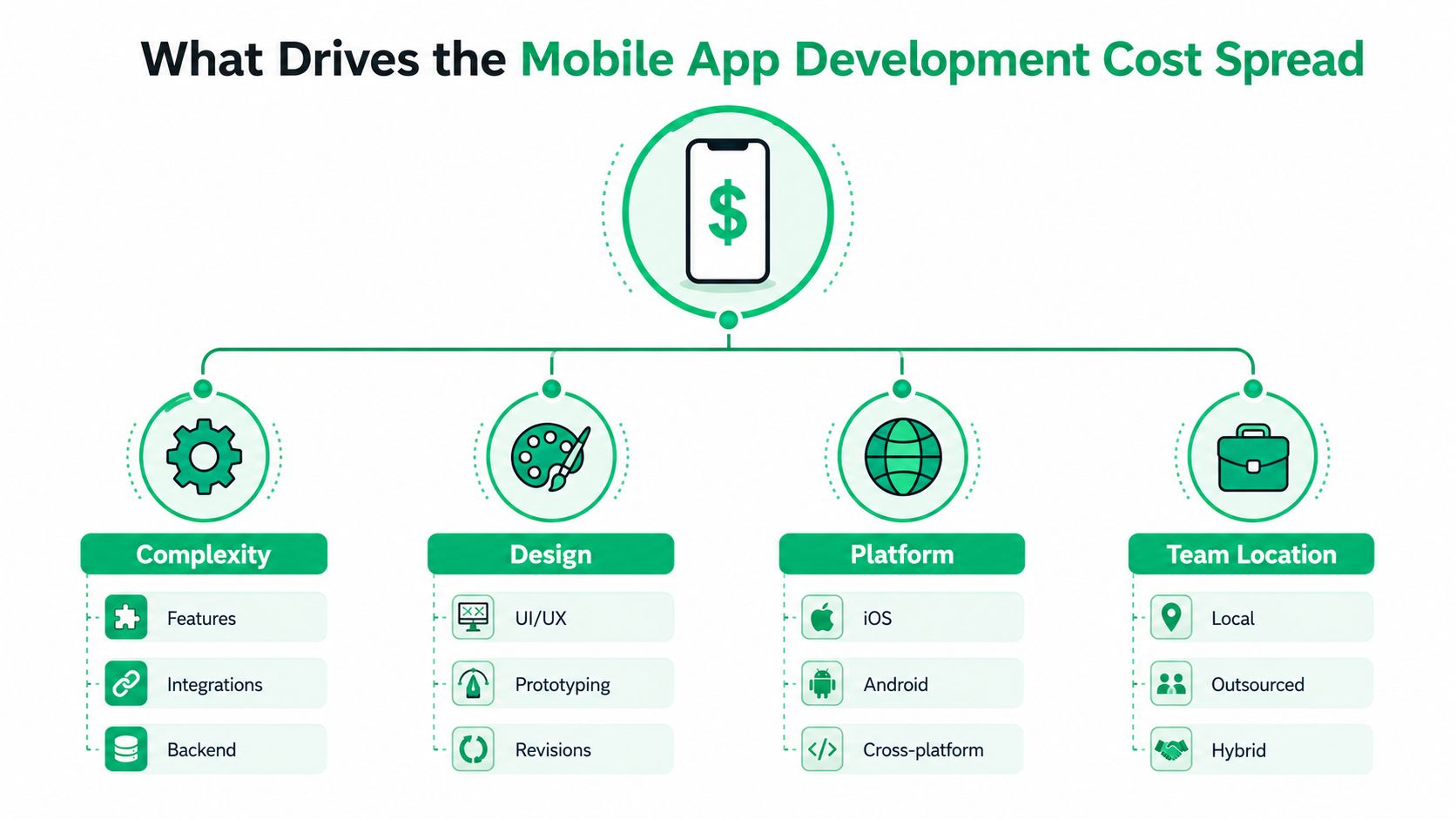
The four levers behind the quote
Complexity drives the biggest jump. If the app needs payments, authentication, live sync, admin tools, or third-party APIs, the cost rises fast because the team has to build and test more moving parts.
Design matters too, but not in the way most owners think. Revisions, prototyping, and polished UI/UX help adoption, yet they rarely move the budget as much as backend logic does.
Platform choice changes the shape of the build. A native iPhone app, a native Android app, and a cross-platform build all carry different engineering paths.
Team location changes pricing and accountability. Local, outsourced, and hybrid models each affect speed, risk, and the amount of rework the client ends up paying for.
Practical rule: ask vendors what they're leaving out of the quote, especially authentication, APIs, testing, analytics, and maintenance. Those are usually the budget grenades.
If you're also deciding whether custom software makes sense at all, the local comparison in this Indiana guide to custom software versus off-the-shelf options is worth a read before you approve a discovery phase.
Where Your Budget Goes
Many Greenwood and Indy SMB owners assume the money goes into “the app.” That frame is too vague to guide a budget. In practice, the spending is split across planning, design, development, and testing, and the build phase takes the largest share because it includes backend logic, frontend work, data structures, and integration overhead cost breakdown.
A useful way to read the budget is straightforward. If the backend is bloated, every other line item tends to grow. If the app mostly needs a cleaner visual layer, the budget hit is usually smaller.
Mobile App Budget Allocation by Phase
| Phase | Percentage Range | Dollar Example ($100K Project) |
|---|---|---|
| Development, backend plus frontend | 40 to 55% | $40,000 to $55,000 |
| UI and UX design | 15 to 25% | $15,000 to $25,000 |
| QA and testing | 10 to 15% | $10,000 to $15,000 |
That split is why trimming backend scope often saves more money than cutting the visual polish. If the app depends on custom database work, role-based access, or multiple APIs, development labor rises first. That is the layer to challenge if you are trying to keep the project inside a predictable budget.
For a $100,000 project, the numbers are blunt. Coding and architecture can consume $40,000 to $55,000 before launch planning is finished. Design and QA still matter, but they are rarely where budgets start to drift out of control.
A clean interface will not save a messy architecture. If the data model is weak, the budget keeps leaking through rework, bugs, and change requests.
That is why a disciplined IT budget process matters for Indiana SMBs. If your app budget gets planned the same way as infrastructure spend, you reduce the surprise expenses that hurt ROI and business continuity. For a practical framework, see this IT budget planning guide for SMB resilience.
Platform Choice and Its Impact on Cost and Timeline
Platform choice is one of the biggest cost step-changes in app development. It is a business decision as much as a technical one, because it shapes timeline, maintenance, and how much duplicate work you pay for later. Native iOS, native Android, and cross-platform builds each come with different trade-offs.
The cost bands are wide because the engineering effort is wide. Simple iOS apps can land around $25,000 to $60,000, while simple Android apps can sit around $28,000 to $70,000. Cross-platform builds for both operating systems generally run $60,000 to $250,000, depending on what the app has to do platform cost guidance.
Platform choice versus timeline
Simple utility apps may take 2 to 3 months, e-commerce apps often need 4 to 6 months, on-demand apps can stretch to 6 to 9 months, and enterprise apps may take 12 to 18 months to finish timeline guidance. Every extra month pulls in more labor, more QA, and more chances for scope drift.
Native builds still make sense when performance, device features, or platform-specific polish are top priorities. Cross-platform can be the better spend when you need to reach both ecosystems without funding two separate codebases. A low upfront quote can still become the expensive option if it forces a second build later.
Indiana businesses feel that trade-off fast. A Greenwood contractor, a Hamilton County service company, and a downtown Indy startup do not need the same platform strategy. Field crews may need dependable Android support. Premium customer experiences may justify iPhone-first work. Internal tools often do better with the simplest build that fits the workflow.
I have seen businesses lose months because they chose the cheapest path first and then had to rebuild for the second platform anyway. That is not savings. That is paying twice.
For a fuller timeline view, this mobile app development timeline guide for 2026 gives a practical planning lens before you commit.
A comparison video can help non-technical owners see the trade-offs more clearly.
Sample Project Estimates for Indiana SMBs
The cleanest way to budget an app is to match your idea to a real project type, not a wish list. I've watched too many owners call something a “simple app” and then add payments, secure logins, dashboards, and compliance review once planning starts. After those features enter the scope, the project stops behaving like a starter build.
A basic internal operations app
A simple internal tool for scheduling, task tracking, or approvals often fits the $15,000 to $50,000 tier in pricing tiers. It's the kind of app that helps a team replace paper forms or messy spreadsheets without trying to act like a marketplace or customer portal.
The work usually moves faster because the feature set stays tight. You are not building public-facing commerce flows or complex consumer workflows. The app still needs solid permissions, backups, and support, but the scope can stay controlled.
A medium customer-facing app
A mid-range product, such as a booking app, loyalty app, or service request app, usually sits in the $50,000 to $120,000 range. At this level, owners start paying for authentication, notifications, API calls, and a stronger user experience.
This category is where estimates often get sloppy. A vendor may quote the visible screens and leave out the backend work needed to keep customer data moving cleanly. That is how a project that looked manageable turns into a budget extension.
Indiana businesses feel that gap quickly. A local contractor, a county service company, and a downtown Indy startup may all want a customer-facing app, but each one has different support needs, device assumptions, and security expectations. The smarter budget accounts for those trade-offs early.
For teams trying to keep the build disciplined, this software development best practices guide is useful reading before the scope locks in.
A compliance-heavy enterprise build
Once the app handles payments, secure authentication, or sensitive data, the budget can climb to $120,000 to $300,000 or more. If the product needs enterprise workflows, secure integrations, or stricter governance, the price can go higher still.
That is the class of project where a healthcare client starts asking about HIPAA, a defense supplier asks about CMMC, and most other firms ask whether the app aligns with NIST CSF. Those are not buzzwords. They change the architecture and the testing burden.
Industry pricing surveys also show the most common project bracket at $10,000 to $49,999, with the average agency-built app around $90,780 survey summary. That gives owners a sanity check when a vendor's quote feels detached from reality.
The post-launch bill matters too. Maintenance, updates, bug fixes, and support can keep adding cost long after the first release, especially for Indiana SMBs that need predictable IT budgeting instead of surprise rework. For practical cost-cutting ideas, Virtustant cost reduction tips can help you compare what to trim and what to keep in the first build.
Smart Ways to Reduce Mobile App Development Cost
The best way to lower app cost isn't to slash quality. It's to avoid buying features before you know users need them. I've seen too many projects overbuild the first release, then spend months patching the parts nobody uses.
Start with the parts that matter
A focused MVP usually beats a sprawling launch. If the first release proves the workflow, you've earned the right to add complexity later. That approach keeps the budget tied to evidence instead of assumptions.
Using ready-made components also helps. APIs, plugins, and reusable modules can remove a lot of custom work when the use case is standard enough to support them. That's especially useful for payments, messaging, notifications, and routine auth flows.
Make the first launch smaller, not cheaper-looking
A cheaper UI doesn't automatically create a better budget. The bigger savings usually come from reducing backend complexity and unnecessary integrations. If you don't need real-time sync on day one, don't pay to build it on day one.
Post-launch planning matters too. Maintenance, updates, and bug fixes can run $5,000 to $30,000+ per year, while launch and post-launch marketing can add $10,000 to $100,000+ maintenance and marketing guidance. That's the hidden line item that catches owners after the app is live.
For practical cost-cutting ideas, Virtustant's cost reduction strategies are a solid companion piece when you're deciding what to build now and what to defer.
A simple cost-control checklist
- Start with an MVP: keep the first release to core workflows and validate demand.
- Use ready-made components: buy or integrate where the market already solved the problem.
- Outsource strategically: keep specialized or non-core work outside the main team if it lowers rework.
- Plan for iterations: launch, measure, then refine instead of trying to perfect everything upfront.
The cheapest quote isn't the cheapest app. The cheapest app is the one you don't have to rebuild six months later.
If you're tightening your software process as part of the same budget discipline, these software development best practices for growth pair well with a more controlled mobile roadmap.
Local Hiring, Outsourcing, and Compliance Considerations for Indiana Businesses
A lot of owners ask the wrong question first. They ask, “How much does the app cost?” The better question is, “Who's building it, where, and what risk are we taking on with that team model?” That's where the pricing starts to make sense.
In-house development in major U.S. markets runs at about $25 to $150 per hour, while outsourcing can range from $75 to $250 per hour depending on scope and delivery model pricing guide. Business of Apps also notes that a U.S. app developer costs about $100,000 to $133,000 per year annual salary guidance, which explains why local staffing looks different from offshore pricing.
Why local accountability still matters
A Greenwood or Indianapolis team can sit in the same room with your operations lead, your security contact, and your vendor manager. That matters when you're trying to map data flow, talk through access control, or avoid a compliance mistake that becomes a cleanup project later.
Local teams also tend to fit better when the app has to align with HIPAA, CMMC, or NIST CSF expectations. Compliance work isn't just paperwork. It changes how authentication, logging, backups, and patching get handled.
If you're comparing models, this guide to hiring a custom application developer in Indiana is a practical next read.
A mixed model often works best
Some Indiana businesses do best with a hybrid setup. A local lead handles architecture, compliance, and stakeholder communication. A remote team handles narrower coding tasks where time zone differences don't create chaos.
That approach can be rational if it protects the app from rework and keeps internal leadership from spending every week translating tech jargon. It also keeps the project closer to the business continuity plan instead of turning it into a disconnected side project.
If you're sourcing beyond Indiana, Hire LATAM talent is one option companies look at when they want a broader hiring pool without completely losing coordination.
Next Steps for Indiana SMBs Building a Mobile App
The smartest app budget is the one that includes more than just code. It includes backend architecture, support, compliance, and the cost of keeping the app stable after launch. That's how you avoid turning a promising product into another line item that keeps asking for emergency money.
For owners in the I-65 corridor, Johnson County, Hamilton County, or the downtown Indy tech hubs, the right app partner should be able to talk about data flow, cloud hosting, security controls, and maintenance terms in plain English. If they can't explain how the app fits your broader IT environment, they're not ready to own the risk.
A strong vendor conversation should cover these points:
- What data the app stores and where it lives.
- Which integrations are mandatory and which can wait.
- How authentication and permissions work from day one.
- What happens after launch, including bug fixes, updates, and support.
- How the app aligns with your security posture and existing network setup.
If you're funding the project through a loan or planned capital spend, the requirements in this 2026 SBA 7(a) loan guide can help you think about the financing side with more discipline. The key is matching app ambition to a real budget, not a hopeful one.
When we help Indiana businesses evaluate tech spend, we look at the app and the surrounding environment together, because downtime, weak backups, and sloppy security all eat into ROI. A mobile app should make operations smoother, not create a new support burden that drags the business down.
If you're planning a mobile app for your Greenwood or Indianapolis business, Finchum Fixes IT can help you think through the build, the security, and the support side before you spend a dollar. Reach out for a Free Network Assessment or Security Risk Audit, and we'll help you map the app to a smarter IT budget instead of a costly surprise.