Non Profit Managed IT Services: Indiana Guide 2026
A lot of Indiana nonprofits hit the same wall at the same time. The server gets older, Wi-Fi starts dropping in the brick addition, one phishing email sneaks through, and suddenly grant reporting, donor tracking, and staff support are all fighting for the same shaky network.
Nonprofit managed IT services are a monthly support model that keeps systems patched, monitored, backed up, and usable without waiting for something to fail first. In plain English, it turns tech from a series of emergencies into a predictable operating service for organizations that can't afford downtime, especially in Greenwood, downtown Indy, and along the I-65 corridor.
What Nonprofit Managed IT Services Actually Are
The first sign you need outside help is usually small. A calendar sync breaks during a board meeting, the old office server takes forever to boot, or the person who “knows computers” is already busy running payroll, donor emails, and facility issues.
In a nonprofit, that kind of friction doesn't stay small for long. A missed backup can delay a grant report. A weak password can turn into a phishing incident. A half-working network can waste staff time every day until nobody trusts the tools anymore.
Nonprofit managed IT services sit between break-fix support and a fully staffed internal IT department. Break-fix means you call when something is already broken. Managed services means someone is watching the environment, patching devices, handling help desk work, and dealing with security before the outage becomes public drama. Internal IT can do some of that, but many Indiana nonprofits don't have enough staff to cover infrastructure, support, cybersecurity, and planning at scale, which is why the sector's average technology staffing ratio matters so much. The benchmark study from NTEN found that the average nonprofit had about 4.5 technology staff members and roughly 1 technology person supporting 30 employees (average nonprofit spends 3.2% of budget on technology).
Practical rule: if nobody is accountable for patching, endpoint protection, backup checks, and response planning every week, you're not managed. You're hoping.
For endpoint security, tools like Bitdefender GravityZone fit the managed model because they let a provider standardize protection across laptops, desktops, and remote users. For distributed offices, UniFi networking is a better fit than piecemeal consumer gear because it gives one place to manage access points, switches, and guest networks across multiple sites.
A lot of nonprofit leaders compare this work to security and compliance in other regulated sectors, which is why security and compliance for CEFs is a useful comparison point even if your mission is social services, not finance. The same discipline applies. You want documented responsibility, not vague reassurance.
If you're still trying to decide where your organization sits, the easiest test is simple. Reactive mode means issues are handled after they hurt people. Partially managed means you have some monitoring or help desk coverage, but gaps still show up in after-hours support or security. Fully managed means the whole environment is covered with clear accountability, documentation, and escalation. For a practical Indiana overview of that progression, the IT managed services guide for Indiana businesses is worth a look.
The Six Service Pillars Every Nonprofit Should Expect
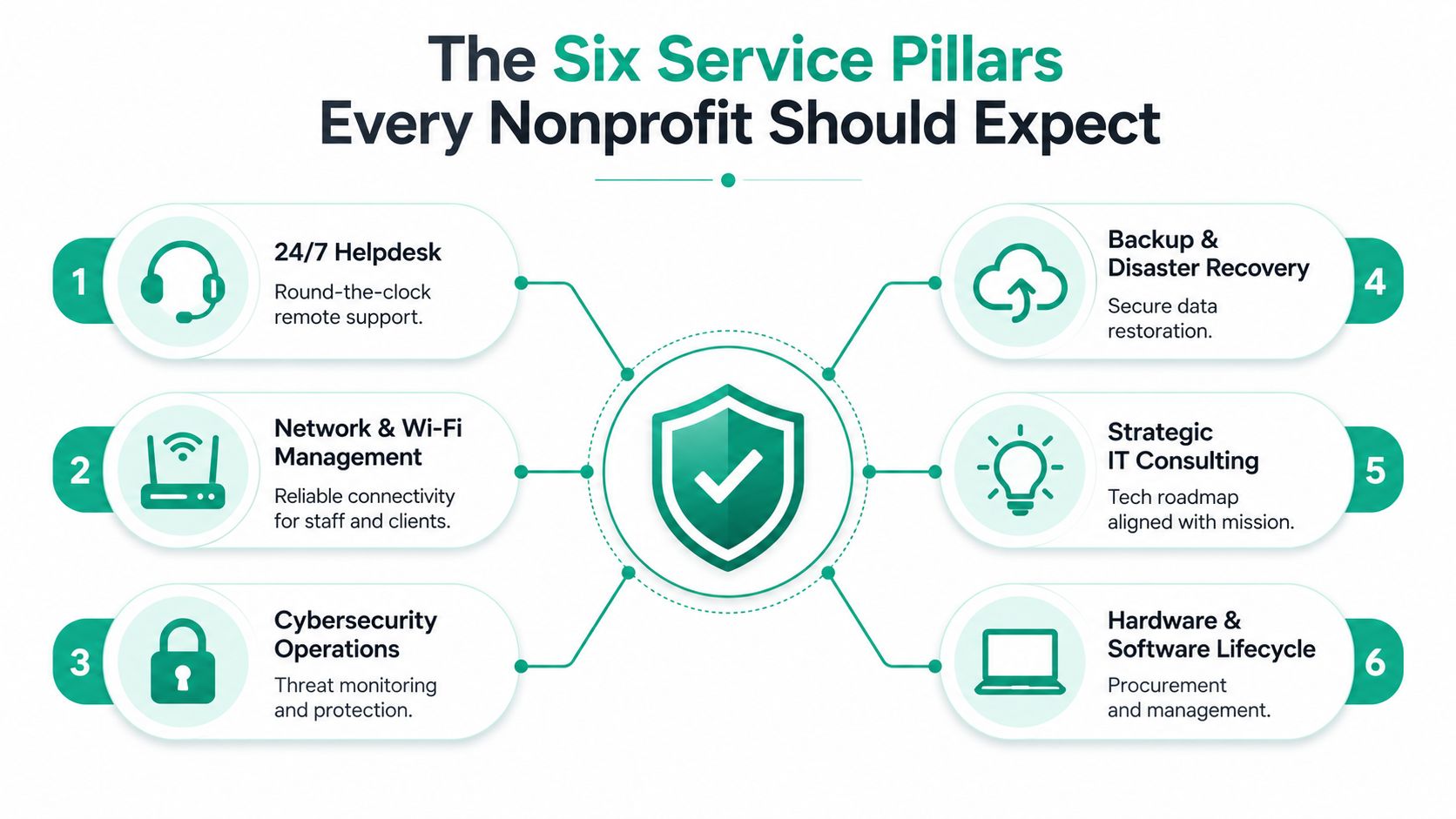
Most nonprofits don't need a giant IT contract. They need the right six pieces covered cleanly, with no mystery about who owns what. If a provider can't explain these pillars in plain language, keep looking.
24/7 Helpdesk and user support
Staff need a real help desk when email fails, passwords lock out, or a board packet won't open ten minutes before a meeting. In practice, that means ticket tracking, remote support, and fast escalation when a local fix isn't enough. For a 10-person shop, this can be lighter coverage. For a 75-person regional nonprofit, it needs real queue management and after-hours response.
Network and Wi-Fi management
Old brick walls in Greenwood and downtown Indy can eat wireless signal for breakfast. Managed network work covers access points, switch health, guest network isolation, and latency-optimized mesh nodes where the building layout makes cabling hard. UniFi networking usually shines in this scenario, because one dashboard can replace scattered consumer routers and mystery passwords.
Cybersecurity operations
This is more than antivirus. A managed stack should include endpoint protection, patching, policy enforcement, and SOC-as-a-Service monitoring when the risk level justifies it. For nonprofits handling health data, HIPAA-aware settings matter. For general governance, align the basics to NIST CSF. If there's federal grant data or a defense-adjacent partner relationship, CMMC awareness belongs in the conversation too.
Backup and disaster recovery
A backup that can't restore is just a warm feeling. Nonprofits should expect immutable off-site backups, restore testing, and a real recovery plan for laptops, servers, and cloud data. That's the difference between a one-hour interruption and a lost week of records.
Cloud and Microsoft 365 administration
Many Indiana nonprofits live in SharePoint, Exchange, Teams, and OneDrive whether they planned for it or not. Managed cloud support handles tenant security, licensing, retention settings, shared mailbox hygiene, and access control. If nobody is watching those settings, staff end up building workarounds that create more confusion later.
Compliance and documentation support
A provider should help with policy writing, audit prep, asset tracking, and evidence collection, not just devices. Grain's nonprofit software guide is a good reminder that the software stack itself needs as much discipline as the hardware. For service-desk process ideas that reduce chaos, the IT service desk best practices guide is a solid companion read.
The right six pillars don't all need to be expensive. They do need to be explicit, written down, and tied to the mission.
For many smaller groups, backup and security are essential first. For larger nonprofits, consulting and lifecycle management matter more because scattered purchasing decisions eventually create a mess nobody owns.
Nonprofit IT Budgets, Grants, and the Real Cost of Downtime
A nonprofit budget can get tight fast when a server slows down, Wi-Fi drops in a brick building off the I-65 corridor, or a donated laptop fails right before intake hours. Most groups cannot treat technology like a blank check. One benchmark source found average nonprofit technology spending at 3.2% of total annual organizational spending, with an average technology budget of $114,443 and a range from $10,530 to $432,214 depending on organization size (average nonprofit spends 3.2% of budget on technology). Another guide says nonprofits usually spend 2% to 5% of their operating budget on technology (managed IT for nonprofits worth the investment).
That range matters in Indiana because funding is often restricted. A United Way allocation, an Indiana Arts Commission grant, or a donor-designated line item usually cannot be shifted to cover a crashed server or emergency cleanup. Planned spending works better than surprise spending, and budget planning for ROI and resilience gives boards a clearer way to tie IT costs to mission continuity. Managed services help because they turn irregular break costs into a monthly line item that can be reviewed before the next board meeting.
Break-Fix vs Managed IT Cost Comparison
| Cost Category | Break-Fix Model | Managed Services Model |
|---|---|---|
| Support pattern | Calls happen after failure | Monitoring and support happen continuously |
| Labor cost | Hourly emergency help, often $125 to $225 an hour (break-fix support rate) | Fixed monthly subscription |
| Budgetability | Hard to predict | Forecastable |
| Risk | Higher chance of prolonged downtime | Lower chance of extended disruption |
| Planning | Usually reactive | Usually documented and scheduled |
For nonprofits with 10 to 50 employees, managed IT for nonprofits commonly runs $125 to $175 per user per month (nonprofit IT cost guide). A separate nonprofit cost guide gives the same range and frames it as a predictable monthly service rather than break-fix work. In the same cost guide, organizations in that headcount range often land between $1,250 and $8,750 per month, depending on size and scope (nonprofit IT cost guide).
For a 25-person Johnson County nonprofit, the math is straightforward. At the lower end, managed support stays predictable. At the higher end, you are still usually buying more coverage than a volunteer tech person can realistically provide, especially if the office depends on cloud apps, remote access, and secure backups.
Practical rule: if a service plan costs less than the disruption caused by one ugly incident, the real question is not “Can we afford it?” It is “Can we afford not to?”
Downtime has a second cost that boards often miss. Staff lose hours, donors wait, client records sit unreachable, and everyone starts patching problems by email or text. A clinic in Greenwood or a food bank in Marion County does not just lose convenience when systems stall, it loses intake time, follow-up time, and the clean records that keep grant reporting on track. That is why protecting assets from cyber threats belongs in the same budget discussion as backups and support. The right spending choice is rarely the cheapest line on paper. It is the one that keeps the mission moving when a device, internet circuit, or cloud account fails.
Co-Managed IT Versus Full Outsourcing
A lot of nonprofit IT advice assumes you either have nobody or you have a full internal department. That's not how most Indiana nonprofits work. Many have one capable operations person, a part-time contractor, or a staff member who inherited IT because they were good with spreadsheets and didn't say no fast enough.
How the split usually works
Full outsourcing means the provider handles help desk, monitoring, patching, cybersecurity, backup oversight, vendor coordination, and most planning. Co-managed IT keeps your internal person in place and fills the gaps that eat time, like after-hours support, escalation, documentation, project work, and security operations. A monitoring-only tier sits even lighter, which can work for a small office with stable systems and low change volume.
The cleanest model depends on what's already in-house. If your internal person handles user accounts, printer drama, and vendor calls but doesn't have time for patch windows, incident response, or system documentation, co-managed IT is usually the right fit. If nobody has time to own any of that, full outsourcing is safer.
A Hamilton County nonprofit that grew from 12 to 35 staff in two years ran into this exact wall. Their generalist could still solve local problems, but growth added too many endpoints, too many cloud permissions, and too many support requests for one person to keep up. The issue wasn't skill. It was scale.
The best co-managed split is boring in a good way. Internal staff keep the mission context, the vendor history, and the day-to-day relationships. The MSP handles the repetitive technical load, the security tooling, the documentation, and the escalation path. That way, nobody is guessing who owns the firewall when something goes sideways during a fundraiser.
Co-managed IT works when both sides know their lane. If everything is “shared,” nothing gets fixed on time.
For Indiana nonprofits, that split matters because staffing pressure is real. The nonprofit cybersecurity discussion cited earlier reported that 53% of surveyed nonprofits had no full-time IT staff and those that did averaged just 1 IT employee for every 96 workers (managed IT for nonprofits worth the investment). That kind of ratio makes co-management attractive when there's at least one internal person who can own governance and communication.
The easiest way to decide is to map ownership. If your internal person can keep documentation current, approve changes, and coordinate users while the provider handles the technical engine, co-management fits. If not, full outsourcing is the cleaner move. For a side-by-side look at the staffing trade-offs, the managed service vs staff augmentation guide is a useful reference.
Choosing and Procuring the Right Indiana Provider
Buying managed IT for a nonprofit shouldn't feel like hiring someone to “just handle computers.” You're buying response times, documentation, cybersecurity discipline, and a way to survive the next ugly surprise without blowing the budget. That means the RFP and interview process has to be sharper than the usual three-line vendor quote.
What to ask for in the RFP
Start with your pain points, your locations, and your service expectations. Then ask for scope in writing. The provider should spell out help desk hours, on-site response expectations, backup responsibilities, cybersecurity tooling, cloud administration, and whether they support HIPAA, NIST CSF, or CMMC-related needs if your mission touches those environments.
Questions that expose weak vendors
- Response timing: What happens when a server fails during a fundraiser in the I-65 corridor?
- Ransomware scope: Does the contract include containment, remediation, and restore support?
- Data ownership: Who owns the tenant, the backups, and the documentation?
- Exit language: How does the handoff work if the relationship ends?
- Reference quality: Can they name other Johnson County business owners or Hamilton County organizations they support?
The local piece matters more than most buyers admit. If a provider can't explain how they support downtown Indy tech hubs, older Greenwood buildings, and satellite sites without hand-waving, that's a clue. A good local provider understands parking, building access, and the reality that a “quick on-site visit” means something different at 2 p.m. on a fundraiser day.
A well-written contract should also say who handles patching, who handles backups, and who handles after-hours response. If the answer is vague, you're going to get the same vagueness later when something breaks.
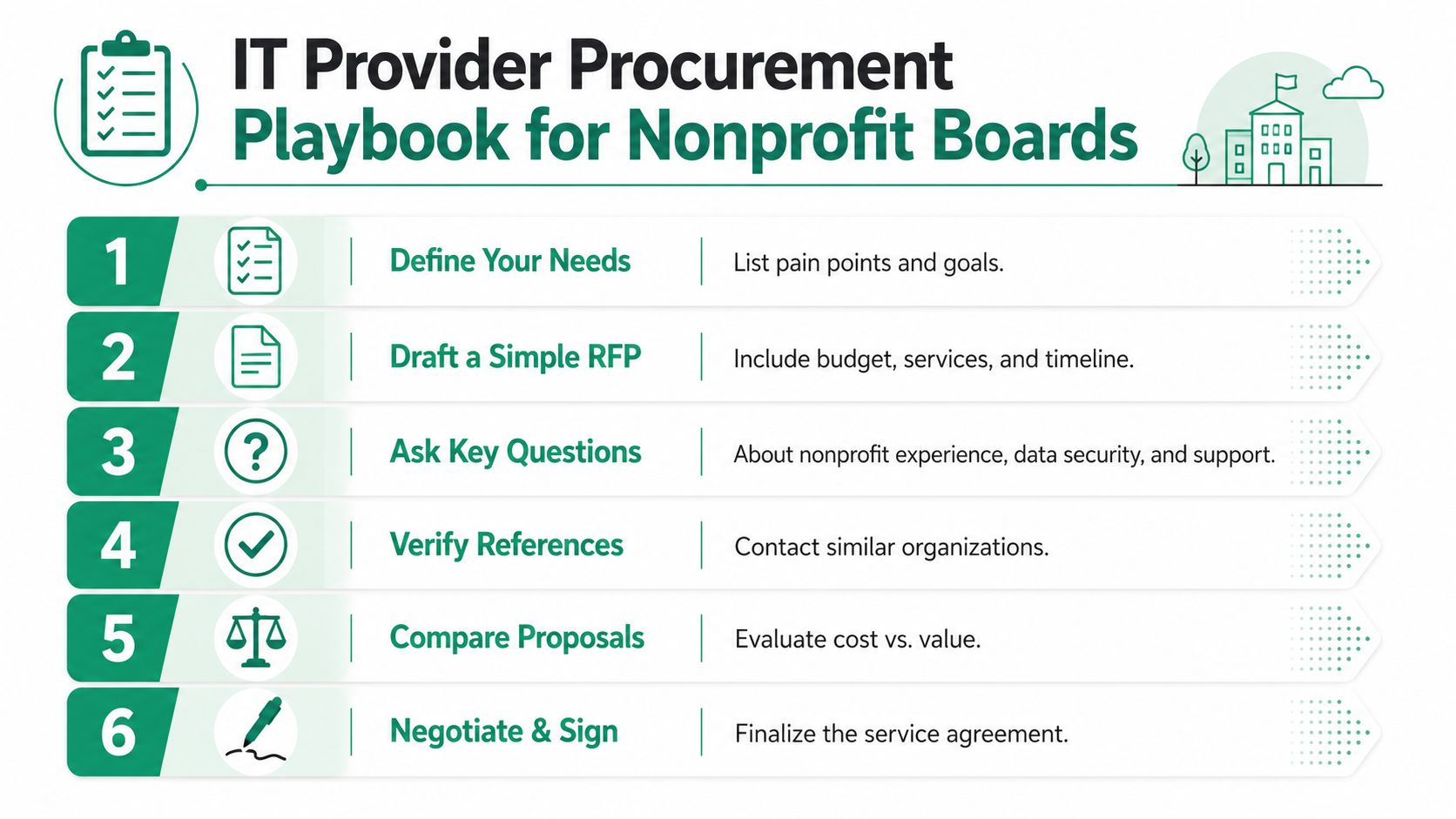
Use the procurement process like a board-level checklist, not a sales call. The Indiana managed service provider selection guide is a good companion when you're comparing proposals.
Practical rule: if the contract doesn't say who restores the data, who notifies leadership, and who documents the incident, it's not a complete contract.
The best providers don't just sell tools. They define the operational handoff, explain the limits, and give you a clean path to audit the work later.
A Greenwood Nonprofit Problem Solved by Managed IT
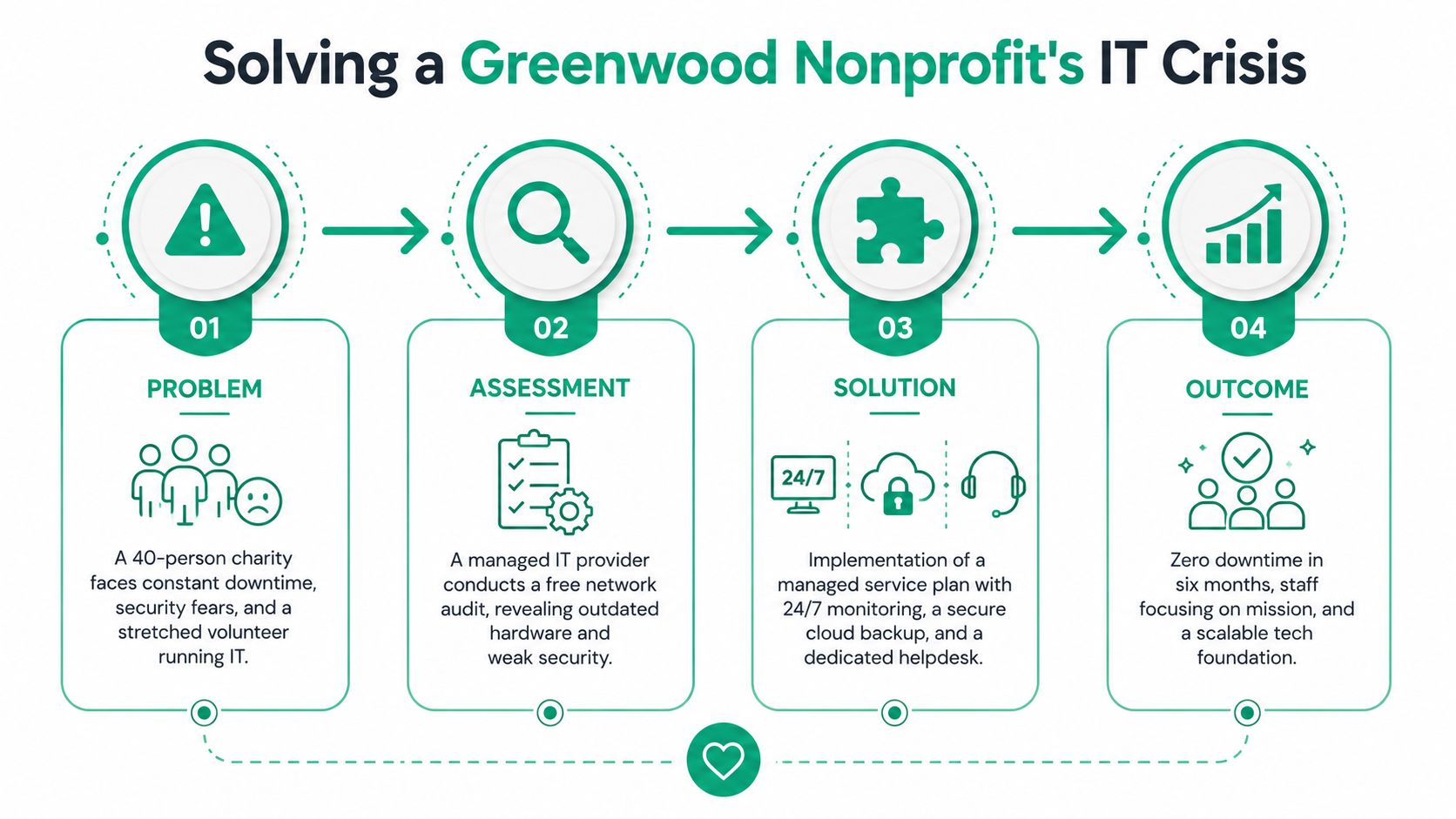
A 40-person nonprofit in a Greenwood business park called after a near-miss phishing attack nearly exposed a restricted grant file. Their Windows Server was six years old, the old brick wing had dead zones, and the staff member “running IT” was also managing office operations. That's how a small technical gap turns into a mission problem.
The first step was a full assessment. We checked server health, switches, wireless coverage, backup integrity, and endpoint status. One RAID array was failing, so we pulled the data with bit-level data recovery before the disks gave up completely. That wasn't glamorous work, but it kept records intact and avoided a much messier rebuild.
The Wi-Fi issue was next. The building layout was the problem, not the internet line, so we deployed UniFi access points and latency-optimized mesh nodes in the dead zones. Staff stopped roaming between weak corners and started trusting their tablets, laptops, and cloud apps again.
After that, we rolled out Bitdefender GravityZone for endpoint protection and paired it with an immutable off-site backup plan. That closed the gap between “we think we're protected” and “we can restore data if something bad happens.” The provider also documented the recovery process, which matters when board members ask what happens if a file server dies during grant season.
In real life, the week after the fix is just as important as the fix itself. Staff need to know who to call, what gets escalated, and what happens during an outage. That's where Zero Trust architecture and sane access control help, because the provider can reduce trust by default instead of assuming every device on the network is safe.
The result wasn't magic. It was fewer interruptions, less volunteer panic, and a support model that matched the organization's size. That's what good managed IT looks like in Greenwood, not a flashy promise, just a working system that doesn't get in the way of the mission.
Getting Started and Booking a Free Network Assessment
If your board is trying to make sense of this, keep the decision simple. You need support that protects uptime, keeps grant work moving, and makes the monthly budget easier to plan. You also need a provider who can explain the network, the backups, the security posture, and the handoff between internal staff and outside help without hiding behind jargon.
A good next step is a Free Network Assessment or a Security Risk Audit. Bring the current pain points, your laptop count, your server age, your cloud apps, and any compliance concerns tied to HIPAA, NIST CSF, or CMMC. Ask for a sample SLA, ask who owns backup verification, and ask how they handle after-hours incidents.
If the provider can't make downtime understandable in business terms, keep shopping. The right partner should show how unmanaged tech drains staff time, creates avoidable risk, and turns a predictable budget into an emergency fund. For Greenwood and Indianapolis nonprofits, that conversation should start with the network.
Finchum Fixes IT helps Greenwood and Indianapolis nonprofits with managed IT, cybersecurity, networking, data recovery, and cloud support that fit real budgets and real buildings. If your staff is dealing with outages, aging hardware, or a security gap that hasn't been fixed properly, visit Finchum Fixes IT to book a Free Network Assessment and get a clear plan for the next step.