Outsourced IT Support: A Practical Guide for Indiana SMBs
At 2 PM, an aging server fails, Wi-Fi disappears, and forty employees stop working. Outsourced IT support prevents that scramble by combining proactive maintenance, cybersecurity, help desk coverage, backups, and recovery planning into a managed service. For Indiana SMBs, the right partner turns technical risk into predictable operations and fewer expensive interruptions.
The Southside Server Crash That Changed Everything
A 40-person accounting firm in a Greenwood business park learned the hard way during tax season. Its aging Dell PowerEdge server stopped responding at 2 PM. The old brick building already had unreliable wireless coverage, so the server failure quickly became a broader outage. Staff couldn't reach shared files, applications, or printers. The owner called every technician in the area and discovered that nobody had documented the recovery process.
That situation is common across the I-65 corridor. Businesses grow, add software, move workloads to the cloud, and keep aging infrastructure running because “it still works.” Then one failed drive, expired firewall, or corrupted database turns routine work into an emergency.
Outsourced IT support means an external technology team handles some or all of your IT operations. That may include help desk support, server maintenance, networking, cloud administration, endpoint security, data recovery, and incident response. The service can be fully managed, shared with internal staff, or purchased only when something breaks.
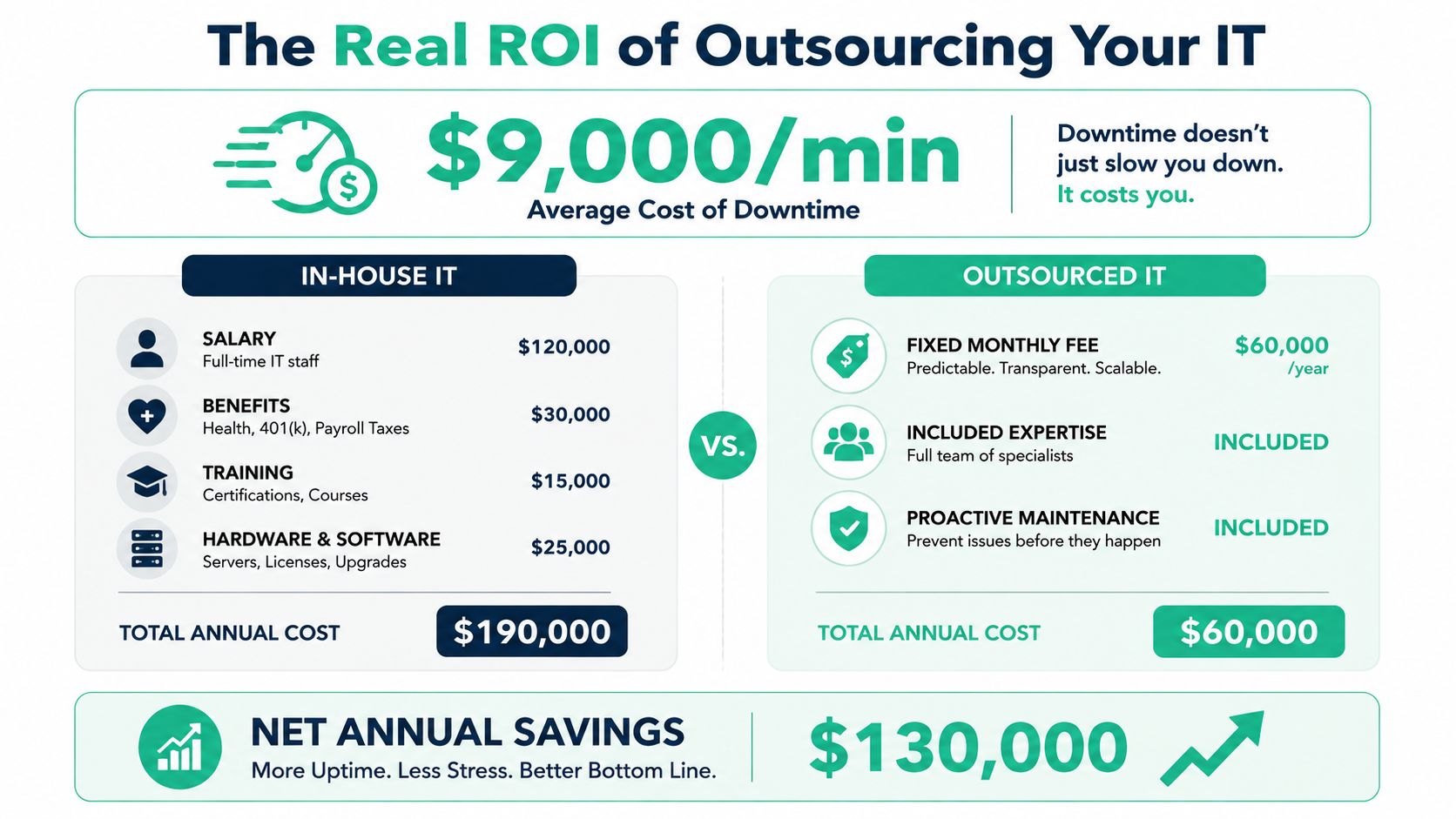
The financial exposure is substantial. IBM cites the average cost of downtime for large organizations as high as $9,000 per minute in its discussion of cloud backup and recovery economics (IBM's downtime cost benchmark). That figure isn't a promise of what every Indiana SMB loses, but it shows why business continuity deserves a place in the IT budget. Lost production, idle employees, missed deadlines, frustrated customers, and emergency labor all add up.

What the managed approach changes
A capable provider doesn't wait for the Dell server to fail. The team inventories hardware, reviews warranty status, checks storage health, monitors backups, patches systems, tests restores, and documents who can approve emergency changes. Network work may include redesigned VLANs, properly placed UniFi access points, and latency-optimized mesh nodes where thick walls interfere with wireless signals.
The provider also establishes escalation rules. A password reset shouldn't follow the same path as ransomware, a failed RAID array, or a cloud identity lockout. Those incidents need defined authority, current runbooks, and a recovery sequence people have practiced.
A business can choose full managed services, co-managed IT, or break/fix support. The right choice depends on risk, internal skills, operating hours, and how much downtime the company can tolerate. A server maintenance guide for Indiana SMBs is a useful starting point for owners assessing aging infrastructure.
Three Outsourced IT Support Models Explained
Indiana businesses usually choose one of three operating models. The distinction isn't just billing. It determines who owns monitoring, documentation, security decisions, after-hours response, and long-term improvement.
| Model | Cost Structure | Typical Response Time | Best For | Risk if Misused |
|---|---|---|---|---|
| Managed service provider | Predictable recurring fee, often based on users, devices, or a defined scope | Contract-defined response and escalation | SMBs without enough internal coverage | Dependence on a provider that doesn't understand the business |
| Co-managed IT | Shared recurring service plus internal ownership of selected functions | Internal or provider response, depending on the issue | Firms with capable IT staff needing depth or coverage | Confusion about authority and duplicated work |
| Break/fix | Pay for labor and materials after an incident | Dependent on availability and severity | Very small firms with low complexity and low risk tolerance | Repeated emergencies, weak documentation, and unpredictable spending |
Managed services for a growing operation
A Hamilton County startup adding employees quickly may need identity management, endpoint deployment, Microsoft 365 administration, secure remote access, and help desk coverage before it can justify a full internal department. An MSP supplies repeatable processes and a wider skill set.
The tooling matters. A provider might manage UniFi networking, deploy Bitdefender GravityZone for endpoint protection, and add SOC-as-a-Service monitoring for security events. Those tools don't replace sound judgment, but they create visibility that a single overloaded administrator often can't maintain.
Owners comparing providers can review managed IT services from Bruce and Eddy to see how another service firm presents its support scope. Compare deliverables, not adjectives. Ask who patches endpoints, who owns licensing, how tickets escalate, and what happens when the provider's primary technician is unavailable.
Co-managed support for internal teams
A downtown Indy tech hub with two in-house developers may not need an outside team to handle every laptop issue. It may need after-hours monitoring, network expertise, backup administration, or security coverage while developers focus on products.
Co-managed IT works when both parties document responsibility. The internal team might own application architecture while the provider manages firewalls, backups, endpoint policies, and incident escalation. Without that division, employees waste time deciding who should act.
Break/fix and the false economy
A small Johnson County law firm may call only when a workstation fails. The low initial commitment can look attractive, but the model encourages reactive decisions. Technicians arrive without current diagrams, asset records, or tested recovery steps. The firm pays for diagnosis during the crisis, then returns to the same fragile environment.
Break/fix can fit a simple operation with limited exposure. It doesn't fit a business dependent on cloud applications, regulated data, remote workers, or continuous customer access. A comparison of managed services and staff augmentation can help owners separate coverage gaps from genuine staffing needs.
The Real ROI of Outsourcing Your IT
ROI isn't the difference between an internal salary and an MSP invoice. It is the value of avoided disruption, recovered employee time, reduced emergency work, and better use of specialized expertise.
Consider a 50-person manufacturer along the I-65 corridor experiencing four hours of unplanned downtime per quarter. Four hours equals 240 minutes per quarter and 960 minutes across a year. Applying IBM's cited benchmark of up to $9,000 per minute produces an implied annual exposure of $8.64 million for that hypothetical scenario, not a guaranteed loss for the manufacturer (IBM's downtime discussion). The calculation is deliberately blunt. It shows why leaders should use their own production, payroll, revenue, and customer-impact numbers rather than treat IT as a minor overhead line.
Build the calculation around your business
Start with four questions:
- Downtime exposure: What systems stop production when they fail?
- Employee waste: How many paid hours disappear into repeated troubleshooting?
- Recovery readiness: How quickly can the business restore a server, application, or user identity?
- Capacity value: What could internal staff accomplish if they stopped handling routine tickets?
A predictable monthly contract won't eliminate every incident. It can fund monitoring, patching, documentation, backup testing, and escalation before a small defect becomes a plant-wide outage. It also turns emergency repair into planned operating expenditure.
Staffing comparisons need the same honesty. A full-time sysadmin brings continuity and internal knowledge, but the business also carries recruiting, training, retention, tools, vacation coverage, and specialist gaps. An MSP brings a team model, though the business must manage vendor quality and make sure its contract covers the work it needs.
Outcome-based pricing has grown 34% year over year and represents 40% of enterprise deals, according to independent industry coverage (outcome-based IT pricing trends). For an SMB, that doesn't mean outcome pricing is automatically appropriate. It does mean buyers should ask whether the provider measures reduced risk, faster recovery, user experience, and operational continuity instead of merely counting closed tickets.
A practical budget model is simple. Estimate the cost of one meaningful outage, add recurring wasted staff time, then compare that exposure with the proposed service scope. Use IT budget planning for ROI and resilience to organize those assumptions before signing a contract.
SLAs and Pricing Structures You Should Demand
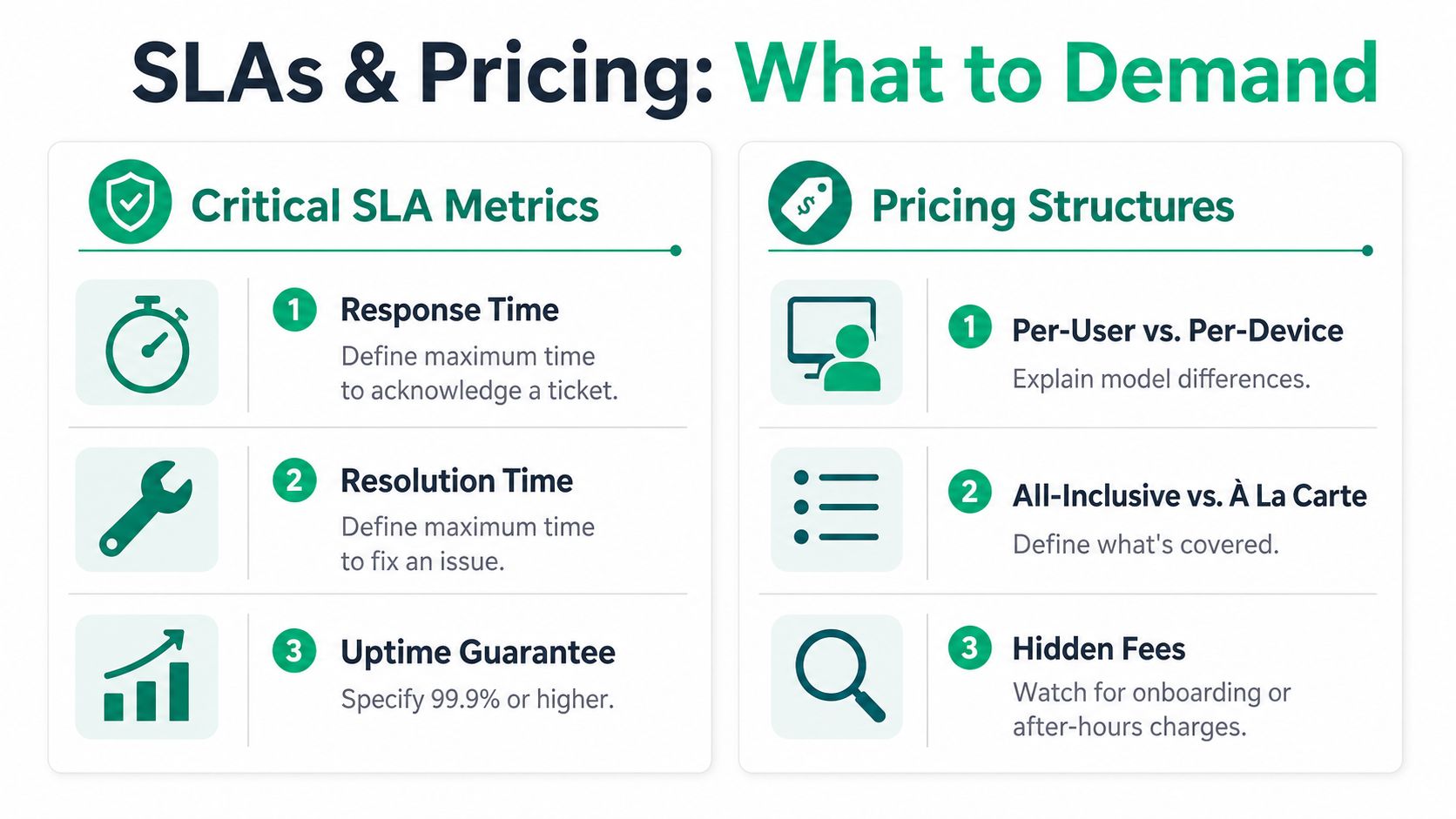
An SLA should tell you what the provider promises, when the clock starts, who responds, and what happens when the commitment isn't met. “Fast support” isn't a measurable obligation.
Read the response language carefully
Response time means acknowledgement or active engagement. Resolution time means the issue is fixed, contained, or given a documented workaround. Those are different promises. A provider can answer a ticket quickly and leave your production system impaired for hours.
Ask for plain definitions:
- Severity levels: Which events qualify as critical, high, medium, or routine?
- Response clock: Does the clock run during business hours, or continuously?
- Resolution standard: Does “resolved” mean restored service, a workaround, or ticket closure?
- Escalation path: Who takes ownership if the first technician can't solve the problem?
- Service credits: What remedy applies when the provider misses its commitment?
Contract rule: If the SLA doesn't define the clock, severity, owner, and remedy, it isn't protecting your business.
Uptime guarantees also need context. A network can be technically available while users struggle with authentication, application latency, or failing wireless coverage. Ask the provider to report user-experience metrics such as time to productive work, repeat incidents, first-contact resolution, and satisfaction alongside traditional ticket targets. Proximity and faster resolution may matter more than a low monthly price when a technician needs to work at a Greenwood site.
Understand how the invoice is built
Per-user pricing is easy to forecast when each employee uses a predictable set of services. It can become expensive when one user needs many devices or specialized support.
Per-device pricing may suit a manufacturer with shared workstations, scanners, and dedicated equipment. It can become confusing when servers, network appliances, mobile devices, and cloud identities fall outside the definition.
All-inclusive pricing gives the clearest budget when the boundaries are specific. “Unlimited support” means little if after-hours incidents, onsite work, projects, licensing, security response, or third-party applications are excluded.
Look for onboarding charges, minimum terms, project fees, emergency rates, and travel limits. A vendor that charges extra for every visit beyond a stated radius may still be the right choice, but you should know that before an outage. Use this managed services agreement template guide while reviewing exclusions and renewal language.
Security and Compliance as Your Primary Filter
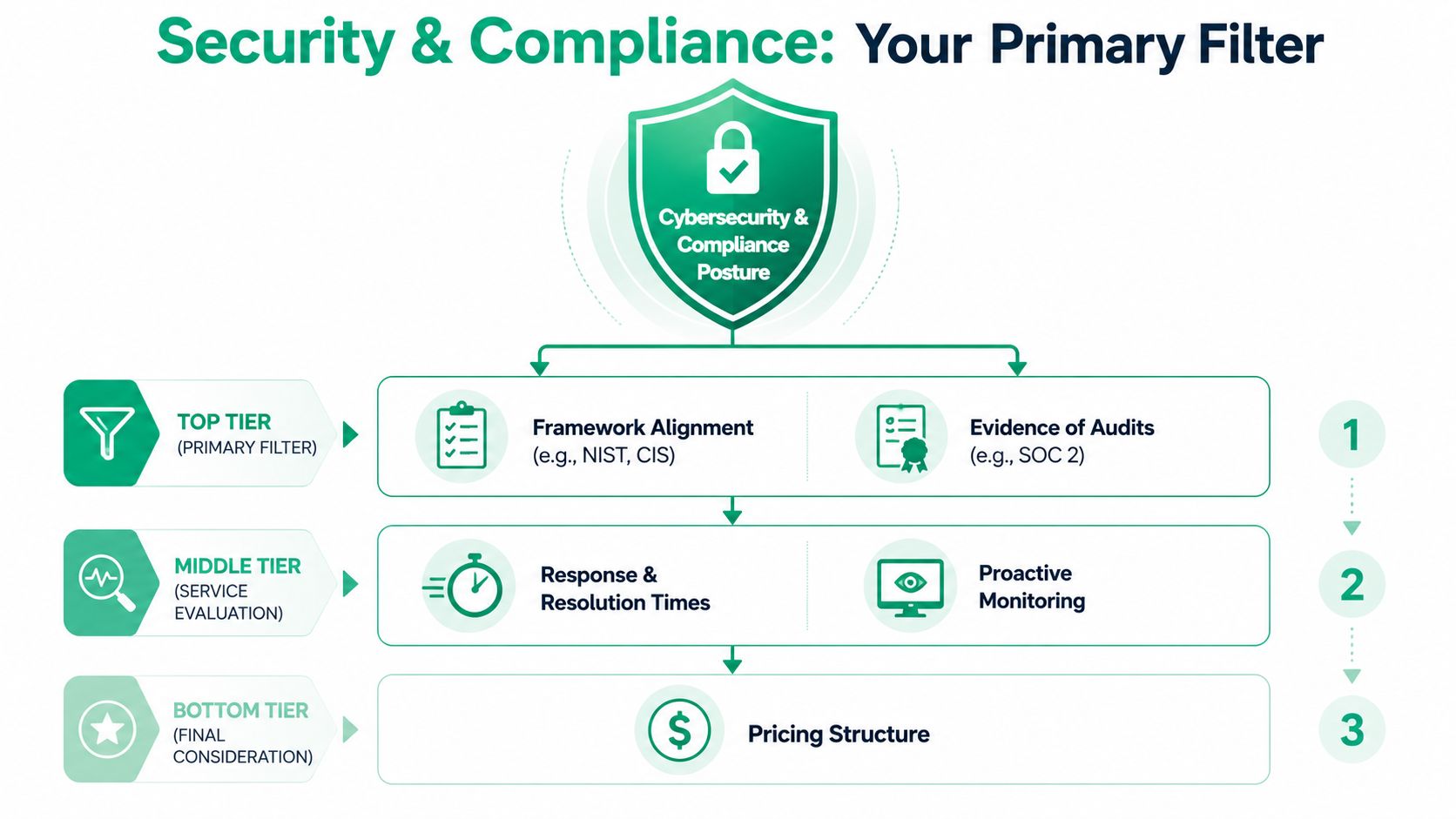
Price and ticket speed belong after security posture. An outsourced provider may have excellent help desk manners and still create unacceptable exposure through broad administrator access, weak logging, untested backups, or vague incident authority.
Map the provider to a named framework
For general business security, ask how the provider maps policies and technical controls to the NIST CSF 2.0. NIST published the framework overview on February 26, 2024, making it a current reference point for organizing governance, identification, protection, detection, response, and recovery (NIST Cybersecurity Framework 2.0).
Healthcare practices in Johnson County should ask how the service supports HIPAA obligations, including access control, audit activity, risk management, and incident procedures. Defense contractors should discuss CMMC requirements and the handling of controlled information. CMMC materials reference NIST resources, including NIST SP 800-66 Rev. 1 for HIPAA-related implementation guidance within the wider compliance ecosystem (NIST's framework reference).
The provider should show evidence, not merely list certifications. Ask for control mappings, sample reports, access reviews, incident records, and an explanation of how exceptions receive approval.
Build for compromise and recovery
Zero Trust architecture assumes that identity, device health, location, and request context must be evaluated before access is granted. In practice, that means multifactor authentication, least privilege, segmented networks, managed endpoints, and regular review of privileged accounts.
Backups need isolation. The 3-2-1-1-0 model means three copies of data, on two different media, with one copy off-site, one copy offline or immutable, and zero verified restore errors (immutable backup strategy guidance). An immutable off-site backup can't be modified or deleted during its retention window, even by an administrator. The restore test is the important part. A successful job log doesn't prove that applications can recover.
SOC-as-a-Service monitoring adds continuous review of security events, but monitoring without authority is noise. Your agreement should state who isolates a device, disables an account, contacts leadership, preserves evidence, and communicates with customers or regulators.
Provider changes create another security risk. Handoffs can disrupt incident context, escalation paths, and procedural continuity (research on provider transitions and incident response). Require documented runbooks, named system owners, exportable logs, current diagrams, and a tested provider-switch procedure. A compliance and security guide for Indiana SMBs can help frame those conversations internally.
The Hidden Governance Trap Most SMBs Miss
Outsourcing doesn't remove management responsibility. It changes who performs the work, while your business still owns the consequences of unauthorized access, failed approvals, missing records, and unclear decisions.
Vendor sprawl makes this worse. A business may use one company for Microsoft 365, another for phones, a third for security cameras, a fourth for line-of-business software, and a fifth for backups. Each vendor may have a legitimate reason to access systems. Without a central access policy, nobody can reliably answer who has administrator rights, which accounts remain active, or who approved a change.
Industry coverage reports that 46% of businesses already outsource technology services and 42% more are considering it in the next 12 months (SMB outsourcing and governance trends). Adoption doesn't make governance automatic. AI and automation can speed up support, but faster execution makes exception handling and approval controls more important.
Keep these controls inside the business
- Role-based access: Give each provider only the permissions required for its assigned work.
- Approval workflow: Require an identified internal approver for firewall, identity, backup, and production changes.
- Audit review: Review administrative logs regularly and investigate unexplained activity.
- Incident runbooks: Document who declares an incident, who can isolate systems, and who communicates externally.
- Vendor register: Record every provider, contract owner, access method, renewal date, and termination process.
- Exception handling: Require automation to route unusual requests to a human decision-maker.
Governance principle: Your provider can operate the controls, but your business must own the rules.
A quarterly access review should include former employees, dormant service accounts, shared credentials, emergency administrator accounts, and third-party integrations. Keep evidence of approvals and remediation. That documentation supports audits and gives leadership a factual view of risk instead of relying on a technician's memory.
Your Indiana SMB Vendor Selection Checklist
Start with the business outcome, not the tool list. A Greenwood accounting firm may prioritize secure document access and recovery. A manufacturer near the I-65 corridor may prioritize plant connectivity and rapid onsite response. A healthcare practice needs HIPAA-aware controls, while a defense supplier needs a credible CMMC path.
Use a practical screening sequence
- Confirm local coverage. Ask whether the team can reach your Greenwood or Indianapolis location during a serious incident. Get the urgent-response commitment in writing.
- Verify technical depth. Ask which staff hold Microsoft, CompTIA, or Cisco credentials and who handles networking, cloud, cybersecurity, software, and data recovery.
- Test the recovery story. Request the backup architecture, immutability details, restore evidence, recovery priorities, and procedure for a failed server or ransomware event.
- Demand framework mapping. For general security, request NIST CSF alignment. For healthcare or defense work, ask how HIPAA or CMMC requirements affect access, logging, retention, and incident response.
- Review the operating model. Identify who owns ticket triage, endpoint policies, UniFi networking, Bitdefender GravityZone, cloud administration, and vendor escalations.
- Call similar references. Speak with Indiana businesses of comparable size and complexity. Ask about communication during outages, not just routine ticket handling.
A simple scoring matrix can weight security posture, recovery readiness, local response, documentation, contract clarity, and price. Score each finalist against the same criteria. Don't let a polished sales presentation compensate for missing runbooks or vague ownership.
Red flags worth taking seriously
- The provider refuses to explain its privileged-access process.
- The proposal promises monitoring but doesn't identify who investigates alerts.
- The contract excludes after-hours incidents without stating that clearly.
- Backup reports show successful jobs but no verified restores.
- The provider can't explain how incident context transfers during a handoff.
- The company won't provide relevant audit evidence or control mappings.
- Every project becomes an extra charge because the base scope is too narrow.
In our 17 years of local service, the most reliable engagements start with accurate documentation and an honest risk conversation. Finchum Fixes IT provides managed IT support, cybersecurity, networking and Wi-Fi design, data recovery, secure migration, custom software development, and urgent technical response for Indiana businesses. Its technical work can include bit-level data recovery, Zero Trust architecture, immutable off-site backups, and SOC-as-a-Service monitoring, depending on the environment.
A provider should make your systems easier to understand, safer to operate, and faster to recover. If it only closes tickets, it isn't managing your technology. It is renting you a reaction.
Greenwood and Indianapolis business owners can request a Free Network Assessment or Security Risk Audit from Finchum Fixes IT. The team will review infrastructure, access controls, wireless coverage, backup readiness, and vendor responsibilities, then show you which risks could interrupt operations and what to fix first.