PCI DSS Compliance Checklist for 2026
Stop Guessing: Your Actionable PCI DSS Checklist
A Johnson County business owner gets a letter from a payment processor, sees the words “PCI DSS audit,” and immediately assumes two things. First, this is going to be painful. Second, this is going to be expensive.
That reaction is common from Greenwood to downtown Indy. Most small and midsize businesses don’t wake up wanting to map cardholder data flows, review firewall rules, or chase down old POS settings in a back office closet. They want payments to work, customers to trust them, and staff to stay productive.
That’s why a practical pci dss compliance checklist matters. PCI DSS compliance is mandatory for any business that stores, processes, or transmits cardholder data, and the framework scales by merchant tier. Level 1 applies to merchants over 6 million transactions annually or those with a prior breach, while Level 4 covers the smallest merchants under 20,000 e-commerce transactions or up to 1 million total transactions annually, with most small Indiana businesses falling into Levels 3 or 4 according to this PCI DSS tier overview.
This isn’t just about passing an audit. It’s about business continuity. Downtime burns cash, disrupts billing, ties up your team, and shreds customer confidence. A breach or payment outage can turn “wasted tech time” into days of cleanup, finger-pointing, and missed revenue. A managed, prioritized approach does the opposite. It turns chaos into a predictable monthly process.
In our 17 years of local service, we’ve seen the same pattern in old brick buildings with flaky wiring, in Greenwood business parks with aging servers, and in fast-growing offices along the I-65 corridor. The companies that treat PCI as a real operational discipline recover faster, stay online longer, and spend fewer hours on avoidable IT fires.
TL;DR: Your PCI DSS Quick Guide
- PCI DSS applies to any business handling card payments. That includes many Central Indiana SMBs.
- Start with scope. Know where card data touches your systems, cloud apps, phones, Wi-Fi, and staff workflows.
- Lock down the basics first: firewall rules, default settings, encryption, MFA, patching, anti-malware, logging, and testing.
- Use segmentation and least privilege to shrink risk and make audits less painful.
- PCI DSS v4.0.1 is now mandatory, so annual reviews and change-driven scope checks matter more than ever.
- A solid managed IT plan protects uptime, cuts cleanup work, and turns compliance into a predictable budget instead of a crisis.
1. Install and Maintain a Firewall Configuration
A payment terminal drops offline at lunch on a Friday. Staff cannot take cards. Customers wait, then leave. In a lot of Central Indiana shops, the root cause is not bad hardware. It is a firewall nobody cleaned up after a vendor visit, an internet change, or a rushed remodel.
Your firewall decides what reaches your payment systems and what gets blocked. If those rules are sloppy, PCI scope grows, troubleshooting slows down, and one bad connection can spill into the rest of the business.
A lot of Indy-area companies already have capable gear. The problem is setup. We see it in Greenwood offices, downtown storefronts, and growing warehouses off I-65. A business has solid switching, decent Wi-Fi, and a firewall that still allows broad inbound access because “the vendor needed it once.” This is how a clean network becomes a risky one.
Segment the payment environment
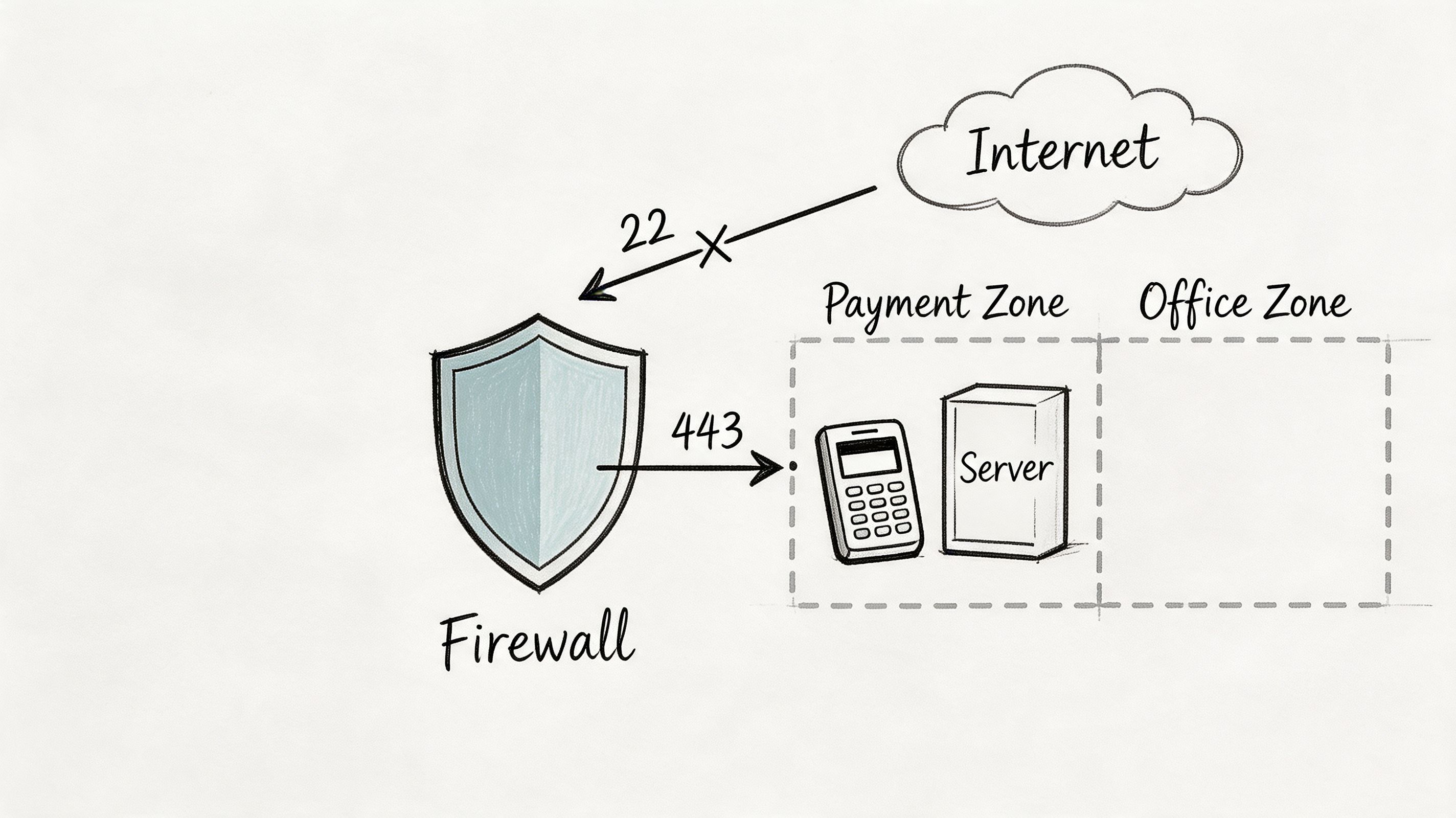
Start with scope. Keep the cardholder data environment separate from everything else.
For an SMB, that usually means putting POS terminals, payment gateway hosts, and any workstation that can reach card data on their own network segment. Do not leave them on the same flat network as front-desk PCs, warehouse tablets, printers, cameras, or guest Wi-Fi. PCI DSS v4.0.1 expects you to define and control those boundaries clearly, including cloud systems and third-party connections that touch payment workflows.
Practical rule: If staff can stream music, check personal email, and process cards across the same unrestricted network path, your firewall rules are too loose.
Use deny-by-default rules. Allow only the exact ports, protocols, and systems required for payment traffic. Then document them. If you run UniFi or another SMB stack, write down every VLAN, subnet, VPN path, and rule tied to card processing. If nobody can explain why a rule exists, remove it.
If you are comparing edge devices or replacing an aging appliance, this Indiana small business firewall guide gives you a practical starting point.
What to check this week
- Review inbound rules: Remove old remote access entries opened for a processor, POS vendor, or copier company.
- Separate guest Wi-Fi: Guest and employee wireless should never have a path to payment systems.
- Map trusted connections: List which terminals, servers, SaaS tools, and support vendors are allowed to talk to the payment network.
- Log rule changes: Track who changed what, when they changed it, and why.
- Test failover and outages: Make sure an ISP issue or hardware swap does not force staff onto an insecure workaround just to keep taking payments.
A well-managed firewall does more than satisfy PCI. It contains problems, keeps payment systems available, and gives your team a faster path back to normal when something breaks.
2. Ditch Vendor-Supplied Default Settings
Default settings are cheap for vendors and expensive for you.
Every router, switch, POS appliance, security camera, and wireless access point ships with starter credentials and canned configurations. Attackers know them. They use automated tools to find them. If your team installs a device with factory defaults and “plans to come back later,” you’ve created a shortcut into your environment.
This shows up constantly in Central Indiana offices with mixed-age infrastructure. A new access point gets added to fix spotty Wi-Fi in an old brick building. A replacement modem goes in after an outage. A payment terminal gets swapped on a Friday afternoon. Nobody updates the admin password, management interface, SNMP settings, or unused services.
Harden every system before it goes live
PCI DSS treats secure configuration as a baseline, not a nice extra. Build a simple deployment checklist and make it mandatory for anything that touches your network.
That checklist should cover more than passwords. Change default usernames where possible. Disable unused ports and services. Shut off remote admin unless you need it, then restrict it. Rename default SSIDs. Disable WPS. Lock down browser-based management consoles. If a device supports certificate-based admin access, use it.
A “temporary” default password often lasts until the next breach review.
For businesses juggling payment systems alongside other obligations like HIPAA, CMMC, or a general NIST CSF security program, this kind of hardening gives you overlap. One disciplined build standard helps across the board.
Fast win list
- Change defaults immediately: Don’t connect a device to production until credentials are replaced.
- Create a build sheet: One page is enough if it covers passwords, firmware, services, and admin access.
- Turn off what you don’t use: Unused remote access, sample accounts, and test services should be disabled.
- Store credentials safely: Use a password manager with role-based access, not sticky notes or shared spreadsheets.
We’ve cleaned up offices where old ISP gear still had factory settings years after install. Those are easy fixes, but only if someone checks. This step is boring. It’s also one of the fastest ways to cut real risk.
3. Protect Stored Cardholder Data
The safest card data is the data you never keep.
That sounds obvious, but plenty of SMBs still hold on to card numbers because a legacy app, recurring billing process, or old reporting habit made it convenient years ago. PCI DSS gets strict here for good reason. The more card data you store, the more systems fall into scope, and the more damage a breach can cause.
One verified warning stands out. A Forrester survey cited in this PCI compliance checklist from S-PRO found many businesses still store full payment card numbers, expiration dates, CVVs, and magnetic stripe data despite prohibitions. That same source notes breach costs averaging $4.45 million per incident based on 2023 IBM data.
Keep less, protect what remains
Start by asking a hard question. Do you need to store cardholder data at all?
If the answer is no, remove it. Move recurring billing to a payment provider’s tokenization or vault service. Purge old exports. Delete stale report files on desktops and file shares. Check CRM notes, scanned forms, email inboxes, and customer support attachments. Card data has a bad habit of spreading into places nobody intended.
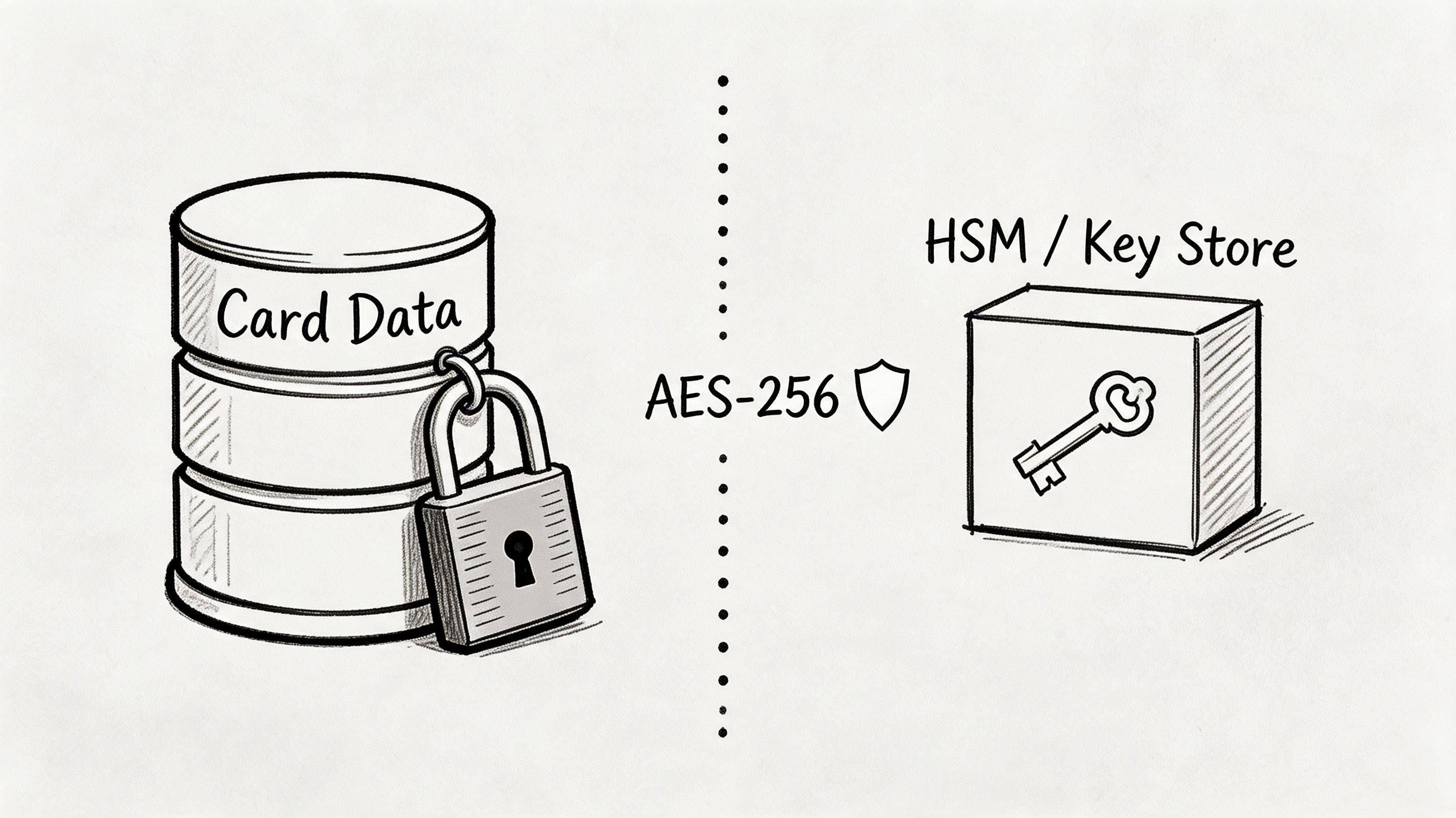
If the answer is yes, make it unreadable. Use strong encryption, tight key management, and access restrictions around the systems that store it. Don’t leave full PANs sitting in a basic database, spreadsheet, or backup set that half the office can access.
Places local SMBs forget to check
- Accounting exports: CSV files saved to desktops or shared folders.
- Support inboxes: Staff sometimes ask customers to email card details. Stop that.
- Backups: Old backup jobs can preserve sensitive data long after production systems changed.
- Custom apps: Homegrown software often stores more than anyone realizes.
This Indiana data loss prevention guide is a strong companion if you’re cleaning up stored payment data across endpoints and cloud apps.
If your team doesn’t know exactly where card data lives, you’re not ready for an audit. You’re not ready for a breach, either.
4. Encrypt Cardholder Data in Transit
A customer pays you from a phone in Carmel, your staff confirms the order in Fishers, and the charge moves through three systems before lunch. If any leg of that trip is exposed, you do not have a payment workflow. You have a business continuity problem.
Small and midsize businesses in Central Indiana get tripped up here because the payment processor feels like the secure part. The weak spots usually sit on your side. An old checkout plugin. A flat office network. Guest Wi-Fi sharing space with POS traffic. A staff habit of taking card details over email because it feels faster.
Requirement 4 is simple in practice. Encrypt cardholder data everywhere it travels over open or public networks, then shut down the side paths that bypass your secure process.
Where transit risk actually shows up
For e-commerce, start with your checkout flow. Use current TLS, keep certificates valid, and remove support for outdated protocols and ciphers. If card data touches your web server before it reaches the processor, reduce that exposure fast or redesign the flow so the processor handles collection directly.
For retail and office environments, wireless is often a significant problem. A lot of older buildings around Indianapolis have grown their networks one access point at a time. That creates messy coverage, weak segmentation, and traffic crossing places it should never cross. Payment traffic belongs on its own segmented path, separate from office devices, guest users, printers, and anything unmanaged.
Phone payments need the same scrutiny. If staff take card numbers by phone, review call recording, softphone apps, ticket notes, chat tools, and AI assistants. One convenience feature can pull payment data into transcripts or recordings you never meant to store or transmit.
Do not accept card data through email, chat, text message, or random web forms.
What to do first
- Lock down web traffic: Enforce HTTPS everywhere card data could appear. Keep certificates current and disable old TLS versions and weak cipher suites.
- Segment payment traffic: Separate POS, payment apps, and any system that touches card data from office and guest networks.
- Fix Wi-Fi design: Use secure authentication, separate SSIDs by function, and map VLANs to the right devices and users.
- Review voice and support tools: Turn off call recording where possible, or configure it so payment details are never captured.
- Kill side-channel collection: Train staff to redirect customers to approved payment methods instead of taking card numbers in messages or notes.
If your network gear is old, fix that before you worry about polishing policy documents. Secure transport depends on the systems carrying the traffic. A modern stack with proper visibility and control makes Requirement 4 much easier to enforce, and our guide to business malware removal and endpoint protection tools is a useful companion if the same aging environment is also creating endpoint risk.
We have rebuilt wireless for Central Indiana offices where coverage was the obvious complaint. Coverage was not the actual issue. Segmentation was. The win came from isolating payment traffic, locking down access, and removing the shortcuts that let card data drift through the wrong apps and networks.
5. Protect Systems with Antivirus and Anti-Malware
Malware still does the dirty work in a lot of payment breaches.
You don’t need a cinematic attack to lose card data. A bad attachment, a poisoned browser session, a malicious script, or a compromised endpoint can be enough if the device has access to the cardholder data environment. Requirement 5 exists because plain old endpoint protection still matters.
Managed tools outperform scattered consumer software. If you’re relying on a few manually updated antivirus installs and hoping staff don’t click the wrong thing, you don’t have a control. You have a wish.
Centralize endpoint protection
Use a business-grade platform with central visibility, alerting, and policy control. Bitdefender GravityZone is a strong example because it gives admins one place to verify coverage, update policies, and review detections across workstations and servers.
That matters during audits. You need to show the system is deployed, active, and maintained. You also need to know which endpoints fall inside PCI scope. If a back-office PC can access the payment portal, it belongs in your review.
The same S-PRO source noted earlier reports non-compliance rates exceeding 50% globally due to persistent risky behaviors. That lines up with what we see on the ground. Businesses buy the tool, then exempt devices, ignore alerts, or leave one old workstation unmanaged because “it only prints labels and runs the POS back office app.”
Keep coverage tight
- Protect all in-scope systems: Servers, workstations, and any device commonly affected by malicious software.
- Update automatically: Signature, engine, and platform updates should not depend on a human remembering.
- Watch the logs: If malware is blocked but nobody reviews the event, the lesson gets missed.
- Isolate quickly: A suspicious endpoint should be removable from the network fast.
For teams comparing options, this malware removal tools guide for businesses helps separate consumer-grade fixes from managed business protection.
Anti-malware won’t solve every PCI problem. It will stop a lot of stupid, expensive ones.
6. Develop and Maintain Secure Systems and Applications
Your POS freezes on a Friday lunch rush in Fishers. The vendor says the fix requires an update you should have installed two months ago. Now you are choosing between lost sales, a rushed emergency change, and a possible security incident. That is what weak patching looks like in real life.
PCI DSS expects secure systems to stay secure. That means patching, vulnerability fixes, change control, and secure development practices have to happen on a schedule, with an owner, not whenever someone finally has time.
For small and mid-sized businesses around Central Indiana, this is not an abstract IT rule. It is business continuity. If your payment server, ecommerce plugin, or back-office app gets hit through an old flaw, you are not just dealing with a security ticket. You are dealing with downtime, chargeback risk, customer calls, vendor finger-pointing, and a staff that cannot process payments cleanly.
Treat patching like an operations function.
Set maintenance windows. Test updates before pushing them to systems that handle payments. Keep a rollback plan for anything tied to POS, ecommerce checkout, accounting syncs, or inventory tools. If a line-of-business app depends on an outdated runtime, document it, isolate it, and put a replacement plan on the calendar. Hoping the old system survives one more quarter is not a plan.
This comes up all the time in Indiana SMBs with older servers or specialty software. An owner delays updates to avoid interrupting a busy week. Then the emergency hits during the busiest week anyway.
Custom software needs the same discipline. If your website, mobile app, or internal tool touches card data or passes payment details to another system, review code changes before release, remove components you do not need, track third-party libraries, and scan for vulnerabilities after meaningful updates. Every new plugin, API connection, or chatbot can change PCI scope and create a new opening for attackers.
Good access control also supports secure development and change management. Teams tightening admin paths and approval workflows should review CEFCore for improved fund access as a practical reference for keeping system access tighter around sensitive financial operations.
One rule matters more than the rest. Assign clear ownership. Someone should be able to answer, without guessing, which systems are in scope, which updates are overdue, who approves changes, and what happens if a patch breaks a payment process.
Secure applications do not stay safe because they were configured well once. They stay safe because someone keeps them current.
7. Restrict Access by Business Need-to-Know
Monday morning in Carmel. Your office manager is out, a sales employee needs to issue a refund, and someone says, “Just use the admin login.” That shortcut is how small mistakes turn into PCI scope problems, failed audits, and a much bigger mess if the wrong account gets abused.
Requirement 7 is simple. If a person does not need access to cardholder data to do their job, they do not get it.
That sounds obvious. It still breaks down all the time in Central Indiana SMBs because people wear multiple hats, vendors come and go, and nobody wants to slow down a busy day. Convenience spreads access fast. Cleaning it up later is harder.
Build access around jobs
Start with roles, not names. Cashier. Bookkeeper. Office manager. IT provider. Owner. For each role, define exactly what that person can view, change, approve, and export in any payment system, accounting platform, shared folder, or back-office tool tied to card data.
Then compare those roles to real accounts.
You will usually find extra permissions hanging around from staff changes, temporary projects, or old vendor work. Remove them. A front-desk employee who sometimes helps with refunds may need limited payment access. They do not need gateway admin rights, batch exports, or access to stored card details.
This matters even more for local businesses with lean teams. In Anderson, Fishers, Greenwood, or downtown Indy, one employee may cover reception, billing, and customer service in the same week. Fine. Give that person the access needed for those tasks only. Do not hand out broad privileges just because the team is small.
Rules that actually hold up
- Approve access by role: Tie permissions to job duties.
- Review access after changes: New software, office expansions, and new vendors can expand PCI scope.
- Tighten third-party access: Limit what vendors can reach, set an end date, and disable access when the job is done.
- Check permissions every quarter: Annual review is too late for stale accounts.
If your team needs a plain-English reference outside PCI language, CEFCore for improved fund access gives useful access control guidance. For logins that should have extra protection, use multi-factor authentication best practices for small businesses to lock down admin and remote access.
Least privilege protects more than compliance. It keeps a single bad click, reused password, or rushed employee handoff from disrupting payments when your business is already busy.
8. Identify and Authenticate Access to System Components
Shared logins kill accountability.
If five employees use the same “cashier” account, your logs are almost useless. If an IT vendor signs into a payment system through a generic admin account, you can’t prove who changed what. PCI DSS Requirement 8 fixes that by requiring unique IDs and stronger authentication.
That gets even more important now that PCI DSS v4.0.1 expects tighter scoping around endpoints, cloud systems, and third-party tools. Every action in the cardholder data environment should point back to a real human identity.
Unique users and MFA
Every employee gets their own account. Every admin gets stronger controls. Multi-factor authentication is one of the simplest upgrades you can make, and it directly supports Requirement 8.
That includes remote access tools, cloud payment dashboards, VPNs, email accounts tied to financial workflows, and any server or workstation with access to payment systems. If an attacker steals one password, MFA gives you another chance to stop the intrusion.
The SecureTrust source states that PCI’s 12 core requirements include controls like MFA, firewalls, and encryption, and warns that over 80% of breaches involving card data were preventable through PCI adherence in global data cited there. That’s the bigger point. Identity controls work best when they’re part of a stack, not a standalone checkbox.
“One login for the whole team” is fast until you need to investigate a bad transaction.
Good identity hygiene
- Ban shared accounts: Every user gets a unique ID.
- Enforce MFA broadly: Especially for admins, remote access, and payment portals.
- Separate admin access: Don’t let staff use privileged accounts for day-to-day work.
- Disable fast: When someone leaves, every credential tied to them should go dark immediately.
If your team still treats MFA like an optional nuisance, send them this business MFA best practices guide.
9. Restrict Physical Access to Cardholder Data
PCI isn’t only about packets and passwords.
If someone can walk off with a payment terminal, plug into an exposed switch, open an unsecured network closet, or grab printed receipts from a desk, you’ve got a physical security problem that becomes a data security problem fast. Requirement 9 closes that gap.
This catches a lot of SMBs because physical security feels old-school. It isn’t. A tampered terminal, stolen laptop, or unsecured backup drive can create the same incident response mess as a phishing attack.
Lock the room, secure the device, track the media
Start with obvious controls. Server rooms and network closets should stay locked. POS devices should be mounted or physically secured where possible. Visitor access should be limited and logged. Paper records with card data should be stored and destroyed securely.
Then go one step further. Check whether anyone can reach network ports in public or semi-public spaces. Check who has keys. Check whether old backup media still exists in drawers or cabinets. If you use immutable off-site backups for core business continuity, make sure payment-related retention is reviewed with the same care as production storage.
In our own work, chain of custody matters. When we dissembled a similar client’s failing RAID array in our Greenwood lab for bit-level data recovery, every drive movement, handler, and transfer point had to be documented. That discipline comes straight out of the same mindset PCI requires. Sensitive systems need controlled physical handling.
Quick physical checks
- Lock infrastructure spaces: Closets, server rooms, and patch panels shouldn’t be open to general staff.
- Inspect terminals: Train staff to spot tampering, damage, or unauthorized attachments.
- Control paper: Don’t leave receipts or handwritten payment notes in open view.
- Document media handling: Drives, backups, and retired hardware need tracked disposal or secure storage.
A lot of breach prevention still comes down to doors, keys, and habits. Ignore that, and the fancy cybersecurity stack won’t save you.
10. Track, Monitor, and Test Everything
If you can’t see it, you can’t defend it. If you don’t test it, you can’t trust it.
PCI Requirements 10 and 11 put the burden where it belongs. Log access. Monitor activity. Run scans. Test controls. Prove your defenses work before an attacker proves they don’t.
Many SMBs freeze because the tooling feels enterprise-grade. It doesn’t have to be. A managed stack with centralized logging, vulnerability scanning, and SOC-as-a-Service monitoring is realistic for a lot of growing Indiana businesses. What matters is consistency and ownership.
Logging and review
Collect logs from firewalls, servers, endpoints, payment systems, and cloud admin portals. Synchronize time across systems so events line up. Store logs where staff can’t surreptitiously alter them. Then review the important events.
PCI DSS v4.0.1 also pushes continuous security monitoring and more practical visibility after significant changes. The GoCardless resource already cited earlier points out that existing checklists often miss SMB-specific realities like validating scope after Wi-Fi expansions or AI app integrations. That’s not a theory problem. It’s a real source of audit pain.
Scans and penetration testing
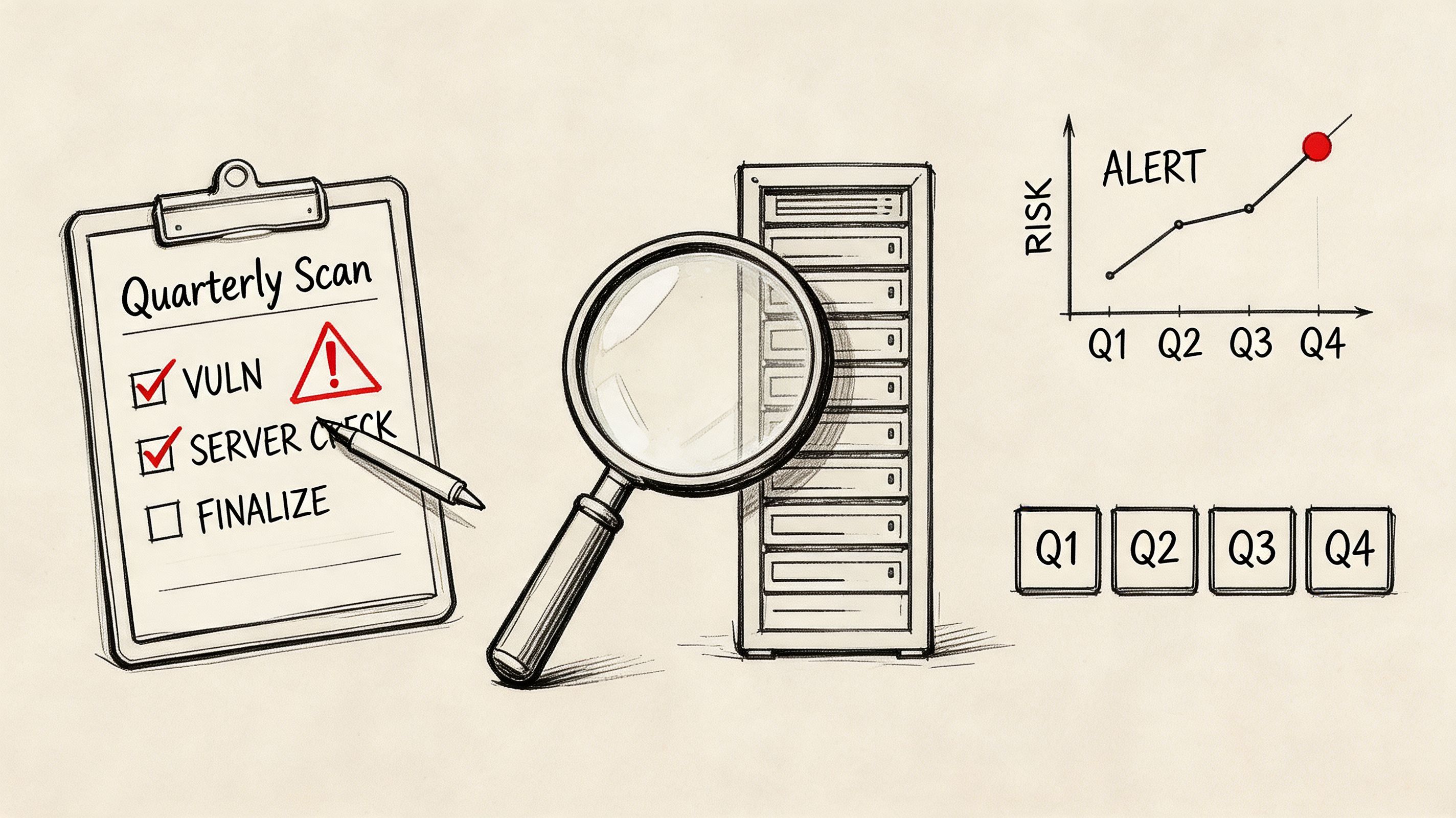
Quarterly ASV scans matter for many merchants, and validation rigor changes by merchant level. The SecureTrust source explains that Level 1 merchants require the most rigorous validation, including an annual ROC by a QSA, quarterly ASV scans, and annual penetration testing, while lower levels typically rely on SAQs, AOCs, and scans depending on scope.
For smaller businesses, that means you still need discipline even if you aren’t at the top tier. External scans, internal reviews, change-based retesting, and periodic penetration testing all expose weak spots before a bad actor does.
- Log critical systems: Firewalls, POS, servers, admin accounts, and remote access tools.
- Review suspicious events: Failed logins, privilege changes, new devices, and unusual outbound traffic.
- Scan on schedule: Keep quarterly external scanning on the calendar where required.
- Test after changes: New locations, ISP swaps, cloud migrations, and software rollouts can change scope.
If your team still mixes up scanning and pen testing, this plain-English breakdown of vulnerability assessment vs penetration testing will clear it up.
Strong monitoring shortens outages, improves forensic clarity, and makes audits less painful. It also gives owners something they rarely get from DIY security. Proof.
PCI DSS 10-Point Controls Comparison
| Item | 🔄 Implementation Complexity | ⚡ Resource Requirements | ⭐ Expected Outcomes | 💡 Ideal Use Cases | 📊 Key Advantages |
|---|---|---|---|---|---|
| 1. Install and Maintain a Firewall Configuration | Medium–High: initial 1–3 weeks; ongoing reviews | Firewall appliance or UTM, network engineer, monitoring/SOC | High ⭐, strong network segmentation and perimeter control | Businesses with on-site networks and CDEs needing segmentation | Enforces traffic rules, reduces lateral movement, audit evidence |
| 2. Ditch Vendor-Supplied Default Settings | Low–Medium: hours per device; standards in 1–2 days | Deployment checklist, password manager, technician time | High ⭐, removes trivial attack vectors | New device rollouts and audits of existing infrastructure | Low cost, quick risk reduction, improves baseline security |
| 3. Protect Stored Cardholder Data | High: 2–6+ weeks depending on scope | Encryption (TDE/HSM), key management, dev/test effort | Very High ⭐, renders stolen PANs unusable if done correctly | Organizations that must store PANs or legacy systems | Reduces breach impact and liability; meets Req 3 |
| 4. Encrypt Cardholder Data in Transit | Low: 1–2 days plus cert management | TLS certs, server/web config, periodic renewal process | High ⭐, prevents interception of data in transit | E‑commerce sites, internal server-to-server communication | Protects data in motion, relatively fast to implement |
| 5. Protect Systems with Antivirus and Anti-Malware | Low–Medium: ~1 week to deploy org‑wide | Enterprise AV, management console, licenses, logging | High ⭐, detects and blocks common malware | Endpoints and servers in the CDE and general user PCs | Automated detection, centralized telemetry for compliance |
| 6. Develop and Maintain Secure Systems and Applications | Medium–High: ongoing monthly cadence | Patch management tooling, test environment, processes | High ⭐, reduces exposure to known vulnerabilities | Environments with frequent third‑party apps or custom code | Closes exploit windows; supports long‑term security posture |
| 7. Restrict Access by Business Need-to-Know | Medium: 2–4 weeks setup; quarterly reviews | IAM/AD, RBAC policies, access review workflow | Very High ⭐, enforces least privilege and reduces insider risk | Organizations with multiple user roles accessing CDE | Limits unnecessary access; simplifies auditing and compliance |
| 8. Identify and Authenticate Access to System Components | Medium: 1–3 weeks to deploy unique IDs and MFA | Identity platform, MFA solution, account provisioning | Very High ⭐, accountability and traceability for actions | Remote/admin access to CDE, POS operator management | Eliminates shared accounts, strengthens forensic capability |
| 9. Restrict Physical Access to Cardholder Data | Variable: days to weeks depending on facility | Physical controls (locks, cameras, card readers), policies | High ⭐, prevents tampering and unauthorized removal of media | On‑prem server rooms, retail POS environments | Protects hardware/media; supports chain‑of‑custody requirements |
| 10. Track, Monitor, and Test Everything | High: ongoing; initial setup several weeks | SIEM, log storage, ASV scans, pentest budget, SOC support | Very High ⭐, continuous detection and validated controls | Any organization that stores/processes/transmits card data | Continuous assurance, rapid detection, required audit artifacts |
From Checklist to Compliant Secure Your Indy Business
A customer is standing at the counter. Your terminal freezes. Payments stop. Your staff starts guessing. That is how PCI trouble usually shows up for a small business in Indianapolis. Not as an audit question, but as lost sales, stressed employees, and a problem that pulls your whole day off course.
A pci dss compliance checklist makes more sense when you treat it like a business continuity plan for your card payments. Yes, compliance failures can bring fines, extra fees, and even problems with your ability to process cards. For a small or midsize business in Greenwood, Franklin, or downtown Indy, the bigger hit is often operational. Cash flow stalls. Customer trust drops. Your team burns hours cleaning up a mess that should have been prevented.
PCI works best when you prioritize it in the right order. Start with the systems that keep revenue moving. Then cut avoidable risk. Then build the habits that keep the environment clean month after month.
That matters in Central Indiana because many SMBs run mixed setups. A shop near the I-65 corridor may have an aging server in the back office, cloud accounting, and a payment app tied to a third-party vendor. A healthcare-adjacent office may have to protect both payment data and regulated client information. A manufacturer may already be dealing with customer security questionnaires. PCI is one requirement, but it touches the same systems you depend on every day.
Scoping decides whether this project stays practical or turns into a money pit. You need a clear map of where card data is stored, processed, transmitted, or touched by connected systems. That includes cloud tools, employee laptops, payment terminals, remote access paths, call recordings, and any third-party platform involved in the transaction flow. Miss one system and you leave a hole. Include everything without a reason and you waste time and budget securing tools that do not belong in scope.
For most SMBs around Indy, the right sequence is straightforward:
- Map the payment flow first: Identify terminals, apps, storage locations, vendors, shared drives, wireless networks, and any system that connects to them.
- Reduce scope next: Segment the cardholder data environment, stop storing card data you do not need, and remove unnecessary user access.
- Fix the basics fast: Patch exposed systems, turn on MFA, replace default settings, and clean up unmanaged endpoints.
- Prove it works: Review logs, run scans, test controls, and update your scope after changes to software, vendors, or network design.
This approach protects revenue and keeps the work realistic. Your team spends less time reacting to avoidable outages and more time serving customers. Planned security work is cheaper than emergency cleanup, especially when the outage hits during a busy lunch rush, a holiday retail weekend, or month-end billing.
We have seen the same pattern across local businesses for years. Companies that document their environment, tighten access, and monitor the systems that matter usually have an easier time with audits. They also recover faster from hardware failures, bad software updates, staff turnover, and vendor issues. The discipline that helps with PCI also makes the rest of the business less fragile.
If you are in Greenwood, Indianapolis, or nearby and this still feels bigger than your internal team can sort out, start with a real assessment. Review your firewall rules, payment flows, user access, endpoints, wireless design, backup handling, and logging. That will show you what needs attention now, what can wait, and what should be removed from the environment entirely.
If your business is in Greenwood or the greater Indianapolis area, Finchum Fixes IT can turn this checklist into a practical remediation plan with clear ownership, realistic priorities, and local support. Schedule a Free Security Risk Audit or Free Network Assessment and get a straight answer on your PCI scope, weak points, and next steps before they become downtime.