Ransomware Detection Playbook for SMBs
A Greenwood office manager notices shared files opening slowly, then sees a few documents renamed and a server backup job failing. Effective ransomware detection looks for behavior such as mass file changes, unusual process activity, API calls, and recovery-system tampering, not just known malware signatures. The objective is to alert before encryption and business interruption spread.
The Reality of Ransomware Detection for Local Businesses
A Tuesday morning in a Greenwood business park starts with payroll, dispatch, patient scheduling, or customer calls, not a security briefing. A slow shared folder may look like an aging server problem, especially for a company that has postponed hardware work along the I-65 corridor. The warning signs change the diagnosis when a user account authenticated overnight, a backup task stopped, and files changed across several departments.
That sequence matters because ransomware detection can fail before anyone sees a ransom note. Organizations often discover ransomware only after an outside party identifies the compromise, according to Halcyon's ransomware statistics overview. The same overview reports that ransomware appeared in 44% of confirmed breaches in 2025, up from 32% the prior year. Sophos reported that 56% of attacks succeeded in encrypting data, and only 1 in 3 smaller organizations stopped the attack before encryption. A slow server, disabled backup, or unfamiliar login therefore needs investigation, not dismissal.
Downtime also changes the response calculation. Lost production, missed billable work, delayed shipments, and payroll pressure arrive before an owner can approve new equipment. For an Indiana manufacturer or medical office, a technically small incident can become an operating problem when the alert sits unreviewed.
Why signatures aren't enough
Static signatures still identify known files quickly and can block familiar payloads. They do not explain why a normal accounting workstation launches PowerShell, accesses administrative shares, changes thousands of files, and contacts a system it has never used.
Behavioral detection connects those events. Configure the EDR to score process creation, command-line arguments, file-system activity, authentication, network movement, and attempts to disable recovery. Feed the high-value events into the SIEM, then tune out routine backup software, approved deployment tools, and scheduled maintenance. An alert should state what changed, which account and host are involved, and what action the analyst should take.
That telemetry-to-alert gap is where many local environments fail. Logging everything can consume storage without giving a Greenwood office manager a useful decision. A smaller rule set with clear ownership is easier to review during a busy workday.
Identity belongs in the same review. This guide to identity management for operations teams covers access rights, privileged accounts, lifecycle controls, and authentication patterns. An overprivileged account can turn one compromised mailbox into access across servers, cloud services, and backups. Restricting those paths gives EDR and SIEM alerts a clearer operational boundary.
Spotting the Early Warning Signs of Compromise
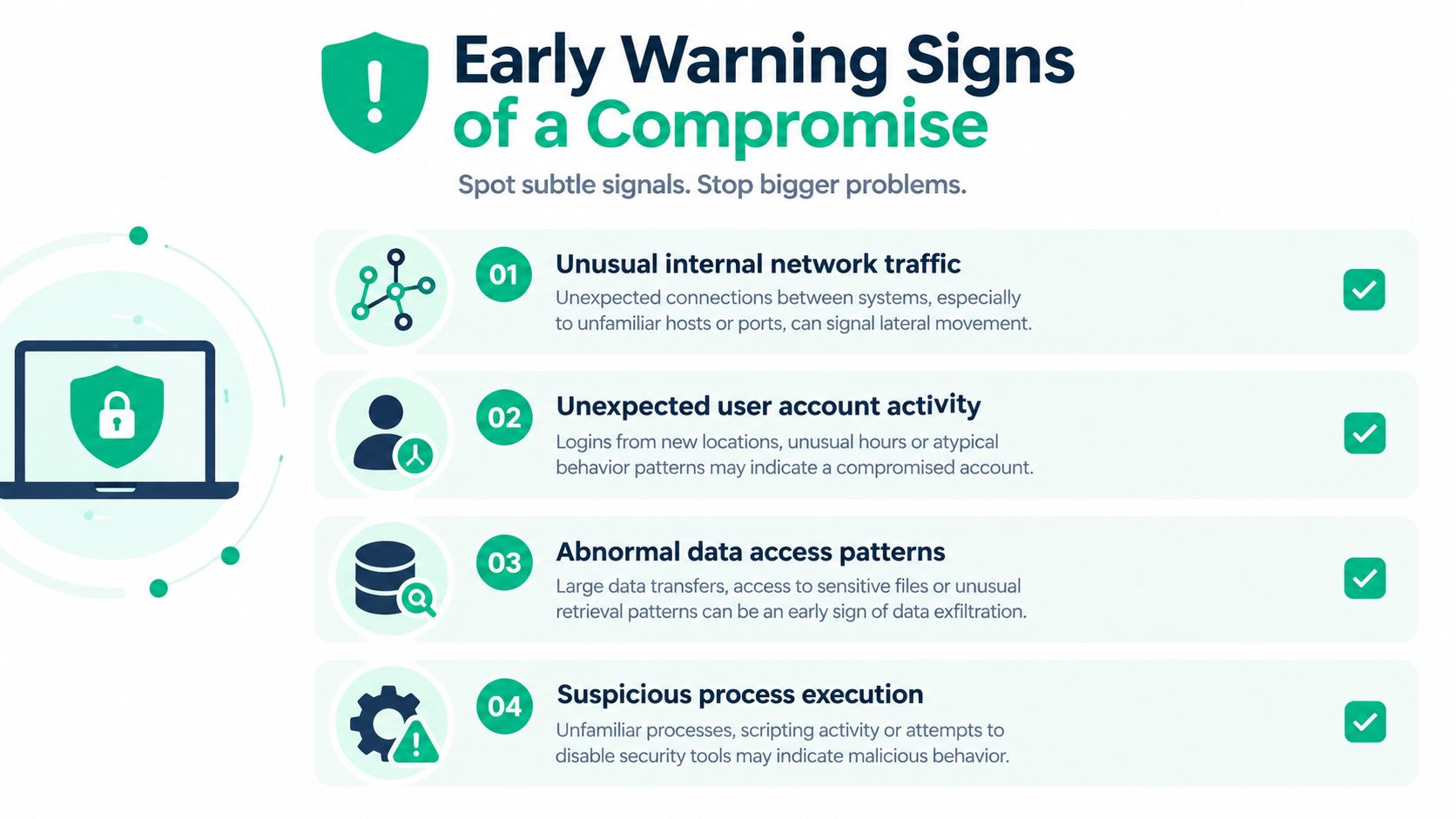
Attackers usually create noise before they create damage. A workstation may generate ordinary Windows events all day, but the combination of unusual PowerShell execution, credential access, remote authentication, and abnormal file reads should change the response priority. The difference between harmless activity and an active breach often appears in the relationship between events, not in one event by itself.
Read the host before guessing
Start with Windows Event Logs and Sysmon if they're deployed. Event ID 4688 records process creation, so review the executable, parent process, account, and command line together. A PowerShell process launched by an office application, a script running from a user-writable temporary directory, or a command that reaches administrative resources deserves more attention than a normal signed application launched from its installed path.
A practical review sequence looks like this:
- Confirm the account. Check whether the user was working, whether the login location makes sense, and whether a service account is being used interactively.
- Inspect the parent-child chain. Follow the process tree from the initial application to PowerShell,
cmd.exe, scripting engines, or remote administration tools. - Review recovery tampering. Commands such as
vssadmin delete shadows /all /quiet,wmic shadowcopy delete, andwbadmin delete catalog -quietcan indicate an attempt to remove recovery options. Treat them as high priority unless a documented administrative task explains them. - Check lateral movement. Look for new RDP activity, administrative share access, unusual SMB connections, and authentication failures followed by a successful login.
- Compare file behavior. A user editing a few documents is normal. A process rapidly modifying files across shared folders is not.
Credential dumping, newly added local administrators, and disabled security controls should move the host into containment review. Don't assume a quiet endpoint is clean. Attackers may spend time gathering credentials and mapping shares before encryption begins.
Fix the Southside visibility problem
An old brick building in Southside Indy can create spotty Wi-Fi, retransmissions, roaming issues, and complaints that bury a real network anomaly. An unmanaged printer, camera, or badge reader may communicate with systems it shouldn't reach, while staff attribute the traffic to poor wireless performance.
A properly designed UniFi networking deployment can separate staff devices, voice systems, guest access, printers, and IoT equipment with VLANs and restrictive firewall policies. It also gives administrators a cleaner view of which device is talking to which segment. Latency-optimized mesh nodes can improve coverage where cabling is difficult, but mesh shouldn't substitute for segmentation or a wired uplink where business-critical equipment requires stable performance.
For a second opinion on suspicious findings, teams can use this practical resource on how to triage scan findings. The same discipline applies to endpoint alerts: identify the asset, validate the evidence, determine scope, and document the decision. Businesses can also review how to tell if your computer has malware in an Indy SMB environment before treating every slow machine as a ransomware event.
Configuring EDR and SIEM for Behavioral Detection
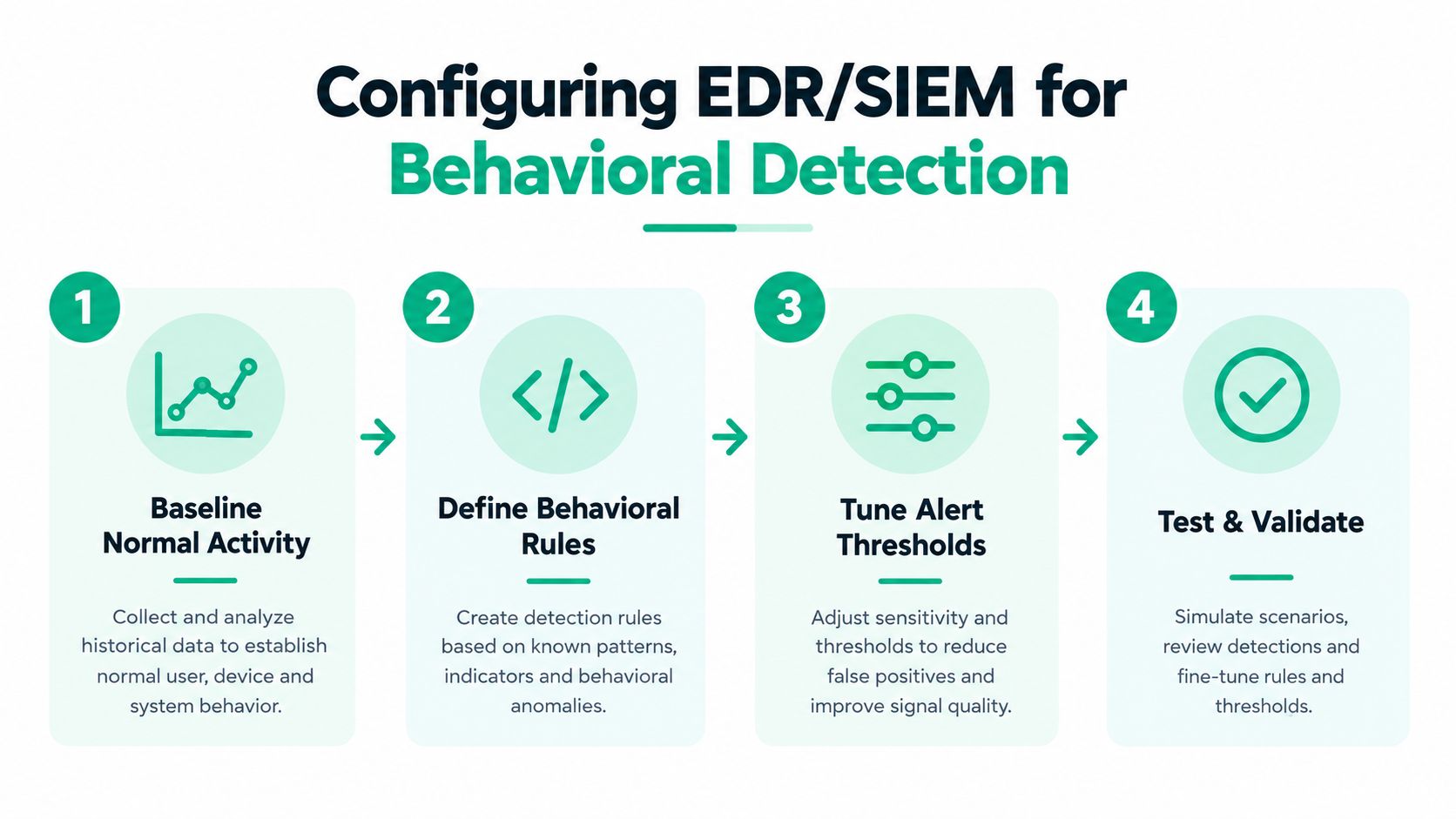
An EDR agent that only reports “malware blocked” isn't a complete ransomware detection program. The useful configuration captures enough context to answer what ran, who launched it, what it changed, where it connected, and whether another event makes the activity more dangerous.
Behavior-based systems commonly follow a three-stage pipeline: behavior extraction, property generation, and machine-learning classification over API calls, system calls, I/O events, or file-system activity. A survey of this approach reported headline accuracies frequently between 97% and 100%, but the cited research warns that evaluation settings vary widely, so those figures shouldn't be treated as a universal product ranking. The technical design matters more than a lab headline. (Research survey)
Build useful telemetry
With Bitdefender GravityZone, review policy modules for ransomware remediation, application control, suspicious behavior, and network attack protection. With Microsoft Defender for Endpoint, confirm that advanced hunting data, attack surface reduction events, tamper protection, and endpoint isolation workflows are available to the people responsible for response. Exact policy names can vary by licensing and tenant configuration, so document the selected settings instead of assuming an agent is enforcing them.
A reliable baseline includes:
- Process creation and command-line data
- File creation, renaming, and mass modification events
- PowerShell and script interpreter activity
- Authentication and privilege changes
- RDP and administrative share activity
- Security-tool tampering
- Backup and shadow-copy operations
The SIEM should correlate weak signals. For example, a failed RDP login followed by a successful login, access to an unusual host, and an immediate compressed archive download should produce a stronger alert than any one event alone. Tune the rule around asset role and account history, then send the alert to a person or SOC-as-a-Service monitoring queue that can act.
Practical rule: An alert isn't useful until somebody knows who owns it, what evidence to collect, and which containment action is authorized.
Cloud workloads need the same thinking. A focused SIEM for AWS guide is useful when connecting cloud identity, audit, workload, and network events to the same investigation process. For Indiana businesses comparing endpoint products, this resource on endpoint protection software for Indiana businesses provides another decision point, but the right choice still depends on coverage, staffing, licensing, and response ownership.
Triage and Containment Steps When Alerts Fire
A ransomware alert creates pressure, but shutting down every machine immediately can destroy useful evidence and interrupt unaffected operations. The first responder should establish whether the signal represents encryption, credential abuse, recovery tampering, or a false positive, then contain the smallest practical scope while preserving forensic information.
The first response sequence
- Assign an incident owner. Record the alert time, affected asset, user, alert rule, and responder. Stop parallel guessing.
- Isolate through EDR. Use the EDR console to cut the endpoint's network access while leaving the system powered on when safe. Preserving RAM and volatile process information can help investigators understand what ran.
- Block the route. Remove suspicious VPN, remote access, firewall, or identity paths. Don't reconnect the host to see whether the behavior stops.
- Protect evidence. Capture relevant EDR timelines, Event Logs, process trees, authentication records, and file activity before remediation changes the system.
- Check scope. Search for the same account, hash, command line, scheduled task, or destination across other hosts.
- Verify recovery. Confirm that immutable off-site backups exist, are offline or otherwise inaccessible to the attack path, and can be restored. CISA recommends offline, encrypted backups and regular testing of both availability and integrity in disaster recovery scenarios. (CISA StopRansomware guidance)
CISA also warns that attackers commonly target accessible backups for deletion or encryption. If a device can't be disconnected logically, CISA's guide recommends powering it down to limit spread. Don't power down a host that has already been isolated unless your incident process calls for it, because the decision affects evidence collection.
Immediate Containment Decision Matrix
| Alert Type | Immediate Action | Forensic Priority |
|---|---|---|
| Mass file modification or new suspicious extensions | Isolate the endpoint and restrict affected shares | Preserve process tree, file timeline, and user context |
| Shadow-copy or backup deletion | Block the host, protect backup systems, and review administrative credentials | Capture command lines, parent process, and account activity |
| Suspicious RDP or privileged login | Disable or step up verification for the account, then review related hosts | Preserve authentication logs and source device details |
| Security control disabled | Isolate the endpoint and verify EDR tamper status | Record policy changes, registry activity, and administrative actions |
The cybersecurity incident response plan template can help Johnson County business owners assign these responsibilities before an emergency. Contact cyber insurance counsel and the designated breach-response team when policy conditions, regulated data, or possible exfiltration are involved. HIPAA, contractual obligations, and legal notification requirements can make an informal cleanup a costly mistake.
Testing Your Defenses and Tuning Out the Noise
A dashboard full of logs can create false confidence. One independent analysis found that 54% of attacks were logged but only 14% generated an alert, highlighting the operational gap between collecting telemetry and turning it into a timely decision. The same coverage reported only 3% prevention effectiveness against double-extortion data theft, a reminder that encryption prevention alone doesn't answer data exposure risk. (Independent analysis)
Accuracy isn't the same as usefulness
A detection model can perform well in a controlled dataset and still frustrate an SMB team with mixed workloads. Research found false-positive rates varied by file type, with compressed archives reaching 4.3% compared with 1.2% for text files. The cited research also identifies challenges involving dataset scarcity, generalizability, adversarial resistance, and explainability, along with emerging fileless and browser-based attacks. (Ransomware detection research)
That matters in a Hamilton County logistics company where an ERP system may lock, rename, or rewrite files in ways that look hostile. In one such tuning exercise, the practical answer wasn't to disable ransomware protection. It was to document the ERP process, constrain the exception to the required host and path, retain alerts for unusual parent processes, and test the rule against ordinary and suspicious behavior.
Test the response, not just the sensor
Run simulations in an approved lab or maintenance window. Don't deploy live ransomware or improvised encryption scripts against production data. Use vendor-provided test mechanisms, isolated test shares, benign file-operation simulations, and controlled credential scenarios to validate whether the EDR isolates the host, whether the SIEM correlates events, and whether a human receives the alert.
Use a tuning record with four fields:
- Expected activity. State which application, account, host, and time window should generate the event.
- Observed noise. Record the exact process, path, command line, and file pattern creating repeated alerts.
- Exception boundary. Limit exclusions by signer, hash, path, device, or account. Broad exclusions erase visibility.
- Validation result. Retest after every change and confirm that the original suspicious behavior still alerts.
Teams can supplement EDR with file-integrity monitoring, YARA, backup anomaly checks, and SIEM correlation. A practical overview of free network monitoring tools may help smaller teams improve visibility, but monitoring tools don't replace an escalation path.
When to Bring in Managed Security Services
A manufacturer near the I-65 corridor may have EDR installed, SIEM logs arriving, and backups completing, yet still lack anyone responsible for deciding which signal demands action. SMBs rarely need to build a downtown Indy security operations center. They do need an operating process that connects endpoint alerts, identity events, backup checks, network controls, and incident response.
The business case is continuity. A managed service can reduce detection delay, limit lateral spread, and shorten recovery while replacing emergency break-fix work with a predictable monthly budget. Employees spend less time waiting for systems to return and more time serving customers.
Match controls to the business
A healthcare clinic needs ransomware detection and recovery practices that support HIPAA obligations. A defense contractor may need controls aligned with CMMC requirements. A general Central Indiana business can use the NIST CSF to organize governance, identification, protection, detection, response, and recovery without purchasing tools its staff cannot operate.
The I-65 corridor includes manufacturers, logistics firms, professional offices, and medical practices with different downtime limits. Hamilton County growth often means more cloud services and remote users. Older Greenwood facilities may require careful Wi-Fi, VLAN, and server modernization. A local provider can assess those constraints in person and confirm whether UniFi networking, Bitdefender GravityZone, Microsoft Defender for Endpoint, immutable off-site backups, Zero Trust architecture, bit-level data recovery, or SOC-as-a-Service monitoring fits the environment.
The recurring failure is usually operational: an alert has no owner, a backup has not been restored in testing, an exclusion is too broad, or the response plan is unavailable during an outage. Managed detection and response assigns escalation rules, response authority, and follow-up to named people. This Indiana guide to managed detection and response offers context for evaluating coverage, escalation, and accountability.
Finchum Fixes IT provides managed ransomware detection, endpoint and network monitoring, backup validation, incident response planning, and recovery support for businesses in Greenwood and Indianapolis. Schedule a Free Network Assessment or Security Risk Audit through Finchum Fixes IT before a missed alert becomes a shutdown.