SaaS Implementation Guide 2026: Indiana SMB Success
A lot of Indiana businesses are in the same spot right now. The server in the back office is old enough to remember the Colts' last stadium, QuickBooks lives on one machine nobody wants to touch, remote access is flaky, and every software problem turns into a small fire drill. In a Greenwood business park or an old brick building off Madison Avenue, that kind of setup doesn't just annoy people. It burns payroll, slows billing, and puts continuity at risk.
That's why SaaS implementation matters. It's not just a software swap. It's a business continuity project. If downtime can cost up to $9,000 per minute, then every bad cutover, broken integration, and rushed rollout hits harder than most owners expect. Good implementation protects uptime, tightens security, and turns wasted tech time into predictable monthly budgeting instead of surprise repair bills.
We've seen this across the I-65 corridor for years. The projects that go well aren't the flashy ones. They're the ones with a plain, disciplined plan.
Your SaaS Playbook Starts Here
TL;DR
- Don't rip and replace everything at once. Indiana SMBs usually do better with one workflow at a time.
- Start with the business problem. Map the process before you shop for software.
- Build the technical blueprint early. Data migration, integrations, identity controls, backups, and compliance need decisions before go-live.
- Use a pilot group first. A small rollout catches workflow friction and training gaps before they hurt the whole company.
- Track business outcomes, not vanity metrics. Measure reduced manual work, better uptime, cleaner data, and faster service delivery.
- Keep optimizing after launch. SaaS implementation isn't done at sign-in day.

A lot of owners hear “cloud software” and think convenience. I think continuity. If your front office can't access scheduling, your sales staff can't pull customer records, or your plant manager can't see inventory status, the problem isn't abstract. Work stops.
That's one reason this shift isn't optional anymore. The global SaaS market is projected to reach $1,228.87 billion by 2032 according to Vena's SaaS market roundup. That matters because SaaS is now a core delivery model, not a niche tool for startups in downtown Indy.
Why local SMBs get burned
Most project disasters don't start with bad software. They start with bad timing and bad assumptions.
A Johnson County business owner buys a platform because the demo looked slick. Nobody maps the current workflow. Nobody checks whether the line-of-business app can sync with the accounting system. Nobody decides how access control will work when employees split time between office, home, and shop floor. Then go-live week arrives and everyone learns in public.
A clean SaaS rollout should feel boring. If launch day feels dramatic, the planning was thin.
What a solid start looks like
The right first move usually has nothing to do with buying licenses. It means slowing down long enough to decide what problem you're solving, what must keep running during the change, and what “done right” looks like for your staff.
That's the same logic behind a broader Indiana business IT roadmap for 2026. Software decisions don't live in a vacuum. They touch networking, identity, backup, compliance, and support.
For Greenwood and Indianapolis businesses, the practical playbook is simple. Replace chaos with sequence. Keep production moving. Move one workflow at a time.
Laying the Foundation Before You Buy
Buying the software first is how teams end up owning a polished headache. The wrong question is, “Which platform has the most features?” The right one is, “Where does work stall today, and what has to change without breaking the rest of the business?”
That discipline matters because the average company now uses 106 SaaS applications, according to this SaaS statistics roundup from eSparkInfo. Without a plan, every new app becomes one more login, one more silo, one more support ticket, and one more source of downtime.
Map the workflow, not the vendor brochure
Take a local professional services firm. They might say they need a new CRM. Usually that isn't the primary issue. Instead, the actual problem is that intake lives in email, follow-ups live in sticky notes, files live in three places, and nobody trusts the client status report.
Before looking at any vendor, write out the current process in plain English.
- Start with the trigger. What kicks off the workflow. A sales inquiry, a patient referral, a quote request, a service ticket.
- Track each handoff. Who touches it next. Front desk, estimator, billing, operations, compliance.
- Mark the slow spots. Where people retype data, wait on approvals, or hunt through inboxes.
- Call out system dependencies. Which tools already hold the source of truth.
- Identify the must-have features. Mobile access, reporting, HIPAA controls, MFA support, audit logs, API access.
That short exercise will save more money than an impressive demo ever will.
What to decide before any purchase
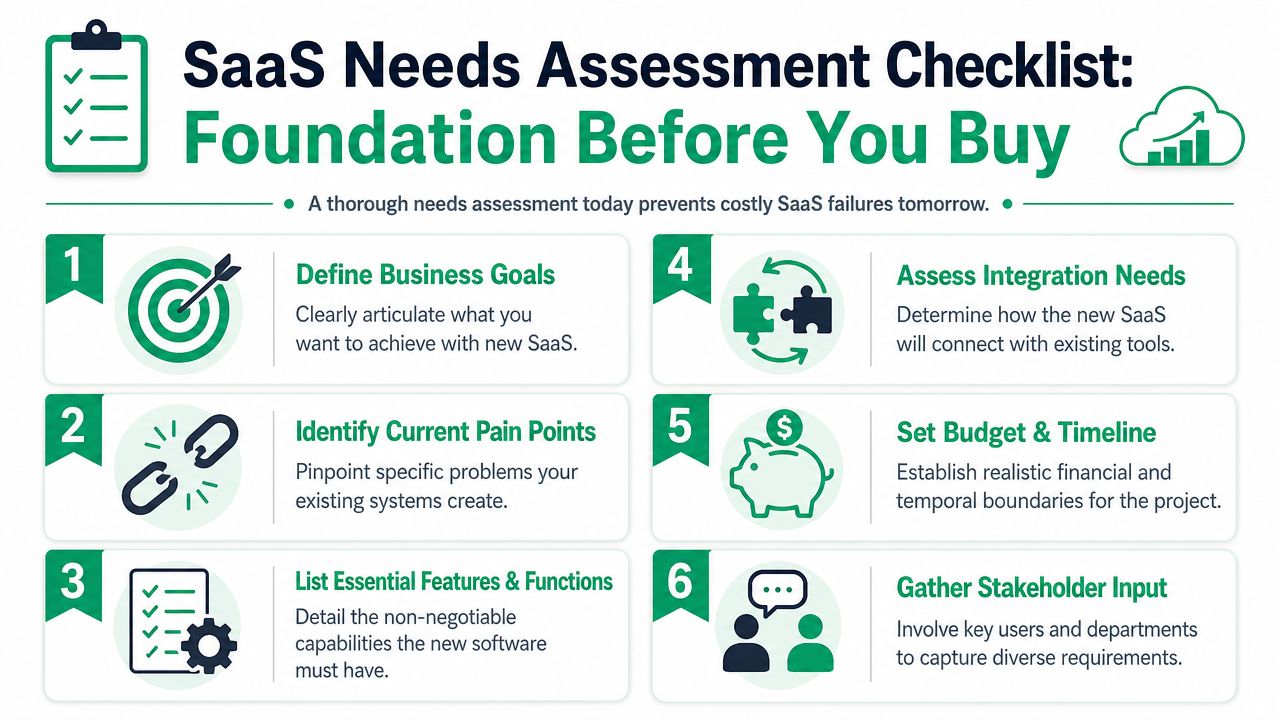
A useful needs assessment isn't a giant consulting binder. It's a short, working document your operations lead, IT contact, and department heads can use.
Here's the checklist I'd want on the table:
- Business outcome. Reduce manual entry, speed approvals, improve customer response, clean up reporting.
- Workflow scope. Start with one process, not the whole company.
- Required integrations. Accounting, Microsoft 365, ERP, EHR, payroll, inventory, or ticketing.
- Security requirements. MFA, role-based access, logging, device controls, retention rules.
- Cutover limits. What can go down briefly, and what absolutely cannot.
- Ownership. Name the internal decision-maker and the technical lead.
A lot of companies also benefit from reviewing cloud migration best practices for Indiana businesses before they sign anything, because application rollout and cloud transition usually collide faster than expected.
Later in the process, a short video walkthrough can help leadership align around what good planning looks like before money gets committed.
The bad habit that wrecks budgets
Feature chasing kills ROI. Owners pay for modules nobody uses, users ignore the platform because it doesn't fit their real work, and the team starts exporting spreadsheets to compensate. That's not transformation. That's expensive swivel-chair labor.
Practical rule: If you can't explain the first workflow you're fixing in one sentence, you're not ready to buy the software.
Mapping Your Technical and Security Blueprint
Once the workflow is clear, the next question is technical. How does data move, who gets access, what breaks if an integration fails, and how do you recover fast if something goes sideways on a Tuesday morning?
Many SMBs often get vague. They say, “The vendor handles security.” The vendor, however, handles only part of it. You still own identity, access policy, device trust, data classification, backup planning, and user behavior.
Build the migration path before touching production
Data migration isn't just export and import. You need to decide which records move, which records stay archived, which fields need cleanup, and what happens to duplicates.
For a Hamilton County healthcare clinic, that also means checking where protected data lives and whether workflows line up with HIPAA obligations. For a defense-related manufacturer, the conversation quickly touches CMMC readiness. For everyone else, NIST CSF is a solid frame for risk discussions because it forces clear thinking around identification, protection, detection, response, and recovery.
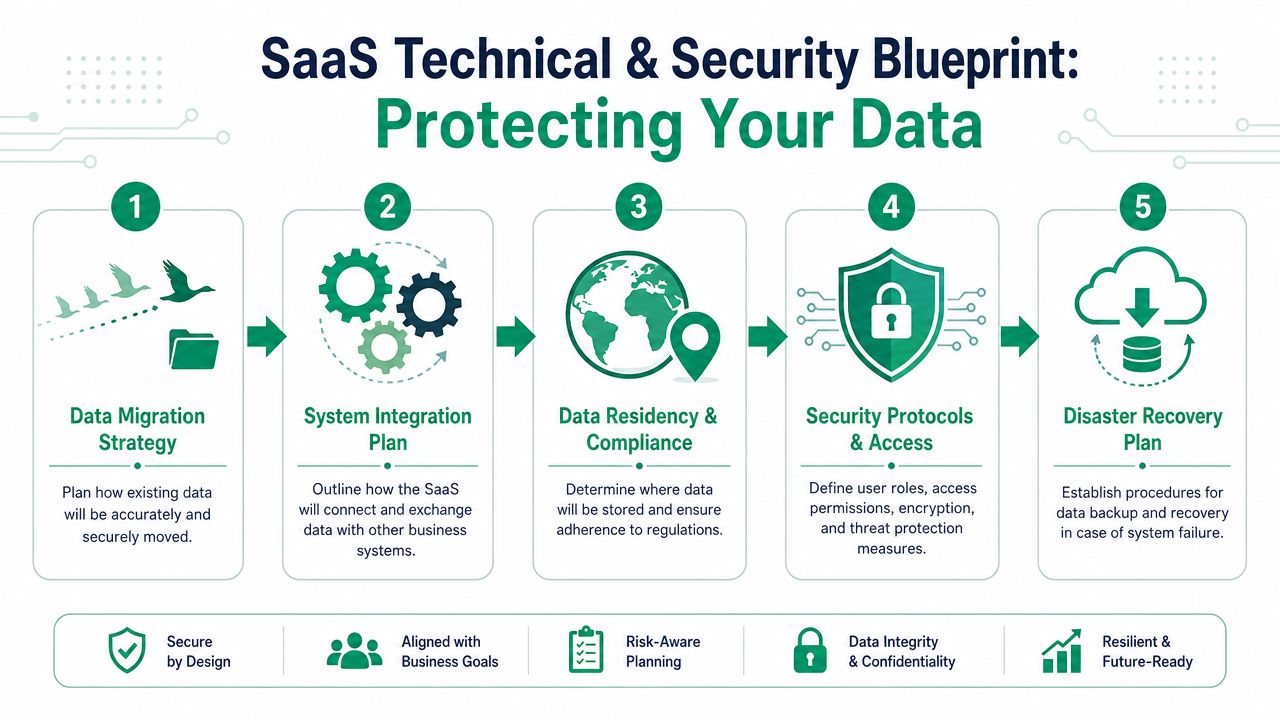
A strong blueprint usually includes:
- Data cleanup rules. Remove junk, standardize fields, resolve duplicates before migration.
- Integration mapping. Define what syncs one-way, what syncs both ways, and what remains manual.
- Authentication design. Use SSO where possible, enforce MFA, and keep role-based access tight.
- Retention and recovery. Decide what gets backed up, how long it stays, and who can restore it.
- Fallback planning. If the cutover fails, know how staff continue operating.
Security has to match the workflow
A sales CRM, patient management portal, project system, and manufacturing workflow tool don't need the same access model. That's why Zero Trust architecture matters. Verify users, verify devices, limit privileges, and assume no session should be trusted just because someone logged in once.
That's also where practical reviews of securing SaaS applications can help. Not because every SMB needs a giant enterprise pentest on day one, but because the mindset is correct. Test the app, test identity flows, test permission boundaries, and don't assume a clean dashboard means a secure deployment.
Most cloud incidents I see are boring. Wrong permissions. Old accounts still active. Data exported somewhere nobody monitors. Boring mistakes create very expensive weekends.
Don't skip recovery planning
If you're moving core operations into SaaS, you still need immutable off-site backups, documented restore paths, and an owner for recovery decisions. Some platforms offer retention. That isn't the same as a recovery strategy you control.
For businesses that want outside help, one option is Finchum Fixes IT, which provides managed IT, security support, networking, and migration assistance for Indiana businesses. Whatever provider you use, make sure they can explain the underlying architecture plainly. Ask how they handle SOC-as-a-Service monitoring, identity hardening, audit logging, and restore testing.
A pre-launch IT security audit checklist for Indiana businesses is worth reviewing before credentials go live. It's a lot cheaper to fix a role mapping mistake in planning than after someone syncs the wrong data set into production.
The Rollout and Training Plan That Actually Works
I've seen two rollouts in the same week look completely different.
The first was the classic mess. Leadership picked a date. Everyone got access at once. Training was a recorded webinar nobody watched. By lunch on day two, staff had built side spreadsheets to keep work moving. The software wasn't the actual problem. The rollout was.
The second rollout was calm. A small pilot team tested the process first, documented snags, and gave blunt feedback. By the time the larger group got access, the rough edges were already handled.
Why the pilot-first model wins
Best practices recommend a pilot with 5 to 10 users for 1 to 2 weeks, with feedback focused on workflow friction, missing features, training gaps, and integration issues, according to Guideflow's SaaS implementation playbook. That's the right move for Indiana SMBs because it limits blast radius.
A pilot group should include people who perform the work, not just supervisors. If the new system affects quoting, dispatch, charting, intake, or order management, the pilot needs real operators from those functions.
Use the pilot to answer questions like these:
- Where do users get stuck. Login flow, approvals, search, data entry, mobile access.
- Which old habits return immediately. Shadow spreadsheets, personal notes, side email chains.
- What training was too generic. Users need task-based instruction, not a grand tour of every menu.
- Which integration errors matter most. Broken alerts, delayed syncs, duplicate records.
Training should match the actual job
Most SaaS training fails because it's built like a product demo. Staff don't need a tour. They need to know how to finish their work faster without getting yelled at by accounting, compliance, or customers.
That means role-based training.
A scheduler needs one set of steps. A manager needs another. A billing clerk cares about different fields than a field tech. If you build one universal training deck, you've already lost attention.
Good teams also build quick internal how-to content. If you need a practical framework, GitDocAI's guide on tutorial creation is a useful reference because it pushes teams to document tasks clearly instead of dumping features into a slideshow.
Train people on the first five tasks they must complete correctly. Save the advanced stuff for later.
Buy-in comes from fewer headaches
People don't resist software because they hate change in theory. They resist when the new process makes them slower, exposes them to mistakes, or lands extra work on their desk.
That's why change management matters more than the announcement email. A practical guide to IT change management and business ROI helps frame this the right way. Explain the reason, show what improves, name the support path, and fix pain fast during the first few weeks.
For shops along the I-65 corridor, phased rollout usually beats the “everyone Monday morning” plan. The quieter launch wins.
Measuring Success and Avoiding Common Pitfalls
A SaaS rollout isn't successful because users can log in. It's successful when billing moves faster, errors drop, customer response tightens up, and the team spends less time babysitting broken process workarounds.
That's where a lot of SMBs drift. They look at logins and call it done. Logins don't pay invoices. Cleaner workflows do.
What to measure after go-live
For a Johnson County manufacturer, success might mean fewer manual handoffs between sales, production, and shipping. For a Hamilton County clinic, it might mean smoother scheduling and more reliable documentation. For a downtown Indy services firm, it might mean staff spend less time re-entering data and more time on billable work.
The useful metrics are tied to operations:
- Manual work removed. Fewer duplicate entries, fewer hand-keyed reports, fewer side spreadsheets.
- Response speed. Faster intake, approval, quote turnaround, or customer follow-up.
- Data reliability. Fewer record errors, cleaner reporting, less confusion about the latest version.
- Support burden. Fewer emergency calls, fewer access problems, fewer recurring workarounds.
- Continuity impact. Less downtime risk, smoother failover, better recovery readiness.
If you can connect the platform to reduced wasted tech time and steadier budgeting, that's real ROI.
The pitfall most generic guides miss
A major pitfall is that most implementation advice assumes a full rip-and-replace project. For SMBs, the hard part is phasing in one workflow at a time without disrupting daily operations, as noted in Tech.us coverage of SaaS implementation challenges. That's the part local owners care about because payroll still runs while the project is happening.
In other words, don't ask whether the platform can replace everything. Ask whether it can improve one process cleanly without breaking the ones around it.
Common SaaS implementation pitfalls and how to fix them
| Common Pitfall | The Local Fix |
|---|---|
| Buying based on features instead of workflow fit | Map the current process first. Pick software that solves one painful process well. |
| Migrating messy data | Clean records before migration. Archive what you don't need in the new system. |
| Weak identity controls | Use SSO, MFA, role-based access, and review permissions by job function. |
| Training everyone the same way | Train by role and by task. Show users how to complete their daily work. |
| Launching company-wide too fast | Roll out one workflow first, then expand after the pilot stabilizes. |
| Ignoring legacy dependencies | Document every integration, export, report, and approval path before cutover. |
| Assuming vendor retention equals backup | Keep your own recovery plan with immutable off-site backups and restore procedures. |
| Treating go-live as the finish line | Schedule regular reviews, fix friction points, and refine the workflow after launch. |
The businesses that avoid project disasters don't chase a perfect launch. They keep the first phase narrow, measure what changed, and make the next phase easier.
Your Next Step for a Smooth Transition
The strongest SaaS implementation projects follow a simple sequence. Assess needs and select the vendor. Migrate and integrate data. Configure workflows. Train users. Keep optimizing after launch. That five-stage model comes straight from Phenom's SaaS implementation guide, and it holds up because it matches how real operations change.
Skip a stage and risk shows up somewhere ugly. Miss the assessment step and you buy the wrong tool. Rush migration and your data gets sloppy. Ignore configuration and staff invent workarounds. Cut training short and adoption drags. Skip optimization and the platform slowly turns into shelfware with a login screen.
Keep the business running while the stack changes
For Indiana SMBs, the smartest move is usually not a giant all-at-once replacement. It's a controlled, phased implementation tied to one workflow at a time. That approach respects business continuity. It also protects cash flow because you aren't blowing up productive systems just to satisfy a software timeline.
This is especially true in places like Greenwood, Franklin, Fishers, and the broader Indianapolis area where a lot of companies run lean. You don't have extra staff sitting around waiting to absorb process confusion. Every hour lost to rework is an hour somebody could have spent shipping, billing, treating patients, or serving customers.
Planning is what protects ROI
A solid plan reduces downtime, limits surprise support costs, and gives leadership a cleaner path to predictable monthly IT budgeting. It also supports the bigger picture. Better security controls. Better auditability. Better recovery options. Fewer “who changed this?” moments.
If you're weighing vendors, rollout models, or support options, this guide on how to choose a managed service provider is a good next step. The right partner should understand more than licensing. They should be able to talk through networking, compliance, endpoint security, backup design, latency-sensitive connectivity, and what happens when the cutover hits a snag at 8:15 on a Monday.
You don't need a dramatic transformation story. You need a rollout that keeps the doors open and the staff productive.
If your business in Greenwood, Indianapolis, or anywhere along the I-65 corridor is planning a SaaS move, Finchum Fixes IT can help you sort out risks before they become expensive downtime. Start with a Free Network Assessment or a Security Risk Audit and get a practical view of your current environment, identity controls, integrations, backup readiness, and the weak spots that could derail a rollout.