Software Modernization: A Guide for Indiana Businesses
A lot of Johnson County owners are living with the same scene right now. The office opens, someone logs into that old line-of-business system, and everybody waits. Maybe it's dispatch software for a company near the I-65 corridor. Maybe it's an inventory tool in a Greenwood business park. Maybe it's an old patient scheduling system that only works on one machine nobody wants to touch.
It still runs, technically. But it crashes, stalls, refuses to integrate, and turns simple work into a daily workaround contest.
Software modernization is how you stop that bleed. Not with a flashy rip-and-replace project for the sake of it, but with a practical plan that protects business continuity, tightens security, and gives you a budget you can predict. That matters when downtime can cost up to $9,000 per minute. For a small business, the hit is often simpler: payroll keeps running while your team waits on a frozen screen.
Coffee-shop version: If your software eats staff time, blocks growth, or keeps you one outage away from chaos, it's already costing more than the monthly number on the invoice.
- Modernization protects uptime: old software doesn't just annoy people, it creates downtime, security gaps, and support problems.
- ROI is real when the plan is phased: some modernization work reaches positive ROI in 12 to 14 months with the right scope and sequencing.
- Indiana SMBs face a hidden downtime tax: timeline overruns and messy data migrations hit cash flow harder than most vendors admit.
- Compliance matters: HIPAA, CMMC, and NIST CSF requirements often expose the limits of old systems.
- The right technical approach matters: Zero Trust architecture, CI/CD security scans, Terraform, immutable off-site backups, and solid networking design reduce risk.
- Good modernization converts wasted tech time into billable hours and more predictable monthly budgets.
Is Your Old Software Costing You More Than You Think
Aging software rarely fails in a dramatic movie scene. It fails the way most Southside tech problems fail. Slowly, repeatedly, and at the worst possible time.
A Greenwood company with older server hardware might have one accounting package that only one employee fully understands. A manufacturer in the Indy metro might depend on a custom app built years ago by a developer who's long gone. A service business in an old brick building might have decent people, decent processes, and terrible system reliability because the software was never built for today's Wi-Fi, cloud tools, or mobile workflows.
The hidden cost isn't just the invoice
The biggest mistake I see is treating old software like a fixed asset that's already paid for. Owners say, “It's ugly, but it works.” Usually, it doesn't. It limps along while your staff burns time re-entering data, calling support, restarting machines, or waiting on reports.
That's technical debt in plain English. If you want a sharp explanation written for founders instead of engineers, this piece on technical debt for non-technical founders is worth your time.
The business risk is wider than slowness. In a 2025 survey of over 500 U.S. IT professionals, 62% of organizations still rely on legacy systems, and 43% cited security vulnerabilities as a major concern driving modernization efforts. The same survey notes the average COBOL programmer is 55 years old, which tells you a lot about the support cliff some companies are approaching, according to Saritasa's modernization survey.
What local owners usually notice first
Business owners in Johnson County usually don't call this “legacy risk.” They call it one of these:
- The bottleneck problem: One workstation, one server, or one employee becomes the gatekeeper for a core process.
- The compatibility problem: Your software won't cleanly connect with Microsoft 365, your CRM, your e-commerce system, or modern reporting tools.
- The compliance problem: Your current setup doesn't line up with HIPAA safeguards, CMMC expectations, or a sane NIST CSF security baseline.
- The budget problem: You can't forecast costs because every quarter brings a surprise repair, emergency support bill, or rushed hardware replacement.
That last one matters more than people think. Good modernization planning is really IT budget planning with fewer ambushes. If you want to frame the conversation in dollars and resilience, this guide on IT budget planning for SMB ROI and resilience lays that out well.
Old software doesn't only waste minutes. It changes how your team works. People stop trusting the system, so they build side processes in spreadsheets, email chains, and sticky notes.
Once that starts, the software isn't supporting operations anymore. Your staff is propping it up.
The Real ROI of Software Modernization
Owners usually ask one fair question first. What do we get back for the disruption and cost?
The answer isn't just “newer software.” The return comes from less downtime, lower maintenance drag, better compliance posture, and faster daily work. In local terms, it means your front office stops waiting on a lagging database, your warehouse team stops double-entering orders, and your IT spending shifts from emergency reaction to predictable monthly planning.
Why the math works
The market itself shows how serious this has become. The global legacy software modernization market is projected to reach $56.87 billion by 2030, and organizations pursuing modernization report an average ROI of 288% to 362% within 3 to 5 years, according to DreamFactory's legacy modernization statistics.
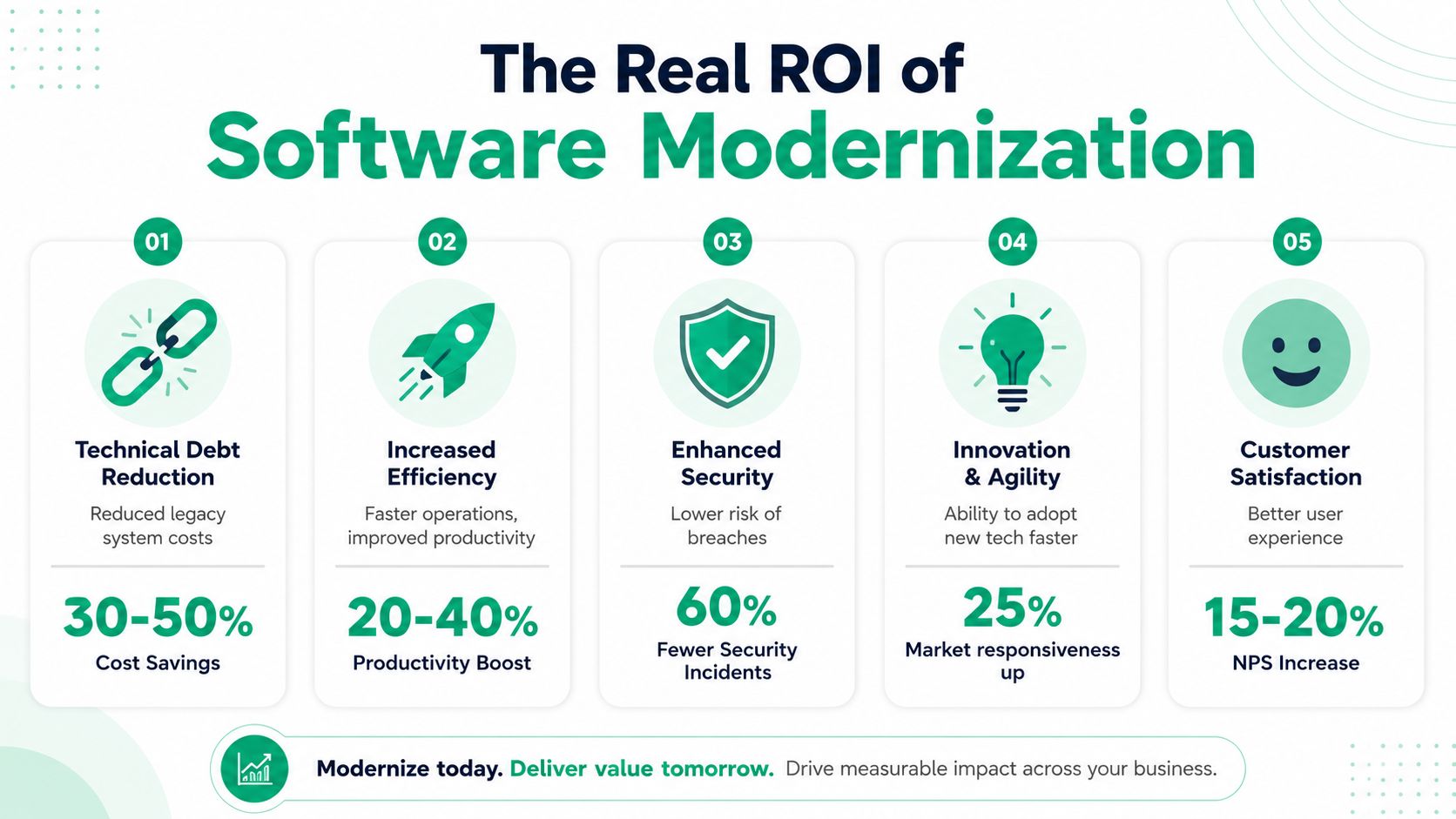
That kind of return makes sense when you look at what old systems force companies to pay for:
- Extra labor: staff members spend paid hours wrestling with broken workflows instead of serving customers.
- Maintenance overhead: legacy apps often require niche support, special hardware, or custom fixes nobody budgets for cleanly.
- Delayed delivery: if your software can't adapt, new products, new locations, and new services move slower.
- Risk exposure: one security incident or one failed upgrade can erase a year of “savings” from keeping the old stack alive.
Indiana examples where ROI gets obvious fast
Take a Hamilton County medical practice. If the patient management system can't support modern security controls, audit expectations, or cleaner integrations, the issue isn't just inconvenience. It's business risk tied to HIPAA obligations and daily scheduling efficiency.
Or look at a defense-adjacent machine shop outside downtown Indy that's getting pulled toward stronger security expectations. If the old quoting and job tracking software can't fit into a broader Zero Trust architecture or support the documentation discipline that CMMC work demands, growth gets boxed in by the toolset.
For general business security, I like seeing modernization decisions tied to NIST CSF language because it gives owners a straightforward way to think about identifying risk, protecting systems, detecting trouble, responding, and recovering. Pair that with practical tools like Bitdefender GravityZone, SOC-as-a-Service monitoring, immutable off-site backups, and stable UniFi networking, and you start turning scattered tech expenses into one coherent operating model.
A lot of companies also find that software modernization and cloud cleanup go together. If you're weighing hosted systems against old on-prem infrastructure, this article on cloud migration benefits that deliver real ROI for Indiana businesses is a useful companion read.
Bottom line: ROI shows up when software modernization removes friction from the work your team does every day. If it only changes the logo and the login screen, it wasn't modernization. It was redecorating.
Choosing Your Modernization Strategy
Not every old system needs to be rebuilt from scratch. That's where owners get bad advice. Some vendors want to replace everything. Others want to keep patching forever. Both can be expensive mistakes.
The smarter move is choosing the strategy that fits your cash flow, your risk tolerance, and how critical the application is to daily operations across the Indy metro.
Five paths that actually make sense
Replatform is like moving your shop into a newer building without changing the basic layout. The application stays mostly the same, but it runs on better infrastructure, often in the cloud.
Refactor means cleaning up the inside so the software is easier to maintain and extend. From the outside, users may notice only modest change. Under the hood, the codebase stops fighting every update.
Rearchitect is the big structural job. You're changing how the application is built so it can scale, integrate, and adapt more cleanly. This effort often incorporates microservices, APIs, containers, and stronger data design.
Replace means choosing a different platform entirely, such as moving from a custom relic to a modern SaaS product. Sometimes that's the least risky option, especially if the old app isn't a real competitive advantage.
Cloud migration can overlap with any of the above. Sometimes you're moving workloads. Other times you're modernizing the application while shifting it to a better hosting model.
If you're deciding between building around your process or adapting to a packaged tool, this guide on custom software vs off-the-shelf for Indiana businesses is worth reading before signing anything.
Software modernization strategies compared
| Strategy | Typical Cost | Risk Level | Timeline | Best For |
|---|---|---|---|---|
| Replatform | Moderate | Lower to moderate | Shorter | Stable apps held back by old infrastructure |
| Refactor | Moderate | Moderate | Medium | Systems that still fit the business but need maintainability |
| Rearchitect | Higher | Higher | Longer | Core systems that must scale, integrate, and evolve |
| Replace | Varies widely | Moderate | Medium | Businesses better served by modern SaaS or packaged platforms |
| Cloud migration | Varies by scope | Lower to moderate | Short to medium | Organizations trying to exit aging servers and improve continuity |
What works for SMBs and what usually doesn't
For many Johnson County business owners, incremental change works better than a dramatic cutover. It protects cash flow and gives staff time to adapt. Enterprise blogs love talking about giant cloud-native transformations, but a local distributor or medical office often needs a more grounded path.
That's also why workforce fit matters. If your team can't support the future state, the technical design doesn't matter much. I've seen small firms buy systems that were technically solid and operationally wrong.
A good outside example of how specialized build decisions change based on the business model is the work behind e-commerce website development Auckland. Different market, same lesson. The architecture has to match how the business sells, fulfills, integrates, and supports customers.
Pick the strategy that your staff can absorb, your budget can survive, and your operations can keep running during the transition.
A Practical Checklist for Your Legacy Systems
Most owners don't need a whitepaper. They need a quick way to tell whether the current system is still helping or draining the business.
In our 17 years of local service, the pattern is pretty consistent. If you answer “no” or “I'm not sure” to more than a few of the questions below, your software is probably costing you more than it's saving.
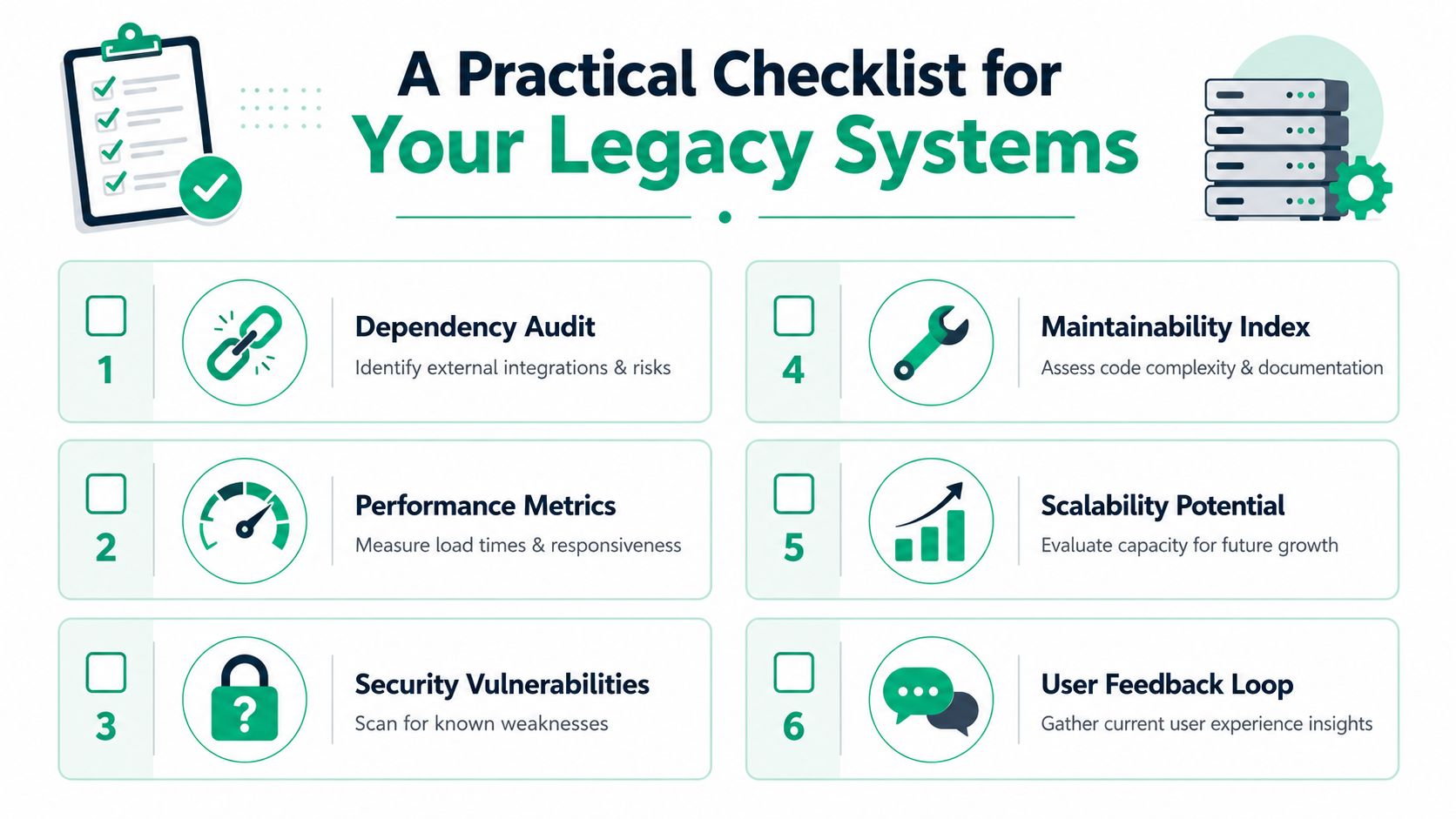
Quick self-audit for Indiana businesses
- Integration check: Can your current system connect cleanly with Microsoft 365, your CRM, accounting tools, or line-of-business apps without manual exports?
- Support check: Does it depend on hardware, operating systems, or plugins that are hard to replace or no longer properly supported?
- Security check: Can it support modern controls such as MFA workflows, role-based access, logging, and a broader Zero Trust architecture?
- Compliance check: If you're in healthcare, can it support HIPAA expectations? If you work with defense contracts, does it fit the documentation and control discipline expected around CMMC? For general operations, can you map it to NIST CSF practices without hand-waving?
- Performance check: Does the system slow down during your busiest hours, especially when multiple users connect from different locations?
- Recovery check: If the server fails today, do you have verified recovery steps, immutable off-site backups, and confidence in the restore process?
- Vendor check: Can you still get responsive support, or are you relying on one freelancer, one old admin account, or tribal knowledge?
- User check: Do employees trust the system enough to use it as designed, or have they built parallel processes in spreadsheets and email?
- Growth check: Can the software support a second location, remote work, new reporting needs, or customer-facing improvements?
- Budget check: Are your software and support costs predictable, or are you dealing with recurring surprise fixes?
How to interpret the results
If this checklist turns up several weak spots, don't assume the answer is a giant rebuild. Often it isn't.
According to Mobisoft's analysis of modernization ROI, incremental software modernization approaches can achieve positive ROI within 12 to 14 months, while big-bang re-architecture projects typically require 18–36 months for payback. That lines up with what practical operators prefer. They want progress without betting the quarter on one cutover weekend.
For a broader environment review, this 10-point IT infrastructure audit checklist for 2026 helps connect software issues to the rest of your stack, including networking, backups, and endpoint security.
Field rule: If the software can't be secured, can't be backed up cleanly, and can't integrate without manual work, it's no longer a bargain.
Your Step-by-Step Modernization Roadmap
The best modernization projects don't start with code. They start with control. Before anyone migrates data, changes hosting, or touches production workflows, the business needs a sequence that protects uptime.
A phased roadmap is usually the safest route for SMBs in Greenwood, downtown Indy, and across the I-65 corridor because it limits blast radius. One bad decision doesn't have to take down payroll, dispatch, scheduling, or inventory all at once.
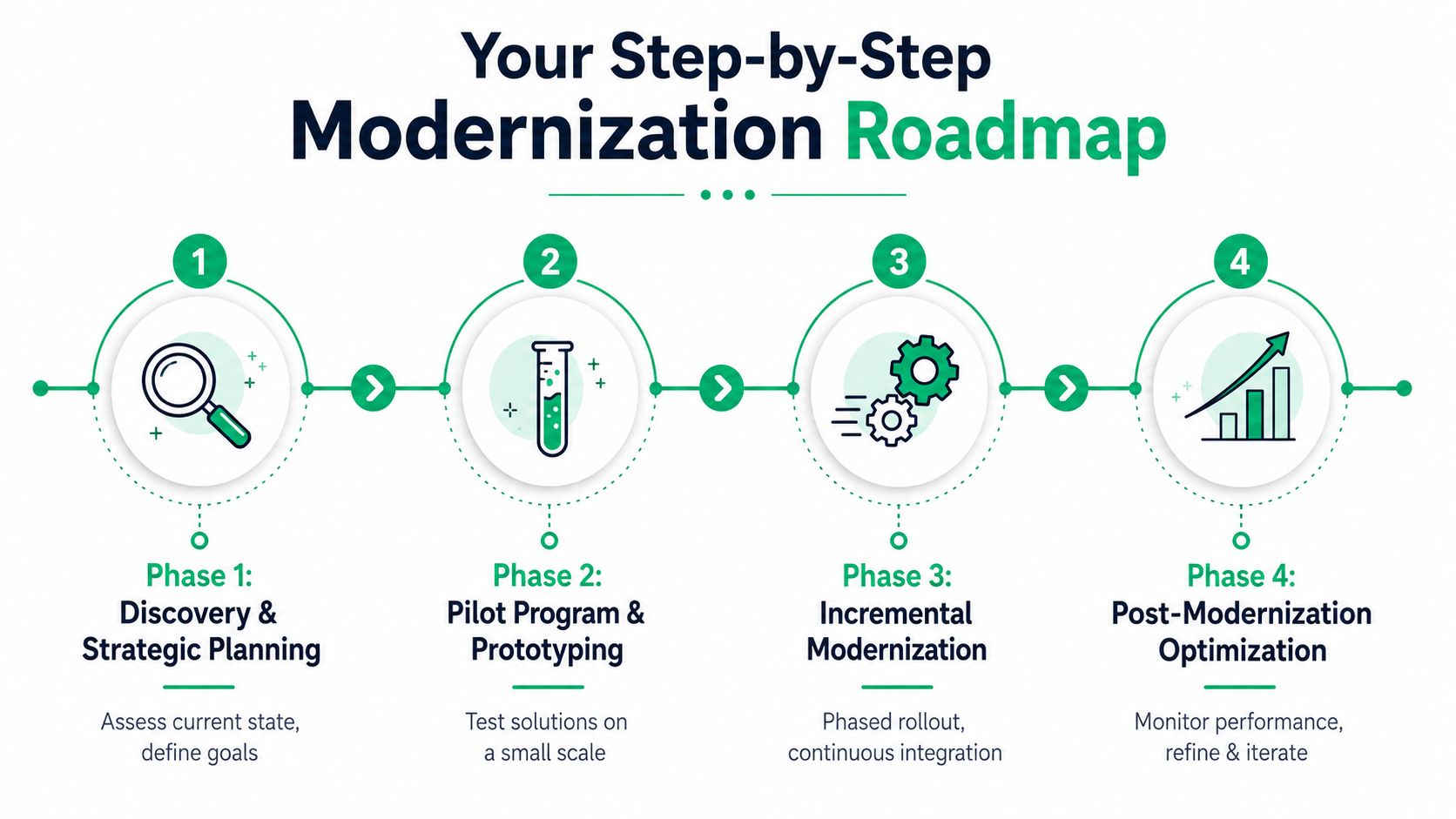
A simple visual helps:
Phase one and two
Discovery and strategic planning comes first. That means mapping the current system, the users, the dependencies, the compliance requirements, and the recovery plan. It also means deciding what can't break. For one company, that's order entry. For another, it's QuickBooks integration. For a clinic, it may be scheduling and record access.
Then run a pilot program and prototype. Don't roll out to the whole company on day one. Test with one team, one branch, or one workflow. Validate integrations, user permissions, reporting, and fallback procedures.
If you're planning an Indiana-based migration with multiple dependencies, this step-by-step cloud migration playbook is a strong planning reference.
Phase three and four
Incremental modernization is where the work happens. This can include replatforming, refactoring, replacing modules one at a time, or moving specific workloads into containers. If the application is headed toward a more modern architecture, this is also where CI/CD discipline matters.
A critical technical specification is to integrate automated security scans into the CI/CD pipeline. That shift-left practice helps catch legacy issues before deployment. Combined with Infrastructure as Code tools like Terraform, teams can right-size compute resources and build scalable failover strategies, as outlined by N-iX on application modernization challenges.
Here's the video version if you want a quick visual overview before you talk to your team:
Post-modernization optimization is where many vendors disappear and operators stay busy. This stage includes log review, permission cleanup, patching, endpoint policy tuning, performance monitoring, and training refreshers. It's also where you refine backups, retention, and remote access controls.
The technical details that keep projects safe
A few details separate clean projects from painful ones:
- Start with immutable off-site backups. Before migration, protect the data against deletion, corruption, and operator error.
- Design around Zero Trust architecture. Don't assume internal traffic is safe by default. Verify users, devices, and access paths.
- Fix the network layer. Spotty office Wi-Fi can ruin a good application rollout. In older buildings, latency-optimized mesh nodes and proper UniFi networking design often matter as much as the software.
- Plan for recovery, not just deployment. When we dissembled a similar client's failing RAID array during a migration, having a bit-level backup was the only thing that prevented total data loss. That's not theory. That's what saved the project.
- Monitor after launch. SOC-as-a-Service monitoring, endpoint visibility, and alerting catch issues before users call the front desk.
“Smooth go-lives happen before go-live day. They're built in discovery, backups, test plans, and rollback options.”
Avoiding Common Modernization Pitfalls
Most modernization guides are written for enterprises with deep benches, loose timelines, and room to absorb mistakes. That's not the world most Indiana SMBs live in.
A Greenwood owner cares about whether the phones ring, the invoices go out, the plant stays moving, and the team can still work on Monday morning. That's why the biggest risk in software modernization usually isn't the code. It's the downtime tax nobody fully accounts for.

The pitfall list owners should care about
The first problem is timeline optimism. According to Zartis on successful software modernization, 45% of SMB projects still exceed timelines because teams underestimate legacy data complexity and integration friction. That tracks with what happens on the ground. The old system usually has more exceptions, hidden workflows, and one-off data rules than anyone documented.
The second problem is people. A lot of modernization failures come from resistance, confusion, and lack of training. If your staff doesn't understand the new workflow, they'll invent a shadow workflow. Then you end up paying for the old mess and the new one at the same time.
The third problem is bad cutover planning. Owners get sold on “phased migration,” but the phase boundaries are fuzzy, user roles aren't tested, and support coverage during launch is too thin.
What reduces the damage
- Train early: Don't wait until the new system is live. Show users the changes while there's still time to adjust.
- Map ugly edge cases: Find the weird invoice, the custom report, the one customer workflow that breaks every clean demo.
- Stage the rollout: Move one process or one team at a time where possible.
- Protect the data first: Immutable off-site backups, verified restore procedures, and clear rollback plans matter more than polished sales decks.
- Watch the support queue: The first days after launch tell you whether the workflow really improved or just changed shape.
One more issue gets overlooked in small businesses. Skill gaps. Enterprise playbooks talk about architecture patterns. They spend far less time on SMB workforce upskilling and culture change. But if your internal team can't support the new environment, you haven't modernized. You've outsourced your future problems.
Get Your Free Modernization Assessment
Software modernization isn't about chasing trends from downtown Indy tech hubs or copying what a Fortune 500 company did. It's about making sure your business in Greenwood, along the I-65 corridor, or anywhere in Central Indiana can keep operating when systems get stressed, hardware gets old, and security expectations rise.
If your current software slows work down, creates support headaches, or keeps you nervous about the next outage, that's your signal. The right modernization plan reduces those risks, supports compliance, and turns wasted tech time into productive hours with a cleaner monthly budget.
Three practical questions owners usually ask
How much does this typically cost?
It depends on the strategy. Replacing a limited function with a modern SaaS platform is very different from rearchitecting a core line-of-business application. The honest answer comes after discovery, dependency mapping, and backup review.
How long does an assessment take? Usually not long, if the business can provide access to the right people and systems. The main variable is complexity. A single-site office with one major application moves faster than a multi-location operation with old integrations and undocumented workflows.
What's the first step?
Start with visibility. Identify what the system touches, what can't go down, what compliance obligations apply, where the backup gaps are, and which workflows users already work around every day.
Whether you're in a family-run Greenwood office, a growing Hamilton County operation, or a busy shop tied into the wider Indianapolis market, the principles are the same. Protect continuity first. Modernize in phases. Train the people. Secure the environment. Test recovery before you need it.
If you're unsure whether your software is merely old or actively holding the business back, a Free Network Assessment or Security Risk Audit is the cleanest next move for a Greenwood or Indianapolis business.
If your business is in Greenwood or the Indianapolis area and you want a practical read on aging software, backups, security gaps, Wi-Fi issues, or migration risk, Finchum Fixes IT offers a Free Network Assessment and Security Risk Audit built for real-world SMB operations. It's a straightforward way to find the bottlenecks, quantify the risk, and decide whether your next move should be repair, stabilization, or full software modernization.