Splice Cat5 Cable: Safe Methods for 2026 Networks

TL;DR
- A quick splice can restore service fast, but it’s a business decision, not just a wiring trick.
- Bad splices create random outages, slow devices, flaky phones, and wasted staff time that often cost more than replacing the run.
- Cat5e supports up to 1 Gbps at 100 MHz when the cable is handled correctly, and a proper splice should keep signal loss very low according to this Cat5e splicing reference.
- Twist control matters most. If you untwist too much, crosstalk and intermittent failures show up later.
- Testing is mandatory, especially for PoE gear like cameras and access points.
- Use a splice for emergency continuity or a short-term fix. Replace the cable for critical links, compliance-sensitive environments, and long-term reliability.
A lot of Johnson County network problems start with something stupid and expensive.
A chair rolls over a floor cable. A shelf gets shoved back into a wall plate. A cleaning crew yanks a patch lead loose and bends it hard enough to break conductors under the jacket. Nobody notices until the phones get choppy, the copier drops offline, and the front desk starts asking why the internet “keeps blinking.”
That’s usually the moment a business owner asks the same question. Can we just splice cat5 cable and get back to work?
Your Network is Down A Damaged Cable in Your Greenwood Office
A damaged cable can stop more business than most owners expect. One bad run can take out a workstation cluster, a point-of-sale terminal, a VoIP phone, a UniFi access point, or a printer that half the office depends on. The technical issue is small. The downtime bill is not.
For local companies trying to keep payroll moving, patient check-in running, or production tickets flowing, every minute of wasted tech time turns into lost output. You don’t need a giant enterprise to feel it. A small office on the Southside can burn a morning just waiting on one broken Ethernet path to behave.
The cable problem nobody plans for
In older Greenwood offices, the most common failures aren’t dramatic. They’re routine.
- Floor-run damage: A temporary cable gets pinched under a desk leg or office chair.
- Wall damage: A remodel crew hits low-voltage cabling behind drywall.
- Closet strain: Someone yanks a patch cable in the rack and stresses the connector.
- Move-day shortcuts: Furniture gets moved first. Cabling gets “figured out later.”
I’ve seen all of it along the I-65 corridor. The trouble is that a cable can look fine from the outside and still fail internally. Copper doesn’t need to be fully severed to cause trouble. A partially damaged pair can create random disconnects that waste far more time than a clean break.
Practical rule: If users describe the issue as “it works sometimes,” assume the physical layer is guilty until proven innocent.
The splice question comes up fast
When business stops, a splice looks attractive. Cut out the bad section. Join the cable. Move on. Sometimes that’s the right call. Sometimes it’s the beginning of a longer, uglier problem that keeps resurfacing every few days.
That’s why I push owners to think beyond the momentary fix. If the damaged run feeds a noncritical desk in a back office, a temporary splice might be exactly what keeps the day on track. If it feeds your firewall uplink, server connection, security camera line, or a compliance-sensitive workstation, the math changes.
There’s a reason structured wiring exists in the first place. Clean runs, proper terminations, and documented labeling cut downtime and make troubleshooting faster. If your business keeps tripping over ad-hoc cabling decisions, it’s worth reviewing networking and cabling services for your Indy business before the next emergency lands on a Monday morning.
What business owners actually need to know
A splice isn’t automatically wrong. It’s just not neutral.
Done right, it can save the day. Done poorly, it creates the kind of issue that burns staff hours, frustrates clients, and sends everyone chasing the wrong root cause. That’s where the actual cost shows up. Not in the copper. In the interruptions.
The Splice Decision When a Quick Fix Becomes a Future Headache
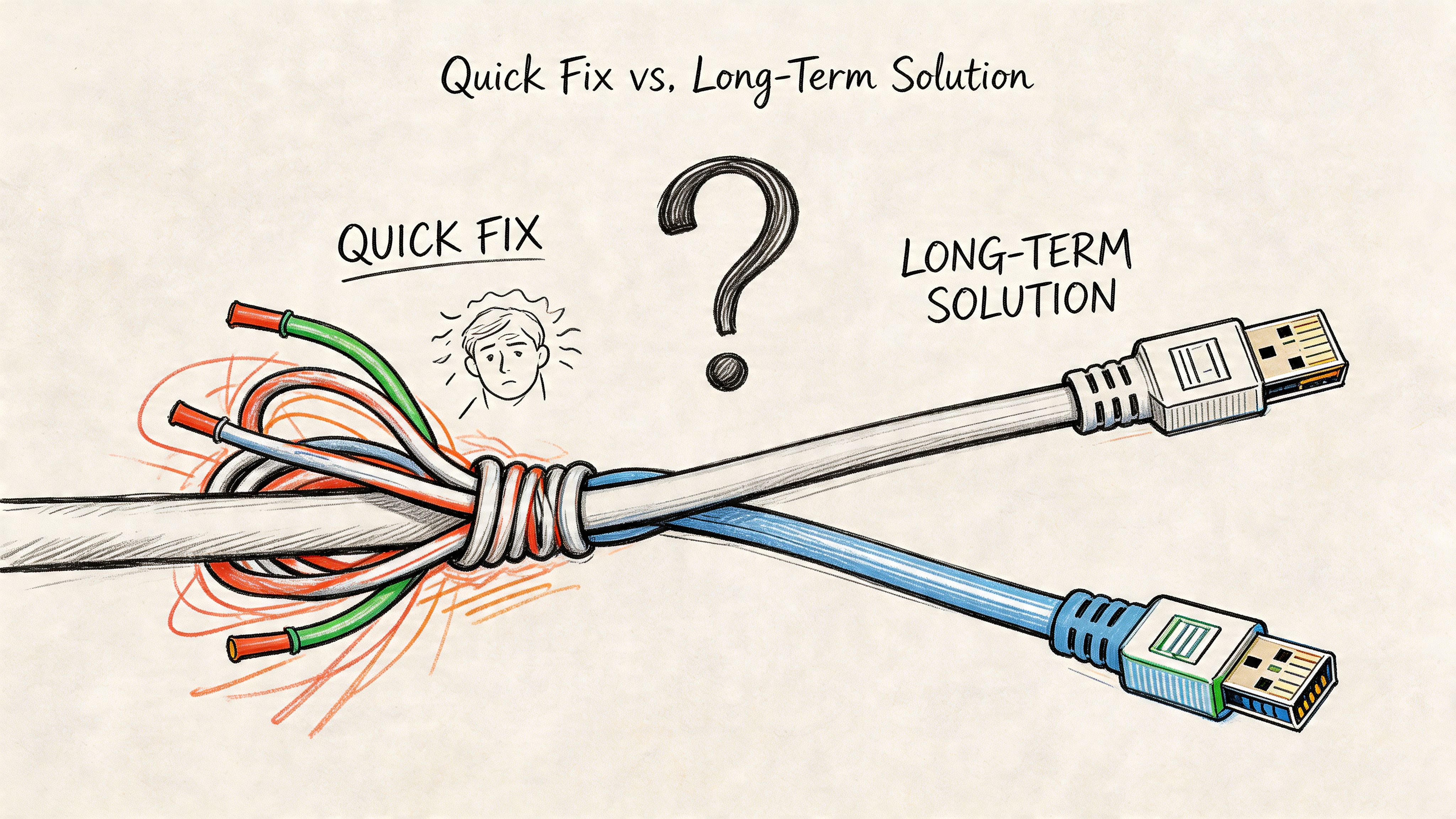
The first question isn’t how to splice cat5 cable. The first question is whether you should.
That sounds obvious, but in the middle of an outage people grab tools before they make decisions. A fast repair feels productive. Then three weeks later the office manager is logging tickets about dropped calls, slow uploads, or one workstation that falls off the network every afternoon. The original cut got fixed. The business problem didn’t.
When a splice makes business sense
A splice is defensible in a few situations.
| Situation | Splice likely makes sense | Better long-term move |
|---|---|---|
| Emergency outage in a noncritical area | Yes | Schedule replacement |
| Temporary continuity during renovation | Yes | Pull a clean final run |
| Legacy area with limited access today | Maybe | Rebuild during planned maintenance |
| Primary uplink or server connection | No | Replace the cable |
| HIPAA or CMMC-sensitive segment | No | Replace and document properly |
For a short-term continuity fix, a careful splice can get users back online without tearing apart a wall the same day. That has real ROI. It stops idle time and gets people back to work.
The trouble starts when a temporary splice becomes “good enough forever.”
The hidden limits owners don’t see
Cat5e has distance and termination limits that don’t care how urgent your outage is. The maximum operational distance is 100 meters (328 feet), and that total includes patch cables, jacks, and couplers, not just the in-wall run, as explained in this discussion of Cat5e length limits. That same reference notes that each coupler degrades signal integrity, and piling on multiple splices in one run is a reliability gamble.
That matters because many “quick fixes” aren’t one fix. They become a chain of compromises. One coupler at a desk. Another in the ceiling. A patched segment after a remodel. Suddenly the network path is a Frankenstein build nobody remembers creating.
If you’re adding connectors and couplers to avoid pulling a proper cable, you’re not saving money. You’re moving the bill into future labor and downtime.
Where quick fixes usually backfire
The ugly failures are rarely dramatic. They’re intermittent.
A Hamilton County office once inherited cabling from a prior provider that loved “good enough” repairs. The phones would work, then stutter. A few users would lose connection for a minute, then reconnect before anybody arrived to inspect it. Those are the worst tickets because they chew up time and make staff doubt the network, the ISP, the phone system, and each other.
In a business environment, intermittent faults are expensive because they waste technical labor and employee attention. That’s why I tell owners to separate continuity fixes from infrastructure decisions.
Use a splice if the priority is immediate continuity
- A damaged cable is stopping work right now
- The link is not mission-critical
- You already plan to replace the run
- You can test the splice immediately
Replace the run if the priority is long-term stability
- The cable supports core operations
- The line powers PoE devices that must stay up
- The environment has compliance requirements like HIPAA, CMMC, or NIST CSF-driven controls
- The existing wiring already has signs of age, poor labeling, or past patchwork
A lot of Southside businesses don’t need more clever fixes. They need fewer mystery connections. That’s why structured design beats improvised recovery every time. If you’re seeing repeated cabling issues, structured cabling for business networks is usually the conversation worth having, not another bag of couplers.
Your Toolkit for a Professional-Grade Splice
Cheap tools create expensive callbacks. That’s the cleanest way to say it.
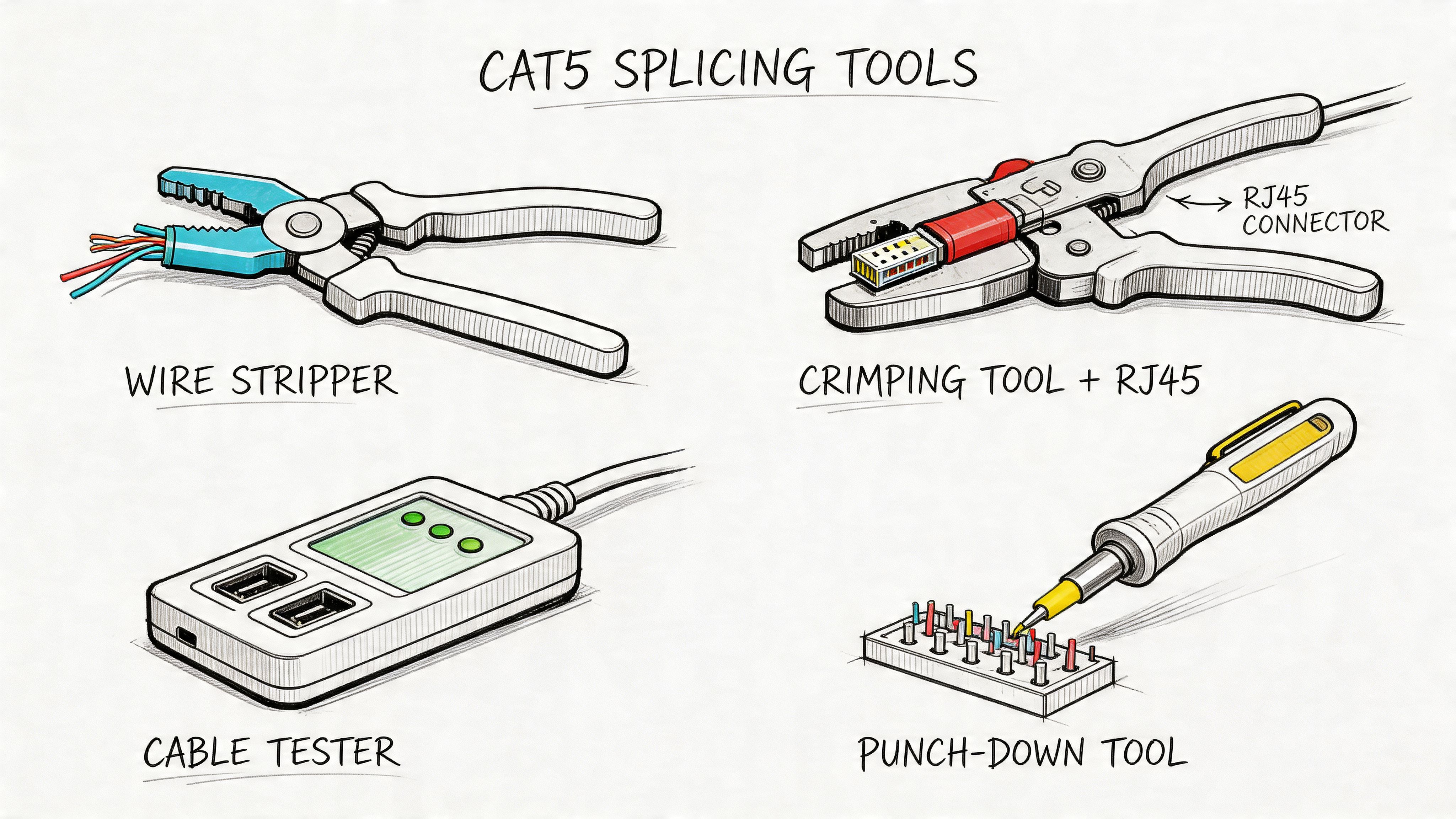
If you’re going to splice cat5 cable, the tool choice matters almost as much as the hand doing the work. The difference between a stable splice and a flaky one often comes down to conductor damage, uneven crimp pressure, poor strain relief, or connectors that don’t match the cable and environment.
The core tools that actually matter
You don’t need a truck full of gear for one repair. You do need the right few items.
- Precision stripper: A good stripper removes the jacket cleanly without nicking the copper. Nicked conductors may pass a quick test, then fail when the cable gets moved.
- Quality crimper: Crimp pressure has to be correct. According to this Ethernet splicing guide, inadequate pressure causes weak contact and excessive pressure can crack insulation or break conductors.
- Cable tester: At minimum, confirm wire map and continuity before calling the job done.
- Flush cutters: Clean, square cuts make terminations more consistent.
- Labels: If you repair it and don’t label it, the next tech loses time rediscovering your work.
Connector choice changes the outcome
Not every connector earns the same trust.
Some businesses grab whatever’s on the shelf at a hardware store, then wonder why the fix doesn’t hold. Connector quality and cable category matching matter. That same splicing guide notes that businesses usually choose between standard RJ45 connectors and tool-free splice couplers, with a trade-off between faster deployment and long-term stability.
Here’s the field view:
| Tool or material | Good for | Risk if you cheap out |
|---|---|---|
| RJ45 connectors | Fast field repairs | Loose fit, poor contact |
| Tool-free couplers | Emergency restoration | More long-term vulnerability |
| Punch-down hardware | Cleaner semi-permanent repairs | Requires the right technique |
| Heat-shrink and boots | Protection and strain relief | Exposed weak point |
| Shielded connectors | Noisy environments | EMI problems if omitted |
Match the environment, not just the cable
An office with standard UTP cabling is one thing. A shop floor, medical suite, or warehouse edge is another. In electrically noisy spaces, connector and shielding decisions matter more because interference will punish sloppy work.
Field note: A splice that survives in a quiet admin office might fail miserably near motors, fluorescent ballast noise, or crowded ceiling pathways.
If the cable is shielded, the splice hardware has to respect that. If the run carries PoE to cameras or access points, the termination quality needs to hold power and data together without heating up or loosening over time. If this sounds more involved than “just join the wires,” that’s because it is.
Professional-grade results don’t come from fancy language. They come from clean prep, correct tools, and refusing to rush the termination.
The Finchum Fixes IT Splicing Playbook Three Reliable Methods
Most failed splices come from one mistake. Too much untwisting.
Cat5e depends on the twists inside each pair to fight interference. Once a tech opens that cable jacket and lets the pairs unravel too far, signal quality starts slipping. The rule worth remembering is this: keep twisted pair integrity within 0.5 inches (13 mm) of untwisted length at termination points, following the guidance in this Cat5 wiring reference. That same reference also calls out the T568B color order and warns that excess untwisting leads to performance loss and hard-to-trace intermittent issues.
That’s the whole game. Neatness isn’t cosmetic here. It protects the signal.
A visual can help if you’re comparing approaches in the field.
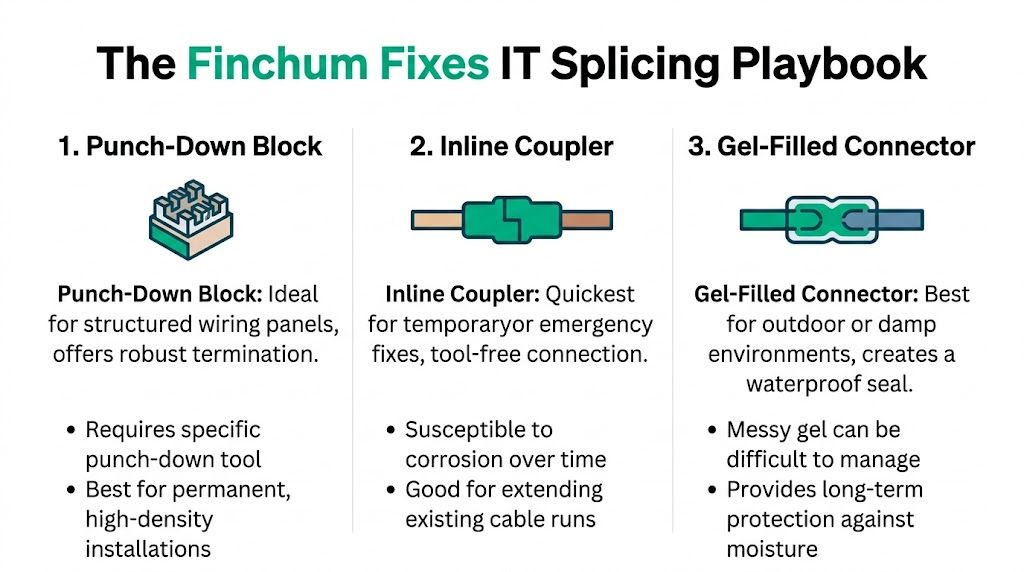
Method one inline coupler for fast recovery
This is the emergency-room method. It’s quick, familiar, and useful when a business needs service restored today.
You cut out the damaged section, terminate both cable ends properly, and join them with an inline coupler. It’s fast because it uses standard termination practice instead of hand-joining individual conductors in the middle of the run.
Best use case
- Broken patch-like segment
- Temporary restoration
- Easy-access location
- Low tolerance for immediate downtime
What to watch
- Keep the jacket stripped back only as much as needed
- Keep each pair twisted right up to the connector
- Follow T568B exactly: white-orange/orange, white-green/green, white-blue/blue, white-brown/brown
- Avoid creating a coupler farm by repeating this trick over and over
The inline coupler method is popular because it’s simple, not because it’s the strongest long-term choice. In a rack, closet, or exposed office area, it can be bumped, flexed, or unplugged.
A coupler is often the best answer for today. It’s rarely the best answer for the next five years.
For a deeper technical walkthrough of keeping production stable during cabling work, this guide on splicing network cable without downtime is worth reviewing.
A quick video helps if you want to see the physical handling before trying it yourself.
Method two punch-down or junction-style termination for cleaner installs
When I want something more controlled than a hanging coupler, I prefer a small junction-style approach using punch-down hardware or a protected splice point. This fits better in structured environments where cable management matters and the repair needs to stay put.
It takes a bit more care, but it gives the splice a home instead of leaving it free-floating in the ceiling or under a desk. That reduces strain on the conductors and makes future service easier.
Why this method works well
| Advantage | Why it matters to a business |
|---|---|
| More stable physical connection | Less chance of movement-related faults |
| Better organization | Faster future troubleshooting |
| Easier labeling | Less wasted technician time |
| Cleaner placement | Better fit for professional environments |
The same pair-handling rule still applies. Strip carefully. Separate only what you need. Keep the twists tight to the termination point. Match colors exactly. Sloppy punch-down work is still sloppy work.
Method three direct wire splice with solder and heat-shrink
This is the craftsman’s method. It takes patience and a steady hand.
When done properly, direct wire splicing can be physically durable because each conductor is joined and insulated individually, then protected as a group. I reserve this for select repair scenarios where movement can be controlled and the person doing the work understands that one bad joint ruins the entire run.
The process in plain language
- Expose the cable carefully without nicking conductors.
- Pair each conductor by color using the T568B standard.
- Keep untwisted length extremely short so the pair geometry stays intact.
- Join each conductor securely and insulate it individually.
- Bundle and protect the repair with heat-shrink and proper strain relief.
This is not the beginner method. It’s easy to create a bulky repair, uneven conductor lengths, or weak insulation if you rush it. Still, in the right hands, it can outperform a sloppy connector-based repair because the work gets more attention.
What works and what doesn’t
Some habits consistently produce better outcomes.
- Works well: Clean cuts, short untwisted sections, proper color matching, strain relief, immediate testing
- Fails often: Twisting wires together loosely, taping the bundle, mixing standards, leaving the splice hanging unsupported
- Works well: Planning the repair location so nobody steps on it or bends it sharply
- Fails often: Hiding the splice in a spot that guarantees future stress
The business lesson is simple. A splice is not “just a splice.” It’s a controlled compromise. The more disciplined the method, the better your odds of preserving uptime without planting a future problem.
Beyond the Splice Testing PoE and Preserving Signal Integrity
Your front desk can get back online after a splice and still be sitting on a problem that shows up at 2 p.m. when phones are ringing, cameras switch to night mode, or the access point starts pulling real traffic. I’ve seen that across Greenwood offices more times than I care to count. The cable passed a cheap tester, everyone went back to work, and then the same business paid for a second outage.
What a good splice means in the real world
A good splice preserves link quality well enough that users never notice it was repaired. That means stable speed, clean negotiation, and no strange behavior once traffic and power load hit the line.
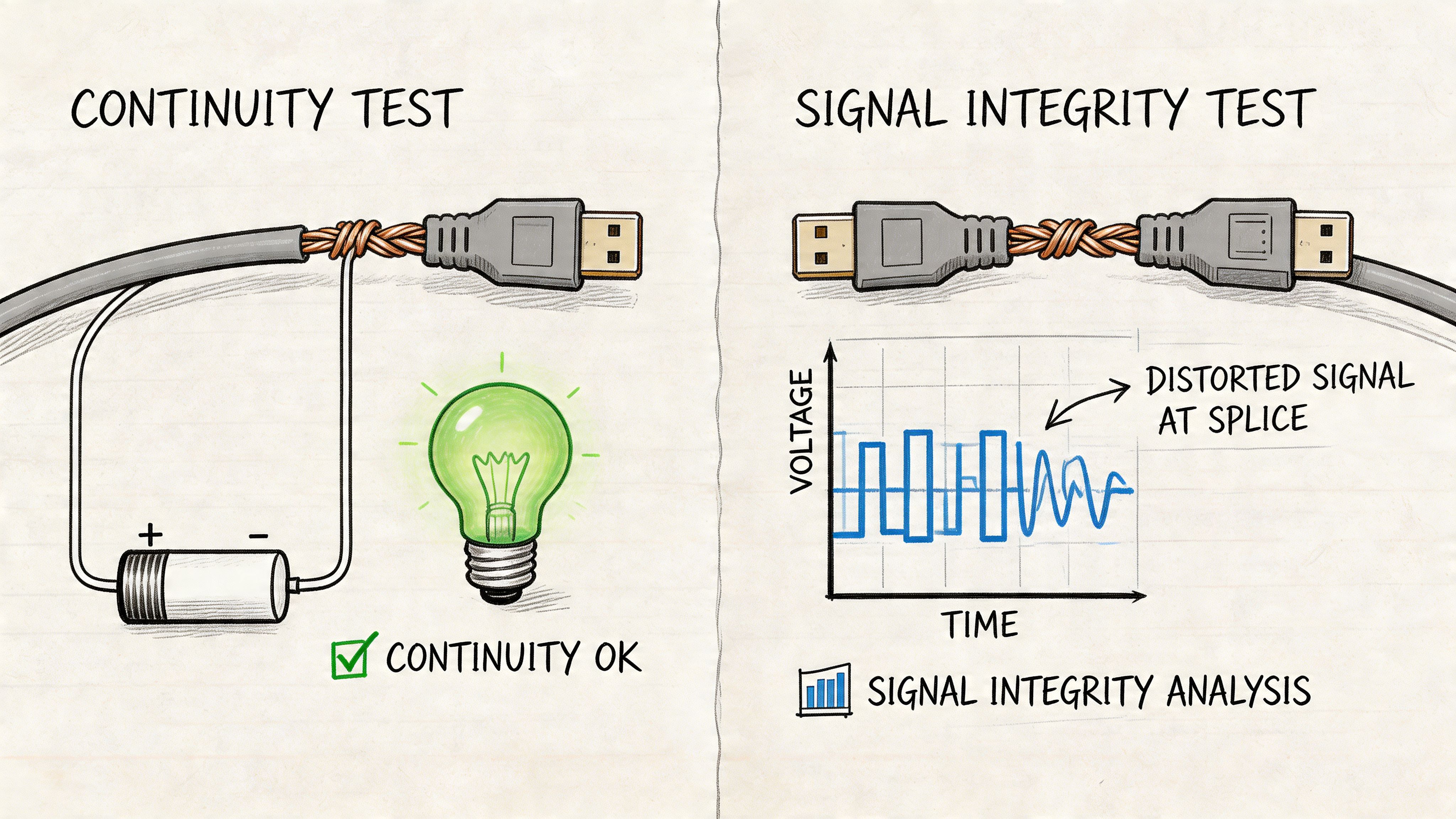
Cat5e is designed for Gigabit Ethernet and controlled electrical performance across the run, as outlined in the TIA category cabling overview from Fluke Networks. A splice interrupts that geometry. If the pairs are untwisted too far, conductor lengths stop matching, or the repair gets compressed behind furniture, signal quality drops even if continuity still looks fine.
That difference matters to a business owner because continuity says the wire is connected. Signal integrity tells you whether the repair will hold up during payroll uploads, VoIP calls, camera traffic, and Monday morning login storms.
Continuity test versus business-grade confidence
A basic tester still has value. It catches the obvious mistakes fast and saves time on bad pinouts.
What it does not prove is whether the repaired run will behave under load.
| Test type | What it confirms | What it misses |
|---|---|---|
| Basic continuity test | Pins connect in order | Pair performance, noise, and weak terminations |
| Better cable analysis | Link quality problems that basic testers miss | Full standards-based certification |
| Professional certification workflow | Whether the repaired run performs like the rest of the network | More labor, better tools, higher cost |
That cost is the trade-off. A faster check gets you back online sooner. A better test cuts the odds of a repeat outage and the labor bill that follows it. For a spare office drop, a basic pass may be enough to get through the day. For a point-of-sale line, phone, camera, or uplink, betting on a minimal test is how a cheap repair turns expensive.
PoE raises the risk
Power over Ethernet exposes weak splices fast because the cable has to carry data and power at the same time. A marginal joint may look fine when the device is idle, then start failing once a phone boots, an access point ramps up, or a camera heater or IR circuit kicks on.
I treat PoE repairs like revenue protection. If a bad splice drops a security camera, front office phone, or wireless access point, the loss is bigger than the cable repair. It becomes missed calls, blind spots, employee downtime, and somebody on your team burning an hour trying to prove the switch is not the culprit.
Bottom line: If the cable powers the device, test the device under normal use and keep it running long enough to expose a weak joint.
Watch the repair after it goes live
The smart move is to verify the splice, then keep an eye on the link for a few days. Look for port flaps, device reboots, speed changes, or user complaints that come and go. Those are early signs that the repair held electrically in the moment but failed in real operating conditions.
For shops that want a low-cost way to catch that early, this list of free network monitoring tools for 2026 is a practical place to start. Monitoring will not fix a bad splice, but it will show you whether that emergency repair is buying time or setting up your next outage.
A splice earns its keep only if it preserves uptime. If testing raises doubts, replacing the run is usually the cheaper decision.
Common Failure Points and How We Dodge Them
A bad splice rarely dies on the spot. It limps along just well enough to keep everyone guessing, then costs you later in callbacks, user downtime, and wasted troubleshooting hours.
Around Greenwood and up the I-65 corridor, I see the same pattern. Someone makes a fast repair to get phones, cameras, or workstations back online. The office opens Monday morning, traffic picks up, and the trouble starts again. At that point, the splice did not save money. It delayed the bill.
It passes continuity, but performance is still poor
A basic tester can show the conductors in the right order and still miss the repair that is hurting your network. The usual cause is sloppy pair management, too much untwist, or a connector choice that looked fine on the bench and falls apart under normal traffic.
The symptoms are expensive because they waste labor. Staff report random slowdowns. VoIP calls clip. One PC keeps dropping off the network. Then your team starts chasing the switch, firewall, ISP, or software before anyone opens the ceiling and checks the splice itself.
We avoid that by treating the twist rate like it matters, because it does. Keep the pairs tight, keep the exposed conductors short, and use hardware meant for data cabling instead of whatever is sitting in the truck.
It works until the cable moves
That points to a mechanical failure.
If a user says, "It comes back when I move the cord," the problem is usually a weak termination, nicked conductor, bad strain relief, or a repair left hanging where foot traffic, desk movement, or vibration keeps pulling on it.
The fix is simple, but it takes discipline. Support the cable. Protect the joint. Do not leave the repaired section carrying its own stress. A splice that only works while nobody touches it is a future service call.
The repair does not match the space
Office conditions are forgiving. Warehouse edges, utility areas, damp locations, and spots near electrical noise are not. I have seen indoor couplers shoved into rough spaces where carts hit them, janitorial crews soak them, or machinery interference beats up the signal over time.
These mistakes show up often:
- Wrong connector for the environment
- No strain relief on the repaired section
- Splice placed where furniture or people will hit it
- Shielded cable repaired with unshielded parts
- Repair buried with no label or service loop
Those are small decisions with real cost attached. If the cable feeds a register, phone, camera, or access point, one weak repair can interrupt sales, security coverage, or employee productivity.
For a more detailed breakdown of repair methods and where DIY starts getting risky, see this guide on how to splice a network cable and why your business should call a pro.
The temporary fix becomes part of the building
This is the failure point that hurts owners the most. The splice solved an emergency, nobody documented it, and now it lives above a ceiling tile like a hidden liability.
Months later, a new outage hits. Your IT person loses half a day tracing a run nobody marked. Your vendor gets blamed. The switch gets rebooted. Staff wait. A cheap repair turns into repeated downtime because nobody decided whether that splice was a short-term patch or an approved permanent repair.
The way we dodge that is process. Label the location. Record what was done. Note whether the run needs replacement. If the cable supports a business-critical device, schedule the full correction while the outage is still fresh in everyone's mind.
Business owners who want a broader operations view can also read more insights on IT support. The same lesson applies here. Quick fixes have value, but only when they are managed like business continuity decisions instead of forgotten shortcuts.
When to Call the Greenwood Network Pros for a Real Fix
If you’re deciding whether to splice cat5 cable yourself, the honest answer is this. You can. Sometimes you should. But not every working repair is a good business decision.
A splice is fine when it restores operations fast and buys you time to make a smarter infrastructure move. It’s a bad habit when it becomes the plan. That’s especially true for primary links, PoE devices, compliance-sensitive environments, and buildings already suffering from aging wiring and messy patchwork.
Johnson County business owners don’t need more mystery outages. They need stable networks, predictable support, and fewer hours lost to troubleshooting. That ties directly to continuity planning, security frameworks like NIST CSF, and practical design choices such as clean cabling, monitored switches, Zero Trust architecture, and SOC-as-a-Service monitoring where the risk profile justifies it. The same mindset protects backups, endpoint security, and line-of-business systems. It’s all one uptime conversation.
If you want broader operational perspective from outsourcing and support teams, you can also read more insights on IT support from Seat Leasing BPO. It’s a useful companion read for leaders thinking about response models and support coverage.
For a local perspective on where DIY stops making sense, this guide on how to splice a network cable and why your business should call a pro is a practical next step.
If your Greenwood or Indianapolis-area business is tired of recurring cable problems, flaky phones, spotty Wi-Fi, or old infrastructure that keeps eating staff time, stop treating every outage as a one-off.
If you want a straight answer on whether to splice, replace, or redesign the run, get a Free Network Assessment from Finchum Fixes IT. For Greenwood and Indianapolis businesses, it’s the fastest way to pinpoint key weak points in your network, reduce downtime risk, and turn wasted tech time into a cleaner, more predictable support plan.