Systems Integration Definition Explained for SMBs
A Greenwood business owner may have a point-of-sale system, QuickBooks, an online store, and a warehouse partner, yet still copy the same order into several places. The systems integration definition is the disciplined process of connecting those systems, synchronizing data, and coordinating workflows so the combined operation can be verified, monitored, and trusted.
A failing server in a Greenwood business park or unreliable Wi-Fi in an old brick building creates the same business problem: people stop serving customers and start working around technology. Along the I-65 corridor, that wasted time can mean delayed orders, duplicate records, missed follow-ups, and staff hours that never become billable work. Integration doesn't replace sound infrastructure, cybersecurity, or data recovery. It makes those pieces work as one operating system for the business.
What Systems Integration Actually Means
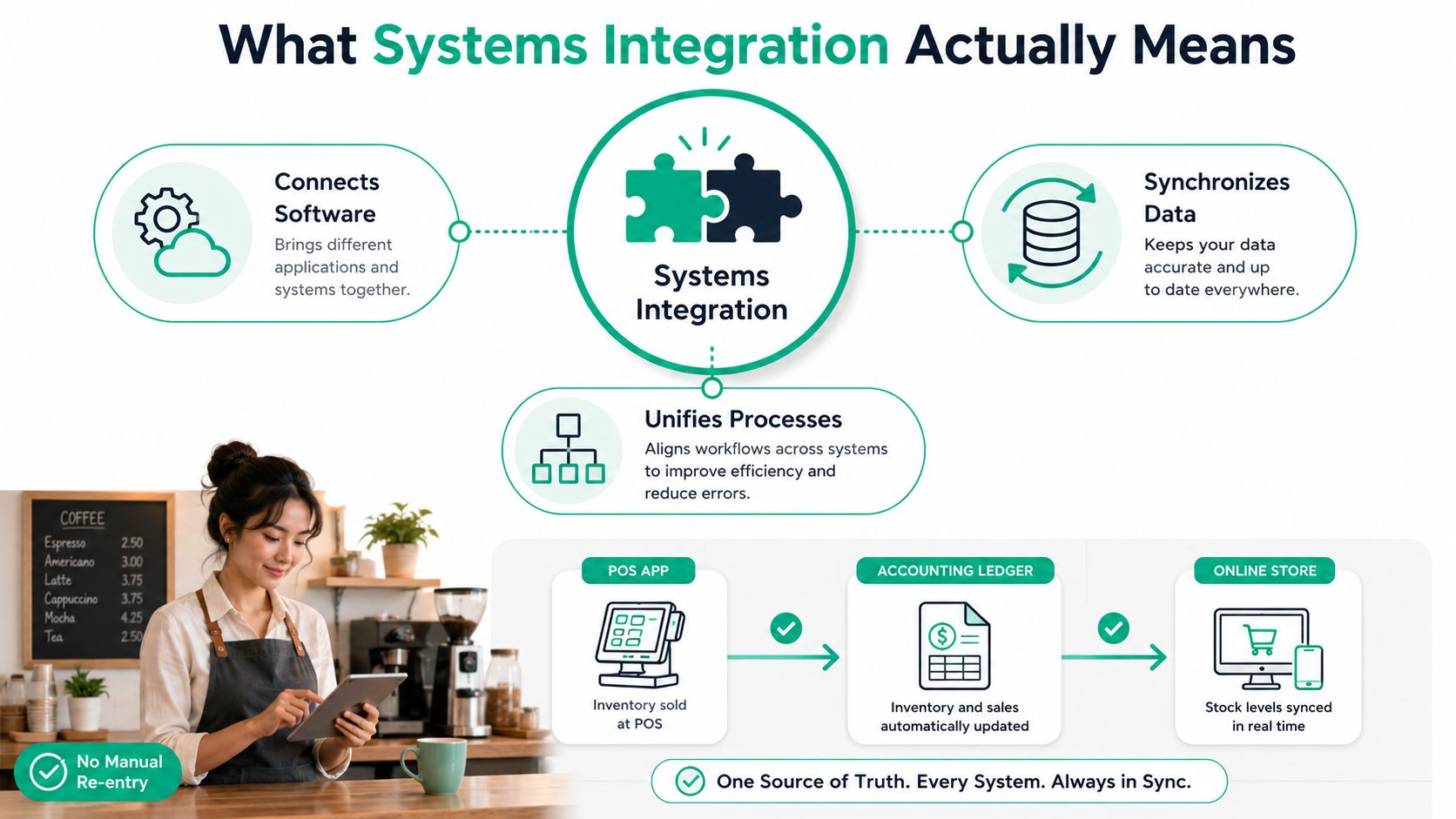
In plain English, systems integration connects software, data, hardware, and business processes so they exchange information and behave like one coordinated operation. A Greenwood coffee shop might use a point-of-sale application, accounting software, an inventory platform, and an online ordering site. When a sale changes stock, records revenue, and updates the web store without manual re-entry, the business has more than a file export. It has an integrated workflow.
The distinction matters. A scheduled CSV export moves information from one place to another, but it may be one-way, delayed, incomplete, or difficult to reconcile. Integration uses defined interfaces, transformation rules, authentication, error handling, and testing. Depending on the design, systems can communicate in both directions, identify duplicate records, and report when a transaction fails.
Practical rule: A connection isn't healthy because data moved once. It's healthy when the business can prove what moved, where it went, and what happens when the receiving system rejects it.
The formal systems integration definition is broader than “connecting systems.” ISO/IEC/IEEE 24748-6:2023 describes integration as planning for and aggregating a progressively more complete set of physical, logical, or combined system elements, activating their interfaces, and synthesizing a system whose properties can be verified and possibly validated. That language ties integration to requirements, interfaces, verification, and validation, not merely to a plug-in.
Connectivity, automation, migration, and integration
These terms overlap, but they aren't interchangeable.
- Connectivity establishes a communication path, such as a network route or API session.
- Automation performs a task without a person initiating every step.
- Migration moves data from an old platform to a new one, often as a controlled project.
- Integration coordinates systems and processes over time, with rules for data ownership, failures, retries, and change.
A small company doesn't need a giant enterprise platform by default. It does need a clear map of which system owns customer names, product quantities, invoices, employee identities, and payment status. A practical starting point may include application inventory, network support, Microsoft 365 protection, and immutable off-site backups, especially when a failed integration could stop order processing.
Teams evaluating custom applications can also review this software modernization guide for Indiana businesses. For a broader view of implementation and technology options, Faberwork's services offered provide useful context.
How the Definition Evolved into a Discipline
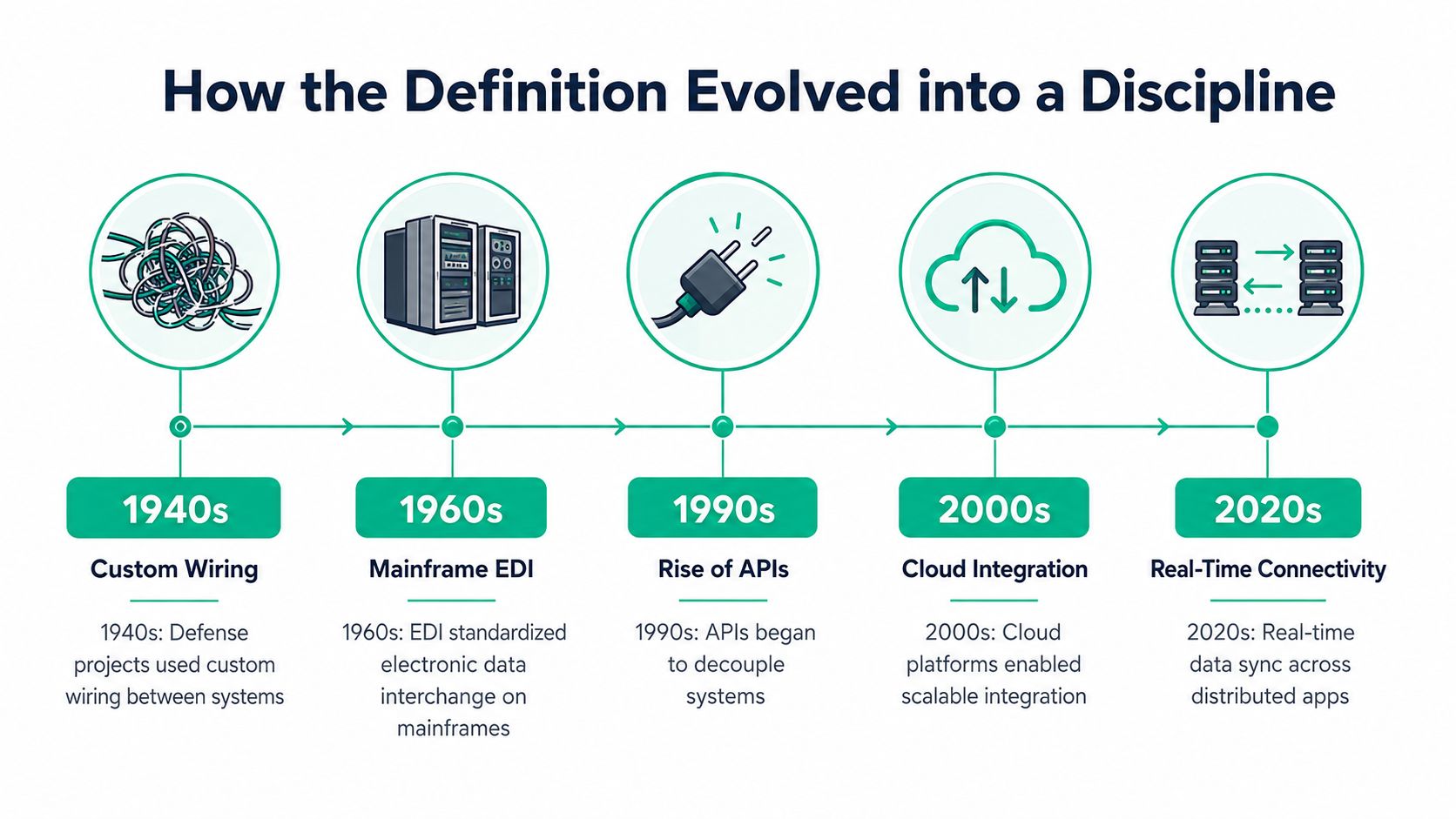
A defense program could not succeed by assembling excellent parts and hoping they worked together. In the late 1940s and early 1950s, large efforts involving atomic and hydrogen weapons, jet fighters, ballistic missiles, satellites, and command-and-control systems had to combine specialized technologies into coordinated capabilities. This history appears in a technical account of systems integration.
Custom wiring worked for a small set of components. It became difficult to maintain when hardware, software, communications, and human procedures changed on separate schedules. Engineers responded with repeatable interface rules, staged assembly, and verification steps that tested whether the combined system met its requirements. Integration became an engineering discipline because connection alone could not prove that the result worked.
From mainframes to cloud services
Business technology encountered the same problem. Mainframe-era electronic data interchange standardized the exchange of structured business documents. Middleware later allowed applications to communicate without a separate custom connection for every pair of systems. SOAP services and enterprise service buses added formal contracts, routing, and centralized message handling. REST APIs, JSON, and cloud-native integration platforms made lighter, distributed connections more common.
The tools changed, but the production questions stayed familiar. Disconnected systems made staff retype information, reconcile conflicting records, and investigate failures manually.
- Which system owns the data?
- What format does the receiving interface accept?
- What happens when a message arrives twice?
- How does the team verify the result?
- Who receives the alert when a connection stops?
ISO/IEC 2382-20:2015 describes integration as the progressive assembling of system components into a whole system. ISO/IEC 15288 treats it as an iterative lifecycle process, while the Systems Engineering Body of Knowledge explains that the work recurs across system hierarchy levels. A team may integrate a component, then a subsystem, then a complete configuration, checking each stage before adding more complexity.
For a Johnson County business, that history points to a practical middle path. A Shopify-to-accounting connection does not require the machinery of a defense program, but it still needs defined ownership, interface testing, failure handling, and monitoring. A connector can transmit an order and still produce incorrect tax treatment or duplicate records. The engineering work is deciding how success is verified and whether the saved labor justifies the ongoing maintenance.
The Three Integration Types SMBs Run Into
A Greenwood retailer may want Shopify sales to appear in QuickBooks before the next bank reconciliation. That request involves more than making two systems exchange messages. It requires a clear result, a defined interface, tests for ordinary and failed transactions, and a way to judge whether the saved labor covers ongoing maintenance. SMB projects usually combine three forms of integration.
Application integration connects separate programs so they exchange events or transactions. A completed sale might create or update an accounting record, while a product change could flow back toward the storefront. The connection can appear successful while still mishandling refunds, partial shipments, tax treatment, duplicate orders, or rejected records. Those cases belong in the design and verification plan, not in a support ticket after launch.
Data integration keeps records consistent, usable, and available across repositories. A service company might synchronize CRM customer data with a marketing platform, transform field names, and exclude incomplete records. SQL queries, scheduled jobs, or an integration platform can compare source and destination records. The work may resemble data migration, yet ongoing synchronization adds rules for changes made after the initial transfer. Someone must decide which system owns each field and what happens when the records disagree.
Process integration coordinates a business procedure across applications and people. A new-hire form might start identity creation, Microsoft 365 mailbox setup, payroll preparation, badge access, and manager notifications. The workflow needs approvals, sequencing, least-privilege access, and a response when one step fails. A shortcut here can create a payroll, security, or compliance problem.
Three integration types at a glance
| Integration Type | Primary Focus | Typical SMB Example |
|---|---|---|
| Application integration | Communication between applications | QuickBooks and Shopify exchange sales and product updates |
| Data integration | Consistency, transformation, and synchronization of records | CRM customer records feed a marketing platform |
| Process integration | Orchestration of multi-step work | A new-hire form starts account, payroll, and access tasks |
Industry requirements add another layer. Healthcare organizations may need HIPAA safeguards, while defense contractors may need controls aligned with CMMC expectations. General businesses can use the NIST CSF to structure security decisions and apply Zero Trust architecture, checking each service and identity instead of trusting anything solely because it sits on an internal network.
The network underneath still matters. UniFi networking may suit some SMB environments, but access-point placement, VLAN design, switch capacity, and monitoring affect reliability. A connection that passes a test can still fail in production when wireless coverage is saturated or server hardware is aging. Integration quality therefore depends on the interface, the records, the workflow, and the infrastructure carrying them.
Common Architectures Behind Integration Projects
Architecture determines how much change one system can impose on the others. A direct API call may be clean for two applications and become a maintenance trap when every new tool needs its own connection. An integration hub can reduce that complexity, but it introduces a central service that needs protection, monitoring, and competent administration.
Three practical patterns
Direct APIs, including REST or GraphQL, connect one application to another. This is often sensible for a low-volume workflow between two SaaS products. The trade-off is coupling. A field rename, authentication change, rate limit, or API version change can interrupt the connection. Per-call charges may also matter, depending on the vendor.
An Enterprise Service Bus, or ESB, places a broker between systems. The bus can route messages, apply transformations, and centralize some rules. It suits organizations standardizing communication across many internal services, but an SMB may be buying enterprise operating burden it doesn't need.
Middleware and iPaaS platforms provide managed connectors, transformations, retries, queues, logs, and dashboards. Some use message queues to absorb temporary outages and process events later. That can reduce infrastructure ownership, but subscription pricing, transaction limits, connector quality, vendor lock-in, and data residency need review. Hybrid and multi-cloud planning also deserves a security assessment, as discussed in this SMB hybrid cloud security playbook.
Choosing the right integration architecture
| Architecture | Best Fit | Typical Cost Model | Operational Burden | Scalability | Common Pitfall |
|---|---|---|---|---|---|
| Direct API | Two systems with straightforward logic | Vendor or usage-based charges | Low to moderate | Limited by connected services | Tight coupling and weak failure handling |
| ESB | Many internal services with shared governance | Platform, infrastructure, and engineering costs | High | Strong with deliberate design | Excessive complexity for a small stack |
| Middleware or iPaaS | SMBs needing retries, transformations, and visibility | Subscription or usage-based pricing | Moderate, often managed | Good for expanding SaaS estates | Paying for features and connectors the business doesn't use |
Latency matters too. Real-time calls can support current inventory, but they depend on both systems being available. Batch processing can tolerate outages and lower traffic, yet stale data may produce poor decisions. The right design matches business tolerance, not fashion.
Don't purchase an enterprise bus to synchronize two uncomplicated cloud applications. Start with the smallest architecture that can handle authentication, retries, logging, security, and an orderly exit if the vendor changes direction.
Walking Through a Typical Integration Project
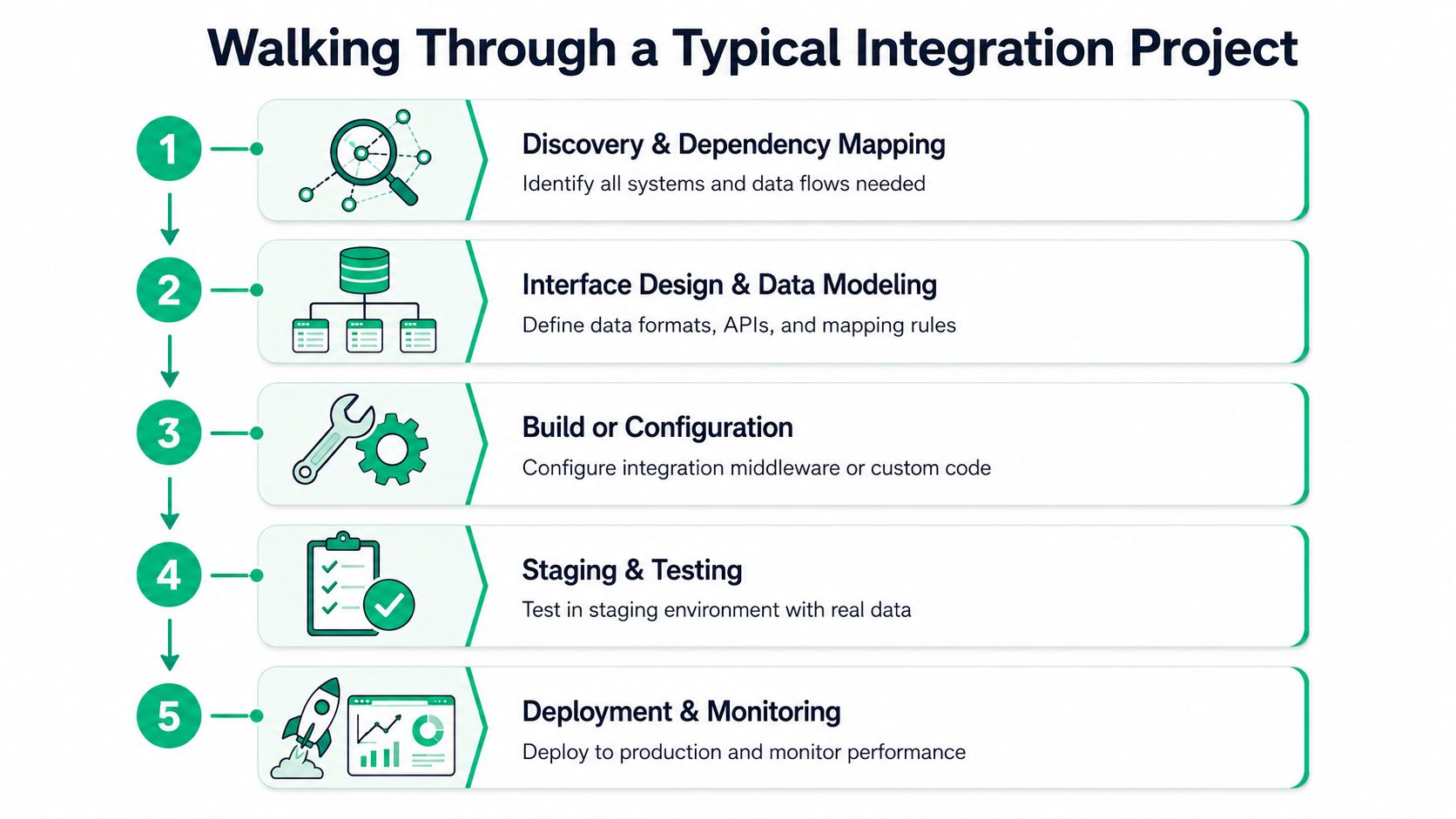
A responsible integration project begins before anyone writes code. The team first identifies applications, databases, devices, users, vendors, interfaces, and business dependencies. An aging SQL database hidden behind a Greenwood office server may matter more than the visible cloud applications because it contains the customer identifier that every other system expects.
Discovery and design
Discovery maps the current state and identifies who owns each field. The team records whether a customer address comes from the CRM, accounting platform, e-commerce site, or a human approval process. This prevents scope creep and stops two systems from overwriting each other with different versions of the truth.
Interface design follows. Engineers define payloads, authentication, field mappings, validation rules, duplicate handling, retry behavior, and audit records. A useful design also names the failure owner. If a payment event is rejected, someone should know whether to correct the source record, replay the message, or escalate to the vendor.
Build, verify, and release
Build or configuration may involve custom code, an iPaaS workflow, a message queue, or a connector supplied by the application vendor. Developers should keep secrets out of source code, restrict service accounts, and log transaction identifiers without exposing sensitive information. Bit-level data recovery belongs in a separate recovery plan, but it becomes relevant when an integration depends on a damaged local database or failed storage array.
Testing belongs in a staging environment with representative records. Engineers should verify normal transactions, duplicates, missing fields, rejected payloads, vendor outages, and recovery after interruption. They should also test load behavior where a busy sales period or batch import could overwhelm an endpoint.
Cutover and ownership
Cutover needs a schedule, communication plan, backup, rollback procedure, and named decision-maker. The business shouldn't discover during deployment that the warehouse uses a different product code or that accounting closes a period at an inconvenient time.
After release, monitoring catches silent failures such as dropped webhooks, stale records, growing queues, and authentication errors. A dashboard that only shows whether a server is online misses the business question, which is whether an order completed correctly from storefront to ledger to warehouse. This SaaS implementation guide for Indiana SMB success offers useful planning context.
A project is iterative by design. New applications, vendors, locations, and compliance requirements will add interfaces. Treating integration as an owned service protects ROI by turning wasted troubleshooting time into productive work and by reducing avoidable downtime, which can cost nearly $9,000 per minute according to a Ponemon downtime cost summary.
What Integration Looks Like in a Real SMB
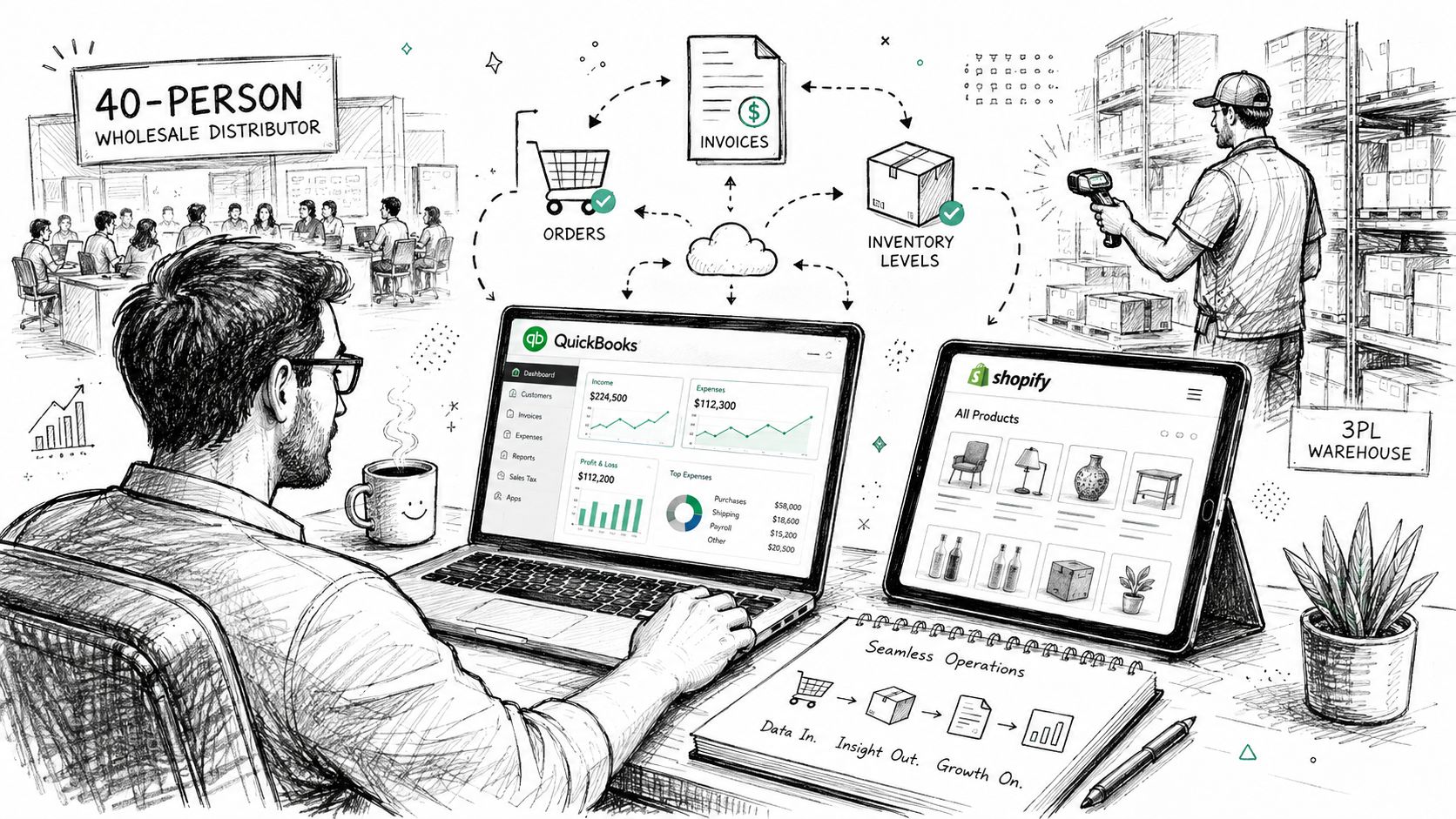
Consider a Greenwood-style wholesale distributor with 40 people, QuickBooks, a custom inventory application, a Shopify storefront, and a third-party logistics warehouse. The exact product mix isn't important. The dependency chain is.
In the healthy version, Shopify sends an order to the integration layer. The workflow validates the customer and product identifiers, passes the financial record to QuickBooks, and sends fulfillment information to the 3PL. Inventory updates return from the warehouse and reach the storefront, while the owner sees a consistent view of cash and stock.
That doesn't mean every record moves at the same instant. It means the business has defined what “current” means for each workflow, how the platform handles delay, and who receives an alert. A monitoring dashboard can show completed, delayed, retried, and rejected transactions. Data-drift checks can flag a product whose warehouse code no longer matches the Shopify catalog.
The failure state
Now a Shopify API change alters a field or response format. The workflow still appears to be running, but the QuickBooks step rejects records. Inventory also drifts because the warehouse and storefront no longer share the same updates. The 3PL can accept an order for stock that isn't available, and staff spend a week comparing exports, invoices, warehouse files, and payment records.
The expensive part isn't only the broken connection. People stop selling, shipping, invoicing, and following up while they reconstruct what happened. In a smaller company, the owner may become the incident manager, finance may pause reconciliation, and customer service may lose confidence in delivery promises.
Integration failure is a business continuity incident when it blocks an order, invoice, payment, shipment, or regulated record.
A proper design would include version-aware interface handling, alerting when transaction volume changes unexpectedly, replayable messages, and a reconciliation report. A rollback plan could temporarily pause storefront fulfillment or route orders into a controlled queue rather than allowing bad records to spread.
Companies that have outgrown disconnected applications may also browse ERP solutions while comparing replacement against integration. Replacement can simplify ownership, but it also brings migration, training, process redesign, and cutover risk. Integration may preserve useful tools, yet it leaves the company responsible for interface governance.
The lesson is simple. Integrations are living systems, not set-and-forget plumbing. They need an owner, a maintenance budget, security controls, and monitoring tied to business outcomes.
Healthy Integration Signals and Next Steps
A durable integration leaves evidence behind. You can trace an order, employee change, or customer update across systems, identify the source record, see each processing step, and explain what happened when a target system rejected the message. A fragile integration depends on one employee remembering undocumented field rules and checking spreadsheets after customers complain.
What to inspect first
Look for these signals during a review:
- Contract testing: Important interfaces have automated tests that confirm payload structure and expected behavior. A mature program may target contract-test coverage above 80 percent, but that threshold should be tied to the source system's risk and business impact, not treated as a magic guarantee.
- Business-level alerting: Alerts should identify failed orders, stale inventory, missing invoices, or delayed employee provisioning. A green server doesn't prove that the workflow succeeded.
- Versioned interfaces: APIs and message schemas have documented versions, owners, and deprecation windows. Teams shouldn't learn about a breaking change after production stops.
- Transaction observability: Logs connect events across systems with correlation identifiers, timing, response status, and retry history. Security teams should restrict access to sensitive payloads.
- Recovery controls: Queues, replay procedures, reconciliation reports, immutable off-site backups, and tested rollback plans protect continuity when a vendor, network, or database fails.
A business handling protected health information should include HIPAA requirements in its design. A defense supplier should map access, logging, and asset controls against CMMC expectations. Other Central Indiana businesses can use the NIST CSF to organize identification, protection, detection, response, and recovery. Bitdefender GravityZone may fit endpoint protection in some environments, while SOC-as-a-Service monitoring can provide continuous review of security events. Those tools don't replace integration governance, but they help protect the systems and identities carrying the data.
A sensible Greenwood starting point
Inventory every application, server, network device, SaaS subscription, and external partner. Then map the data flows and mark the business owner for each record. Score each connection by the time it consumes, the revenue or service process it supports, the risk of bad data, and the cost of an outage.
Pilot one high-volume workflow before expanding. Instrument it, document its failure paths, and measure whether staff spend less time on re-entry and reconciliation. Don't buy an iPaaS subscription first and write the roadmap afterward. The platform should follow the architecture and operating model, not substitute for them.
Businesses evaluating an ongoing partner can use this managed service provider selection guide to compare monitoring, response, documentation, security, and ownership expectations. In the Greenwood and Indianapolis area, the right assessment should be practical and zero-pressure. It should identify what breaks, what matters most, and what can wait.
A free 30-minute integration assessment is a useful next move for a company along the I-65 corridor, a downtown Indy tech hub, or a growing Hamilton County operation. Bring the application list, the workflow that causes the most manual work, and the last integration failure you remember.
Finchum Fixes IT helps Greenwood and Indianapolis businesses map system dependencies, strengthen networks, protect endpoints, and build monitored integrations that support continuity instead of creating hidden work. Visit Finchum Fixes IT to request a Free Network Assessment or Security Risk Audit and get a clear, practical scope for your next integration decision.