What Is Data Migration and Why Indiana SMBs Need It Now
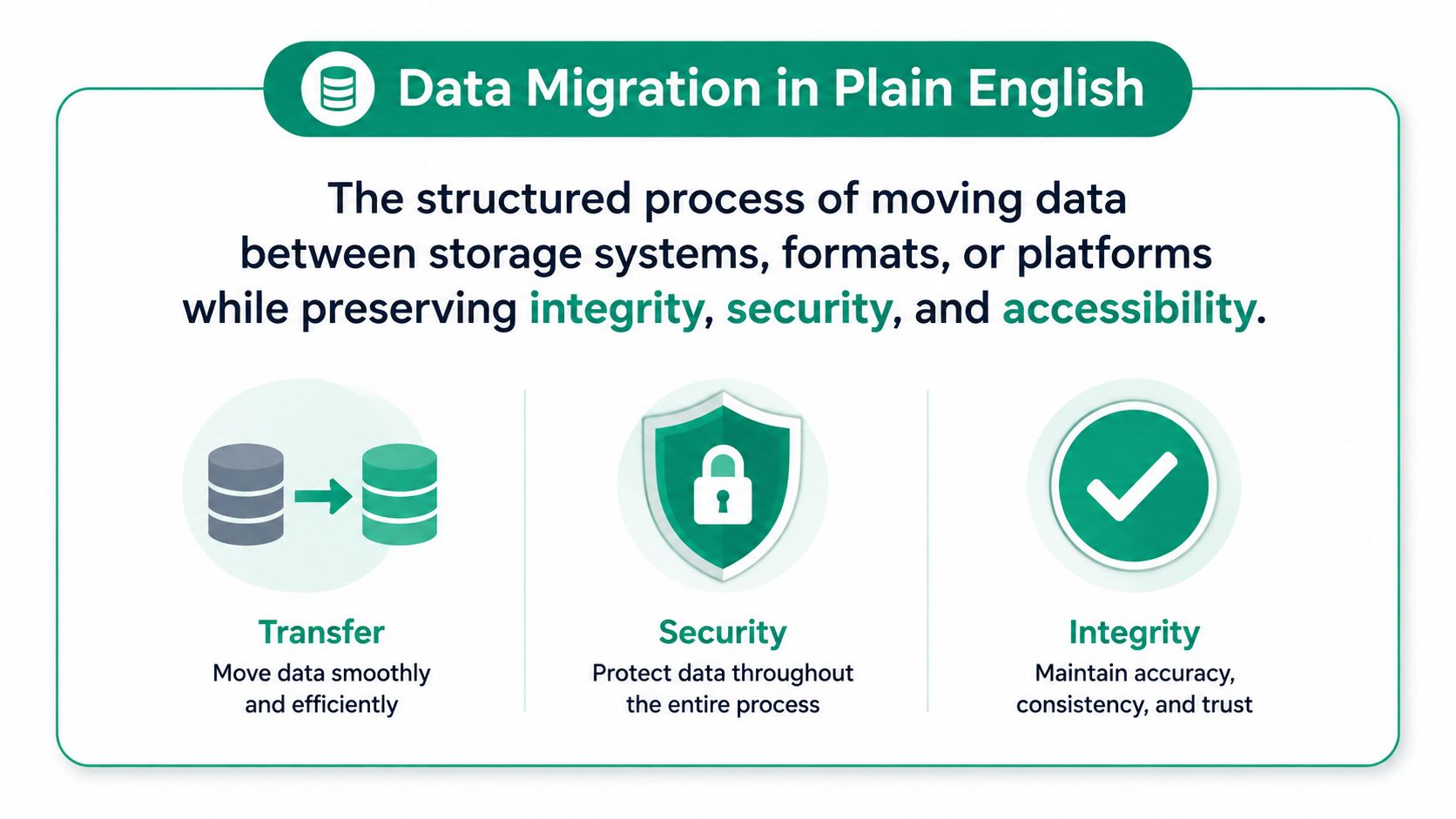
Data migration is the structured process of moving data between storage systems, formats, or platforms while preserving integrity, security, and availability. A poorly planned cutover can cost thousands of dollars per minute, turning a routine technology project into a business continuity problem.
For a Greenwood company operating from an older brick building, the trigger might be an aging server, unreliable storage, or a line-of-business application that no longer belongs on local hardware. Across the I-65 corridor, Johnson County business owners are also replacing legacy systems, adopting Microsoft 365, consolidating databases, and shifting workloads into hybrid cloud environments.
The market reflects that pressure. Data migration expanded from an estimated USD 12.99 billion in 2023 to USD 31.71 billion by 2031, with a projected 12.0% CAGR, while another industry estimate places the market at USD 10.9 billion in 2024 and USD 38.7 billion by 2034. Those separate projections point to the same conclusion, migration is now a core digital transformation activity, not a one-time file-copy job (KBV Research data migration market analysis).
My advice is simple. Treat migration as an operational risk decision before you treat it as an IT task. Before approving a project, answer four questions: How long will it take? What can fail? What will it really cost? Can your team safely run it without outside help?
Data Migration in Plain English
Data migration means moving records, files, databases, applications, or infrastructure data from one environment to another while keeping the information usable and protected. The source might be a local Windows Server, a QuickBooks Desktop installation, a SQL database, or a network-attached storage device. The target might be Microsoft 365, SharePoint, Azure, a hosted SQL instance, or a new server in the same office.
A simple file copy checks whether bytes moved. A proper migration checks whether the right records moved, whether fields still mean the same thing, whether permissions survived, and whether applications can still use the data. That requires discovery, schema mapping, transformation, testing, validation, cutover planning, and rollback preparation. Heterogeneous platforms often use different data models, metadata standards, storage methods, and access protocols, so a lift-and-shift approach can fail without explicit mapping and checkpoints (research on enterprise data migration complexity).
The business decision behind the transfer
Downtime is the number that changes the conversation. One source cites an average IT downtime cost of $5,600 per minute, while another Gartner estimate cited for multinational organizations reaches up to $9,000 per minute (Mission Cloud guidance on reducing migration downtime). The same source notes that 98% of organizations report a single hour of downtime costs more than $100,000.
That doesn't mean every Greenwood business loses the same amount. It means the cost of a failed cutover includes more than the IT invoice. Employees stop billing, orders wait, customers call, and managers spend their day coordinating recovery instead of running the business.
Practical rule: If nobody can explain how the business keeps operating during the cutover, the migration plan isn't ready.
A useful primer should also cover how to migrate your product data when an application or commerce platform is part of the move. For Indiana companies comparing cloud options, Finchum Fixes IT's guide to the real benefit of cloud migration for Indiana businesses adds the business continuity context owners often miss.
How a Migration Actually Works
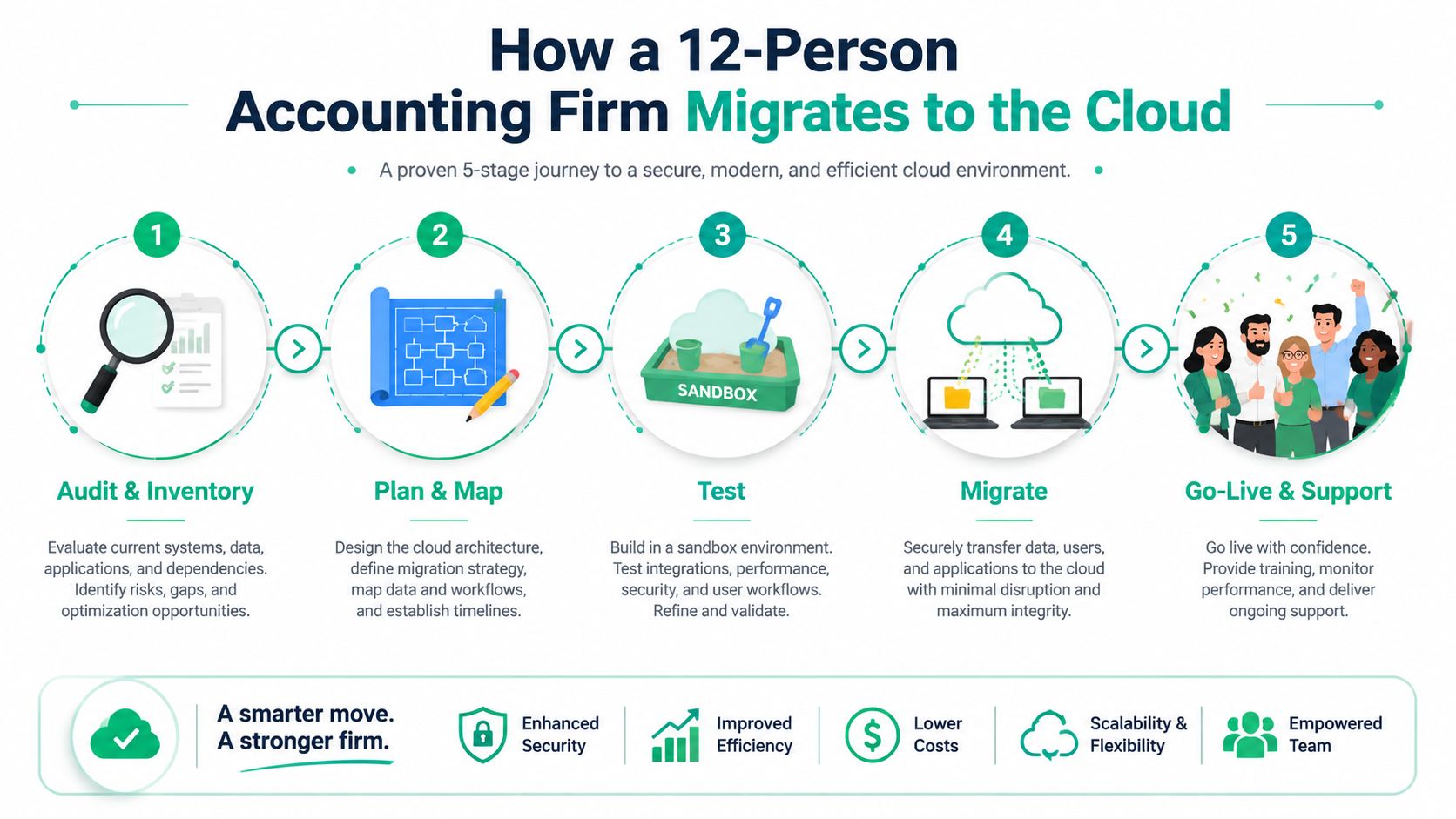
Consider a 12-person accounting firm near Greenwood with an aging on-premises server. The firm wants Microsoft 365 for email, document collaboration, and cloud access, but its current environment also contains shared folders, client archives, printer dependencies, application credentials, and permissions that nobody has documented.
The first step isn't copying files. It's discovery. The migration lead inventories server volumes, user accounts, mailbox sizes, shared folders, active applications, scheduled jobs, backup status, and network dependencies. A folder named “Tax Archive” may connect to a document-management workflow. A scanner may send files through an old SMTP relay. A permissions group may control access to sensitive client records.
From inventory to pilot
Next, classify the data. Separate active client work from stale archives, personal files, duplicate documents, and records subject to retention rules. Then map legacy fields and folder structures to the target design. In Microsoft 365, that might mean deciding what belongs in OneDrive, what belongs in SharePoint, and which groups should receive access.
The team should document dependencies between applications before selecting the cutover window. It should also plan mailbox rehydration, permission re-creation, shared mailbox ownership, mobile-device sign-in, and multi-factor authentication enrollment. These are the details that make a migration feel broken even when the files technically arrived.
Run a pilot with a small group of users and representative records. Test document access, search, sharing, version history, printing, accounting workflows, and external collaboration. A practical Cloudvara data migration checklist can help owners organize the work without mistaking a checklist for a complete risk plan.
Cutover and proof
During production migration, the team freezes changes according to the agreed plan, transfers the remaining data, and switches users to the target environment. Validation should compare row counts, checksums, permissions, timestamps, file sizes, and business behavior. For databases, reconciliation should happen at the table and record level. For files, it should include sampling and targeted checks for critical folders.
Watch the walkthrough below for a visual explanation of migration planning and execution.
Keep the old environment available until stakeholders sign off. A rollback path should state who makes the decision, how traffic returns to the source, how new changes are captured, and how users are informed. After go-live, remove duplicate records, stale archives, unused accounts, and obsolete credentials. Cleanup isn't cosmetic. It reduces attack surface and prevents users from working in the wrong system.
For larger server moves, the same principles apply to data center migration for SMBs. The hardware changes, but the discipline doesn't.
Choosing the Right Migration Strategy
There isn't one universal migration method. The right choice depends on interdependencies, compliance obligations, operating hours, data quality, and how much disruption the business can absorb.
A big bang cutover moves everything during one controlled event. It can work for a small file share with few dependencies and a flexible weekend. It becomes reckless when the environment contains payroll, clinical records, manufacturing systems, or customer-facing applications.
A trickle migration moves users, workloads, or data groups in waves. It takes more planning and requires source and target systems to coexist, but it limits the blast radius. Regulated organizations and businesses that operate continuously should usually choose this route.
The platform strategy matters too. Lift-and-shift moves workloads with minimal redesign. It's usually quicker, but it can carry poor configurations and unnecessary infrastructure into the cloud. Re-platforming changes the hosting service while preserving much of the application. Refactoring changes the application itself, which can improve long-term performance but demands stronger development and testing capacity.
| Strategy | Downtime Exposure | Best Fit | Cost Profile |
|---|---|---|---|
| Big bang | Higher during one cutover | Small, low-dependency file shares | Lower planning effort, higher failure impact |
| Trickle or wave-based | Lower per wave | Regulated or continuously operating businesses | More project coordination and testing |
| Lift-and-shift | Depends on cutover design | Stable workloads needing a fast platform move | Lower redesign cost, possible cloud inefficiency |
| Re-platform | Moderate | Applications needing a supported managed service | More engineering than lift-and-shift |
| Refactor | Spread across development and releases | Strategic applications with long service lives | Highest engineering demand |
| Hybrid transition | Managed across old and new environments | SMBs needing gradual change | Ongoing operational complexity |
For an older Johnson County office, hybrid migration often makes sense when the local server must remain available while Microsoft 365 or hosted databases come online. The risk is operational confusion. Staff need one clear source of truth, documented synchronization rules, and a firm retirement date for the old system.
The MarTech Do migration tips are useful for planning fundamentals, but don't let generic advice decide your cutover model. Match the strategy to the business, not to the vendor's preferred diagram. A focused Indiana SMB cloud migration playbook can help frame that decision around local staffing and continuity constraints.
Timeline and Phases for a Typical SMB Migration
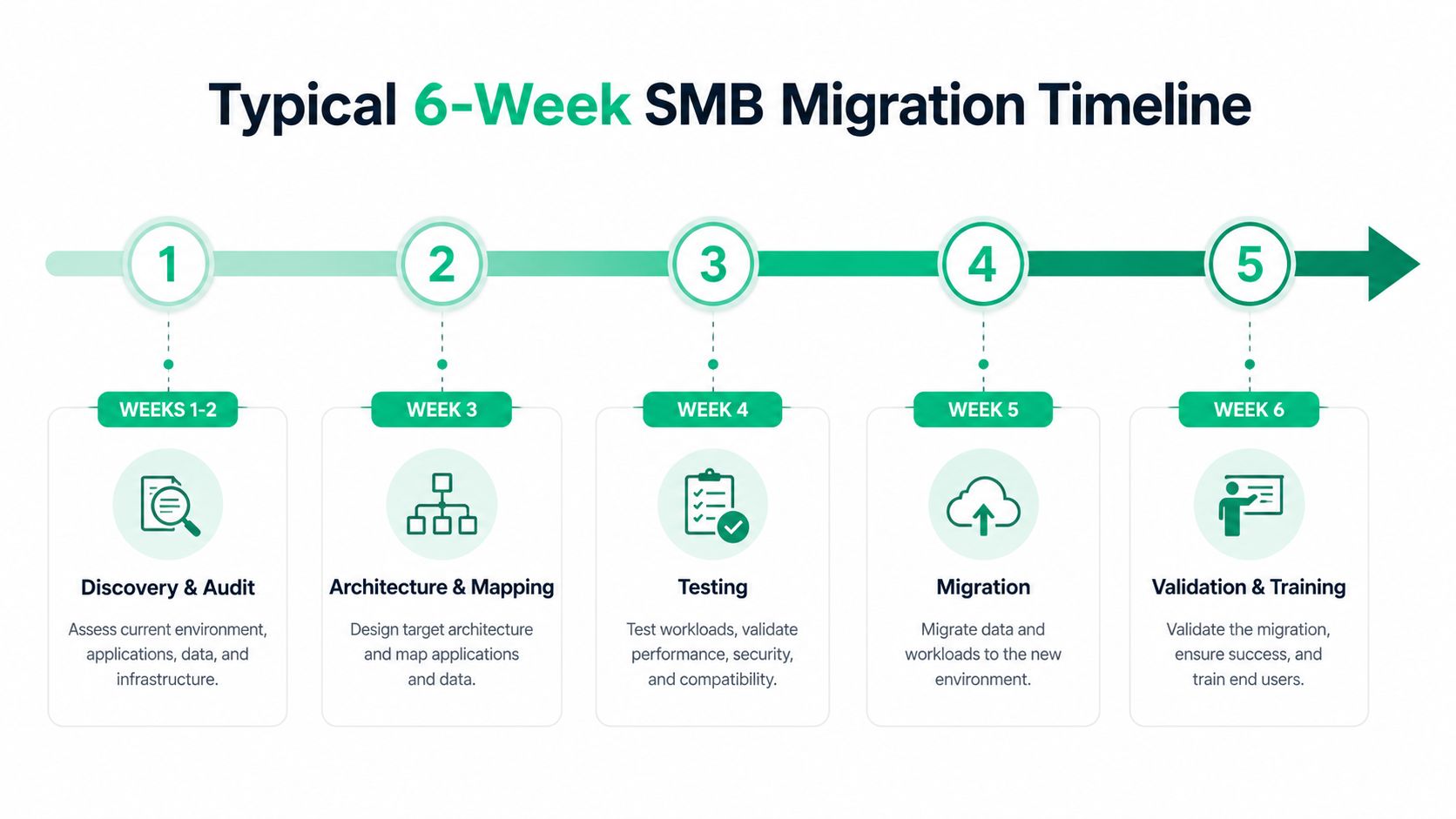
A realistic SMB migration follows a sequence, not a single weekend appointment. The exact schedule depends on data condition and application dependencies, but the work commonly breaks into five phases.
The five working phases
-
Discovery and audit, one to two weeks. Inventory servers, storage, users, applications, permissions, backups, integrations, and retention requirements. Identify data owners before technical work begins.
-
Architecture and dependency mapping, one week. Design the target environment, map source fields and permissions, document network paths, and determine which systems must remain connected during transition.
-
Test migration and validation, one to two weeks. Move representative data into a controlled target environment. Reconcile counts, checksums, permissions, application behavior, and user workflows.
-
Production cutover, one to three days of planned hard downtime, followed by a 48-hour rollback window. Freeze changes, complete the final transfer, switch users, validate critical operations, and keep the source available for recovery.
-
Post-migration stabilization, two to three weeks. Resolve access issues, clean duplicates, tune performance, train users, close documentation gaps, and confirm backup and restore operations.
The phase owners underestimate
Dependency mapping causes the most avoidable surprises. Legacy line-of-business applications in older Johnson County buildings often share undocumented database connections, mapped drives, printer queues, or service accounts. Those relationships may surface only when testing starts.
One cited study reports 64% of data migration projects delivered late and 37% over budget, linking the problem to complexity management rather than data volume (study on data migration project delivery). Another industry summary reports that 84% of projects either fail to meet objectives or overrun time and budget under manual approaches (summary of AI data migration automation statistics).
Don't choose the cutover date because the IT team prefers a weekend. Choose the slowest business week for that specific company, then confirm customer deadlines, payroll, billing cycles, tax work, production schedules, and executive availability. A quiet calendar creates room to validate before the business returns to full speed.
Risks, Security, and Compliance to Plan Around
The most dangerous migration failures aren't always obvious. A transfer can complete while truncating text, dropping records, changing permissions, or leaving an old credential active. The team needs a control for each risk before it moves production data.
| Risk | Mitigation |
|---|---|
| Data corruption or silent truncation | Compare row counts, checksums, field lengths, aggregates, and critical records between source and target |
| Identity and access gaps | Map every Active Directory object, recreate permissions deliberately, and rotate credentials before cutover |
| Ransomware exposure during transit | Encrypt data in motion with TLS 1.2 or newer and isolate the migration VLAN from production traffic |
| Weak compliance evidence | Preserve immutable audit logs, restore tests, approvals, and chain-of-custody records according to applicable obligations |
| Vendor lock-in | Negotiate raw data export rights and documented schema access before signing the cloud agreement |
A database migration should validate completeness first, then record fidelity, business meaning, and application behavior. That layered sequence catches different classes of failure. Matching row counts won't prove that a date field retained the right meaning, and a clean checksum won't prove that users can access the records they need.
Security controls that belong in the runbook
Use a dedicated migration account with only the permissions required for the task. Log every export, transformation, transfer, permission change, and restore attempt. Rotate temporary credentials once validation finishes.
Backup planning must be explicit. NIST CSF 2.0 control PR.DS-11 calls for protected backups, with examples that include near-real-time backup for critical data, scheduled backup for other data, offline and off-site copies, restore testing at least annually, and quarterly recovery testing for sampled assets (NIST CSF backup and recovery guidance).
HIPAA and CMMC also affect evidence retention. One security modernization source states that the HIPAA Security Rule requires six-year retention, while CMMC 2.0 Level 2 requires evidence covering the assessment cycle plus the prior 12 months (security-aware Microsoft modernization guidance). Keep migration approvals, restore tests, change logs, access reviews, and validation results where auditors can retrieve them.
For healthcare, map the migration to HIPAA safeguards. For defense contractors, align evidence collection with CMMC. For general business security, use the NIST CSF as the organizing framework and pair it with immutable off-site backups, Bitdefender GravityZone endpoint protection, Zero Trust architecture, and SOC-as-a-Service monitoring where the risk justifies the investment.
Use secure data migration best practices for Indiana businesses as a practical reference, but have counsel or a qualified compliance professional confirm the retention obligations that apply to your records.
What Migration Really Costs an Indiana SMB
A representative Johnson County professional services firm with 75 employees is moving 8 TB from an aging on-premises file server and QuickBooks Desktop to Microsoft 365 and a hosted SQL instance. The visible quote includes licensing, migration labor, and a one-time project fee. The hidden bill begins when the team assumes the visible quote is the whole project.
Partner labor may run from $125 to $185 per hour, depending on platform expertise and project responsibility. A full engagement for this type of move may fall between $18,000 and $32,000, but the range is a benchmark, not a promise. Data quality, permissions, application dependencies, documentation, and cutover requirements determine where a real proposal lands.
| Cost Category | Estimated Range |
|---|---|
| Licensing and cloud services | Varies by selected Microsoft 365, storage, and hosted database services |
| Migration partner labor | $125 to $185 per hour |
| One-time project fee | Included in the agreed engagement scope |
| Full representative project | $18,000 to $32,000 |
| Cloud egress during cleanup | Depends on provider, transfer path, and legacy data decisions |
| Staff overtime and revalidation | Depends on the volume of post-cutover exceptions |
| Remediation | Depends on configuration errors and business impact |
The firm may also pay egress charges while cleaning up legacy data. Staff may work overtime rechecking records after go-live. A misconfigured firewall can block synchronization for three days, turning a technical setting into lost productivity and delayed client work. Productivity loss during the switchover is real even when the migration itself finishes on schedule.
The most expensive shortcut is cutting documentation. A skipped dependency note becomes a troubleshooting call. An undocumented permission becomes a security incident. A missing restore test becomes an emergency exercise during the worst possible week.
That same discipline applies to adjacent infrastructure. If the office has spotty Wi-Fi in an older brick building, plan the migration network path with UniFi networking, latency-optimized mesh nodes, and tested failover rather than assuming the existing wireless signal can carry a critical transfer. A cheap migration that depends on unstable connectivity isn't cheap.
DIY Versus Hiring a Pro and Your Next Step
A capable internal administrator can often manage a clean lift-and-shift to Microsoft 365 with fewer than 50 seats, provided the file structure is understandable, the permissions are documented, the data is backed up, and the business can tolerate a controlled outage. That scenario still needs a written runbook and a rollback plan. “We can copy the files” isn't a migration plan.
Bring in outside help when the move touches regulated records, multi-site file shares, legacy ERP systems, manufacturing databases, complex QuickBooks workflows, or systems that must stay available. The same applies when the internal administrator is also responsible for help desk tickets, security alerts, backups, and daily operations. Splitting attention during cutover is how small errors become long outages.
A practical decision test
Use these questions before choosing DIY:
- Inventory: Can someone name every source system, data owner, integration, service account, and backup?
- Ownership: Has a business owner approved what moves, what gets archived, and what gets deleted?
- Rollback: Can the team restore service to the old platform without guessing?
- Validation: Can it prove completeness, fidelity, permissions, and application behavior?
- Compliance: Can it produce the evidence required for HIPAA, CMMC, or the organization's NIST CSF controls?
- Sign-off: Have finance, operations, security, and affected users approved the cutover plan?
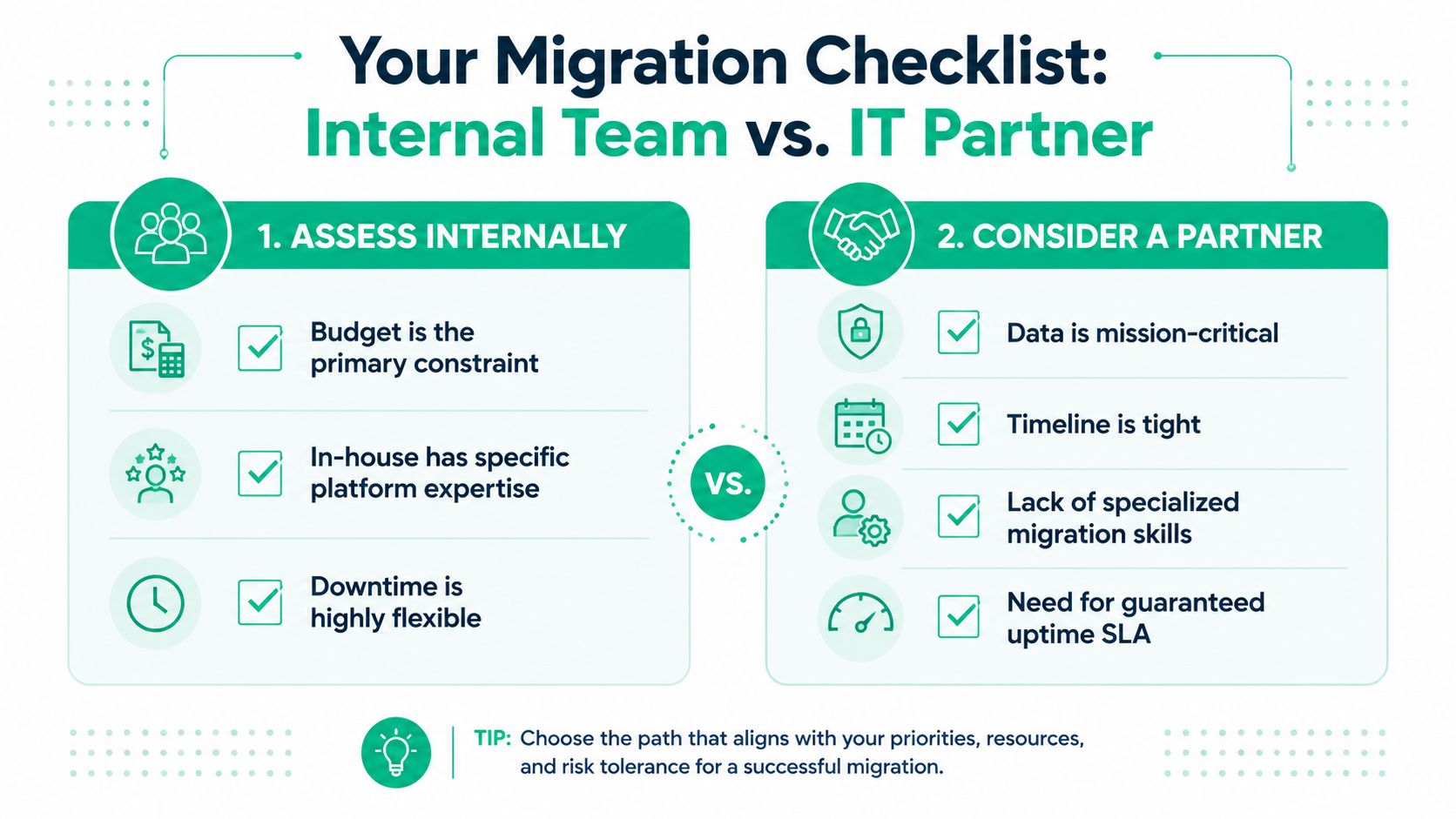
One hour of unplanned downtime can exceed the cost of a full migration engagement, particularly for businesses that process orders, bill clients, or support customers continuously. The decision isn't whether the IT budget can absorb professional services. It's whether the company can absorb the risk of an undocumented dependency, failed restore, or stalled cutover.
In our 17 years of local service, we've seen aging hardware, failing RAID arrays, and improvised network closets turn ordinary upgrades into urgent recovery work. When we dissembled a similar client's failing RAID array, the important work wasn't just bit-level data recovery. It was identifying which records mattered, preserving evidence, rebuilding access safely, and giving the business a controlled path back to normal operations.
For owners comparing providers, cloud migration service providers in Indiana can help frame the questions to ask. Finchum Fixes IT is one local option for migration planning, secure data transfer, recovery preparation, networking, and managed support. The team also handles cybersecurity, custom software development, and ongoing technical support when migration exposes broader infrastructure problems.
Greenwood and Indianapolis businesses can book a Free Network Assessment or Security Risk Audit with Finchum Fixes IT to review migration readiness, identify compliance gaps, test continuity controls, and scope a fixed quote before selecting a cutover window. Bring your current server inventory and backup details, and get a practical plan built for your actual systems.