Tier 2 Support Explained for Growing Indiana Businesses
Tier 2 support is the specialized escalation layer for the roughly 20% of IT incidents Tier 1 can't resolve, using deeper diagnostics, privileged access, and infrastructure expertise to restore service. It typically handles more complex work, with benchmarks of about 31 minutes average handling time and 2 hours 26 minutes average response time.Enterprise Support benchmark
At 8:47 a.m. on a production day, a 14-person manufacturer on the south side of Indianapolis loses access to its ERP. The Windows Server update completed, but the print spooler on the domain controller failed, and the application workflow now stalls at every workstation. Tier 1 has already rebooted the server, checked the obvious settings, and confirmed the fault needs deeper access.
That's where a properly run tier 2 operation earns its keep. It doesn't just move the ticket to a more experienced person. It gives that person the right evidence, the authority to inspect the system, and a defined path to restore service without turning a short outage into an all-day event.
What Tier 2 Support Actually Does
Tier 2 support takes ownership of incidents that exceed first-line troubleshooting. Its work includes service-level diagnostics, Active Directory and Entra ID administration, network and firewall configuration, endpoint security investigation, backup recovery, and vendor coordination. The purpose is practical, restore the failed service quickly, then document the cause so Tier 1 can prevent a repeat. Incident Management guidance
Think of the support ladder as plumbing. Tier 1 is the sink plunger. It handles the familiar blockage with a known procedure. Tier 2 is the pipe camera and auger. It gets inside the system, follows the failure, checks dependencies, and clears the problem at a deeper level. Tier 3 is the crew re-trenching the line, redesigning the architecture, changing application code, or working with a vendor's technical assistance center.
Where each tier fits
- Tier 0: Self-service portals, searchable runbooks, automated password workflows, and AI deflection for routine requests.
- Tier 1: First human contact, ticket classification, standard troubleshooting, account assistance, and known fixes.
- Tier 2: Advanced technical support, privileged changes, root-cause investigation, infrastructure repair, and coordinated recovery.
- Tier 3: Architecture, code-level defects, vendor escalation, major redesign, and specialist engineering.
The distinction matters for Johnson County business owners because every ticket doesn't deserve the same level of access. Giving broad administrative rights to every help desk analyst increases security exposure. Sending every difficult ticket directly to a senior engineer creates a bottleneck and leaves routine knowledge trapped in one person's head.
Practical rule: Tier 2 should receive a complete ticket, not a vague message that says “the server is broken.”
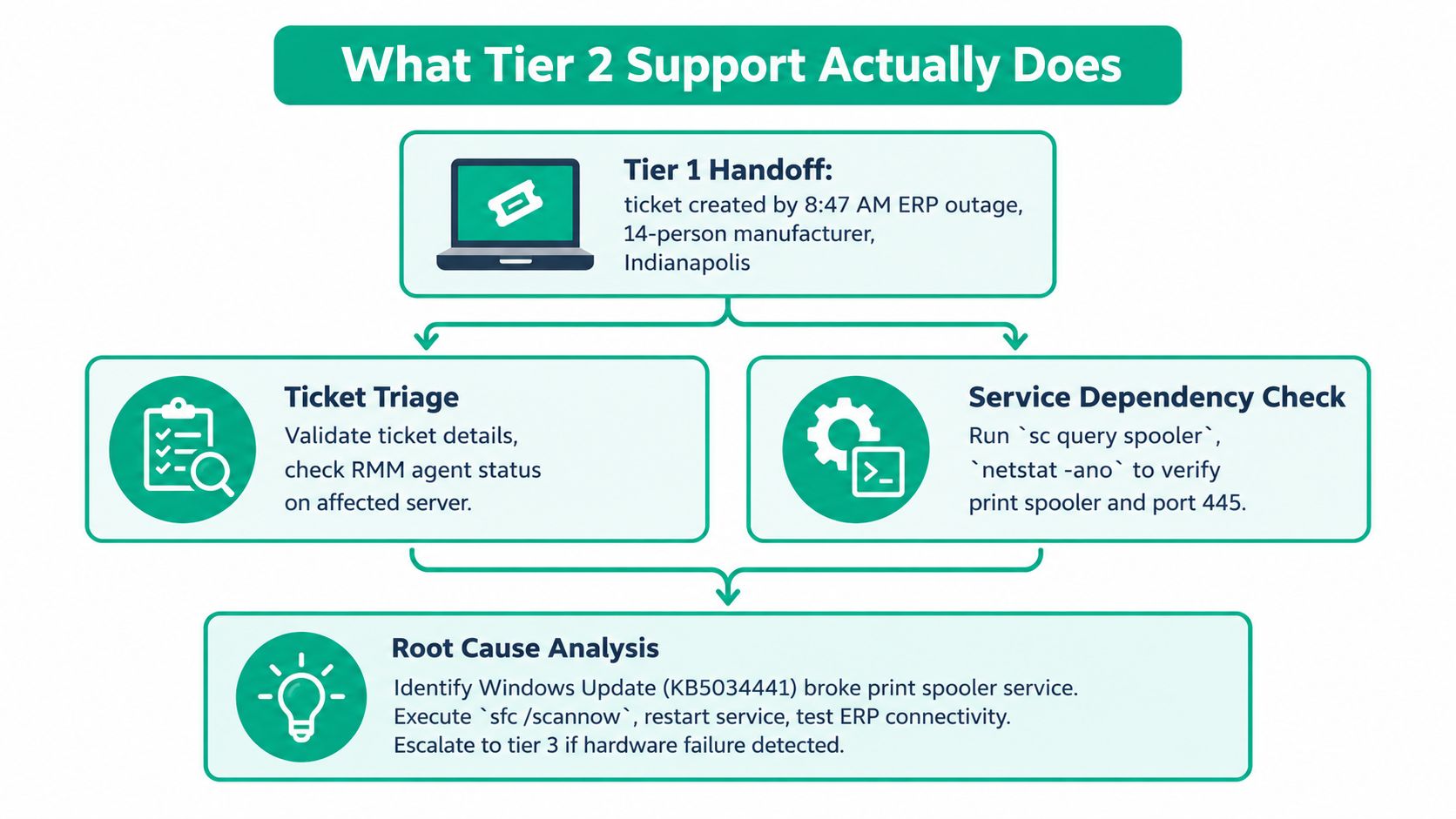
A good handoff identifies the affected user, system, environment, timestamps, recent changes, symptoms, and available logs or screenshots. That prevents re-triage, keeps the SLA clock visible, and gives the engineer a starting point instead of forcing the customer to repeat the story. Tier 2 investigation SOP guidance
Tier 1 vs Tier 2 vs Tier 3 Compared
A tier model works when ownership, access, and escalation authority are explicit. Tier 1 handles the first conversation, classification, routine requests, and documented fixes. Tier 2 investigates complex incidents, performs approved privileged changes, restores service, and identifies root causes. Tier 3 owns architecture, code defects, vendor engineering, and redesign.
The split should reflect your PSA data, not a copied contract assumption. Some service desks report roughly 70% to 80% of tickets at Tier 1, 15% to 20% at Tier 2, and 3% to 5% at Tier 3. Use those figures as a planning reference, then test actual volume, resolution time, and reassignments.
| Dimension | Tier 1 Help Desk | Tier 2 Technical Support | Tier 3 / Vendor |
|---|---|---|---|
| Ownership | First contact, classification, known fixes | Complex incident resolution and root cause analysis | Architecture, code defects, vendor escalation |
| Permissions | Standard administrative rights inside the PSA and approved endpoint tools | Elevated Active Directory and Entra ID rights, infrastructure consoles, BitLocker recovery workflows | Change authority, vendor TAC access, solution architecture |
| Tools | PSA, knowledge base, basic remote support | RMM, SIEM, Group Policy, firewall and switch consoles, backup platforms | Vendor TAC, engineering environments, architecture and change systems |
| Typical work | Password resets, basic Wi-Fi, software installation, routine access | Multi-user outages, policy failures, server services, network segmentation, security incidents | Platform defects, architectural failures, custom integrations |
| Accountability | Capture context and resolve or escalate | Restore service, document diagnosis, feed knowledge back to Tier 1 | Design the durable correction and manage specialist dependencies |
The boundary also controls risk. Giving every help desk analyst broad administrative access increases exposure. Routing every difficult ticket to a senior engineer creates a bottleneck and leaves operational knowledge with one person. Tier 2 is the hybrid layer: automation handles repeatable checks, while engineers make controlled changes and document the result. That separation supports stronger NIST CSF 2.0 maturity and gives Indiana businesses a clearer continuity plan during an outage.
For hiring, this skills-first Nokia engineer job listing from HiredBySkill shows how fault management and structured investigation differ from general help desk work.
A Tier 1 help desk guide for Indy businesses can help define the frontline boundary. Tier 2 should not absorb tickets that better documentation would let Tier 1 resolve.
The cited benchmark places Tier 2 handling near 31 minutes per ticket and average response near 2 hours 26 minutes.Enterprise Support benchmark Build urgent incidents into faster response targets, but reserve enough time for evidence collection and safe remediation. In Greenwood and Indianapolis, that balance matters because the cost of an outage includes idle staff, missed orders, and rushed changes that extend recovery.
The Tier 2 Diagnostic Workflow and Escalation Handoff
At 2 a.m., a print server can look like a simple service failure while authentication errors, disk corruption, or a recent change point elsewhere. Tier 2 needs a repeatable workflow that separates evidence collection from intervention. Changing five settings at once destroys the evidence needed to identify the cause.
Start with the handoff
Validate the ticket before opening a remote shell.
- Confirm the hostname, affected user or department, business impact, timestamp, recent changes, and reported symptoms.
- Check RMM status and the latest check-in. If the agent is offline, record that as a separate failure rather than treating the server as healthy.
- Review the SIEM timeline for authentication failures, malware detections, unusual processes, and related alerts.
- Record an initial hypothesis and label it unconfirmed until logs support it.
For a suspected print spooler crash, run:
wevtutil qe System /c:1 /f:text /q:"*[System[(EventID=7031)]]"
Then check the service:
Get-Service spooler
If the service is stopped and the event trail supports the diagnosis, make one controlled change:
Start-Service spooler
Check system integrity next:
DISM /Online /Cleanup-Image /RestoreHealth
sfc /scannow
Review the output and preserve the CBS log when corruption appears. The ticket should show the command, result, operator, and timestamp, not merely a note that “repairs were attempted.”
Use decision points, not guesswork
Apply gpupdate /force when Group Policy may be involved. Review recent system events with:
Get-WinEvent -LogName System -FilterHashtable @{StartTime=(Get-Date).AddHours(-1)}
For domain authentication issues, use:
nltest /dsgetdc
Review patch history with:
wmic qfe list brief /format:texttable
If evidence identifies an update as the cause, follow the approved rollback procedure instead of removing patches casually. Vendor-controlled application failures should go to vendor TAC with logs and reproduction details. If server state is unsafe or data integrity is uncertain, stop changing it and assess recovery from an immutable backup.
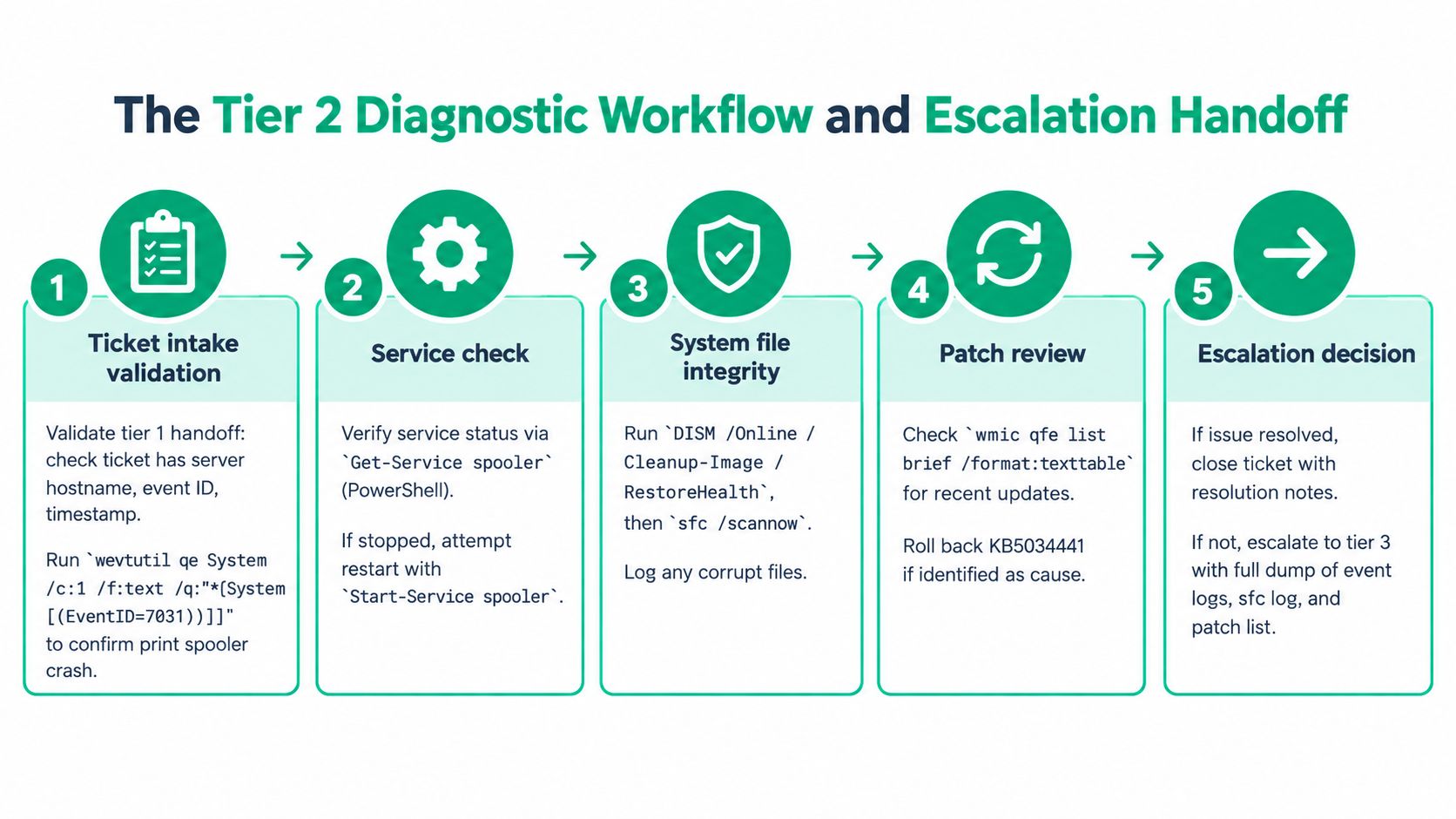
A useful handoff contains the Tier 2 root-cause hypothesis, relevant logs and screenshots, a customer-impact statement, required change records, and the next PSA check-in time. That structure supports NIST CSF 2.0 Detect and Respond functions, while its Tiers help teams discuss maturity and consistency. The NIST CSF Tiers quick-start guide gives teams a practical way to assess how consistently those controls operate.
Teams refining their operating baseline can also review these IT service desk best practices and adapt the controls to their actual ticket flow. In Greenwood and Indianapolis, clear evidence and safe rollback reduce downtime from idle staff, missed orders, and changes that prolong recovery.
Tools and Stack a Tier 2 Team Uses Daily
A tier 2 engineer without visibility is just guessing faster. The stack should expose endpoint state, security events, network paths, identity behavior, and recovery options from a single documented workflow.
For endpoint and server work, ConnectWise Automate or NinjaOne can provide RMM inventory, remote shell access, script-based remediation, and patch deployment. The important question isn't which brand appears on the contract. It's whether the agent checks in, whether the engineer can run a controlled script, and whether every action is logged against the ticket.
Datadog or Wazuh can provide SIEM and monitoring context, but alert volume needs discipline. A tier 2 analyst should correlate a security alert with the active incident, affected asset, user identity, and recent change. For ransomware triage, console access to Bitdefender GravityZone is required. The engineer needs to isolate the endpoint, inspect detections, confirm policy state, and coordinate recovery without destroying evidence.
Match the tool to the failure
| Tool | Primary Tier 2 Job | Incident Class | Indiana SMB Fit |
|---|---|---|---|
| ConnectWise Automate or NinjaOne | Remote shell, inventory, scripts, patch review | Server-down or endpoint failure | Practical for distributed I-65 corridor offices |
| Datadog or Wazuh | Correlate alerts, logs, and timelines | Multi-user outage or security incident | Useful when ticket and monitoring data are joined |
| Bitdefender GravityZone | Endpoint isolation and malware investigation | Suspected ransomware or compromise | Strong fit for businesses building managed security controls |
| UniFi Network Controller | VLAN, switch port, wireless, and RF troubleshooting | VoIP, Wi-Fi, or segmentation failure | Familiar option for local offices and older buildings |
| Veeam or Datto SIRIS | Recovery testing and restoration | Data loss, ransomware, or server failure | Appropriate when immutable off-site backups are verified |
| PSA platform | Ownership, SLA clock, change records, and notes | Every escalation | Essential for predictable service management |
With UniFi, Tier 2 should inspect the affected switch port, client history, VLAN assignment, access point health, and controller event log before changing radio settings. Packet captures should follow the controller and switch capabilities available in the deployment, not a generic checklist.
License cost still matters to Indiana SMB budgets. Buy enough access for the incident classes you face, then test whether the tools work together. A calendar platform can also reduce missed handoffs and maintenance conflicts, so teams comparing calendar sync tools for teams should consider the operational calendar alongside the ticketing system.
For a broader product comparison, see this guide to help desk software for small businesses in Indiana. The best stack is the one an engineer can use at 2 a.m. without hunting through disconnected consoles.
Staffing, Training, and Hiring for Tier 2
Staff Tier 2 against actual escalation demand, not total employee count. Tier 2 handles roughly 20% of support requests, with a cited handling time of about 31 minutes per ticket. Protect specialist capacity for identity, network, endpoint, and recovery work instead of filling the queue with routine password requests.
A practical planning range is one Tier 2 engineer for 350 to 500 endpoints. Treat that as a starting point, not a verified industry standard. Adjust it for server density, manufacturing OT, compliance duties, travel, and after-hours coverage. One engineer may support a quiet office comfortably, then fall behind when a Greenwood manufacturer, a Bloomington branch, and a downtown Indianapolis client report incidents at once.
Build capability, not just headcount
Training should cover CompTIA Network+, CompTIA Security+, Microsoft AZ-800 for hybrid Active Directory environments, plus vendor instruction for Bitdefender and Ubiquiti. Certifications establish shared terminology for routing, identity, endpoint security, and change control. They do not replace the judgment required to test a fix, protect production, and verify recovery.
Assess candidates through evidence rather than titles:
- Help desk progression: They collect symptoms, scope, and recent changes before touching production.
- Manufacturing exposure: They understand that an ERP or line-side workstation can affect operations beyond one user.
- Home-lab evidence: They can explain a domain controller, VLAN, backup restore, or failed update they built and repaired.
- Written discipline: Their ticket notes separate symptoms, evidence, action, and verification.
For interviews, use a short incident exercise. Give the candidate a failed login, an unreachable server, or a workstation with a recent update. Ask for the first checks, the rollback boundary, the escalation trigger, and the evidence they would record. That reveals whether they can follow an SOP while still recognizing an unusual failure.
Check regional compensation against current Indiana postings before setting an offer. Underpaying a technical escalation role can produce turnover, weak after-hours coverage, and undocumented tribal knowledge. Cross-training limits that risk. Each recurring Tier 2 fix should return to Tier 1 as a runbook, brief lab exercise, or approved script, with ownership and a verification step.
That feedback loop strengthens the entire service desk and supports the hybrid automation-plus-engineering model expected at higher NIST CSF 2.0 maturity. Analysts at Talent Strategy Group found that most service centers provide support through at least Tier 2, while organizations with more than 25,000 employees were less likely to provide Tier 2 and Tier 3 directly, with only about one-third offering support at that level.HR Operating Model Report Large environments often centralize specialist work instead.
Real Tier 2 Moments from Central Indiana
At 2 a.m. in Greenwood, a dental practice does not care which incident category appears in the ticket. Its server is degraded, morning appointments depend on electronic records, and Tier 2 must recover service without risking the only usable data copy.
A representative response starts with evidence. The engineer checks RAID health, isolates the failing disk with mdadm --detail, and reviews smartctl output before replacing hardware. After the swap, Tier 2 starts the rebuild from the hot spare, monitors array state, and validates restored data against an immutable Veeam backup. Recovery is verified only when the application opens, records are readable, and the backup remains a separate recovery point.
That sequence combines automation with engineering judgment. Monitoring can identify a degraded array and scripts can collect diagnostics, but an engineer still decides whether rebuilding is safe, whether the application needs testing, and when the incident should move to a specialist. Those controls support the repeatable detection, response, and recovery practices expected as an organization works toward greater NIST CSF 2.0 maturity.
Bit-level recovery follows a different SOP. A mechanically failing disk or compromised array metadata can deteriorate with repeated boot attempts. Tier 2 preserves the media, records its condition, labels the chain of custody, and transfers the case to a controlled recovery process instead of experimenting on the only copy.
A RAID rebuild restores redundancy. It does not prove that the application data is valid.
Near Monument Circle, a 90-year-old brick office can expose a different failure pattern. Legacy cabling, overlapping SSIDs, and a failing UniFi US-24 switch make VoIP calls unstable. Tier 2 maps the building with the UniFi Network app, records switch and access point relationships, places guest traffic on a dedicated VLAN, replaces the switch, and retunes RF channels after reviewing client behavior.
The handoff determines whether the fix survives the next shift. “Wi-Fi fixed” is not a usable closure. The ticket should record the cable path, switch port, VLAN, affected SSID, replacement hardware, validation test, and remaining risk. The Enterprise Support benchmark's 31 minutes average handling time reinforces why evidence must be captured during the repair, not reconstructed afterward.
KPIs, SLAs, and the Cost of Getting It Wrong
At 2 a.m., a failed firewall, unreachable file share, or stalled ERP can turn a Tier 2 queue into a business interruption. Downtime converts technical delay into operating expense. A widely cited benchmark estimates outage costs at nearly $9,000 per minute for medium and large businesses, while small businesses may still lose hundreds of dollars per minute.Cost of downtime benchmark For a Greenwood or Indianapolis company, response ownership, monitoring, and recovery speed belong in continuity planning and financial controls.
KPIs should reward safe restoration, not fast ticket closure. Track first-touch resolution, time to engage Tier 2, restoration time, escalation accuracy, recurrence rate, and the share of tickets containing complete evidence. The 31-minute handling benchmark can help with capacity planning, but it should not pressure engineers to close a complex security or data-recovery case before validation. Use the Enterprise Support benchmark as context, not as a universal productivity quota.
A defensible operating matrix
The matrix below provides a starting design. Agree on target values with the customer, then match them to staffing, monitoring, application criticality, and backup readiness. Response and restore times depend on the service impact and the controls available. They are not universal promises.
| Severity | Tier 2 Response | Restore Target | Escalate to Tier 3 | CSF 2.0 Function |
|---|---|---|---|---|
| Critical, broad service outage | Immediate engagement under the contracted SLA | Restore or contain as quickly as safely possible | Vendor, architecture, or security dependency identified | Detect, Respond, Recover |
| High, multiple users or core workflow affected | Prioritized technical review | Restore within the agreed business impact window | Evidence shows a defect, design issue, or exhausted internal path | Detect, Respond |
| Standard, limited user impact | Queue according to contracted response | Resolve within the agreed service window | Repeated failure or unknown root cause | Identify, Respond |
| Request or recurring incident | Scheduled specialist ownership | Complete the approved change or problem record | Pattern requires redesign or vendor action | Govern, Identify, Improve |
NIST CSF 2.0 gives organizations a structure for managing and reducing cybersecurity risk. Its Tiers help describe whether operations are ad hoc, risk-informed, repeatable, or adaptive. For healthcare clients, HIPAA adds a concrete continuity requirement. The Security Rule calls for contingency planning safeguards that include a data backup plan, disaster recovery plan, and emergency mode operation plan.
A Greenwood clinic can demonstrate operational maturity by tying each KPI to an artifact, such as an alert timeline, incident record, restore test, change approval, or post-incident review. A KPI without evidence is a dashboard decoration. A target without an owner is not an SLA.
Leaders who need to turn response promises into workable service terms can use this guide to set SLA response targets that actually work. Define who acknowledges the incident, who owns diagnosis, what “restored” means, and when Tier 3 or a vendor takes control.
Tier 2 Checklist and Next Steps for Indiana SMBs
A practical Tier 2 program starts with evidence. If the engineer can't identify the affected asset, access the logs, verify the backup, and record the change, the business doesn't have a reliable escalation function. It has individual heroics.
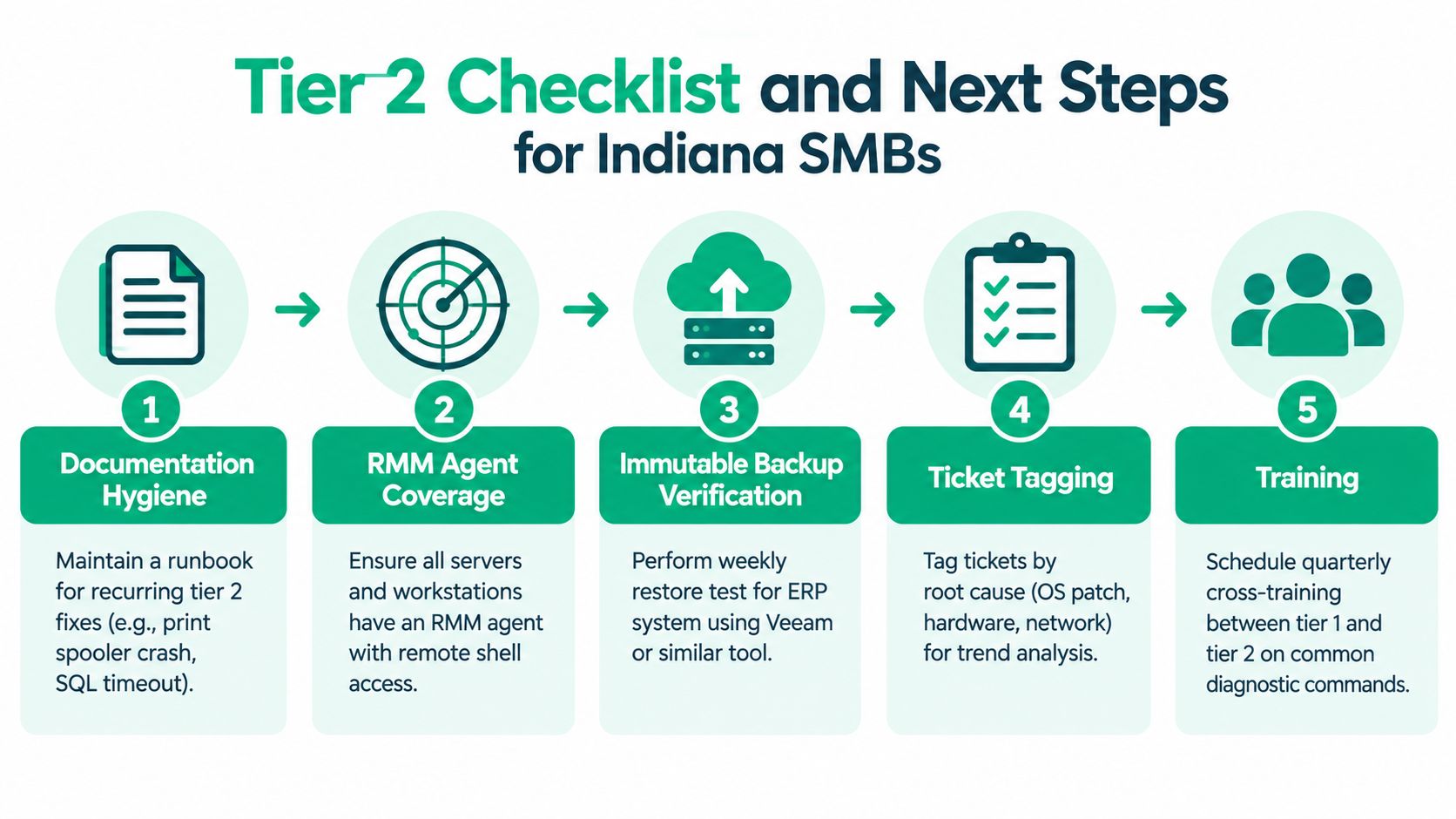
Use this pass or fail checklist with a new IT lead:
- Documentation hygiene: Pass when recurring fixes have tested runbooks, including print spooler crashes and SQL timeouts. Fail when the only procedure lives in one engineer's memory.
- RMM coverage: Pass when every server and workstation has a healthy RMM agent with remote shell access. Fail when an asset appears only after a user calls.
- Immutable backup verification: Pass when restore tests confirm the ERP recovery path using Veeam or a similar platform. Fail when the team can show backup jobs but not a usable restore.
- Security controls: Pass when BitLocker or equivalent encryption is enforced, Bitdefender GravityZone policies are visible, and suspicious endpoints can be isolated. Fail when protection status depends on manual checks.
- Ticket tagging: Pass when incidents are tagged by root cause, such as OS patch, hardware, identity, or network. Fail when reports contain only vague categories.
- Team training: Pass when Tier 1 and Tier 2 regularly practice diagnostic commands and escalation notes. Fail when every complex ticket starts from scratch.
- Continuity exercises: Pass when the team runs tabletop exercises quarterly and records gaps. Fail when recovery plans have never been discussed under pressure.
A 30-60-90 day operating plan
During the first 30 days, inventory assets, verify RMM coverage, review open escalations, identify recurring incidents, and document the highest-risk systems. In the next 30, test restoration, tune alert routing, tighten privileged access, and build handoff templates in the PSA.
By day 90, run a tabletop outage exercise, review recurrence data with Tier 1, validate vendor contacts, and present a NIST CSF 2.0 maturity snapshot to leadership. Defense contractors should also map the work to their CMMC obligations, while healthcare organizations should connect backup and recovery evidence to HIPAA contingency planning.
A managed services agreement should spell out ownership, access, backup responsibilities, security response, after-hours handling, and change approval. This managed services agreement template guide can help leaders identify missing terms before a critical incident exposes them.
Finchum Fixes IT provides managed IT support, remote monitoring, cybersecurity, networking, data recovery, and business continuity services for organizations in Greenwood and the Indianapolis area. Request a Free Network Assessment or Security Risk Audit through Finchum Fixes IT to identify tier 2 gaps before they become an expensive outage.