WiFi Installation Cost for Indiana SMBs
A typical Indiana SMB should budget about $4,500 to $25,000 per site, with professional installation commonly running $650 to $3,500 per access point installed. The final WiFi installation cost depends less on the radio itself and more on cabling, PoE switching, mounting, security, configuration, and the building you're working inside.
The situation is familiar around Greenwood. Someone adds a few wireless access points to an old brick office, the conference room still drops video calls, and the quote suddenly includes cable pathways, a new switch, a controller subscription, and ceiling work. A retail mesh kit may look cheap beside that proposal, but it isn't designed around roaming employees, guest traffic, voice calls, compliance, or a documented recovery plan.
That's the Southside problem in a nutshell. Aging infrastructure, dense construction, long attic runs, and improvised network closets turn a simple coverage request into a business continuity project. The right design fixes the underlying bottleneck instead of scattering more radios around the building.
What WiFi Installation Cost Looks Like for Indiana SMBs in 2026
Most Central Indiana small and mid-sized businesses land somewhere between $4,500 and $25,000 for a full commercial WiFi installation, while each access point can run $650 to $3,500 installed once mounting, cabling, configuration, and labor are included. Those commercial benchmarks are outlined by commercial WiFi installation pricing guidance and business wireless deployment estimates.
That range is broad because buildings behave differently. A drop-ceiling retrofit in a modern Greenwood office is straightforward. Old plaster, concrete block, fire-rated walls, high ceilings, and multi-floor construction add labor before anyone configures an SSID. A quote also changes when the project includes a managed PoE switch, security gateway, fiber uplinks, internet circuit coordination, or a new network closet.
Start with the building, not the access point
The access point sticker price is often the least interesting line. Cabling, PoE switches, controller licensing, documentation, and the labor required to pull wire through difficult pathways can account for two to three times the cost of the radios themselves, depending on the deployment. Structured cabling commonly runs $100 to $250 per drop installed, while Cat6 drops often fall between $175 and $275, according to structured cabling cost guidance.
A professional installer should begin with an RF survey, floor plan, wall-material review, user-density estimate, and closet inspection. That process determines whether you need four carefully placed APs or a denser design with directional coverage. It also supports services such as business WiFi solutions for SMBs, where reliability matters more than seeing a strong signal on a phone.
Why voice changes the design
WiFi calling adds another reason to avoid guesswork. Employees expect calls to continue as they move between offices, warehouses, and parking areas. Poor roaming behavior, channel overlap, and weak uplinks can create clipped audio even when a speed test looks acceptable. Businesses evaluating WiFi calling for SMBs should treat wireless design and voice quality as related decisions.
For a small consumer setup, one-time professional installation has been benchmarked at $96.73 in the United States, compared with $35.65 for self-installation. When equipment and WiFi purchase fees are included, the U.S. startup benchmark rises to $162.46, as shown in global connectivity cost research. Those figures are useful context, but they don't describe a commercial deployment crawling through an attic on the I-65 corridor.
The Line Items That Actually Drive Your Quote
A clean proposal should show where the money goes. If the quote only says “enterprise WiFi package” with one lump sum, you can't tell whether you're paying for necessary infrastructure or services nobody requested.
The cost shares below are planning ranges for a typical Indiana SMB proposal. They're useful for reviewing structure, not for replacing a site-specific estimate.
| Line Item | Typical Cost Share | What Drives It |
|---|---|---|
| Access points | 15% to 25% | Radio class, antenna design, density, WiFi 6E or WiFi 7 selection |
| Cabling and conduit | 20% to 30% | Cat5e reuse, Cat6A replacement, pathway distance, fire-rated assemblies |
| PoE switches, controllers, and licensing | 15% to 25% combined | Power budget, multi-gigabit uplinks, cloud management, subscription terms |
| Labor and installation | 20% to 30% | Mounting, cable pulls, lifts, testing, labeling, configuration |
| Survey, documentation, and materials | 5% to 10% | RF survey, heatmaps, patch panels, testing, as-built records |
Cabling is where old buildings fight back
A clean Cat5e run may be reusable when its test results, pathway, termination, and intended throughput fit the design. A failed test, damaged jacket, poor termination, or inaccessible route changes that calculation. Cat6A costs more, but it gives the installer a stronger foundation for multi-gigabit uplinks and future AP refreshes. A practical Cat6 cable installation guide for business owners can help owners understand why “we already have cable” isn't the same as “the existing cable is ready.”
Ceiling tile is usually simpler than surface mounting on finished walls. Plaster, masonry, conduit, and fire stopping require more time. Fiber runs can reach $500 to $1,500 or more each, according to the structured cabling benchmark cited above, so a multi-floor design can grow quickly when the closets aren't positioned well.
Hardware and recurring fees need separate scrutiny
WiFi 6E and WiFi 7 radios cost more than basic WiFi 6 equipment, but the radio is only part of the decision. You also need to check switch capacity, uplink speeds, controller compatibility, firmware support, and client-device readiness. Cloud-managed platforms can simplify updates and remote troubleshooting, but recurring per-AP licensing can surprise a first-time buyer.
Quotes balloon when a vendor adds a security gateway, managed firewall, guest portal, redundant internet circuit, or 24/7 monitoring without separating those items from the wireless scope. Those services may be valuable, especially for HIPAA environments, CMMC contractors, or organizations aligning controls with the NIST CSF. They still belong in clearly labeled options, not hidden inside a wireless lump sum.
Practical rule: Ask for one base design, one security-enhanced option, and a written list of recurring fees. You should know what you're buying now and what you'll keep paying later.
Three Real-World Cost Scenarios Across Central Indiana
A single-story office near Greenwood has different needs from a downtown law firm or a Plainfield warehouse. The following planning scenarios show how building conditions and installation choices affect the total.
| Scenario | Square Footage | AP Count | Total Installed Cost |
|---|---|---|---|
| Greenwood professional office | About 1,800 sq ft | 4 | $6,500 to $9,000 |
| Downtown Indianapolis law firm | 6,500 sq ft across two floors | 8 | $18,000 to $24,000 |
| Plainfield warehouse | 40,000 sq ft | 12 ruggedized APs | $35,000 to $55,000 |
Greenwood office
The small professional office assumes four access points and reuse of existing Cat5e after testing. That choice holds the project near $6,500 to $9,000 installed. The design still needs switching, mounting, configuration, secure employee and guest networks, and documentation.
The cost stays controlled because the site is compact and single-story. If the existing cable routes are accessible and the ceiling grid is usable, the installer avoids much of the attic exploration and wall repair that pushes smaller projects upward.
Downtown law firm
The downtown Indianapolis law firm has two floors, new Cat6A runs, eight APs, and controller-based management. The projected $18,000 to $24,000 reflects cable distance, vertical pathways, higher-density office use, and the need for predictable roaming through conference rooms and perimeter offices.
Law firms also handle confidential files and remote access traffic. A network design should separate staff, guests, printers, building systems, and management traffic. Zero Trust architecture principles, MFA enforcement, logging, and protected administrative access matter more than chasing a maximum link speed.
Plainfield warehouse
The warehouse reaches $35,000 to $55,000 because high ceilings, racking aisles, ruggedized APs, lifts, conduit, and high-density mounting change the installation method. A warehouse survey must account for metal shelving, moving inventory, forklift routes, loading doors, and outdoor transitions.
A retail mesh kit won't provide the same mounting discipline, channel plan, or roaming behavior. A proper design may use latency-optimized mesh nodes in difficult areas, but wired backhaul remains preferable wherever the building permits it. Expert wireless network design for Indiana SMBs is a useful reference for evaluating those trade-offs before equipment is ordered.
Why WiFi 7 and Next-Gen Hardware Quietly Inflates Budgets
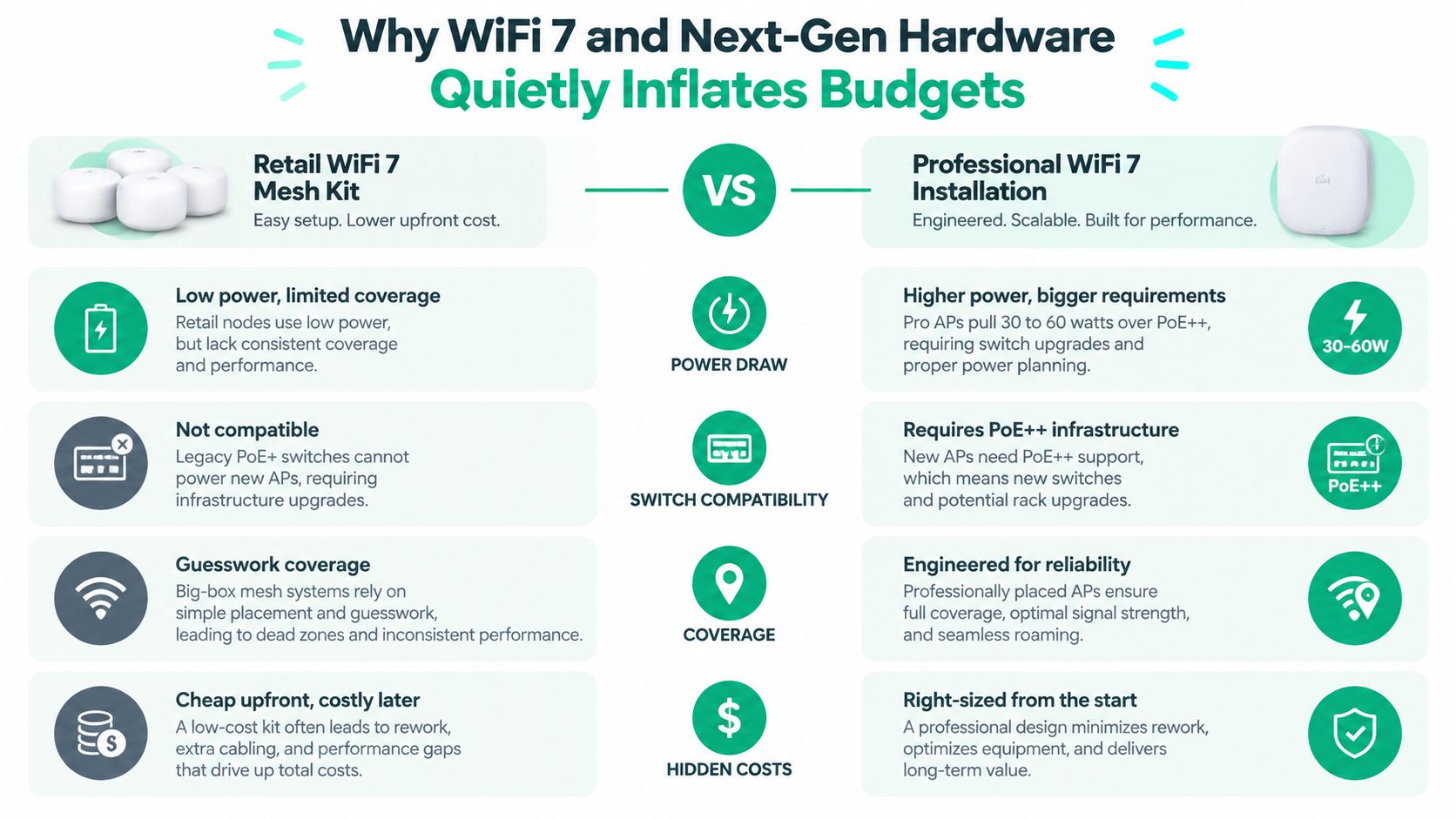
A bag of WiFi 7 mesh nodes from a big-box store solves a home coverage problem. It doesn't automatically solve an SMB network problem. Business WiFi needs predictable roaming, VLAN separation, power planning, firmware control, logging, support access, and a design that survives the building's walls and workflow.
Recent guidance places small-office WiFi 7 access points at about $338 to $539 each when PoE++ injection is added, while enterprise-grade options can reach $1,900 to $2,600 per AP plus licensing, according to WiFi 7 access point guidance for small businesses. The difference isn't cosmetic. It reflects radio capability, management, support, security features, and the network layer underneath.
Power becomes part of the wireless design
Newer APs can pull 30 to 60 watts over PoE++, according to the supplied market guidance. An existing PoE+ switch may turn the AP on but fail to provide its full feature set, or it may leave no room for growth. Some projects therefore require PoE++ switches, injectors, UPS capacity, and closet cooling.
Cabling can become the next bottleneck. Cat5e may support a basic connection in one environment and throttle a multi-gigabit uplink in another. Cat6A, correctly terminated and tested, gives the design more room for 2.5 and 5 GbE connections.
Licensing and support don't disappear after installation
Cloud or hardware controllers may add $50 to $200 per AP annually for licensing, based on the cited WiFi 7 market guidance. Ask whether the subscription includes firmware access, analytics, support, security features, and replacement coverage. Also ask what happens if the business stops paying.
That is why a WiFi 7 refresh should be priced as a system: APs, PoE++, switching, uplinks, cabling, UPS, controller, licensing, security gateway, and labor. Hardware-as-a-Service guidance for Indiana businesses can help owners compare outright purchases with structured replacement and support plans.
Six Practical Ways to Bring the Number Down
Lowering the bill doesn't mean buying the weakest AP. It means removing guesswork and paying for infrastructure that serves the actual building.
-
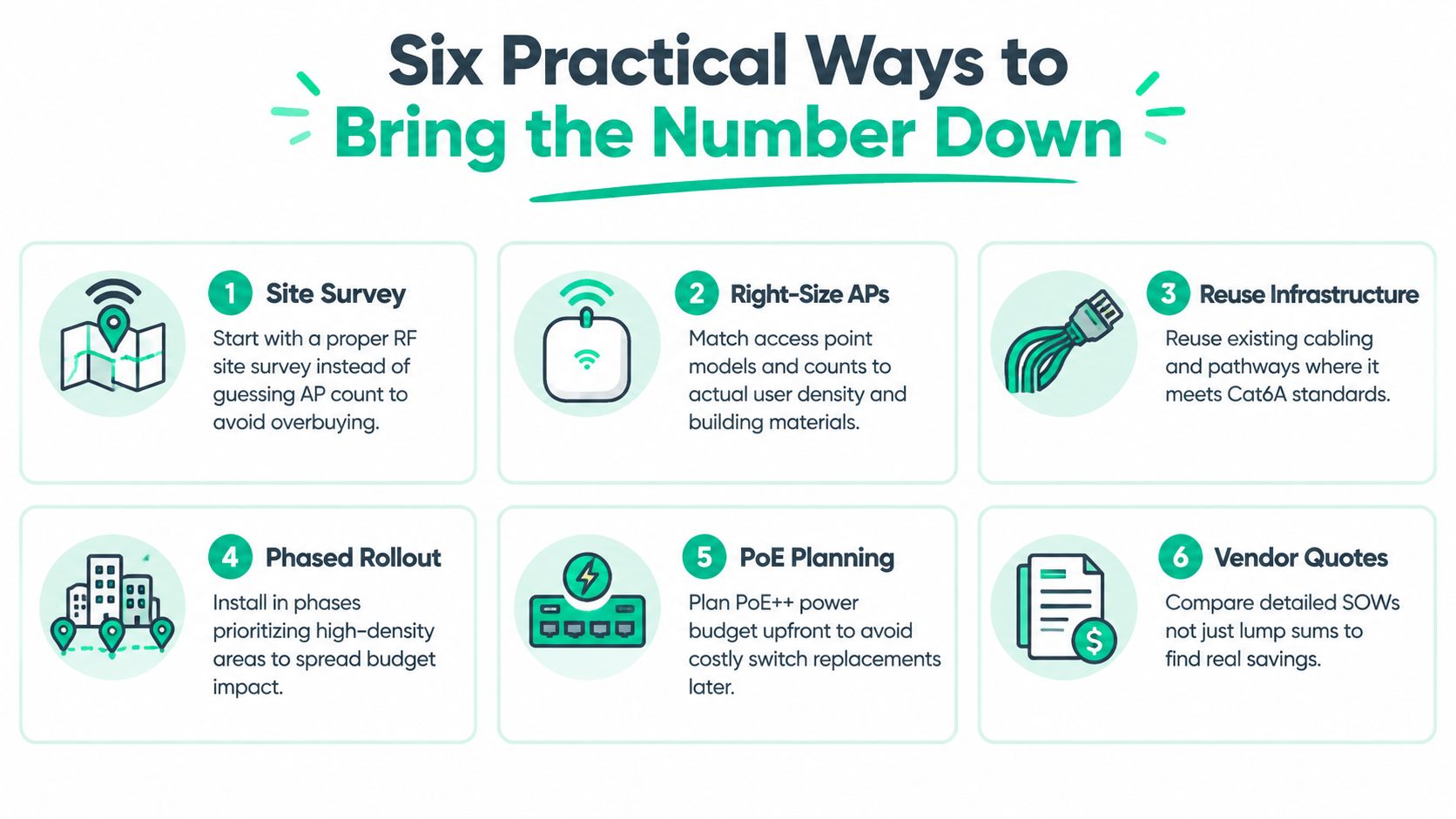
Survey before ordering. A predictive RF plan followed by an on-site survey prevents an office from buying too many APs in open areas or too few for dense rooms. The savings come from avoiding rework, not from skipping engineering.
-
Right-size density. Match AP placement to wall material, user concentration, voice requirements, and application traffic. One AP per room is a lazy default. A conference room, warehouse aisle, and private office don't create the same wireless load.
-
Reuse clean cabling. Test existing Cat5e rather than replacing every run automatically. Reuse makes sense only when the cable passes certification, supports the design, and has a usable pathway and termination.
-
Choose practical mounting. Ceiling mounting often reduces surface hardware and keeps coverage patterns consistent. Wall mounting may be appropriate for a warehouse or a specialized space, but it can require extra brackets, conduit, and visible cable work.
-
Phase the rollout. Start with the departments that lose the most productive time, such as a call-heavy service team, clinical area, or warehouse shipping zone. A phased plan spreads spending while producing usable operational feedback.
-
Negotiate management terms. Compare cloud licensing, bundled support, hardware replacement, and renewal pricing. A lower first-year quote can become expensive if the vendor hides per-AP fees in a later renewal.
Field note: Don't accept a “savings” proposal that removes testing, labeling, heatmaps, or documentation. Those are the records someone needs when the network fails six months later.
PoE planning deserves special attention. Confirm the switch's total power budget, per-port capability, UPS runtime expectations, and room for additional APs before installation begins. A small amount of planning can prevent a second truck roll and an avoidable switch replacement.
Turning the Project Into ROI and Predictable Monthly Budgets
A wireless outage wastes more than internet access. Employees stop processing orders, staff can't reach cloud applications, calls break up, and managers spend time restarting equipment instead of serving customers. An industry post citing an Oxford Economics figure places cyber-attack-related downtime at $9,000 per minute, or $540,000 per hour, as reported in this operational resilience discussion.
Small-business outage estimates are lower but still serious. One business internet cost guide cites unplanned downtime at $137 to $427 per minute, while standard internet installation fees in that guide range from $50 to $500. The comparison makes the decision clearer: a controlled installation is a modest operating expense beside repeated interruptions, provided the deployment addresses the cause.
A 50-person professional services firm in Carmel that loses two hours of connectivity burns roughly $3,000 in billable time per incident. That example is a planning model, not a universal rate. Each owner should substitute the firm's real loaded labor cost, client deadlines, and revenue exposure.
| Cost Factor | One-Time Capex | Monthly Managed Opex |
|---|---|---|
| Hardware | Purchased upfront | Included or financed within the service |
| Installation | Paid during deployment | May be spread through the agreement |
| Monitoring | Separate or internal | Included in the managed scope |
| Firmware and maintenance | Staff-managed or billed later | Scheduled by the provider |
| Break-fix response | Variable emergency cost | Covered under stated support terms |
| Budget profile | Large project expense | Predictable recurring allocation |
A $15,000 to $20,000 installation financed through managed networking at $400 to $900 per month can be easier to approve than a single capital hit, according to the supplied planning scenario. The arrangement may bundle monitoring, firmware patching, break-fix support, guest portals, and security updates. Confirm the contract, because not every provider includes every service.
The ROI question isn't “Can we buy cheaper APs?” It's “How much wasted tech time and outage exposure are we willing to carry?” A managed service can convert emergency troubleshooting into predictable monthly budgeting, although finance should model contract terms, renewal pricing, equipment ownership, and expected useful life. IT budget planning for SMB resilience provides a useful framework for that conversation.
Hiring Checklist, Local Considerations, and FAQs
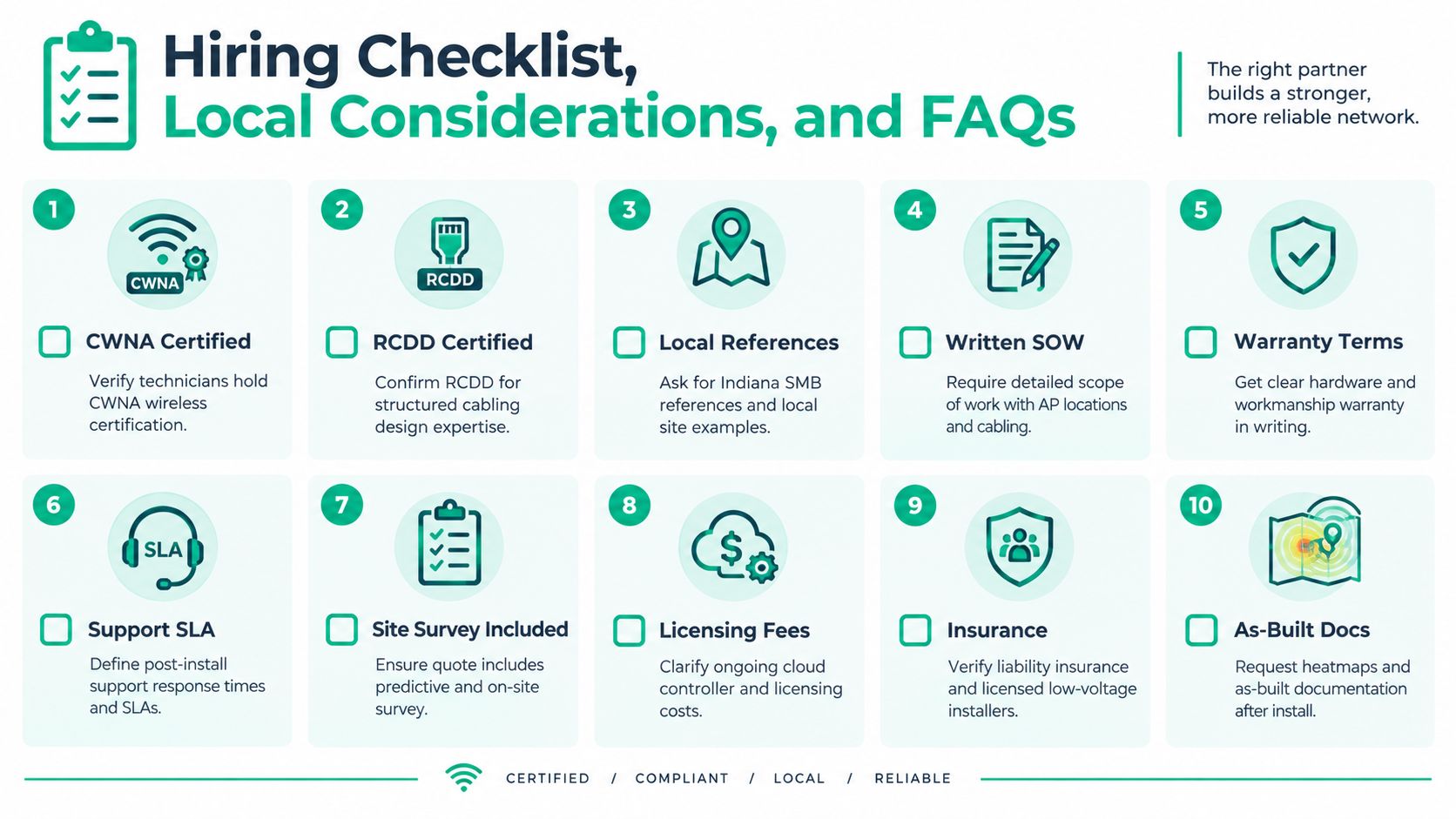
A good installer leaves behind a working network and evidence of how it was built. Before signing, ask for these ten items:
- CWNA certification. Verify the wireless technician understands RF behavior, roaming, interference, and survey methods.
- RCDD capability. Confirm the project has structured cabling design experience when pathways, risers, and large deployments are involved.
- Local references. Request Indiana SMB references with buildings similar to yours.
- Written SOW. Require AP locations, cable counts, mounting, switching, configuration, testing, and exclusions.
- Warranty terms. Put hardware coverage and workmanship responsibility in writing.
- Support SLA. Define response targets, escalation, remote access, and after-hours handling.
- Survey inclusion. Confirm the proposal includes predictive planning and an on-site RF survey.
- Licensing disclosure. Separate cloud controller, analytics, security, and renewal fees.
- Insurance and installers. Verify liability coverage and qualified low-voltage installation practices.
- As-built documentation. Request heatmaps, cable labels, switch-port records, and final network documentation.
Indiana questions owners ask
Does rural broadband availability limit AP choices?
It can limit the internet circuit and upstream capacity available to the site, but it doesn't automatically determine the indoor AP design. Rural counties may need a careful WAN assessment, dual-path planning, or traffic prioritization so a capable wireless network isn't bottlenecked by the provider connection.
How long does a 5,000-square-foot installation take?
A typical project may take 3 to 7 business days, depending on cable access, permit coordination, testing, and whether the installer must work around employees. Ask the vendor to separate active installation time from equipment lead time.
Is cloud licensing mandatory?
No. Some platforms use cloud management and recurring per-device fees, while others support hardware controllers or one-time purchase models. Compare remote management, firmware access, reporting, support, and exit options rather than choosing on license price alone.
What happens to the warranty when a third-party integrator installs vendor-locked APs?
Check the manufacturer's authorized-installer rules before purchase. Get written confirmation about warranty coverage, firmware access, replacement handling, and who owns the controller account.
How do Johnson County permit rules affect outdoor mesh?
Outdoor work may involve low-voltage, electrical, structural, landlord, or municipal requirements depending on the mounting and power method. Your installer should verify local requirements before attaching equipment to an exterior wall, pole, or roofline. Don't assume an indoor-rated AP is acceptable outside.
A strong proposal should also explain security controls. Healthcare offices may need HIPAA-aligned safeguards, defense suppliers may face CMMC requirements, and general businesses should map administrative access, segmentation, logging, and recovery to the NIST CSF. For environments with sensitive systems, pair wireless controls with Bitdefender GravityZone, immutable off-site backups, and SOC-as-a-Service monitoring where the risk profile justifies it.
In our 17 years of local service, the avoidable failures usually come from skipped documentation, undersized PoE, or AP placement based on a floor plan instead of a survey. Treat WiFi as part of business continuity, not as a pile of ceiling-mounted gadgets. The same discipline supports incident response, cloud access, data recovery, software development workflows, and IT support because every one of those functions depends on a stable, controlled network.
Finchum Fixes IT provides wireless network design, RF site surveys, structured cabling coordination, secure configuration, and ongoing support for businesses in Greenwood and the Indianapolis area. Request a Free Network Assessment through Finchum Fixes IT to review your building, current equipment, licensing exposure, and a practical WiFi installation cost before you approve a quote.