How to Improve WiFi Signal Strength for Your Business

TL;DR: Key Takeaways for Indiana Businesses
- Problem: Weak Wi-Fi in older brick buildings or modern office parks around Indianapolis costs businesses up to $9,000 per minute in downtime. Consumer-grade gear can't handle the physical barriers or device density.
- Solution: A professional site audit, strategic placement of enterprise-grade hardware like UniFi networking, and smart configuration are essential. This isn't a DIY fix; it requires a managed approach.
- ROI: Upgrading from flimsy extenders to a professionally managed mesh network built on fiber and structured cabling eliminates "wasted tech time," converting it back into billable hours and providing a predictable monthly IT budget.
- Security: A robust Wi-Fi network is foundational for meeting compliance standards like HIPAA or CMMC. A Zero Trust architecture with proper network segmentation is non-negotiable for protecting sensitive data.
Slow WiFi isn't just annoying; it's a silent killer of productivity that’s costing your Indiana business real money. When you consider that network downtime can cost up to $9,000 per minute, that "spinning wheel of death" starts to look a lot more expensive. This isn't about quick fixes; it's about permanently solving the problem to boost your ROI.
This guide is about getting you permanent answers, not just quick fixes. We're drawing on our 17 years of experience helping businesses across Johnson County turn their tech headaches into the reliable, predictable performance they need.
Fixing Spotty WiFi for Good in Central Indiana
If you run a business in a Greenwood business park or a classic old brick building in downtown Indy, you know the struggle. The Wi-Fi signal just can't punch through those thick walls, leading to dropped video calls, a lagging point-of-sale system, and a team that’s constantly fighting its own tools.
This isn't just an inconvenience—it's a direct hit to your bottom line. Every minute an employee spends wrestling with a bad connection is a minute they aren't billing a client or closing a deal. This is "wasted tech time" that a managed IT approach converts back into revenue.
The root of the problem often comes from a basic misunderstanding of what WiFi actually is. It’s not magic; it’s just radio waves. And just like the music from your stereo, those waves get muffled and blocked by physical stuff in their way.
In our 17 years serving local businesses, we’ve seen it all. A classic mistake we see in the Hamilton County growth corridor is a business owner tucking their router away in a metal server closet. It looks tidy, but that metal box acts like a Faraday cage, effectively killing the signal before it even gets to the main office floor.
Moving Beyond Simple Fixes
Look, we all know the first step is to restart the router. But that's a temporary patch for a recurring wound. To truly solve your WiFi woes, you have to start thinking like a network engineer. That means digging into your specific environment and making smart, targeted changes.
Here’s what we’re going to cover:
- Strategic Placement: Why putting your access point (AP) in a central, elevated spot isn't just a suggestion—it's non-negotiable.
- Intelligent Configuration: How to use tools for channel analysis and band steering to squeeze every drop of performance out of your existing gear.
- Smart Hardware Upgrades: Knowing when it's time to invest in professional-grade equipment like UniFi networking instead of wasting money on flimsy consumer-grade extenders.
For any business dealing with compliance standards like HIPAA or CMMC, a rock-solid, secure network isn't just a nice-to-have; it's a strict requirement. A shoddy network is a wide-open door for security threats. Our professional approach focuses on both speed and safety, building a system that’s as secure as it is fast.
Quick Fixes vs. Professional Solutions for WiFi Improvement
It's tempting to grab a quick-fix gadget from a big-box store, but those rarely solve the underlying issue. This table breaks down the difference between a DIY attempt and a permanent, professional solution.
| Action | DIY Approach (Limited Impact) | Finchum Fixes IT Professional Approach (Permanent Fix) |
|---|---|---|
| Dead Zones | Buys a cheap WiFi extender, which often just creates more interference and a second, clunky network. | Conducts a full site survey with heatmapping software to precisely identify and eliminate dead zones with strategically placed mesh APs. |
| Slow Speeds | Moves the router around randomly, crossing their fingers for a better signal. | Optimizes channel selection, implements Quality of Service (QoS) to prioritize critical business traffic, and enables band steering for seamless device connection. |
| Security | Uses the default password the ISP provided, leaving the network wide open to anyone nearby. | Implements a Zero Trust architecture, sets up separate guest and corporate networks, and manages firmware updates with tools like Bitdefender GravityZone. |
| Scalability | Adds more and more devices to an already overloaded consumer-grade router, slowing everyone down. | Designs a scalable UniFi networking system with multiple access points built to handle your current and future device load without breaking a sweat. |
A dependable WiFi network is the backbone of any modern business operating along the I-65 corridor and beyond. It powers everything from your cloud software to your customer communication. By addressing the real causes of a poor signal, you can finally turn all that "wasted tech time" back into productive, billable hours and a predictable monthly budget.
If you're ready to stop tinkering and get a permanent fix, check out our professional networking and WiFi solutions.
How to Diagnose Your WiFi Problems Like a Pro
Before you even think about buying new gear, let's put on our detective hats. Throwing a new router at a WiFi problem without knowing what's actually broken is a classic mistake we see all over Central Indiana. It’s a shot in the dark, and it’s the fastest way to waste money.
A proper diagnosis is what separates the pros from the "geeks with a screwdriver." It tells you exactly where the bottleneck is, so you can fix the real problem instead of just treating the symptoms. So, let’s get under the hood.
The Metrics That Actually Matter
Forget the five little bars on your screen. They're a terrible gauge of performance. To truly understand what's happening with your network, we need to look at the numbers that tell the whole story. Don't worry, it's not as complex as it sounds.
Here’s what you need to know:
-
Signal Strength (dBm): This is the raw power of the WiFi signal your device is receiving. It’s measured in negative decibels (dBm), so numbers closer to zero are better. For most business needs, -67 dBm is the sweet spot. Once you start dipping toward -80 dBm or lower, you’re in the digital dead zone.
-
Throughput: This is your actual speed. Not the fantasy number your internet provider advertises, but how fast data is really moving between your device and the network. A terrible WiFi connection can make a blazing-fast fiber line feel like old-school dial-up.
-
Latency: You probably know this as "ping" or "lag." It’s the time it takes for a signal to make a round trip from your device to a server and back. High latency is what causes those awkward pauses on video calls or makes your cloud software feel sluggish, killing productivity one frustrating second at a time.
We once walked into a manufacturing plant just off the I-65 corridor where their barcode scanners were constantly dropping connections. A quick audit showed their signal strength was technically fine, but their latency was through the roof. It wasn't a coverage problem at all—it was massive interference from the heavy machinery. The network was losing data packets and constantly resending them, grinding their entire inventory system to a halt.
Create a Heatmap of Your Office
The single most powerful diagnostic tool at your disposal is a WiFi heatmap. Think of it as a weather map for your signal, showing you exactly where the "sunny" spots (strong signal) and "rainy" dead zones are. It turns an invisible problem into a crystal-clear picture.
While the professional software we use for network audits can be pricey, you can get a surprisingly good idea of your layout on your own. There are free apps like Wi-Fi Analyzer for Android, or you can even use the hidden utility on a Mac (just hold the Option key and click the WiFi icon in your menu bar).
Grab a floor plan of your office, walk around, and take dBm readings every few feet. Jot them down on the map. You’ll immediately see where the signal drops off. Is it behind that beautiful brick wall in your downtown Indy office? Or in the far corner conference room? This simple exercise makes it obvious that fixing WiFi is often about smart placement, not just more power.
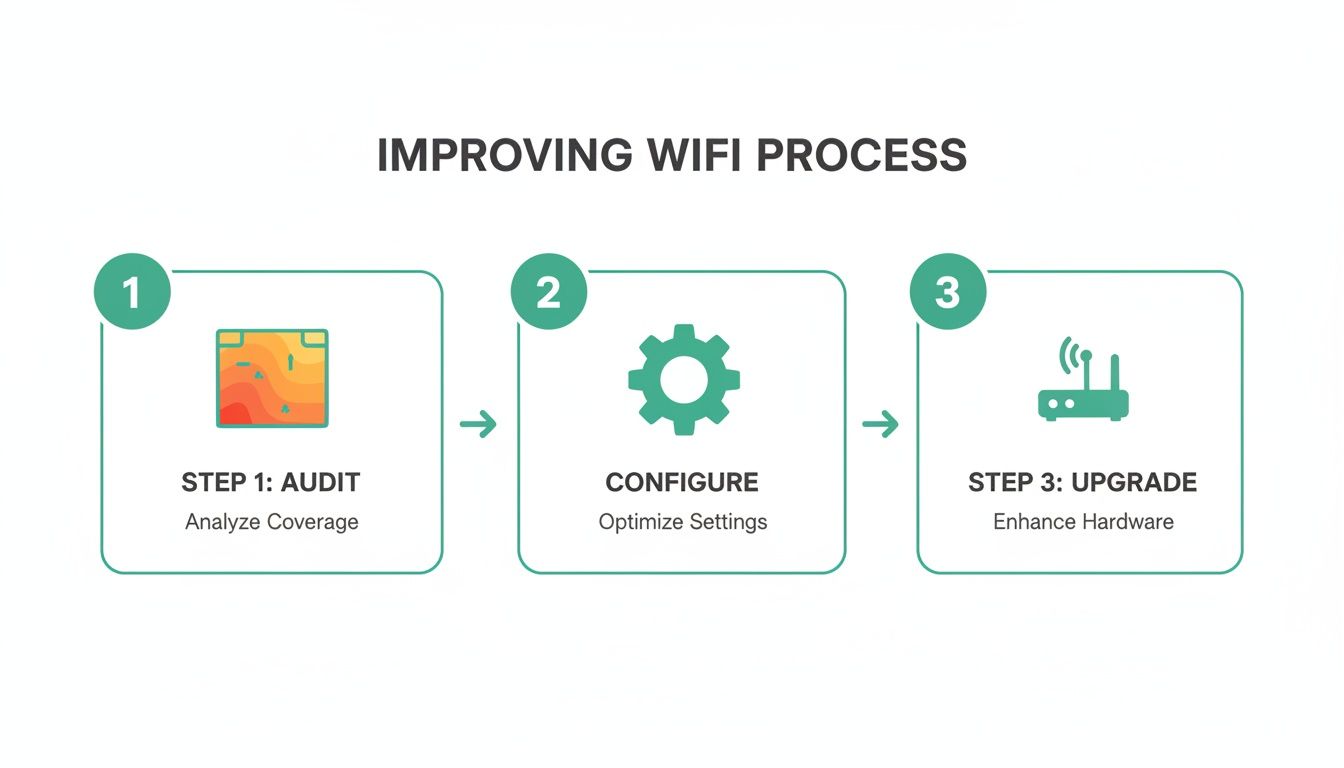
This process—audit first, then configure, then upgrade—is the core of all effective IT management. Diagnose before you spend a dime.
Is It a Coverage or Capacity Problem?
Sometimes your heatmap looks great—a beautiful sea of green signal covering the entire office—but the WiFi is still painfully slow. When that happens, you’re likely dealing with a completely different beast: a network capacity issue.
-
A coverage issue means the signal simply can't reach a location. It's a dead zone. The fix is usually moving an access point or adding another one.
-
A capacity issue is a digital traffic jam. Too many devices are trying to talk at once, and the network can't keep up. It’s like rush hour on I-465; the road is perfectly paved, but it's too congested for anyone to move fast.
If you have dozens of employees with laptops, phones, printers, and smart devices all fighting for airtime on a single consumer-grade router from a big-box store, it doesn’t matter how strong the signal is. That little box is overwhelmed.
A professional audit can instantly tell the difference, making sure you invest in the right solution—whether that’s just repositioning an existing AP or upgrading to a business-grade system like UniFi that’s built to handle high-density environments. For a deeper dive, check out our guide on the best practices for network monitoring your Indiana business needs.
Why Access Point Placement Is Your Biggest Win
Forget fiddling with software settings for a moment. If you want to make the single biggest improvement to your Wi-Fi, you need to get physical. Where you put your access points (APs) is, without a doubt, the most critical factor for a strong, reliable signal.
We see it all the time—a brand-new, powerful router stuffed in a back-office closet or tucked behind a metal filing cabinet in a Hamilton County office. It might look tidy, but you’re essentially putting a gag on your network. Wi-Fi signals are just radio waves, and they don’t like playing hide-and-seek with walls, doors, or furniture.
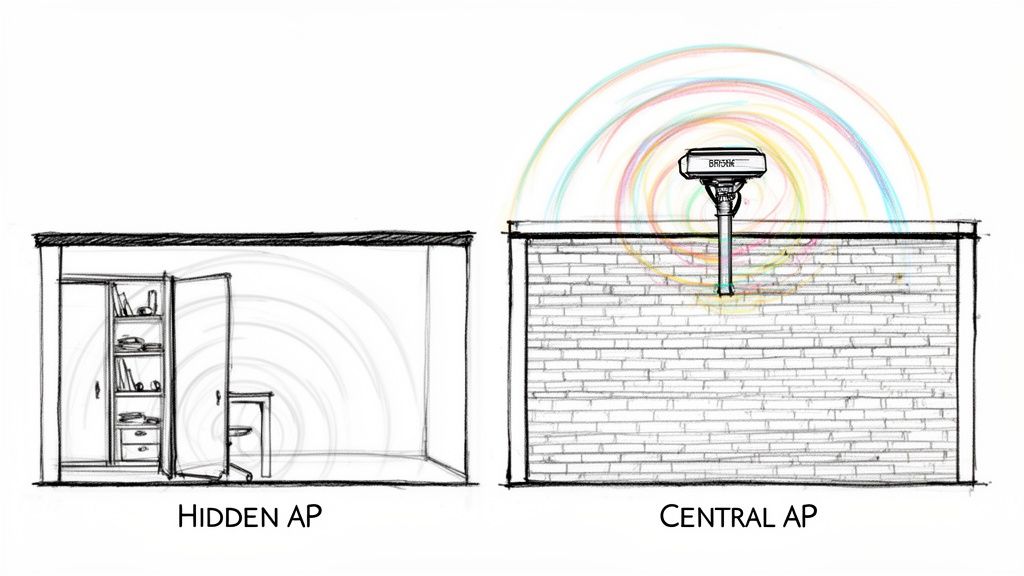
This isn’t just some abstract IT problem. For a law firm in downtown Indy, it means a choppy video call that makes you look unprofessional to a client. For a bustling retail shop in Greenwood, a lagging point-of-sale system means frustrated customers and lost sales. It’s a direct hit to your bottom line.
The Physics of Poor Placement
Physical objects don’t just block your Wi-Fi; they actively absorb and reflect it. The very materials your building is made of are often the worst offenders, and Indiana’s beautiful historic architecture can be a nightmare for connectivity.
Here are the usual suspects we hunt down first:
- Brick and Concrete: Common in older buildings and warehouses, these dense materials are Wi-Fi public enemy #1. A single brick wall can absolutely cripple a signal.
- Metal: This one is sneaky. It's not just filing cabinets. Think about ductwork, plumbing, and even the metal-lath plaster in older walls. Metal reflects radio waves, creating dead zones where the signal simply cannot go.
- Tinted Glass: That sleek, modern conference room with floor-to-ceiling windows? The low-emissivity (Low-E) coating on that glass often contains a metallic film that bounces Wi-Fi signals away, turning your meeting space into a connectivity black hole.
These materials aren't just a minor inconvenience. We've measured it: a single wall or floor can slash signal strength by 20-30 dB. When the sweet spot for business-critical apps is around -67 dBm, that’s a massive drop. Getting this right turns wasted tech time into billable hours.
From a Single Router to a Professional Mesh System
For a small, open-concept office, you might get away with a single, strategically placed router. The key word here is strategically. You want it mounted high on a wall or ceiling, out in the open, with a clear line of sight to as much of the office as possible. Think of your AP like a lightbulb—you wouldn't hide it in a closet and expect it to light up the whole room.
But let's be realistic. Most businesses have weird layouts, multiple floors, or those stubborn old brick walls. In these cases, a single AP just won’t cut it. This is where you graduate to a professionally designed mesh network using enterprise-grade gear from companies like UniFi networking.
Instead of one overworked router screaming its heart out, a mesh system uses multiple latency-optimized mesh nodes placed intelligently throughout your space. These nodes work together, wrapping your entire facility in a single, seamless Wi-Fi blanket. This is foundational to smart network design, often built on a solid physical layer. As you think about placement, it's also the perfect time to explore what structured cabling is and why your business needs it for a truly bulletproof setup.
The ROI of Smart Placement
Getting your AP placement right delivers an immediate and measurable return. North America currently dominates 41.2% of the global Wi-Fi market, a surge driven by businesses just like yours upgrading for better performance.
In our experience, simply moving a router to a central, elevated location can boost coverage by 40% in a typical 2,500 sq ft office. That's a huge win for a simple physical change, and it pays for itself almost instantly in reduced downtime. For businesses all over Johnson County, this means a more stable connection for every single device, from the front-desk PCs to the scanners in the warehouse. If you love data, you can find more detailed statistics on how placement impacts WiFi performance and see why it’s such a critical focus.
Nailing the placement from day one saves you from countless future headaches. It makes your tech investment actually work for you, creating a reliable environment where your team can be productive, not perpetually frustrated. It’s the bedrock of a network that truly supports your business goals instead of holding them back.
Getting Under the Hood: Optimizing Your Network Settings
Shifting your hardware is a great start, but it's only half the story. Now it's time to pop the hood and do some digital tuning. When you log into your router's admin panel, you're not just flipping switches—you're working with a suite of powerful tools that can take a sluggish network and make it fly.
These aren't some obscure, hidden settings. They're fundamental adjustments that can make or break your network's efficiency. For any business in a crowded spot, like the downtown Indy tech hub, this is your secret weapon. You're surrounded by dozens of other Wi-Fi networks all screaming for attention, and these settings help you cut through that digital noise.
Let's be real: every dropped video call or endlessly-loading cloud app costs you. That's billable time down the drain. A few smart configuration changes can put that money right back in your pocket.
Fine-Tuning Your Wi-Fi Channels
Think of your Wi-Fi as a multi-lane highway. The 2.4GHz and 5GHz bands are the main interstates, and the "channels" are the individual lanes. If everyone piles into the same lane, you get a traffic jam. That’s exactly what’s happening when your office Wi-Fi is fighting with every other business in the building.
Most routers are set to "Auto" right out of the box, which sounds helpful but often isn't. They tend to pick the most popular—and therefore most congested—channels. You can do better by manually picking a clearer lane.
- On the 2.4GHz band: Your magic numbers are 1, 6, or 11. These are the only three channels that don't overlap, which means less interference from your neighbors.
- On the 5GHz band: You have way more room to breathe. There are tons of non-overlapping channels, making it the hands-down winner for crowded office environments.
By simply choosing a less-traveled channel, you’re giving your business-critical data a wide-open road, free from the digital fender-benders that cause lag and dropped connections.
The One-Two Punch of Band Steering and QoS
Modern business routers have some brilliant traffic-management features built right in. You just have to tell them what to prioritize. Two of the most powerful are band steering and Quality of Service (QoS).
Band steering is like an invisible traffic cop for your devices. It gently nudges dual-band capable hardware—like newer laptops and smartphones—onto the faster, less congested 5GHz network. It’s an automated way to keep your fastest devices in the fast lane.
Quality of Service (QoS) is where you really take control. It’s a game-changer for business continuity. QoS lets you tell your network, "Hey, this application is a VIP!" It ensures your VoIP phone system and video conference calls always have the bandwidth they need, even if someone in accounting starts downloading a massive file. For a healthcare practice in Johnson County, this isn't just a convenience—it's critical for maintaining the stable, secure connection needed for HIPAA-compliant telehealth calls.
A Zero Trust Mindset: Performance Meets Security
A fast network is great, but a secure one is non-negotiable. A slow connection is an annoyance; a data breach is a disaster. This is why we preach a Zero Trust architecture. The philosophy is simple: trust no one by default, even if they're already inside your network.
This goes way beyond just having a strong password. It means segmenting your network (keeping guest Wi-Fi completely separate from your internal network), using the latest security protocols, and actively managing who has access to what. For a defense contractor, this approach is foundational for meeting NIST CSF and CMMC standards.
For businesses that demand absolute control over their network's performance and security, digging into advanced router configuration is a must. This can involve professional-grade equipment, and learning resources like this guide to Mastering MikroTik for advanced network configuration are invaluable for those who want to truly take the reins.
Getting these settings right is what separates a flimsy, consumer-grade setup from a robust, business-class network. If diving into these admin panels feels like deciphering a foreign language, don't sweat it. Our Free Network Assessment is designed to demystify all this and get your Greenwood or Indianapolis business on the fast track to a better, safer network.
Time for a Hardware Upgrade? How to Future-Proof Your Wi-Fi
Let’s be honest. Sometimes, all the software tweaks in the world won’t fix the core issue: your hardware is ancient. If you're running your business on that dusty router the ISP handed you five years ago, you're essentially trying to win the Indy 500 in a golf cart. It's time to stop thinking of an upgrade as an expense and start seeing it as a critical investment in your company's productivity.
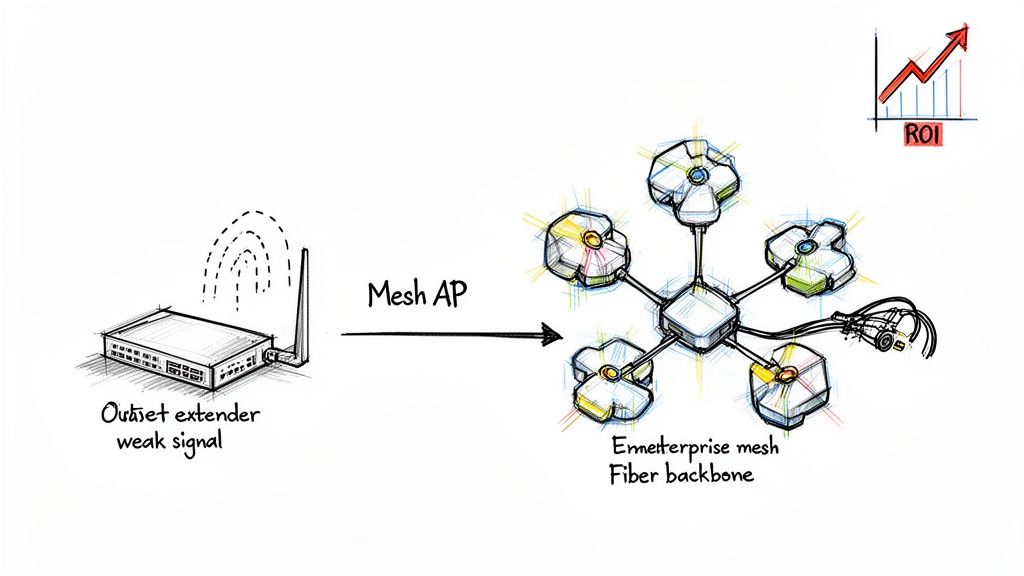
We recently worked with an accounting firm in a Greenwood industrial park that perfectly illustrates this. They were paying for a premium internet plan, but their old-school router just couldn't keep up with the dozens of devices their team used. They were constantly fighting with slow cloud software and dropped connections, which turned simple tasks into frustrating time-wasters. For them, a hardware upgrade wasn't just a fix—it was a direct boost to their billable hours.
The Siren Song of Cheap Wi-Fi Extenders
When a Wi-Fi dead zone pops up, the first instinct for many is to grab a cheap Wi-Fi extender from a big-box store. This is almost always a mistake. These little plug-in devices might seem like a quick fix, but they often cause more problems than they solve.
Here’s the deal: extenders create a separate, clumsy network. Your phone or laptop won't automatically switch over, leaving you manually toggling between networks. Worse yet, they slash your available bandwidth in half. An extender has to use its radio to both receive the signal from your router and rebroadcast it, creating a massive bottleneck and adding frustrating lag. It’s like putting a bandage on a broken leg.
We've walked into countless Indiana businesses where a tangled web of extenders was causing more interference and support tickets than the original dead zone ever did. The owner thought they were saving a few bucks, but the lost productivity from a slow, unreliable network was costing them a fortune.
The Professional’s Choice: UniFi Mesh Systems
Instead of just patching holes, a professionally installed enterprise-grade mesh system is the real solution. It blankets your entire office, warehouse, or storefront in a single, intelligent Wi-Fi network. We build our solutions with hardware from proven vendors like UniFi, which is designed from the ground up for busy, high-density business environments.
A mesh system is a team of access points (APs) working together to create a seamless web of coverage. The benefits are immediate:
- Seamless Roaming: Walk from the front desk to the warehouse during a VoIP call without a single drop. Your devices automatically hop to the strongest signal without you ever noticing.
- Centralized Management: We can monitor and manage the entire network from a single dashboard. This means we can often spot and fix a problem before you even know it exists.
- Built to Scale: As your business grows, adding another AP to the mesh is simple. Your network expands right along with your team.
This is the permanent fix that transforms "wasted tech time" into a predictable, high-performing asset. For larger facilities or connecting separate buildings, you can also explore how Point-to-Point networking creates a private data highway for your business.
A Great Network Needs a Great Foundation: Fiber Optic Upgrades
You can install the best Wi-Fi system on the planet, but if your internet connection is a trickle, your network will always feel sluggish. Upgrading your building’s internet backbone to fiber optic is the final piece of the puzzle. Fiber provides a much faster and more stable pipe for your access points to draw from.
The data doesn't lie. A 2023 report from Ookla showed that global fixed networks saw a 19% jump in median download speeds and a massive 28% surge in upload speeds, driven almost entirely by the switch to fiber. An upgrade like this can improve the signal strength your APs have to work with by 20-50%.
For a Johnson County business battling slowdowns, a fiber upgrade delivers the raw power needed for a truly modern wireless network. When you combine it with a professionally designed UniFi mesh system, you get a future-proof setup that just works. Our Cisco-certified pros design these systems to grow with you, ensuring your tech is an accelerator, not an anchor.
When to Call the Pros for Your Business WiFi
Alright, you’ve done the troubleshooting dance. You’ve moved the router around the office like a piece of modern art, fiddled with every setting in the admin panel, and probably even downloaded one of those Wi-Fi analyzer apps on your phone. Yet, your team is still grumbling about dropped video calls and loading screens that never end.
Here’s a hard truth from the trenches: knowing when to throw in the towel on a DIY network fix isn’t admitting defeat. It’s making a smart business decision.
Trying to wrangle a complex business network by yourself is a bit like doing your own corporate taxes. You might get by, but the risk of a catastrophic, expensive mistake is always looming. When you consider that network downtime can cost a business up to $9,000 per minute, paying an expert starts to look less like an expense and more like a brilliant investment.
The Tipping Points for Calling in a Professional
Figuring out your home Wi-Fi is one thing. But a business network? That's a different beast entirely. Certain situations should be an immediate red flag, telling you it's time to stop tinkering and pick up the phone. If you recognize your business in any of these scenarios, going it alone is actively costing you money.
Here are the signs that you’ve outgrown your DIY setup:
- You Have More Than 25 Devices: This is the magic number where consumer-grade gear just throws its hands up in surrender. Once you have dozens of laptops, phones, printers, and smart devices all screaming for bandwidth, you're creating a digital traffic jam that your little router was never designed to handle.
- Your Building is a Wi-Fi Nightmare: Are you in a multi-story office? A massive warehouse off the I-65 corridor? Or one of those beautiful old brick buildings in downtown Indy with walls that laugh at radio signals? A single router has no chance. You need a professional site survey and a strategically designed multi-access point system to get real, seamless coverage.
- You Handle Sensitive Data: This one is non-negotiable. If you’re a defense contractor navigating CMMC compliance or a healthcare provider bound by HIPAA, your network security has to be ironclad. A professionally managed network with a Zero Trust security model isn't just a "nice-to-have"—it's a legal and operational necessity.
And don't even get me started on guest networks. Providing Wi-Fi for customers is great, but a poorly set up guest network is like leaving your front door wide open with a "Welcome, Hackers!" sign. To see just how involved a proper setup is, check out this overview of professional Guest Wi-Fi Hotspot Services. It’s not a simple checkbox in your router settings.
The Real ROI of Managed WiFi Services
Bringing in an IT partner isn't just about fixing what's broken; it's about buying back your time and your team's productivity. Instead of your staff wasting billable hours rebooting routers and complaining to each other about the slow internet, they can get back to work. You're essentially converting that lost time into a predictable monthly IT cost that guarantees performance.
Over our 17 years serving businesses right here in Johnson County, we’ve walked into countless offices struggling with networks they outgrew years ago. The problem is a constant, low-grade productivity killer. A managed WiFi solution swaps that frustration for enterprise-grade gear and proactive monitoring, solving the issue for good and delivering a clear return.
When we take over a network, we're not just plugging in a fancier box. We're deploying a complete strategy. This means everything from SOC-as-a-Service, where we watch your network 24/7 for threats, to installing latency-optimized mesh systems that hunt down and eliminate dead zones. It’s the difference between slapping a patch on a leaky pipe and installing brand-new, reliable plumbing. If you want to see the kind of nitty-gritty detail involved, our guide on how to splice a network cable and why your business should call a pro shows the level of precision required.
Stop letting a flaky Wi-Fi signal be the bottleneck holding your business back. The right network isn’t a liability; it’s an asset that powers your growth.
If you're a business owner in the Greenwood or Indianapolis area and you're tired of this fight, let's talk. Finchum Fixes IT has the expertise and the tools to fix your connectivity headaches—permanently.
Ready for a network that just works? Schedule your Free Network Assessment today and let's get it done.